
MiBOXER MLR2
Miboxer MLR2 Mini Single Color LED Controller
Instruction Manual
Introduction
The Miboxer MLR2 Mini Single Color LED Controller is designed for precise and efficient control of single-color LED lighting systems. This compact device utilizes 2.4GHz wireless technology, enabling seamless communication with compatible remotes and gateways for dimming control from 0.1% to 100%. It features a wide voltage range and easy connectivity, making it suitable for various residential and commercial applications.
Safety Information
- Ensure the power supply is disconnected before installation or maintenance.
- Verify that the input voltage matches the controller's specifications (DC12V-24V).
- Do not expose the device to moisture or extreme temperatures.
- Avoid overloading the controller; ensure the total current of connected LED lights does not exceed 6A.
- Consult a qualified electrician if you are unsure about any installation steps.
Package Contents
- Miboxer MLR2 Mini Single Color LED Controller
- Instruction Leaflet
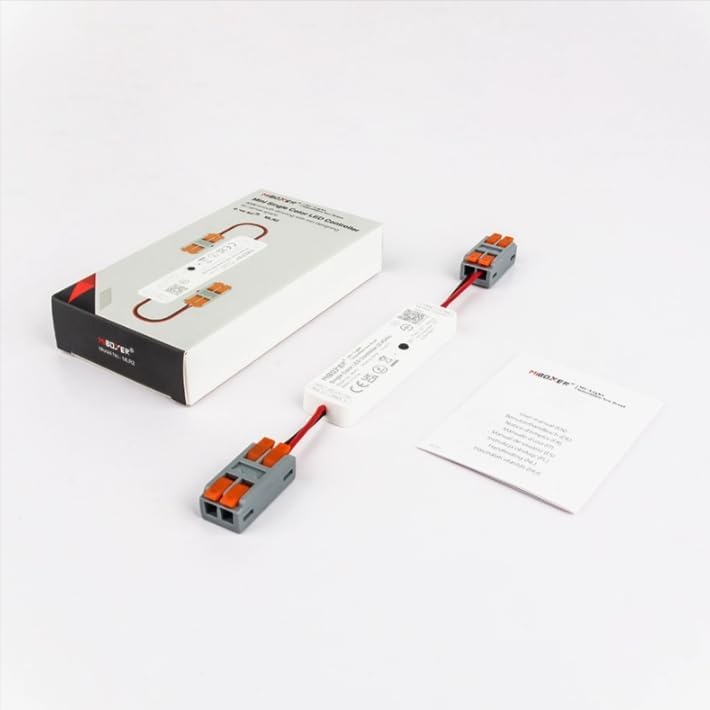
Image: Miboxer MLR2 controller shown with its packaging and included instruction leaflet.
Product Overview
The MLR2 controller features integrated DC male and female connectors for simplified wiring. It includes a 'SET' button for pairing with remotes and gateways, and clearly labeled input/output terminals.

Image: Detailed view of the MLR2 controller, highlighting the input (DC12V-24V), output (MAX 6A), and the 'SET' button for configuration.

Image: Technical drawing illustrating the dimensions of the MLR2 controller and its connectors.
Specifications
| Feature | Specification |
|---|---|
| Model Number | MLR2 |
| Input Voltage | DC12V-24V |
| Output Current | Max 6A |
| Dimming Range | 0.1%-100% |
| Wireless Frequency | 2.4GHz |
| Control Distance | Up to 30m (with compatible remote) |
| Operating Temperature | -10°C to 40°C |
| Dimensions | 76mm (L) x 19.2mm (W) x 8.6mm (H) (controller body) |
| Item Weight | 2.89 ounces |
Setup and Installation
Wiring Diagram

Image: An application diagram illustrating the connection flow from power input to the LED strip, including optional gateway and remote control integration.
Wiring Instructions
- Ensure the power supply is turned off before making any connections.
- Connect the DC power adapter (DC12V-24V) to the input side of the MLR2 controller. The input is labeled 'INPUT: DC12V-24V Red: V+ Black: V-'.
- Connect your single-color LED strip to the output side of the MLR2 controller. The output is labeled 'OUTPUT: MAX 6A Red: V+ Black: V-'.
- Double-check all connections for polarity (V+ to V+, V- to V-).
- Once all connections are secure, you may turn on the power supply.
Pairing with Remote or Gateway
The MLR2 controller can be paired with up to 12 compatible Miboxer 2.4GHz remotes or gateways.
- To Link: Power on the controller. Within 3 seconds, press the 'SET' button on the controller briefly. Then, on your compatible Miboxer remote, press the 'ON' button for the desired zone or the 'ON' button for the entire system. The LED lights should flash to confirm successful pairing.
- To Unlink: Power on the controller. Within 3 seconds, press and hold the 'SET' button on the controller for approximately 3 seconds. The LED lights should flash to confirm unlinking.
Operating Instructions
Basic Dimming Control
Once paired with a compatible Miboxer 2.4GHz remote, you can control the brightness of your single-color LED lights. The controller supports a smooth dimming range from 0.1% to 100%, allowing for precise adjustment of light intensity.
Smart App Control (Requires 2.4GHz Gateway)
For advanced control via a smartphone app, the MLR2 controller can be integrated with a Miboxer 2.4GHz gateway (sold separately). The gateway connects to your home Wi-Fi network, enabling control through applications like Tuya Smart.

Image: A smartphone screen showing the Tuya Smart app controlling LED lighting, alongside a Miboxer 2.4GHz gateway, illustrating smart app integration.
Voice Control (Requires 2.4GHz Gateway)
When connected through a Miboxer 2.4GHz gateway, the MLR2 controller can be controlled using third-party voice assistants such as Amazon Alexa and Google Assistant. This allows for hands-free operation of your LED lighting.

Image: Various smart home devices, including Amazon Alexa and Google Assistant, demonstrating compatibility for voice control when used with a 2.4GHz gateway.
Maintenance
- Keep the controller clean and free from dust. Use a soft, dry cloth for cleaning.
- Do not use harsh chemicals or abrasive cleaners.
- Ensure adequate ventilation around the controller to prevent overheating.
- Regularly check all wiring connections to ensure they remain secure.
Troubleshooting
| Problem | Possible Cause | Solution |
|---|---|---|
| LEDs do not light up. | No power, incorrect wiring, or faulty LED strip. | Check power supply, verify wiring polarity, test LED strip separately. |
| Cannot control LEDs with remote. | Controller not paired, remote battery low, or out of range. | Re-pair the controller with the remote, replace remote battery, ensure remote is within 30m range. |
| Dimming is not smooth or flickers. | Overloaded controller or incompatible LED strip. | Ensure total current does not exceed 6A. Use compatible single-color LED strips. |
| App/Voice control not working. | Gateway not connected/paired, Wi-Fi issue, or incorrect app configuration. | Ensure gateway is properly set up and paired with the controller. Check Wi-Fi connection and app settings. |
Warranty and Support
For warranty information and technical support, please refer to the official MiBOXER website or contact your retailer. Keep your purchase receipt for warranty claims.
Related documentsMLR2


Ask a question about this manual
Ask about setup, troubleshooting, compatibility, parts, safety, or missing instructions. Manuals+ will review the question and use this page’s manual context to help answer it.