
1. Introduction
The Xidehuy MP3 Player is a portable multimedia device designed for music playback, video viewing, voice recording, FM radio, photo viewing, and e-book reading. It features a built-in HD speaker and comes with a 32GB TF card for immediate use. This manual provides detailed instructions to help you utilize all functions of your device.

Image 1.1: Xidehuy MP3 Player with main menu and video playback.
2. Package Contents
Please verify that all items listed below are included in your package:
- 1 x Xidehuy MP3/MP4 Player
- 1 x 32GB Memory Card (TF Card)
- 1 x HiFi Bass Earphone
- 1 x USB Cable
- 1 x User Manual
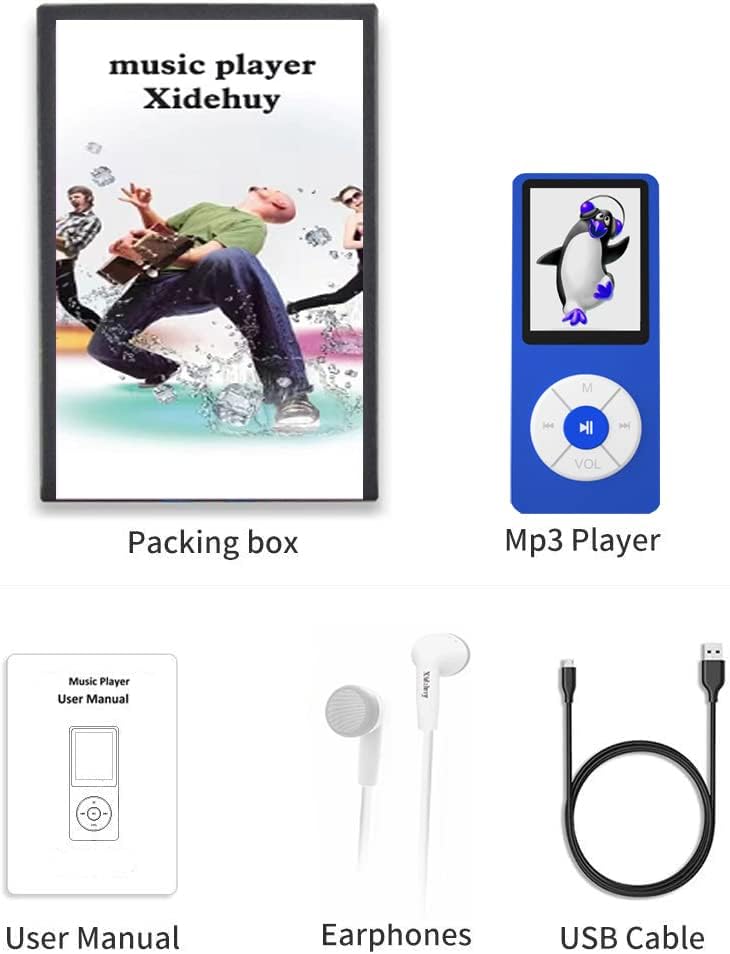
Image 2.1: Included items in the product package.
3. Device Layout and Controls
Familiarize yourself with the buttons and ports on your MP3 player for optimal operation.

Image 3.1: Button Guide for Xidehuy MP3 Player.
- M (Menu/Up): Short press to enter the menu. Long press to return to the main interface.
- ◀◀ (Left/Previous): Short press to select the previous music file. Long press to rewind the music.
- ►► (Confirm/Play/Pause): Short press to confirm selection or play/pause media. Long press to turn the player on or off.
- ▶▶ (Right/Next): Short press to select the next music file. Long press to fast forward the music.
- VOL (Volume/Down/Return): Short press to enter the volume adjustment menu. Use ◀◀ or ▶▶ to adjust volume. Long press to return to the previous step.
4. Setup
4.1 Charging the Device
The player has a built-in Li-ion battery. Connect the device to a PC or a wall socket adapter using the provided USB cable. Charging time is approximately 1 hour. It is recommended to turn on the player before charging.
4.2 Installing and Managing the TF Card
The device comes with a 32GB TF card pre-installed. It supports TF card expansion up to 128GB (card not included). Ensure the TF card is properly inserted into the designated slot.

Image 4.1: Storage capacity and TF card insertion.
4.3 Copying Music and Other Files
To transfer files to the MP3 player:
- Connect the MP3 player to your computer using the USB cable.
- The player will appear as an external storage device on your computer.
- Open the device folder and drag and drop your desired music, video, photo, or e-book files into the appropriate folders on the player or TF card.
Note: This MP3 player does not work with iTunes. It is not an Apple iPod.
5. Operating Instructions
5.1 General Navigation
Use the ◀◀ (Left) and ▶▶ (Right) buttons to navigate through menu options. Press ►► (Confirm) to select an option. Press M (Menu) to return to the previous menu or long press to go to the main interface.
5.2 Music Playback
From the main menu, select 'Music'. You can browse by artist, album, or all songs. Supported audio formats include MP3, WMA, OGG, APE, FLAC, WAV, AAC-LC, ACELP.
5.3 Video Playback
From the main menu, select 'Video'. The player recognizes AMV and AVI video files. For other formats, you may need to convert them using Actions Media Player Tools on a computer.
5.4 FM Radio
From the main menu, select 'Radio'. The FM radio operates within the 87.5MHz~108MHz frequency range and can save up to 30 channels.

Image 5.1: FM Radio interface.
5.5 Voice Recorder
From the main menu, select 'Record'. Voice can be recorded and saved in WAV or MP3 format. Phase/Contrast repeat functions are available.
5.6 Photo Viewer
From the main menu, select 'Photo'. Supported picture browsing formats include JPEG, BMP, GIF.
5.7 E-Book Reader
From the main menu, select 'E-Book'. The device supports TXT format e-books.
5.8 Tools
The 'Tools' menu includes Calendar, Stopwatch, and Alarm clock functions.
6. Maintenance
- Keep the device dry. Avoid exposure to moisture or liquids.
- Clean the screen and body with a soft, dry cloth. Do not use abrasive cleaners.
- Avoid extreme temperatures. Store the device in a cool, dry place.
- Do not attempt to disassemble or repair the device yourself. This may void any applicable warranty.
- Charge the battery regularly, even if the device is not in use, to maintain battery health.
7. Troubleshooting
If you encounter issues with your Xidehuy MP3 Player, please refer to the following common problems and solutions:
| Problem | Possible Solution |
|---|---|
| Device does not turn on. | Ensure the battery is charged. Connect to a power source and charge for at least 1 hour. Long press the Play/Pause button to power on. |
| Computer does not detect the device. | Try a different USB port or USB cable. Ensure the device is powered on before connecting. Restart your computer. |
| Cannot play certain music or video files. | Verify the file format is supported (Music: MP3, WMA, OGG, APE, FLAC, WAV, AAC-LC, ACELP; Video: AMV, AVI). Convert unsupported video files using Actions Media Player Tools. |
| Headphones not working or sound is distorted. | Ensure headphones are fully plugged into the 3.5mm jack. Test with another pair of headphones to rule out headphone malfunction. Check volume settings. |
| Built-in speaker volume is too low. | Adjust the volume using the VOL button. Ensure the device is not in a quiet mode or connected to headphones. |
| Cannot read or play pre-recorded SD cards. | The device is designed to read files copied directly to it or its TF card. Compatibility with pre-recorded SD cards may vary. Ensure the card is formatted correctly (FAT32 recommended). |
8. Specifications
| Feature | Detail |
|---|---|
| Model Name | MP-BLUE*13 |
| Screen Size | 1.8 inches High Resolution Real Color LCD |
| Memory Storage Capacity | 32 GB (TF Card included), supports up to 128 GB TF Card |
| Connectivity Technology | USB |
| Audio Formats | MP3, WMA, OGG, APE, FLAC, WAV, AAC-LC, ACELP |
| Video Formats | AMV, AVI (requires conversion for other formats) |
| Picture Formats | JPEG, BMP, GIF |
| E-Book Format | TXT |
| FM Radio Frequency | 87.5MHz~108MHz (up to 30 channels) |
| Battery Type | 1 Lithium Ion battery (included) |
| Charging Time | Approximately 1 hour |
| Playing Time | Approximately 8-12 hours |
| Product Dimensions | 0.3 x 1.5 x 3.5 inches |
| Item Weight | 2.39 ounces |
| Manufacturer | Xidehuy |
9. Warranty and Support
For product support, please refer to the seller's contact information or the platform where the product was purchased. Standard return policies typically allow for returns or replacements within 30 days of purchase. Please retain your proof of purchase for any warranty or support claims.