
1. Introduction
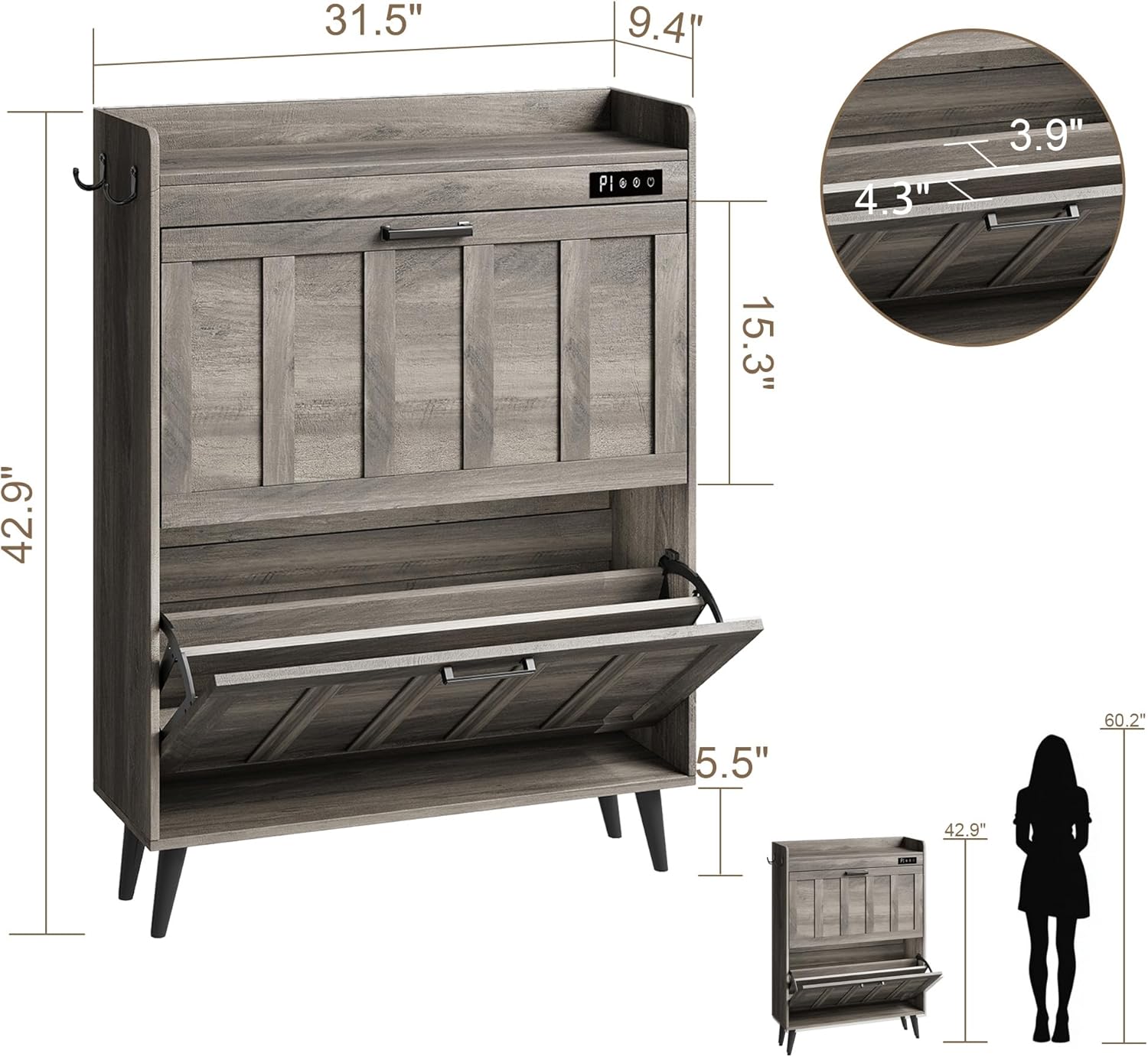
Thank you for choosing the ChooChoo SR2402-GY Shoe Storage Cabinet. This manual provides detailed instructions for the assembly, operation, and maintenance of your new shoe cabinet. Designed with a farmhouse style, this slim and narrow cabinet features two flip-top drawers, a built-in deodorizer, and additional hooks, making it ideal for entryways, living rooms, or porches. Please read this manual thoroughly before assembly and use to ensure proper function and safety.
2. Safety Information
Your safety is paramount. Please adhere to the following guidelines:
- Always secure the cabinet to the wall using the provided anti-tip kit to prevent tipping and potential injury, especially in households with children or pets.
- Ensure all screws and fasteners are tightened securely before use. Periodically check and re-tighten as necessary.
- Do not overload the drawers. The cabinet is designed to hold up to 16 pairs of shoes, depending on shoe size.
- Keep small parts and packaging materials away from children during assembly.
- Assemble the unit on a soft, clean surface to prevent scratches.

3. Package Contents
Please verify that all components are present before beginning assembly. If any parts are missing or damaged, please contact customer support.
3.1. Parts List
- Main cabinet panels (top, bottom, sides, back)
- Flip-top drawer panels (2 sets)
- Adjustable internal dividers
- Legs (4)
- Side hooks (2)
- Deodorizer unit with power cable
3.2. Hardware List
- Various screws, cam locks, and dowels
- Metal handles (2)
- Anti-tip kit (wall anchors, strap, screws)
- Cable clips for deodorizer cable
4. Assembly Instructions
Assembly is straightforward and typically takes 20-30 minutes with two people. A screwdriver is required.
4.1. General Assembly Tips
- It is recommended that at least two people install this product together.
- Follow the numbered steps in sequence.
- Do not overtighten screws to avoid damaging the wood.
4.2. Step-by-Step Guide
For a visual guide, please refer to the assembly videos below.


5. Operating Instructions (Deodorizer)
The ChooChoo Shoe Storage Cabinet features a built-in deodorizer to maintain freshness and hygiene. The deodorizer supports 4 cycle modes and 4 timing modes.
5.1. Deodorizer Functions
- Remove Odors: Eliminates unpleasant smells from shoes.
- Sterilization: Helps to reduce bacteria and germs.
- Formaldehyde Reduction: Contributes to a healthier environment by reducing formaldehyde.
- Air Purification: Circulates air to keep the cabinet fresh.

5.2. Using the Deodorizer
To operate the deodorizer, connect the power cable to a suitable power source. Use the touch controls on the top panel to select your desired mode and timing.
6. Maintenance and Care
To ensure the longevity and appearance of your ChooChoo Shoe Storage Cabinet, follow these maintenance tips:
- Wipe surfaces with a soft, damp cloth. Avoid harsh chemicals or abrasive cleaners.
- Keep the cabinet away from direct sunlight and excessive moisture to prevent warping or discoloration.
- Regularly check and tighten all hardware to maintain stability.
- Clean the deodorizer unit's air vents periodically to ensure optimal performance.
7. Troubleshooting
If you encounter any issues with your shoe cabinet, please refer to the following common problems and solutions:
| Problem | Possible Cause | Solution |
|---|---|---|
| Cabinet feels unstable/wobbly | Screws are loose; Anti-tip kit not installed. | Tighten all screws. Install the anti-tip kit securely to the wall. |
| Drawers do not close properly | Shoes are too large or improperly placed; Internal divider is misaligned. | Adjust the internal divider or remove it for taller shoes. Ensure shoes are placed flat. |
| Deodorizer not working | Power cable not connected; Unit is off. | Check power connection. Press the power button on the deodorizer unit. |
8. Specifications
| Feature | Detail |
|---|---|
| Brand | ChooChoo |
| Model Number | SR2402-GY |
| Color | Grey |
| Material | Engineered Wood |
| Product Dimensions | 9.45"D x 31.5"W x 42.9"H |
| Item Weight | 43.4 Pounds |
| Number of Drawers | 2 |
| Number of Shelves | 3 (internal adjustable) |
| Additional Features | Adjustable Shelf, Anti-Tipping, Removable Shelf, Built-in Deodorizer |
| Installation Type | Freestanding |
9. Warranty and Support
For any questions, concerns, or to report missing/damaged parts, please contact ChooChoo customer support. Information regarding extended protection plans may be available from your retailer.
- 2-Year Protection Plan: Available for purchase.
- 3-Year Protection Plan: Available for purchase.
- Complete Protect: Monthly plan covering eligible past and future purchases.
Please refer to your purchase documentation for specific warranty details and contact information.


