
Surtime 8502-white-40
Surtime 40-inch Ceiling Fan with Light User Manual
Model: 8502-white-40
1. Introduction
Thank you for choosing the Surtime 40-inch Ceiling Fan with Light. This modern ceiling fan is designed to provide efficient air circulation and adjustable lighting for your living space. Featuring a powerful yet quiet DC motor, reversible blades, and smart control options, it offers comfort and convenience year-round. Please read this manual thoroughly before installation and operation to ensure proper use and safety.

This image displays the complete Surtime 40-inch ceiling fan unit, alongside its dedicated remote control and a smartphone screen illustrating the mobile application for smart control. It highlights the fan's sleek black design and integrated LED light.
2. Safety Instructions
To reduce the risk of electric shock, fire, or injury to persons, always follow these basic safety precautions:
- Read all instructions before installing the fan.
- All wiring must be in accordance with national and local electrical codes. If you are unfamiliar with wiring, consult a qualified electrician.
- Before installation, disconnect power by turning off the circuit breakers at the main fuse box.
- The fan must be mounted to a structural part of the building capable of supporting the fan's weight (5.7 kg).
- Ensure the installation site allows for a minimum clearance of 7 feet (2.1 meters) from the floor to the fan blades.
- Do not operate the fan if any part is damaged.
- Do not insert objects into the path of the fan blades.
- This appliance is not intended for use by persons (including children) with reduced physical, sensory or mental capabilities, or lack of experience and knowledge, unless they have been given supervision or instruction concerning use of the appliance by a person responsible for their safety.
3. Package Contents
Carefully unpack your ceiling fan and inspect the contents. You should have the following items:
- Ceiling Fan Motor Housing with Integrated LED Light
- Fan Blades (5 pieces, double-sided: Wood/Black)
- Remote Control (with 1 AAA battery included)
- Mounting Bracket
- Hardware Pack (screws, wire nuts, washers)
- User Manual
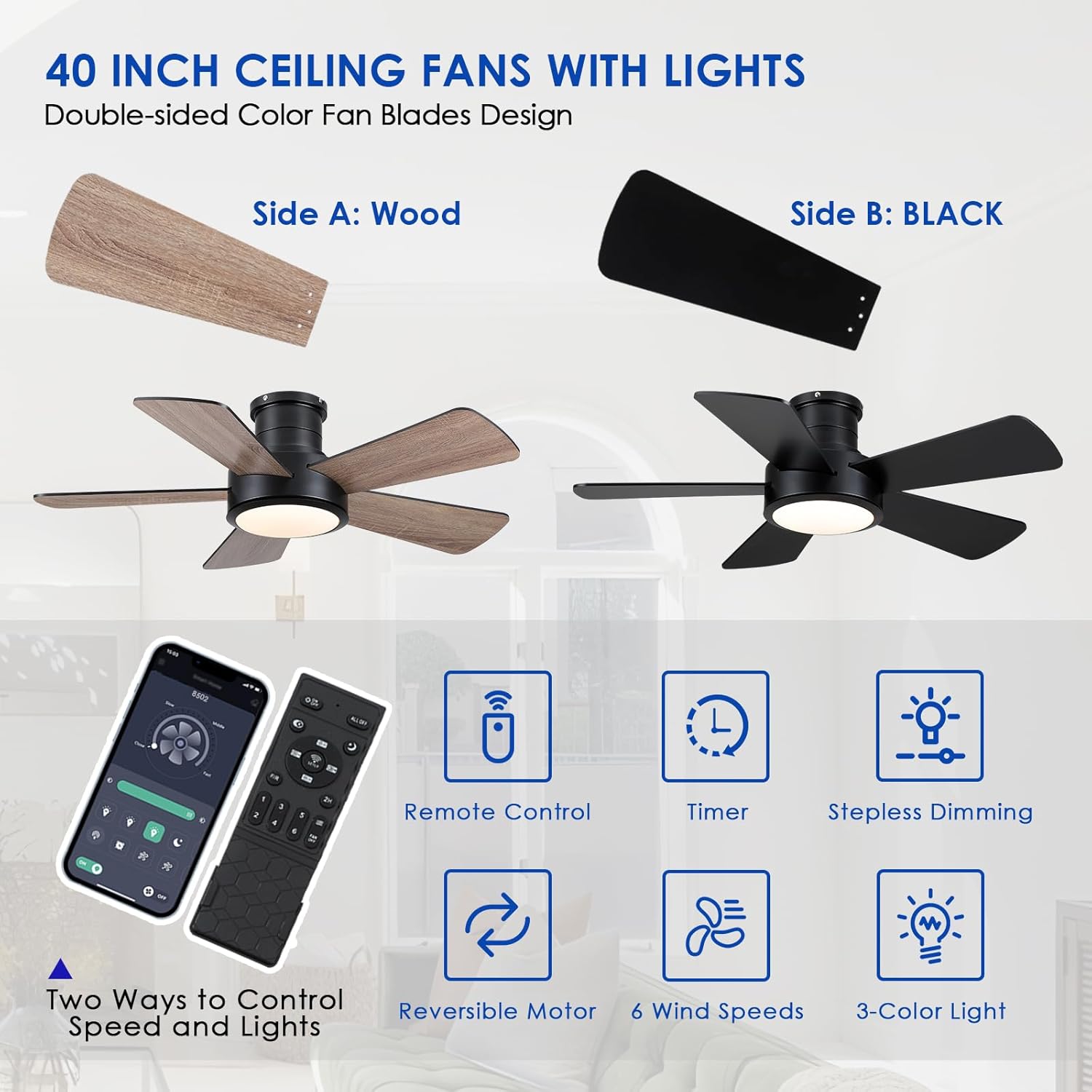
This image highlights the versatility of the Surtime ceiling fan, featuring double-sided fan blades with a wood finish on one side and a black finish on the other, allowing for customizable aesthetics. It also reiterates the two primary control methods: remote control and mobile application, along with icons for timer, stepless dimming, reversible motor, 6 wind speeds, and 3-color light.
4. Setup and Installation
Before beginning installation, ensure the power is OFF at the circuit breaker.
4.1 Mounting the Fan
The Surtime ceiling fan supports both flush mount and angle mount installations. Choose the appropriate method for your ceiling type.
- Flush Mount: Ideal for standard ceilings, providing a low-profile look.
- Angle Mount: Suitable for sloped or vaulted ceilings.
4.2 Wiring
Connect the fan's electrical wires to your household wiring according to the provided wiring diagram. Ensure all connections are secure and insulated with wire nuts.
4.3 Attaching the Blades
Attach the five fan blades to the motor housing. You can choose between the elegant wood finish or the sleek black finish for each blade, as they are double-sided. Ensure all screws are tightened securely.

This image provides essential installation details, including the fan's dimensions (40 inches diameter, 10 inches height), recommended installation height for rooms (8-10 ft ceiling height, 100-225 sq ft space), and illustrations of both flush mount and angle mount installation options.
5. Operating Instructions
Your Surtime ceiling fan can be controlled via the included remote control or a dedicated mobile application.
5.1 Remote Control Functions
The remote control allows you to manage all fan and light functions:
- Power On/Off: Turns the fan and light on or off.
- Fan Speed: Adjusts between 6 wind speeds.
- Light On/Off: Controls the LED light independently.
- Light Dimming: Stepless dimming to adjust brightness.
- Color Temperature: Cycle through Warm Light (3000K), Natural Light (4500K), and Day Light (6000K).
- Reversible Motor: Switch between Summer Mode (forward direction, air down) and Winter Mode (reverse direction, air up).
- Timer: Set a timer for automatic fan shutdown.
5.2 Mobile App Control
Download the official Surtime app from your smartphone's app store. Follow the in-app instructions to pair your fan. The app provides similar control functionalities as the remote, offering convenience from your mobile device.

This diagram explains the reversible motor function of the Surtime ceiling fan, which offers 6 speeds. In Summer Mode, the blades rotate forward to push cool air down. In Winter Mode, the blades reverse direction to gently draw warm air up, distributing heat evenly.

This image illustrates the customizable LED light feature of the Surtime ceiling fan. It shows the light adjusting from Warm Light (3000K) to Natural Light (4500K) and Day Light (6000K), allowing users to set the ambiance according to their preference.

This image demonstrates the Surtime ceiling fan's efficient and quiet operation. It highlights the fan's ability to move air 30% faster than ordinary fans while producing less than 35dB of noise, ensuring a peaceful environment.
6. Maintenance
Regular maintenance ensures the longevity and optimal performance of your fan.
- Cleaning: To clean the fan, wipe with a soft, damp cloth. Do not use abrasive cleaners or solvents. Ensure power is off before cleaning.
- Blade Inspection: Periodically check the blade attachments for tightness. Loose blades can cause wobbling and noise.
- Light Source: The integrated LED light source is designed for long life. Do not attempt to replace the LED lens yourself.

This image provides detailed views of the Surtime ceiling fan's key components: the dimmable, energy-saving LED smart light source; the pure copper DC motor, which is 75% more energy-efficient; and the durable blades designed for a longer lifespan.
7. Troubleshooting
If you experience issues with your fan, refer to the following common problems and solutions:
| Problem | Possible Cause | Solution |
|---|---|---|
| Fan does not start | No power to the fan; Loose wire connections; Remote control battery low. | Check circuit breaker; Ensure all wires are securely connected; Replace remote control battery. |
| Fan wobbles | Loose blade screws; Improperly balanced blades; Loose mounting bracket. | Tighten all blade screws; Ensure blades are installed correctly; Check mounting bracket for secure installation. |
| Light does not work | Loose wire connection to light; LED module failure. | Check light wiring connections; Contact customer support if LED module is faulty. |
| Remote control not responding | Battery low or incorrectly inserted; Remote not paired. | Replace battery, ensure correct polarity; Refer to pairing instructions in the full manual (if applicable). |
8. Specifications
| Feature | Detail |
|---|---|
| Brand | Surtime |
| Model Number | 8502-white-40 |
| Product Dimensions | 33 x 19 x 43 cm (packaging); 40 inches diameter (fan) |
| Weight | 5.7 Kilograms |
| Color | Black (fan body), White (light cover), Double-sided blades (Wood/Black) |
| Voltage | 230 Volts (AC) |
| Power Source | Corded Electric |
| Motor Type | DC Motor (Reversible) |
| Fan Speeds | 6 Speeds |
| Light Type | Integrated LED (Dimmable, 3000K-6500K adjustable) |
| Control Method | Remote Control, Mobile App |
| Battery (Remote) | 1 AAA (included) |
9. Warranty and Support
For warranty information or technical support, please contact Surtime customer service through the retailer where you purchased the product or visit the official Surtime website. Please have your model number and purchase date available when contacting support.
Related documents8502-white-40


Ask a question about this manual
Ask about setup, troubleshooting, compatibility, parts, safety, or missing instructions. Manuals+ will review the question and use this page’s manual context to help answer it.