
ATEM POWER 200W Foldable Solar Panel with MPPT Controller
ATEM POWER 200W Portable Solar Panel User Manual
Model: 200W Foldable Solar Panel with MPPT Controller
1. Introduction
Thank you for choosing the ATEM POWER 200W Portable Solar Panel. This manual provides essential information for the safe and efficient operation, setup, and maintenance of your solar panel. Please read this manual thoroughly before use and retain it for future reference.
This portable solar panel is designed for outdoor use, providing reliable power for 12V/24V batteries and power stations. Its foldable design and integrated MPPT controller make it ideal for camping, RVs, hiking, and other off-grid applications.
2. Key Features
- High-Efficiency HPBC Cells: Utilizes advanced HPBC (Hybrid Passivated Back Contact) technology for up to 25.8% conversion efficiency by relocating metal contacts to the back, reducing shading.
- Durable Anti-Cracking Coating: Features a flexible, anti-crack ETFE film that provides exceptional strength, thermal stability, and resistance to physical stress, protecting cells from bending or cracking. The self-cleaning, non-stick surface enhances light transmission.
- Integrated MPPT Charge Controller: Equipped with a 20A MPPT controller for efficient charging of 12V/24V batteries (Lead Acid, AGM, GEL, Calcium, LiFePO4) and activation of sleeping LiFePO4 batteries.
- Versatile Charging Options: Includes 5V USB output ports (USB-A and USB-C) for direct charging of smartphones, tablets, and other USB-powered devices.
- Portable and Foldable Design: Weighs approximately 5.8kg (12.79 lbs) and folds into a compact size (479x422x80mm / 18.86"x16.61"x3.15") with a sturdy carry handle for easy transport and storage.
- Wide Compatibility: Comes with MC4 to multi-connector adapter cables to link with various power stations and devices.
- Safety Protections: Built-in protections against reverse polarity, overcurrent, undervoltage, overvoltage, and short circuits.
3. Product Components
The ATEM POWER 200W Portable Solar Panel package includes the following components:
- 200W Foldable Solar Panel
- Integrated 20A MPPT Solar Charge Controller
- MC4 to Multi-Connector Adapter Cable (various DC plugs, Anderson, XT60)
- Alligator Clips Cable
- Carry Bag

Image: The ATEM POWER 200W Portable Solar Panel shown folded in its carry bag, alongside the MPPT solar charge controller, multi-connector adapter cable, and alligator clips cable.
4. Setup Instructions
4.1 Unfolding and Positioning the Solar Panel
- Unzip the carry bag and carefully unfold the solar panel sections.
- Position the solar panel in a location with maximum direct sunlight. Ensure no shadows are cast on the panel surface for optimal performance.
- Adjust the angle of the panel towards the sun. For best results, the panel should be perpendicular to the sun's rays.

Image: Illustration showing the solar panel folding and unfolding process, and its compact storage in the carry bag.
4.2 Connecting to a Battery or Power Station
The integrated MPPT controller manages the charging process. Follow these steps to connect your solar panel:
- Connect the solar panel's MC4 connectors to the input of the integrated MPPT controller.
- For Battery Charging: Connect the alligator clips cable to the output terminals of the MPPT controller. Ensure correct polarity (red to positive, black to negative) when connecting the alligator clips to your 12V/24V battery.
- For Power Station Charging: Use the appropriate multi-connector adapter cable (e.g., DC7909, DC5525, XT60, Anderson) to connect the MPPT controller's output to your power station's input port.
- Ensure all connections are secure before proceeding.
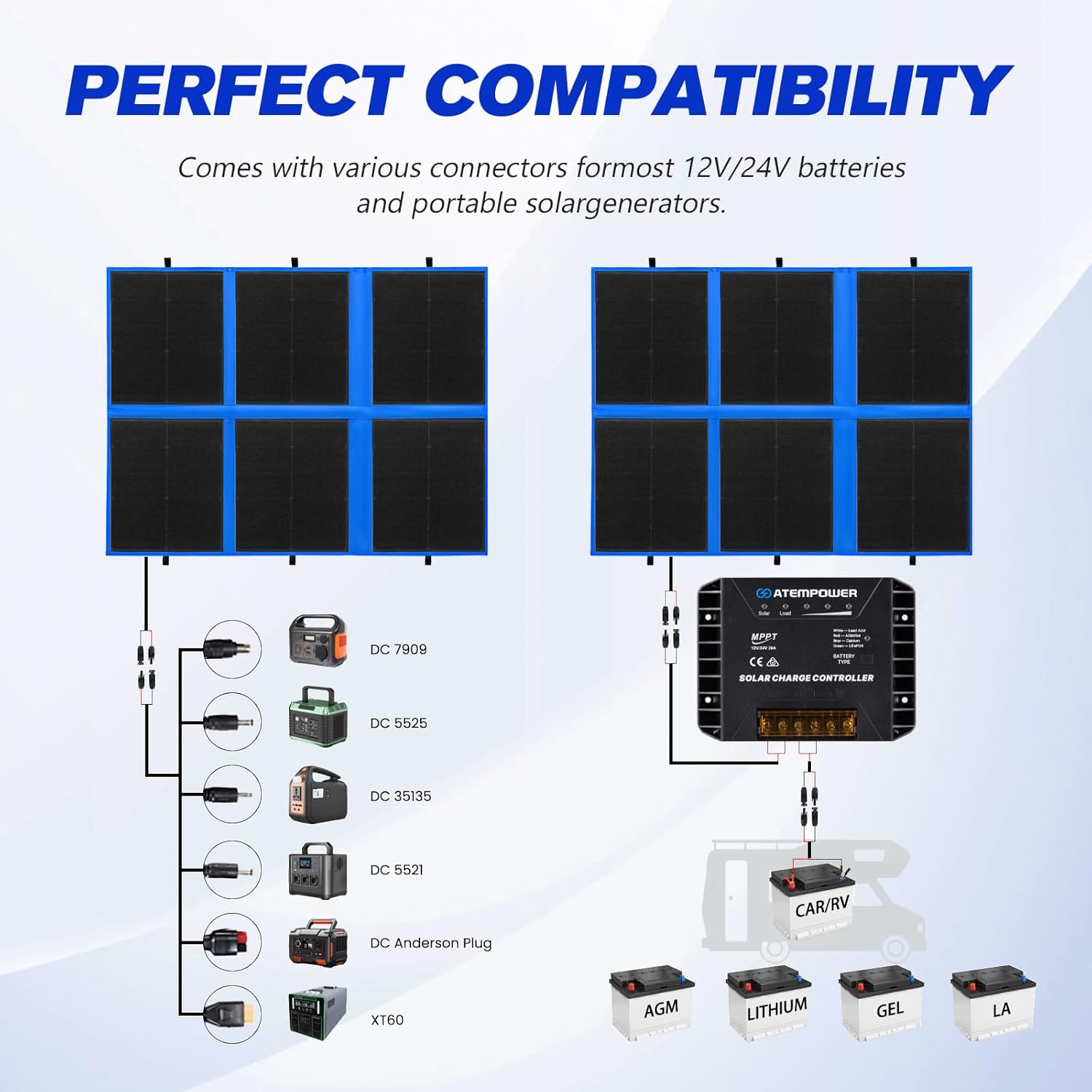
Image: A diagram illustrating the perfect compatibility of the solar panel with various power stations using different DC connectors (DC7909, DC5525, DC35135, DC5521, DC Anderson Plug, XT60) and direct connection to 12V/24V batteries (AGM, Lithium, GEL, LA).

Image: A diagram showing the connection of the solar panel to a 12V/24V battery through the MPPT controller, compatible with LiFePO4, AGM, Lithium, LA, and GEL battery types.
5. Operating Instructions
5.1 MPPT Controller Operation
The MPPT controller automatically detects 12V or 24V battery systems. It features indicator lights for solar input, load, and battery type.

Image: A close-up view of the MPPT solar charge controller, highlighting the solar connector input, 5V USB-A (18W Max) and Type-C (60W Max) outputs, and the battery type selection button. An illustration shows a smartphone charging via USB-C.
5.2 Selecting Battery Type
To optimize charging for your specific battery, you can select the battery type on the MPPT controller:
- Long press the "Battery Type" button on the controller. The indicator light will flash.
- Press the button repeatedly to cycle through the available battery types:
- White: Lead Acid
- Red: AGM/GEL
- Blue: Calcium
- Green: LiFePO4
- Release the button when the desired battery type's indicator light is selected. The light will remain on, confirming the selection.

Image: A visual guide demonstrating how to select the battery type on the MPPT controller, showing the button and corresponding indicator lights for LiON/Acid, AGM/Gel, Calcium, and LiFePO4 batteries.
5.3 Charging USB Devices
The MPPT controller includes USB-A and USB-C ports for charging small electronic devices directly:
- Connect your USB device (e.g., smartphone, tablet) to the USB-A or USB-C port on the MPPT controller using a compatible cable.
- Ensure the solar panel is exposed to sufficient sunlight for charging to commence.
6. Maintenance
Regular maintenance ensures the longevity and optimal performance of your solar panel.
- Cleaning: The ETFE coating is designed to be self-cleaning. However, if dirt, dust, or debris accumulates, gently wipe the surface with a soft, damp cloth. Avoid abrasive cleaners or harsh chemicals.
- Inspection: Periodically inspect the solar panel, cables, and connectors for any signs of damage, wear, or corrosion. Ensure all connections are secure.
- Storage: When not in use, fold the solar panel and store it in its carry bag in a cool, dry place away from direct sunlight and extreme temperatures.
- Weather Resistance: The panel is weather-resistant, but prolonged exposure to heavy rain or extreme weather conditions should be avoided when possible.

Image: Water being poured over the solar panel surface, illustrating its weather-resistant ETFE film technology and ease of cleaning.
7. Troubleshooting
If you encounter issues with your ATEM POWER 200W Portable Solar Panel, refer to the following common problems and solutions:
| Problem | Possible Cause | Solution |
|---|---|---|
| No power output from solar panel. |
|
|
| Battery not charging or charging slowly. |
|
|
| USB devices not charging. |
|
|
If the problem persists after attempting these solutions, please contact ATEM POWER customer support for further assistance.
8. Technical Specifications
| Parameter | Value |
|---|---|
| Model | 200W Foldable Solar Panel |
| Maximum Power (Pmax) | 200 Watts |
| Cell Type | HPBC (Hybrid Passivated Back Contact) |
| Efficiency | Up to 25.8% |
| Open Circuit Voltage (Voc) | 23.5V |
| MPPT Controller | 20A, 12V/24V Auto-detect |
| USB-A Output | 5V (18W Max) |
| USB-C Output | 5V (60W Max) |
| Folded Dimensions | 479 x 422 x 80 mm (18.86" x 16.61" x 3.15") |
| Item Weight | 5.8 kg (12.79 lbs) |
| Coating Material | ETFE (Anti-Cracking Flexible Film) |
| Included Components | Solar panel, MPPT controller, MC4 to multi-connector adapter, alligator clips, carry bag |
9. Warranty and Support
ATEM POWER provides a two-year warranty on this 200W Portable Solar Panel, covering defects in materials and workmanship from the date of purchase. This warranty does not cover damage caused by misuse, accident, unauthorized modification, or normal wear and tear.
For warranty claims, technical support, or any questions regarding your product, please contact ATEM POWER customer service through the retailer where you purchased the product or visit the official ATEM POWER website for contact information.
Please retain your proof of purchase for warranty purposes.
Related documents200W Foldable Solar Panel with MPPT Controller


Ask a question about this manual
Ask about setup, troubleshooting, compatibility, parts, safety, or missing instructions. Manuals+ will review the question and use this page’s manual context to help answer it.