
1. Introduction
This manual provides essential information for the safe and effective use of your ACMER P1 10W Laser Engraver Machine. Please read this manual thoroughly before operating the device to ensure proper setup, operation, and maintenance. Retain this manual for future reference.

Figure 1: ACMER P1 10W Laser Engraver Machine with various engraved and cut samples.
2. Safety Information
The ACMER P1 10W Laser Engraver Machine utilizes a Class IV laser, which can cause severe eye injury and skin burns if not handled properly. Adhere strictly to the following safety guidelines:
- Eye Protection: Always wear appropriate laser safety goggles that block the laser's wavelength during operation. The laser head is equipped with a light shield designed to protect the user's eyes from harsh beams, but additional protection is recommended.
- Emergency Stop: The machine features an emergency stop button. Press this button immediately in case of any malfunction or unsafe condition.
- Safety Lock: A safety lock mechanism is integrated and must be engaged before operation.
- Tilt Protection: The laser engraver is designed to stop automatically if it moves or tilts during processing, enhancing operational safety.
- Supervision: Never leave the machine unattended during operation.
- Ventilation: Operate the machine in a well-ventilated area to dissipate fumes and smoke produced during engraving and cutting.
- Flammable Materials: Keep flammable materials away from the working area.
- Children and Pets: Keep children and pets away from the machine during operation. The child lock safety guard further enhances safety.
- Power Supply: Use only the specified power adapter.
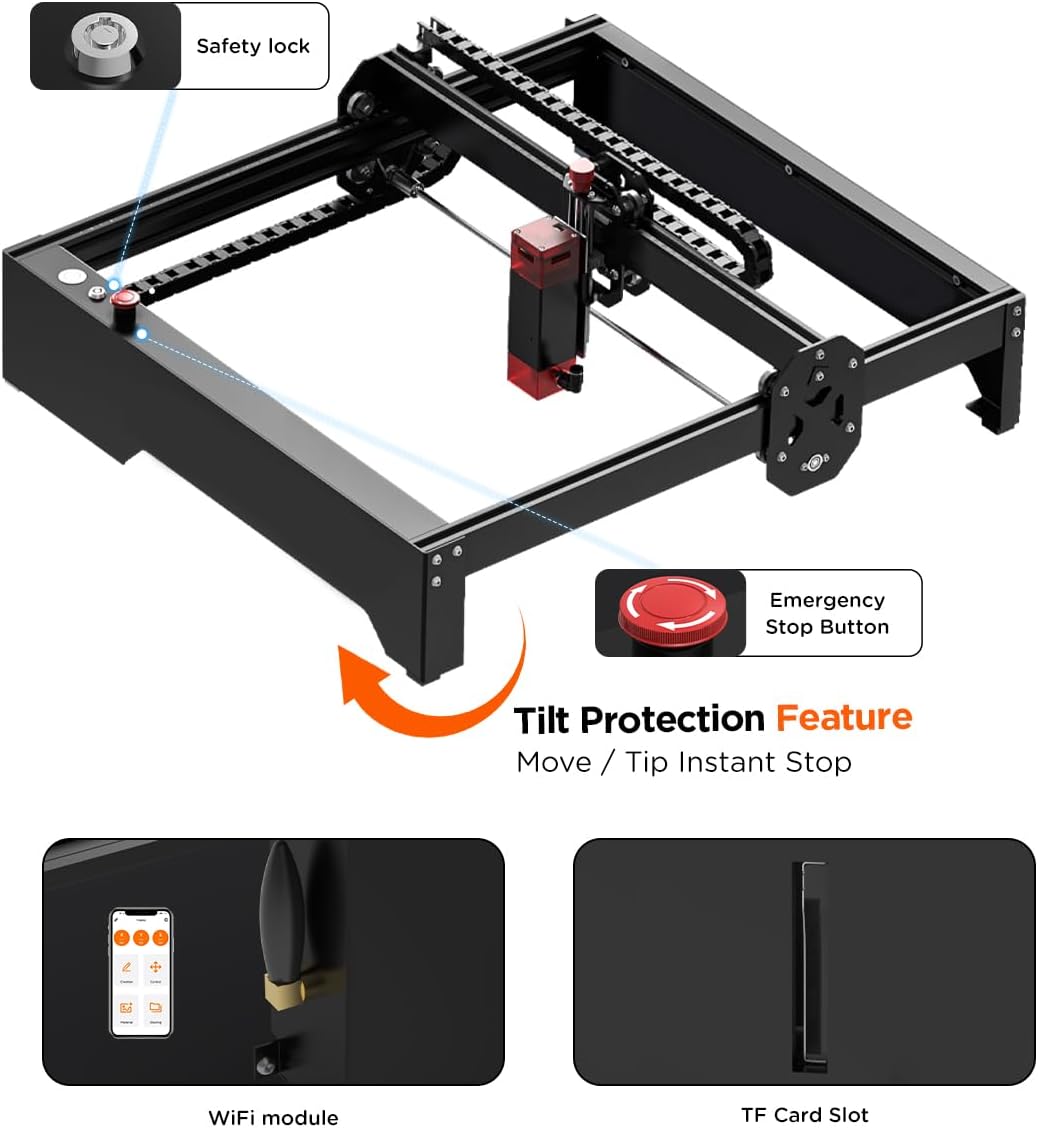
Figure 2: Overview of safety features including the safety lock, emergency stop button, and tilt protection.
3. Product Features
The ACMER P1 10W Laser Engraver Machine is engineered for high precision and versatility. Key features include:
- Powerful 10W Dual Laser Output: Equipped with a 10W (10,000mW) output power laser, capable of cutting 8mm basswood or 5mm black acrylic in a single pass at speeds up to 10,000mm/m.
- 0.06mm High Precision: Utilizes compressed spot technology for a narrow laser spot, enabling finer details and cleaner cuts.
- Robust All-Aluminum Alloy Structure: Designed with a durable frame and steel axle-wheel guide rails for stability and quiet operation.
- Spacious Working Area: Offers a generous 400x410mm (approximately 15.7x16.1 inches) work area for various project sizes.
- Wide Software Compatibility: Compatible with professional engraving software such as LaserGRBL and LightBurn, supporting Windows, MacOS, and mobile applications.
- Flexible Data Transfer: Supports data transfer via Wi-Fi, USB cable, or TF card, allowing for offline use.
- Upgradeable Design: Features a large upgradeable space, compatible with 10W/20W/2W IR lasers, and matching Y-axis extension upgrade kits.
- Flexible Drag Chain Design: Safeguards cables from damage due to bending and abrasion, ensuring smooth and controlled movement.

Figure 3: Key features of the ACMER P1 10W Laser Engraver.
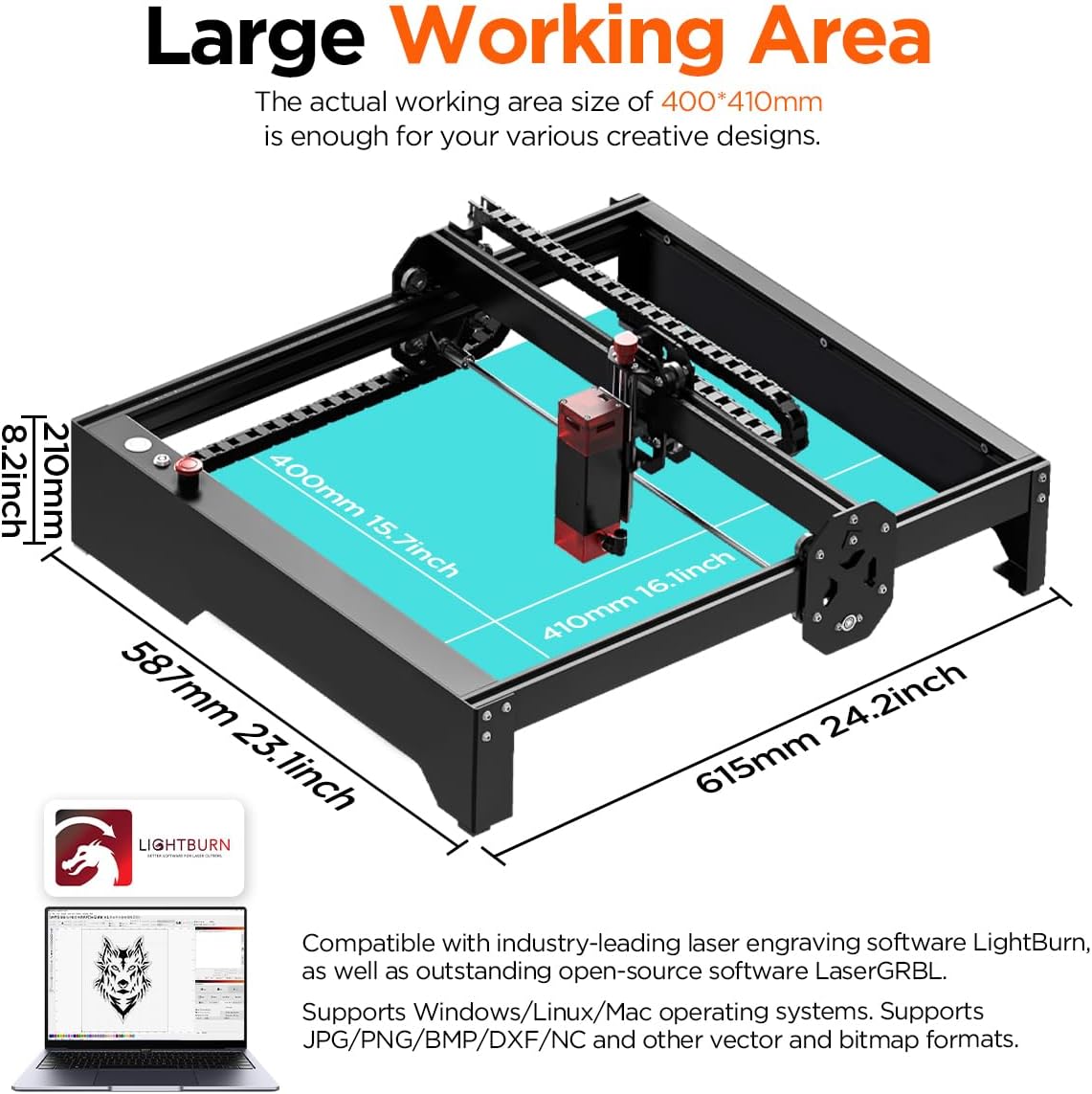
Figure 4: Illustration of the 400x410mm large working area.

Figure 5: Explanation of Compressed Spot Technology for precise engraving and cutting.

Figure 6: Example of precise detail replication in engraving.

Figure 7: Demonstrates the cutting capabilities on various materials.

Figure 8: Internal view of the powerful diode laser module.

Figure 9: Detail of the flexible drag chain design.
4. Setup & Assembly
The ACMER P1 laser engraver is designed for straightforward assembly. It comes with all necessary tools and detailed instructions to guide you through the process. Most components are pre-assembled, requiring only a few steps to complete the setup.
4.1 Assembly Steps
- Unpack all components and verify against the packing list (refer to your product packaging for the complete list).
- Follow the provided step-by-step instructions for attaching the main frame components.
- Install the laser module onto the gantry.
- Connect all cables as indicated in the assembly guide.
- Ensure all screws are securely tightened before proceeding.
4.2 Focusing the Laser
Achieving optimal engraving and cutting results requires precise laser focusing. The ACMER P1 simplifies this process:
- Place the material to be engraved or cut on the work surface.
- Adjust the focus knob on the laser module to control its vertical height.
- Fine-tune the height until the laser's focal length is precisely set for your material. This ensures concentrated laser power for optimal effects.

Figure 10: The three-step process for focusing the laser.
5. Operation
Operating the ACMER P1 involves preparing your design, transferring it to the machine, and initiating the engraving or cutting process.
5.1 Software Compatibility
The ACMER P1 is compatible with leading laser engraving software:
- LaserGRBL: An open-source software, ideal for beginners.
- LightBurn: A professional, industry-leading software offering advanced features.
Both software options support Windows and MacOS operating systems. Mobile applications are also available for convenient control.

Figure 11: Software compatibility with LightBurn and LaserGRBL.
5.2 Data Transfer Methods
You can transfer your design files to the engraver using several methods:
- Wi-Fi: For wireless transfer from your computer or mobile device.
- USB Cable: Direct connection to a computer.
- TF Card: For offline operation, load files onto a TF card and insert it into the machine's slot.
5.3 Engraving/Cutting Process
- Prepare your design in LaserGRBL or LightBurn.
- Place your material on the work surface and ensure it is secure.
- Focus the laser according to the material thickness (refer to Section 4.2).
- Transfer your design file to the machine.
- Initiate the engraving or cutting process from your software or the machine's controls.
- Monitor the process closely and ensure proper ventilation.
6. Maintenance
Regular maintenance ensures the longevity and optimal performance of your ACMER P1 Laser Engraver.
- Cleaning the Lens: Periodically clean the laser lens with a soft, lint-free cloth and lens cleaning solution to maintain laser power and precision.
- Cleaning the Work Area: Remove debris and dust from the work area after each use to prevent interference with machine movement.
- Lubrication: Apply a small amount of lubricant to the guide rails as recommended in the detailed product guide to ensure smooth motion.
- Cable Inspection: Regularly inspect all cables for wear or damage. The flexible drag chain design helps protect cables, but visual checks are still important.
- Firmware Updates: Check the official ACMER website for any available firmware updates to ensure your machine has the latest features and improvements.
7. Troubleshooting
This section addresses common issues you might encounter. For more complex problems, please contact customer support.
- Machine Not Powering On:
- Ensure the power cable is securely connected to both the machine and a working power outlet.
- Check if the safety lock is engaged.
- Laser Not Firing/Weak Output:
- Verify the laser is properly focused on the material.
- Clean the laser lens.
- Check software settings for laser power and speed.
- Inaccurate Engraving/Cutting:
- Ensure the material is securely placed and not moving during operation.
- Check for any loose belts or components on the gantry system.
- Recalibrate the machine if necessary (refer to advanced setup guides).
- Connection Issues (Wi-Fi/USB):
- For Wi-Fi, ensure the machine is within range of your router and connected to the correct network.
- For USB, try a different USB port or cable.
- Restart both the machine and your computer.
8. Specifications
| Feature | Detail |
|---|---|
| Model Number | P1 |
| Laser Output Power | 10W (10,000mW) |
| Laser Type | Diode Laser, Class IV |
| Spot Size | 0.06mm |
| Engraving Speed | Up to 10,000mm/min |
| Movement Accuracy | 0.01mm |
| Working Area | 400 x 410 mm (15.7 x 16.1 inches) |
| Product Dimensions | 25.79 x 10.03 x 12.6 inches |
| Item Weight | 16.52 pounds |
| Connectivity | Wi-Fi, USB, TF Card |
| Compatible Software | LaserGRBL, LightBurn |
| Operating Systems | Windows, MacOS, Mobile Apps |
| Manufacturer | ACMER |
| Date First Available | July 3, 2023 |
9. Warranty & Support
9.1 Warranty Information
The ACMER P1 10W Laser Engraver Machine comes with a 12-month warranty period from the date of purchase. This warranty covers manufacturing defects and ensures the product meets its specified performance standards. Please retain your proof of purchase for warranty claims.
9.2 Customer Support
ACMER provides dedicated customer support to assist you with any questions or issues. Our support team is available 24/7 online to provide assistance. For technical support, troubleshooting, or warranty inquiries, please visit the official ACMER website or contact us through the provided channels.

Figure 12: ACMER 24/7 Online Support.
9.3 Certifications
The ACMER P1 10W Laser Engraver holds Class 4 laser certification and has been tested according to IEC 60825-1 standards, with NRTL documentation available, ensuring compliance with safety regulations.
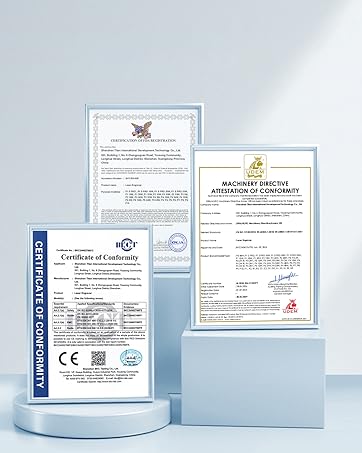
Figure 13: Product Certifications.


