
Introduction
Thank you for choosing the Socool A10 Portable Foldable Rechargeable Fan. This versatile fan is designed for convenience and powerful cooling, suitable for various environments including home, kitchen, travel, and outdoor camping. It features a long-lasting rechargeable battery, 8 adjustable wind speeds, automatic oscillation, LED lighting, and a remote control for ease of use. Please read this manual thoroughly before operation to ensure proper use and maintenance.
Safety Instructions
To prevent injury or damage to the product, please observe the following safety precautions:
- Do not insert fingers or any objects into the fan grille when the fan is operating.
- Keep the fan away from water or other liquids to avoid electric shock.
- Do not use the fan in excessively humid or high-temperature environments.
- Ensure the fan is placed on a stable, flat surface to prevent it from falling.
- Keep out of reach of children and pets.
- Use only the provided USB-C cable for charging.
- Do not attempt to disassemble or repair the fan yourself. Contact customer support if service is required.
- Unplug the fan when not in use for extended periods or before cleaning.
Package Contents
Please check the package for the following items:
- Socool A10 Portable Foldable Fan
- USB-C Charging Cable
- Remote Control
- User Manual
- Storage Pouch
Product Overview
The Socool A10 fan is designed for portability and multi-functional use. It can be configured as a floor fan, table fan, or wall-mounted fan. The fan features a telescopic rod for height adjustment, a control panel with a digital display on the base, and a magnetic remote control for convenient operation.

Image: The Socool A10 fan in its compact, folded state, highlighting its silicone handle, included travel case, and non-slip footpads on the base.
Setup
Unfolding and Adjusting Height
- Gently pull the fan head upwards from the base to extend the telescopic rod.
- Adjust the rod to your desired height. The fan can extend up to 58 cm (22 inches) and folds down to a compact 14.2 cm (5.6 inches).
- Ensure the fan head is securely positioned at the desired angle.
Initial Charging
Before first use, fully charge the fan. Connect the USB-C cable to the fan's charging port and the other end to a compatible USB power source (e.g., USB charger, laptop, car charger). The digital display will indicate the charging status.
Operating Instructions
Power On/Off
Press the power button on the fan's control panel or the remote control to turn the fan on or off.
Speed Adjustment
The fan offers 8 adjustable wind speeds. Use the speed adjustment buttons on the control panel or remote to cycle through the speeds. The current speed level will be shown on the digital display.

Image: Visual representation of the 8 wind speed settings, indicating increasing airflow from Speed 1 (78 CFM) to Speed 8 (191 CFM).
Oscillation and Tilt
The fan supports 360-degree base rotation. It also features automatic oscillation at 45° and 90° angles. To activate or deactivate automatic oscillation, press the oscillation button on the control panel or remote. The fan head can be manually tilted 180° vertically to direct airflow as needed.

Image: Diagrams illustrating the fan's 75-degree manual vertical tilt and 45-degree/90-degree horizontal automatic oscillation capabilities.
Timer Function
Set a sleep timer for 1, 2, 4, or 8 hours using the timer button on the control panel or remote. The fan will automatically turn off after the selected duration.

Image: The fan operating quietly in a bedroom, demonstrating its timer function with options for 1, 2, 4, or 8 hours, and a noise level below 30dB.
LED Light Modes
The fan includes three LED light modes. Press the light mode button on the control panel or remote to cycle through the different light settings. This feature is useful for ambient lighting during evenings, reading, or camping.
Remote Control
The fan comes with a remote control for convenient operation from a distance of up to 5 meters. The remote can be magnetically stored in the center of the fan's base to prevent loss.

Image: Close-up of the fan's touch screen control panel and the remote control, highlighting the magnetic storage feature for the remote.
Power Bank Function
The fan features a USB 5V-3A output port, allowing it to function as an emergency power bank to charge your mobile phone or other USB-powered devices during power outages or outdoor activities.
Charging
The Socool A10 fan is equipped with a built-in 20,000 mAh rechargeable battery, providing extended operation time.
- Battery Life: Up to 112 hours at low speed, 24 hours at mid speed, and 12 hours at high speed on a full charge.
- Charging Time: Approximately 8-9 hours for a full charge.
- Charging Input: USB Type-C 5V-3A.
- The fan supports use while charging.
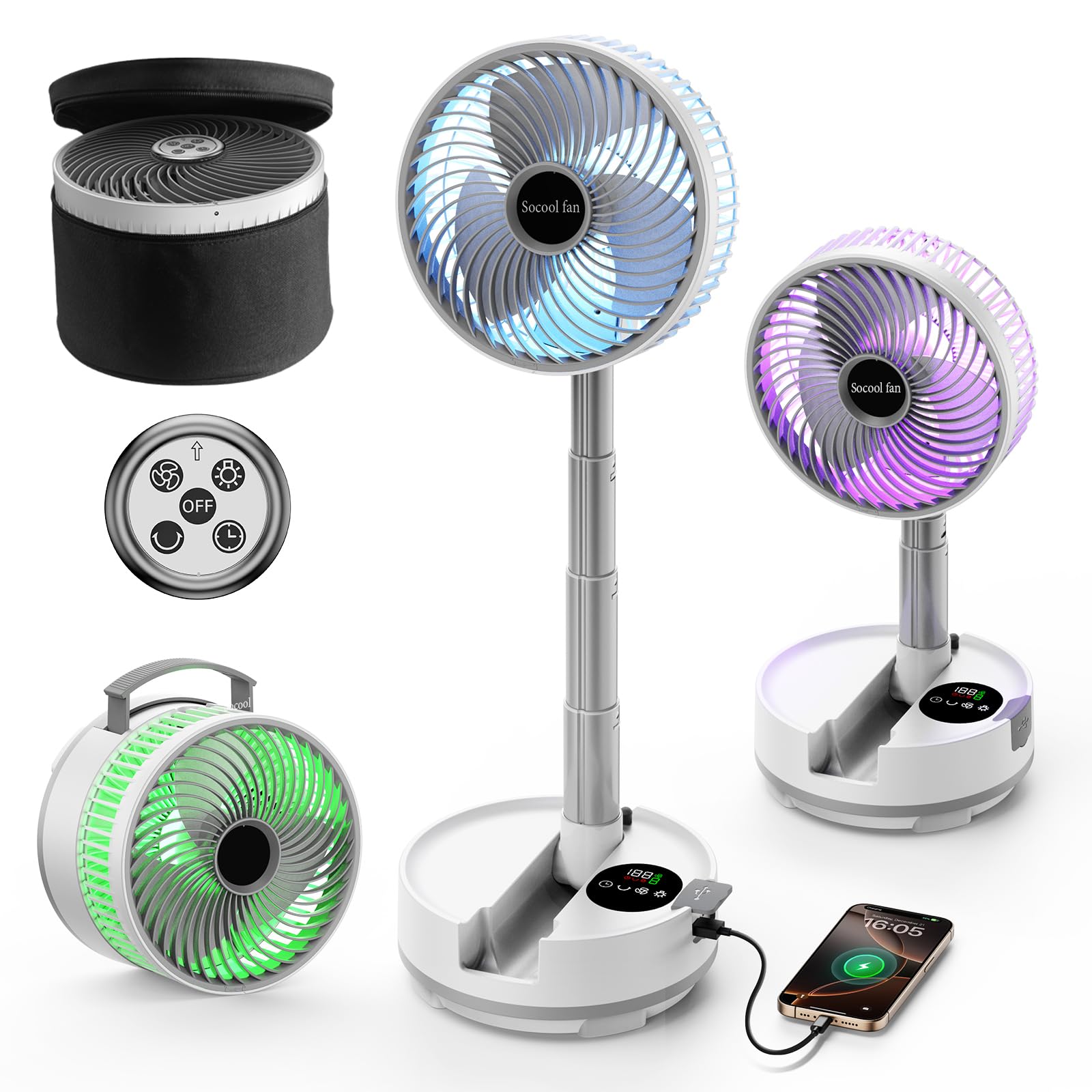
Image: The Socool A10 fan demonstrating its 20,000mAh battery capacity, indicating up to 112 hours of operation at low speed and its ability to charge a mobile phone.
Maintenance
Cleaning the Fan
To clean the fan blades, gently twist and remove the front cover. Wipe the blades and cover with a soft, damp cloth. Ensure all parts are completely dry before reassembling and operating the fan. Do not use abrasive cleaners or immerse the fan in water.
Storage
When not in use, fold the fan into its compact size and store it in the provided travel pouch in a cool, dry place.
Troubleshooting
- Fan does not turn on: Ensure the battery is charged. Connect the fan to a power source using the USB-C cable.
- Weak airflow: Check the fan speed setting and ensure the front grille is not obstructed. Clean the fan blades if necessary.
- Remote control not working: Ensure there are no obstructions between the remote and the fan. Check the remote's battery (if applicable) and ensure it is within the 5-meter operating range.
- Fan not charging: Verify the USB-C cable is securely connected to both the fan and the power source. Try a different USB power adapter.
Specifications
| Feature | Specification |
|---|---|
| Model Name | A10 Folding Fan |
| Battery Capacity | 20,000 mAh |
| Battery Type | 1 P76 (included) |
| Charging Input | USB Type-C 5V-3A |
| Power Bank Output | USB Type-A 5V-3A |
| Number of Speeds | 8 |
| Max Airflow Speed | 5.5 m/s |
| Max RPM | 1970 rpm |
| Noise Level | Less than 30 dB |
| Power | 15 Watts |
| Voltage | 5 Volts |
| Oscillation | 45°/90° Automatic, 360° Base Rotation |
| Manual Tilt | 180° Vertical |
| Timer Settings | 1H, 2H, 4H, 8H |
| LED Light | 3 Color Modes |
| Dimensions (Folded) | 19.81 x 19.81 x 14.22 cm (7.8 x 7.8 x 5.6 inches) |
| Weight | 1.54 kg (3.39 lbs) |
| Material | ABS, Silicone Handle |
| Control Method | Touch Screen, Remote Control |
| Usage Environment | Indoor/Outdoor (Camping, RV) |
Warranty and Support
Warranty and support information for this product is not available in the provided data. Please refer to the product packaging or contact the retailer for details regarding warranty coverage and customer support.
