
1. Introduction
Thank you for choosing the CoolKiller VIVID67 Aluminum Mechanical Keyboard. This manual provides detailed instructions for setup, operation, and maintenance to ensure optimal performance and user experience. The VIVID67 features a premium aluminum alloy casing, tri-mode connectivity, hot-swappable switches, and customizable RGB lighting.
2. Package Contents
Please verify that all items are present in your package:
- CoolKiller VIVID67 Mechanical Keyboard x1
- USB-C Cable x1
- 2.4G Receiver x1
- Peach Switch x4 (Spare)
- Keycap Puller x1
- Switch Puller x1

Image: The CoolKiller VIVID67 keyboard shown with its included accessories, including the USB-C cable, 2.4G receiver, spare switches, keycap puller, and switch puller.
3. Product Overview
3.1 Design and Construction
The VIVID67 features a premium aluminum alloy casing with a piano lacquer finish, providing a sleek and durable design. The seamless molding process enhances its aesthetic appeal and structural integrity.

Image: Close-up view of the CoolKiller VIVID67 keyboard highlighting its aluminum alloy casing and piano lacquer finish.
3.2 Gasket Structure
The keyboard incorporates a gasket-mounted design for an enhanced typing experience and improved acoustics. This structure includes high-density PORON foam, IXPE switch pads, and a high-density PORON switch seat foam to reduce vibrations and provide a softer, more consistent keypress feel.

Image: Exploded view diagram illustrating the internal gasket structure of the VIVID67 keyboard, showing the foam layers and switch pads.
3.3 Switches
The VIVID67 uses CK Custom Linear Switches, designed for smooth keystrokes and a responsive feel. These switches have an initial force of 30g, a work force of 40±10g, a work travel of 2.0±0.5mm, and a total travel of 3.60±0.2mm, with a lifespan of 50 million keystrokes. The top housing is transparent to enhance RGB lighting.

Image: Detailed diagram showing the specifications and components of the CK Custom Linear Switch, including force, travel, and lifespan.
4. Setup
4.1 Tri-Mode Connectivity
The CoolKiller VIVID67 supports three connection modes: USB Type-C Wired, 2.4GHz Wireless, and Bluetooth 5.0. You can seamlessly switch between up to 3 devices.

Image: The CoolKiller VIVID67 keyboard displayed with various devices, illustrating its tri-mode connection capabilities.
4.1.1 USB Type-C Wired Connection
- Connect the provided USB-C cable to the keyboard's Type-C port.
- Connect the other end of the cable to your computer's USB port.
- The keyboard will automatically be recognized.
Function Key: Press and hold FN + T to switch to Type-C Wired mode.
4.1.2 2.4GHz Wireless Connection
- Insert the 2.4GHz wireless receiver into an available USB port on your device.
- On the keyboard, press FN + R briefly, then hold to initiate pairing. The indicator light will flash.
- Once connected, the indicator light will become solid.
4.1.3 Bluetooth Connection
The keyboard supports Bluetooth 5.0 and can connect to three different Bluetooth devices.
- On the keyboard, press FN + Q, FN + W, or FN + E briefly, then hold to select a Bluetooth channel and initiate pairing. The indicator light for the selected channel will flash.
- On your device, enable Bluetooth and search for "CoolKiller VIVID67".
- Select the keyboard to pair. Once connected, the indicator light will become solid.
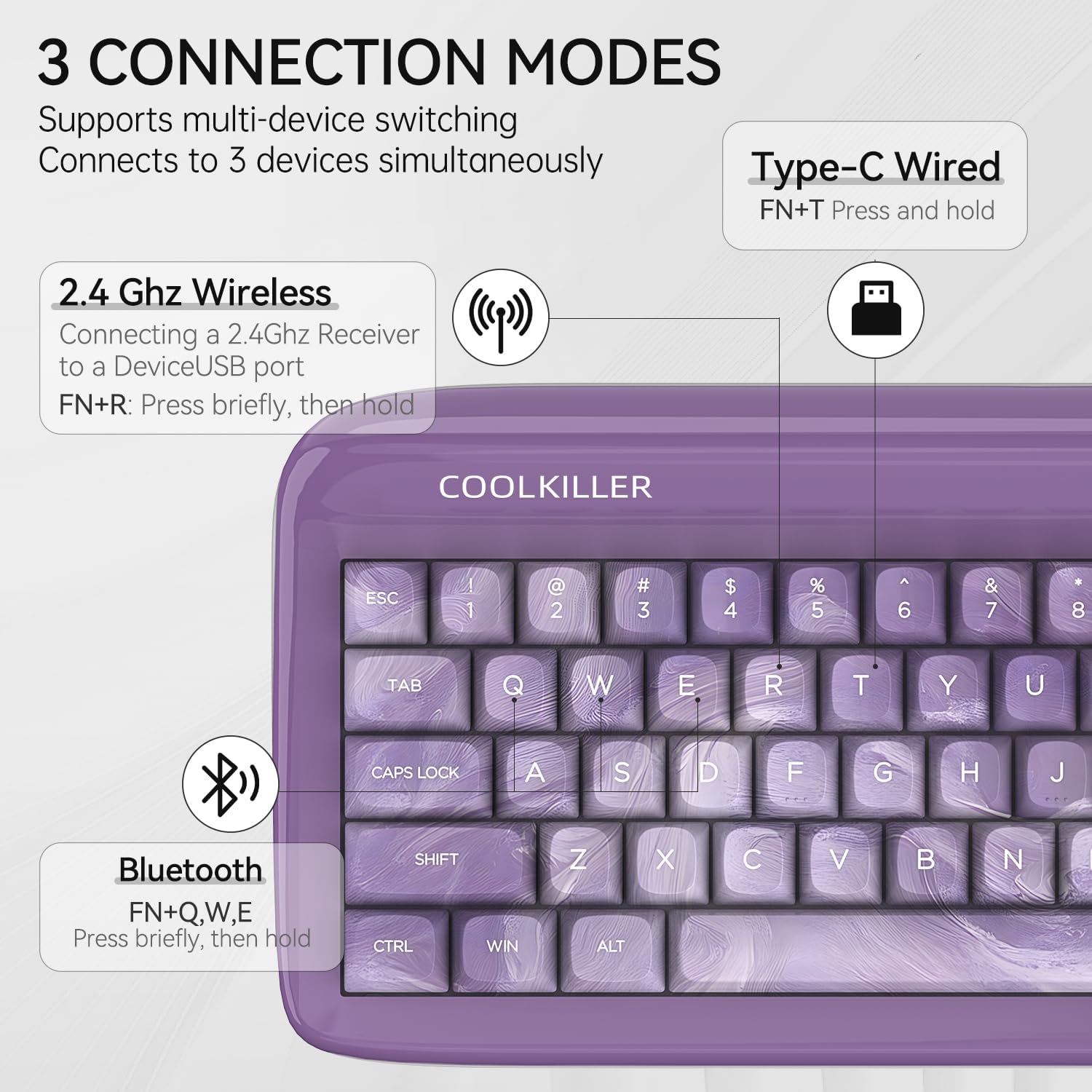
Image: Diagram showing the three connection modes (Type-C Wired, 2.4GHz Wireless, Bluetooth) and their corresponding FN key combinations.
4.2 Power On/Off
To power the keyboard on or off, long press the designated power switch key for approximately 3 seconds.
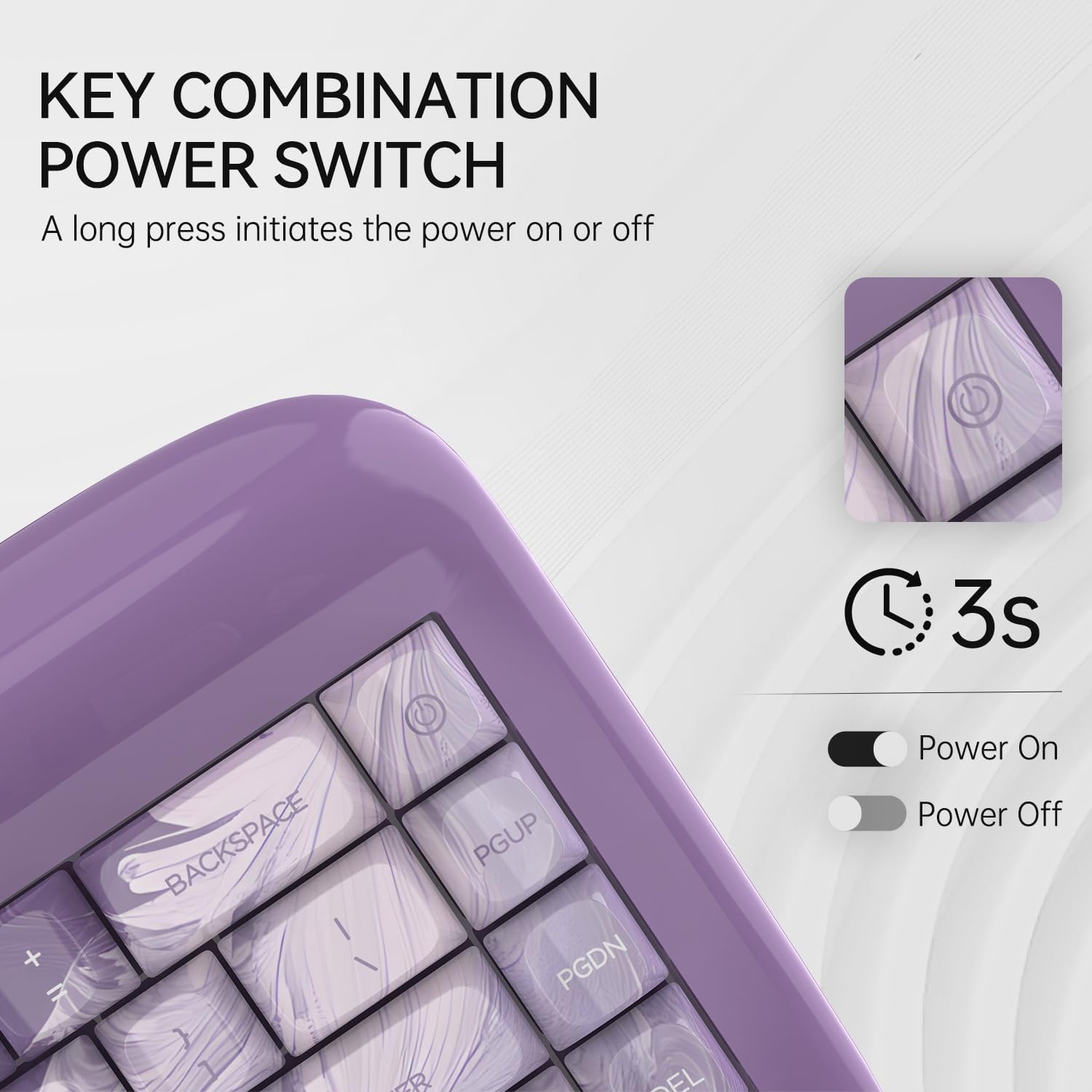
Image: Close-up of the keyboard showing the power key and indicating a 3-second long press for power on/off.
4.3 Charging
The keyboard has a built-in 4000mAh rechargeable battery. Connect the USB-C cable to the keyboard and a power source (e.g., computer USB port, USB wall adapter) to charge. The indicator light will show charging status.
5. Operating Instructions
5.1 Key Functions and FN Layer
The VIVID67 features a compact 68-key layout. Many keys have secondary functions accessible via the FN key. Refer to the keycap legends for specific FN combinations.
5.2 RGB Backlighting
The keyboard features vibrant RGB backlighting with 16 million colors and various customizable effects. You can adjust lighting effects, speed, and brightness directly on the keyboard using FN key combinations or through the dedicated software.

Image: The CoolKiller VIVID67 keyboard showcasing its dynamic and customizable RGB lighting effects.
5.3 Software Customization
Unlock the full potential of your VIVID67 keyboard with the dedicated custom driver software. This software allows for:
- RGB Backlight Customization: Adjust colors, effects, speed, and brightness.
- Macro Programming: Create and assign complex key sequences to single keys.
- Key Remapping: Change key assignments for layout and shortcuts.

Image: Screenshot of the CoolKiller custom driver software interface, showing options for RGB backlight, macro, and key combination settings.
5.3.1 Using the Custom Driver Software
The following video demonstrates how to use the custom driver software to remap keys and customize settings.
Video: A demonstration of using the CoolKiller custom driver software to remap keys, specifically showing how to change F1, F2, F3, F4, F5, and F6 functions. The video also shows testing the remapped keys.
6. Maintenance
To maintain your CoolKiller VIVID67 keyboard in optimal condition:
- Cleaning: Use a soft, dry cloth to wipe the keyboard surface. For deeper cleaning, remove keycaps using the provided keycap puller and use compressed air to clear debris from between switches.
- Switch Replacement: The keyboard is hot-swappable. Use the switch puller to carefully remove switches. Align new switches with the PCB pins and press gently until they click into place. Ensure the keyboard is disconnected before replacing switches.
- Storage: Store the keyboard in a cool, dry place away from direct sunlight and extreme temperatures.
7. Troubleshooting
If you encounter issues with your CoolKiller VIVID67 keyboard, please refer to the following common solutions:
- Keyboard Not Responding:
- Ensure the keyboard is powered on.
- Check the connection mode (wired, 2.4GHz, Bluetooth) and ensure it matches your device.
- For wired mode, try a different USB port or cable.
- For 2.4GHz, ensure the receiver is properly inserted and try re-pairing (FN+R).
- For Bluetooth, ensure Bluetooth is enabled on your device and try re-pairing (FN+Q/W/E).
- Charge the keyboard if the battery is low.
- Keys Not Registering:
- Ensure the switches are properly seated. Use the switch puller to reseat any loose switches.
- Clean any debris around the affected keys.
- If a specific switch is faulty, replace it with a spare switch.
- RGB Lighting Issues:
- Ensure the keyboard is powered on and not in a low-power state.
- Use the software to reset or adjust lighting settings.
- Check for firmware updates for the keyboard.
- Software Not Detecting Keyboard:
- Ensure the keyboard is connected via USB-C wired mode when using the software.
- Restart your computer and the software.
- Download the latest version of the software from the official CoolKiller website.
8. Specifications
| Brand Name | COOLKILLER |
| Product Name | VIVID 67 |
| Number of Keys | 68 Keys |
| Keyboard Material | Aluminum Alloy |
| Case Process | Piano Baking Varnish Process |
| Supported Switch | Peach Switch (Linear) |
| Keyboard Structure | GASKET |
| N-Key Rollover | Support |
| RGB Backlight | 16 million colors |
| Connection Mode | Wired + 2.4G + Bluetooth |
| Support System | Windows / macOS / iOS / Android |
| Battery Parameters | 4000mAh |
| Product Size | 336mm * 151mm * 43mm (maximum 48mm, front height 18mm, rear height 35mm) |
| Product Weight | 1470g |
Table: Detailed specifications for the CoolKiller VIVID67 mechanical keyboard.
9. Warranty and Support
CoolKiller products are designed for quality and performance. For warranty information or technical support, please refer to the official CoolKiller website or contact customer service through your retailer. Keep your purchase receipt for warranty claims.


