
1. Product Overview
The Babytone Baby Sleep Sock Monitor is designed to provide parents with peace of mind by continuously tracking a baby's heart rate and movement during sleep. This smart sock system utilizes Bluetooth technology to connect to a mobile application, allowing for real-time monitoring and historical data review.

The system includes a comfortable, wearable sock that houses the sensor, a compact monitor unit, and a dedicated mobile application (ViHealth) for iOS and Android devices. It is suitable for infants aged 0-36 months.
2. What's in the Box
Please verify that all items are present and in good condition upon opening the package.
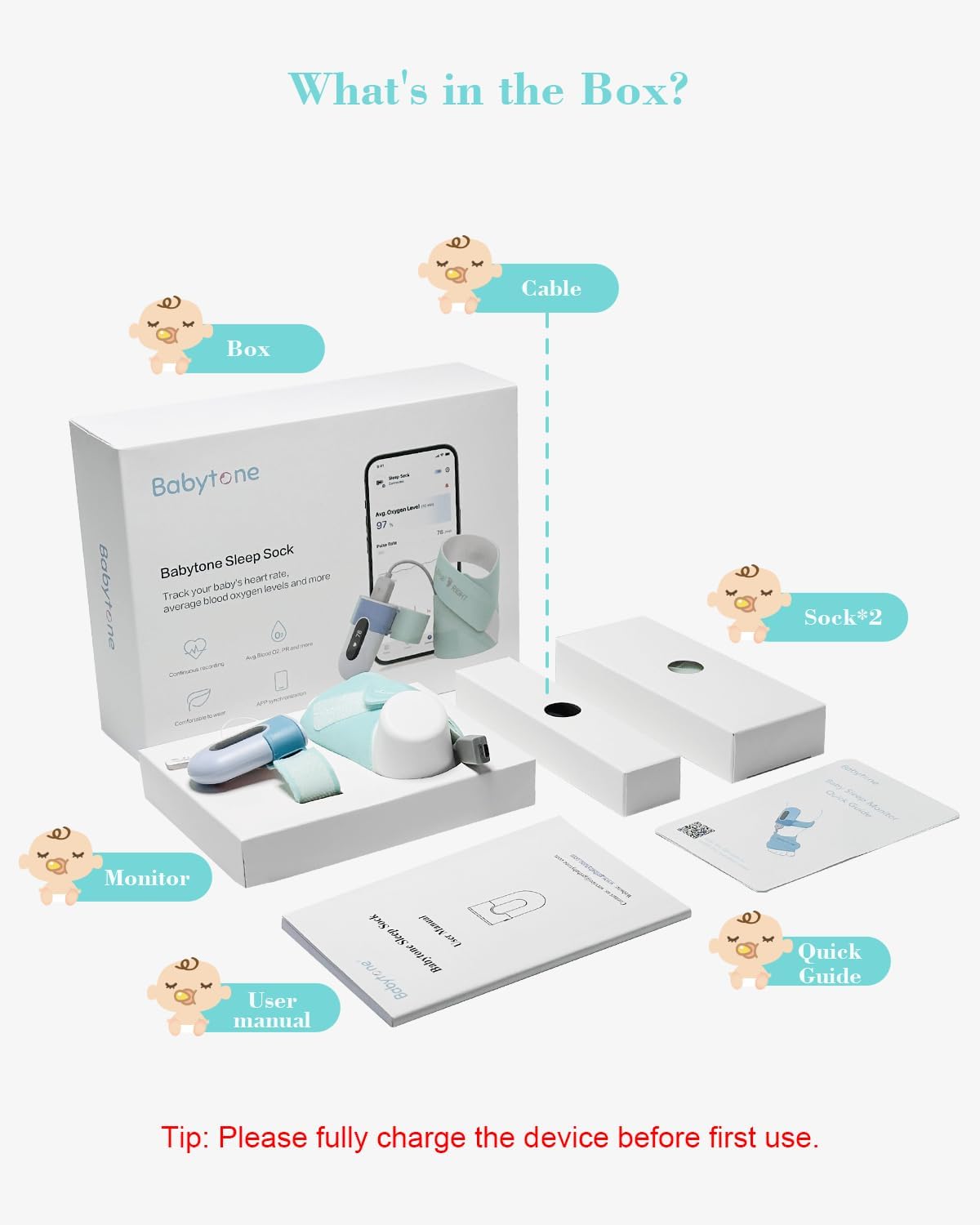
- Babytone Sleep Sock Monitor Unit
- Sleep Sock (3 sizes: S, M, L)
- Charging Cable
- User Manual
- Quick Guide
Important: Fully charge the device before first use.
3. Setup Guide
3.1 Charging the Monitor
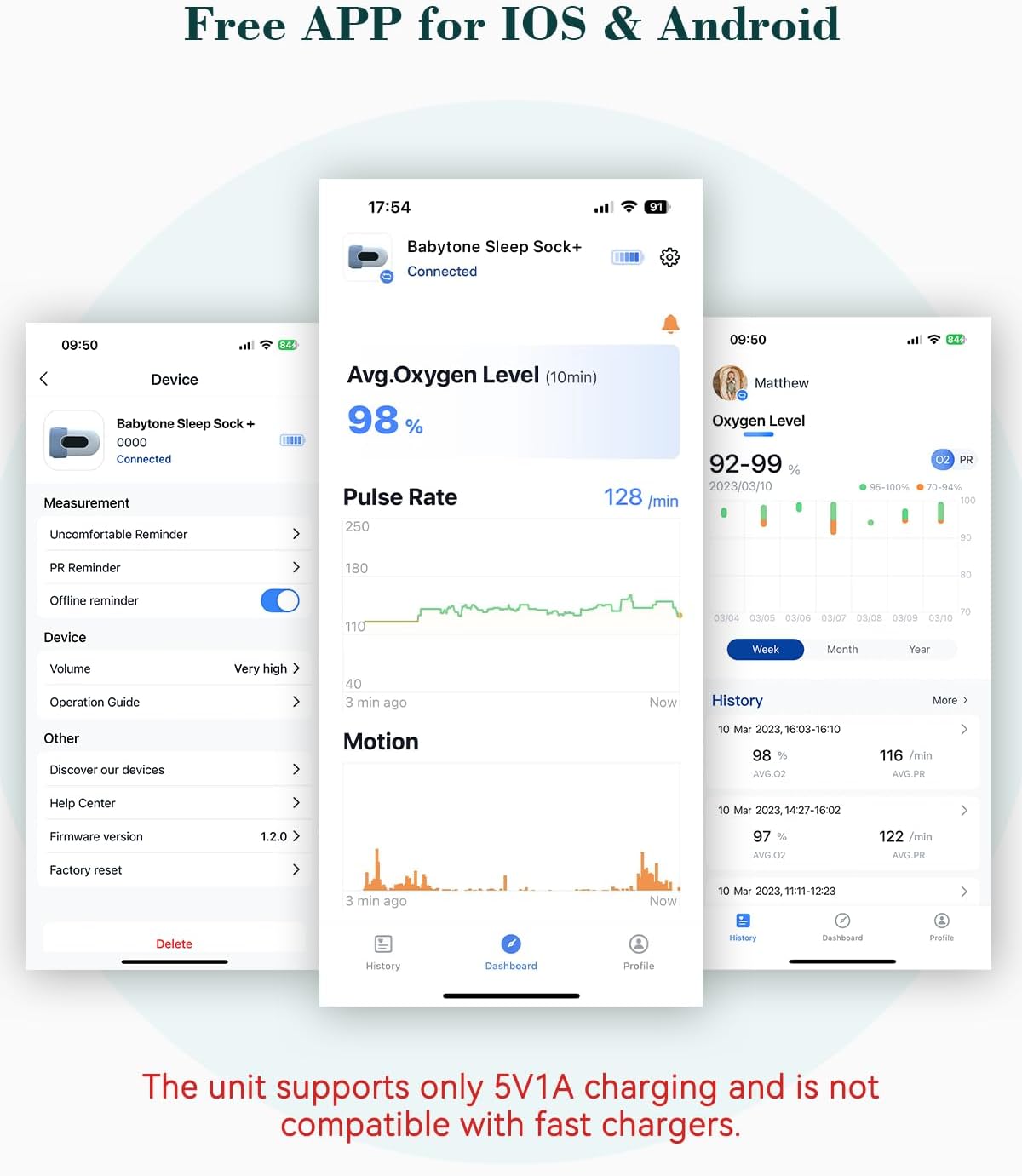
Connect the provided charging cable to the monitor unit and a compatible 5V1A USB power adapter (not included). The unit supports only 5V1A charging and is not compatible with fast chargers. A full charge is recommended before initial use.
3.2 App Download and Installation
Download the ViHealth app from the App Store (iOS) or Google Play Store (Android). Search for "ViHealth" and install the application on your smartphone.
3.3 Pairing with the ViHealth App
Follow these steps to pair your Babytone Sleep Sock Monitor with the ViHealth app:

- Turn on the BBSM device: Press the power button on the monitor unit.
- Turn on Bluetooth and run the App: Ensure Bluetooth is enabled on your smartphone and open the ViHealth application.
- Select the device icon: When ViHealth finds your device, select the Babytone Sleep Sock icon displayed in the app.
- Press the side button: Press the side button on the monitor device to initiate pairing.
- Confirm connection: If paired successfully, the app dashboard page will display "Connected".
4. Wearing the Sleep Sock
4.1 Choosing the Correct Sock Size
The Babytone Sleep Sock Monitor comes with three sizes of socks (S, M, L) to ensure a precise fit for babies of different weights:
- Small (S): For babies weighing 0-8.6 lbs
- Medium (M): For babies weighing 8.6-18.7 lbs
- Large (L): For babies weighing 18.7-30.6 lbs
Select the sock size that best fits your baby's foot to ensure comfort and accurate readings.

4.2 Proper Placement
Gently place the monitor unit into the designated pocket on the sock. Ensure the light emitter and detector are correctly positioned on the baby's foot. The sock should be snug but not too tight, allowing for comfortable movement. The light emitter should contact the detector to receive correct readings.


Note: Foot temperature below 35°C may reduce sensor accuracy.
5. Operating the Monitor and App
5.1 Real-Time Tracking
Once connected, the ViHealth app provides real-time data on your baby's heart rate and movement. The dashboard displays current readings and graphs showing trends over time.

5.2 Alerts and Notifications
The app is designed to provide instant notifications if your baby's heart rate or movement deviates from preset safe ranges. This feature helps you stay informed and provides peace of mind.

Note: The reminder works only when your phone stays on the dashboard and is not locked.
5.3 Built-in Memory
The monitor unit has a built-in memory that can store up to 4 sessions of data. This means you don't have to worry about losing data even if your phone is not continuously connected to the device. Data will sync to your mobile app when re-paired (unlimited storage on the app).
Please keep the APP open to avoid disconnection from the monitor. You can also sync data later, as the built-in memory can store up to 4 sessions.
5.4 Reviewing and Sharing Records
The ViHealth app allows you to review detailed sleep summaries and historical data. You can also export these records in PDF or CSV format for sharing or personal record-keeping.

6. Care and Maintenance
- Cleaning the Sock: The fabric sock can be hand-washed with mild soap and water. Allow it to air dry completely before re-use. Do not machine wash or tumble dry.
- Cleaning the Monitor Unit: Wipe the monitor unit with a soft, dry cloth. Do not submerge the unit in water or use harsh chemicals.
- Storage: Store the monitor and socks in a cool, dry place away from direct sunlight and extreme temperatures.
7. Troubleshooting
| Problem | Possible Cause | Solution |
|---|---|---|
| Device not connecting to app | Bluetooth off, device off, app not open, out of range | Ensure device is on, Bluetooth is enabled on phone, app is open, and device is within 32 feet (10m) range. |
| Inaccurate readings | Sock too loose/tight, sensor misalignment, low foot temperature | Adjust sock for proper fit, ensure light emitter contacts detector, ensure baby's foot is warm. |
| Sock comes off baby's foot | Incorrect size, baby's movement | Ensure correct sock size is used. Securely fasten the sock. |
| Device not charging | Incorrect charger, faulty cable/port | Use a 5V1A charger. Check cable and charging port for damage. |
If you encounter issues not listed here or if the problem persists, please refer to the contact information in the Warranty and Support section.
8. Specifications
| Feature | Detail |
|---|---|
| Brand | Babytone |
| Model Name | baby sleep sock S1 MM |
| Compatible Devices | Smartphones (iOS/Android) |
| Sensor Type | Optical, Accelerometer |
| Battery Description | Lithium-Ion Polymer |
| Charging Input | 5V1A (Not compatible with fast chargers) |
| Item Weight | 263 Grams |
| Material | Nylon |
| UPC | 850063708654 |
9. Warranty and Support
The Babytone Baby Sleep Sock Monitor comes with a 1-year warranty from the date of purchase. This warranty covers manufacturing defects and malfunctions under normal use.
For warranty claims, technical support, or if the device you received does not work or cannot be charged, please contact Babytone customer service. Contact information can typically be found on the product packaging, the official Babytone website, or through your purchase platform.

