
Introduction
This manual provides detailed instructions for the ZMX YK61 Magnetic Switch Gaming Keyboard. It covers setup, operation, features, maintenance, and troubleshooting to ensure optimal performance and user experience. The YK61 is a 60% compact wired mechanical keyboard designed for gaming and productivity, featuring rapid trigger technology, adjustable actuation, and customizable RGB lighting.
Package Contents
Please verify that all items are present in the package:
- ZMX YK61 Magnetic Switch Gaming Keyboard
- USB-C Cable
- Keycap Puller
- User Manual (this document)
Setup
- Connect the Keyboard: Locate the USB-C port on the back of the YK61 keyboard. Connect one end of the provided USB-C cable to the keyboard and the other end to an available USB port on your computer.
- Driver Installation (Optional): For advanced customization and features, download the official ZMX software from the manufacturer's website. Follow the on-screen instructions for installation.
- Initial Test: Open a text editor or browser and type to ensure the keyboard is recognized and functioning correctly.
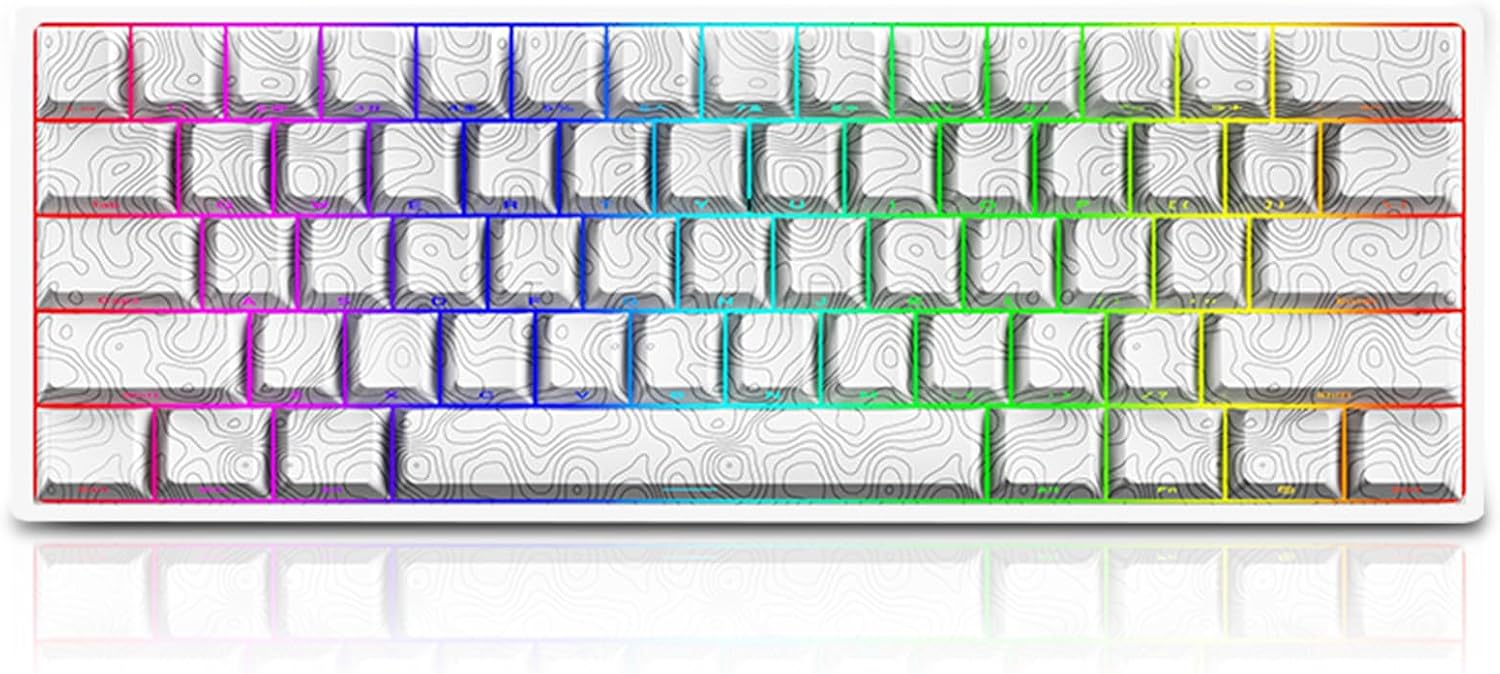
Image: The ZMX YK61 Magnetic Switch Gaming Keyboard in white, showcasing its compact 60% layout and RGB backlighting.
Operating Instructions
1. Rapid Trigger and Dynamic Keystrokes (DKS/MT/TGL)
The YK61 features magnetic switches with rapid trigger technology, allowing for instant key activation and deactivation. This minimizes travel distance for faster response times.
- Rapid Trigger: Keys activate and deactivate with minimal travel, enhancing response speed.
- Dynamic Keystrokes (DKS): Assign up to four distinct operations to a single key based on analog input, providing advanced customization for complex actions.
- Two Actions for One Keypress: Utilize the professional software to assign different actions based on key pressure. For example, a light press for walking and a deep press for sprinting in games.

Image: Diagram illustrating the rapid trigger functionality and adjustable trigger travel for selected keys, showing sensitivity ranges from 0.1mm to 2.3mm.
2. Adjustable Magnetic Switches
The YK61 utilizes Hall effect magnetic switches, which are highly sensitive and durable. These switches are hot-swappable, allowing for easy replacement without soldering.
- Actuation Range: The rapid trigger (RT) actuation range is adjustable from 0.1mm to 2.3mm, with 0.1mm accuracy, allowing users to fine-tune key sensitivity.
- Hot-Swappable: The keyboard supports 3/5-pin magnetic switch replacements.

Image: An exploded diagram showing the internal components of the YK61 keyboard, including side-printed PBT keycaps, magnetic switches, satellite switches, metal positioning plate, sandwich sound absorb foam, PCB board, bottom cotton, and dye-sublimation shell.
3. RGB Backlighting and Keycaps
The YK61 features customizable RGB backlighting and unique keycaps.
- 16 Million RGB Colors: The built-in RGB backlight offers a wide spectrum of colors and effects.
- South-Facing LEDs: Designed for optimal lighting and compatibility with various keycap profiles.
- Topographical-Theme Keycaps: The keyboard comes with PBT keycaps featuring a topographical design and side-printed translucent characters, enhancing the RGB lighting effect.

Image: A close-up view of the YK61 keyboard's south-facing LEDs, highlighting the vibrant RGB illumination through the translucent side-printed keycaps on both white and black versions.

Image: A detailed view of the YK61's dye-sublimated PBT keycaps with side-printed translucent characters, showcasing the topographical theme and how light shines through the legends.
Customization Software
The ZMX YK61 keyboard is supported by professional customization software. This software allows users to:
- Adjust DKS, MT, and TGL settings.
- Create and manage key macros.
- Fine-tune the rapid trigger actuation distance (0.1mm accuracy).
- Customize RGB lighting effects and colors.
- Assign two different actions to a single key based on pressure.
Refer to the software's built-in help or the ZMX website for detailed instructions on using the customization software.
Maintenance
Proper maintenance ensures the longevity and performance of your keyboard.
- Cleaning: Use a soft, dry cloth to wipe the keyboard surface. For deeper cleaning, use a can of compressed air to remove dust and debris from between the keycaps.
- Keycap Removal: Use the provided keycap puller to carefully remove keycaps for cleaning or switch replacement. Avoid excessive force to prevent damage.
- Storage: When not in use for extended periods, store the keyboard in a clean, dry environment away from direct sunlight and extreme temperatures.
Troubleshooting
| Issue | Possible Solution |
|---|---|
| Keyboard not responding |
|
| Keys not registering or double-typing |
|
| RGB lighting not working |
|
Specifications
| Feature | Detail |
|---|---|
| Model Name | YK61 Magnetic Switch Rapid Trigger Keyboard |
| Connection | USB-C Wired |
| Number of Keys | 61 keys (60% Layout) |
| RT Travel (Adjustable) | 0.1 - 2.3 mm (0.1mm accuracy) |
| Magnetic Switch Total Travel | 4.0 ± 0.3 mm |
| Magnetic Switch Trigger Force | 35 ± 5 gf |
| Switch Lifespan | 100 million times |
| RGB Backlight | 16 million colors, South-Facing LEDs |
| Keycaps | Dye-sublimated PBT, Topographical-Theme, Side-Printed Translucent |
| Structure | Gasket Mount |
| NKRO | Supported (N-Key Rollover) |
| Special Features | Rapid Trigger, DKS, MT, TGL Tech, Hot-Swappable Magnetic Switches |
| System Compatibility | Windows, Mac, iOS, Android |
| Product Dimensions | 11.5 x 4 x 1.1 inches (29.2 x 10.2 x 2.8 cm) |
| Item Weight | 1 pound (0.45 kg) |
| Manufacturer | ZMX |
Warranty and Support
For warranty information and technical support, please refer to the official ZMX website or contact ZMX customer service directly. Keep your purchase receipt for warranty claims.
ZMX Official Website: Visit ZMX Store on Amazon