
1. Introduction
Thank you for choosing the FLEXISPOT X3 Power Recliner Chair. This manual provides essential information for the safe and efficient assembly, operation, and maintenance of your new recliner. Please read all instructions carefully before use and retain this manual for future reference.
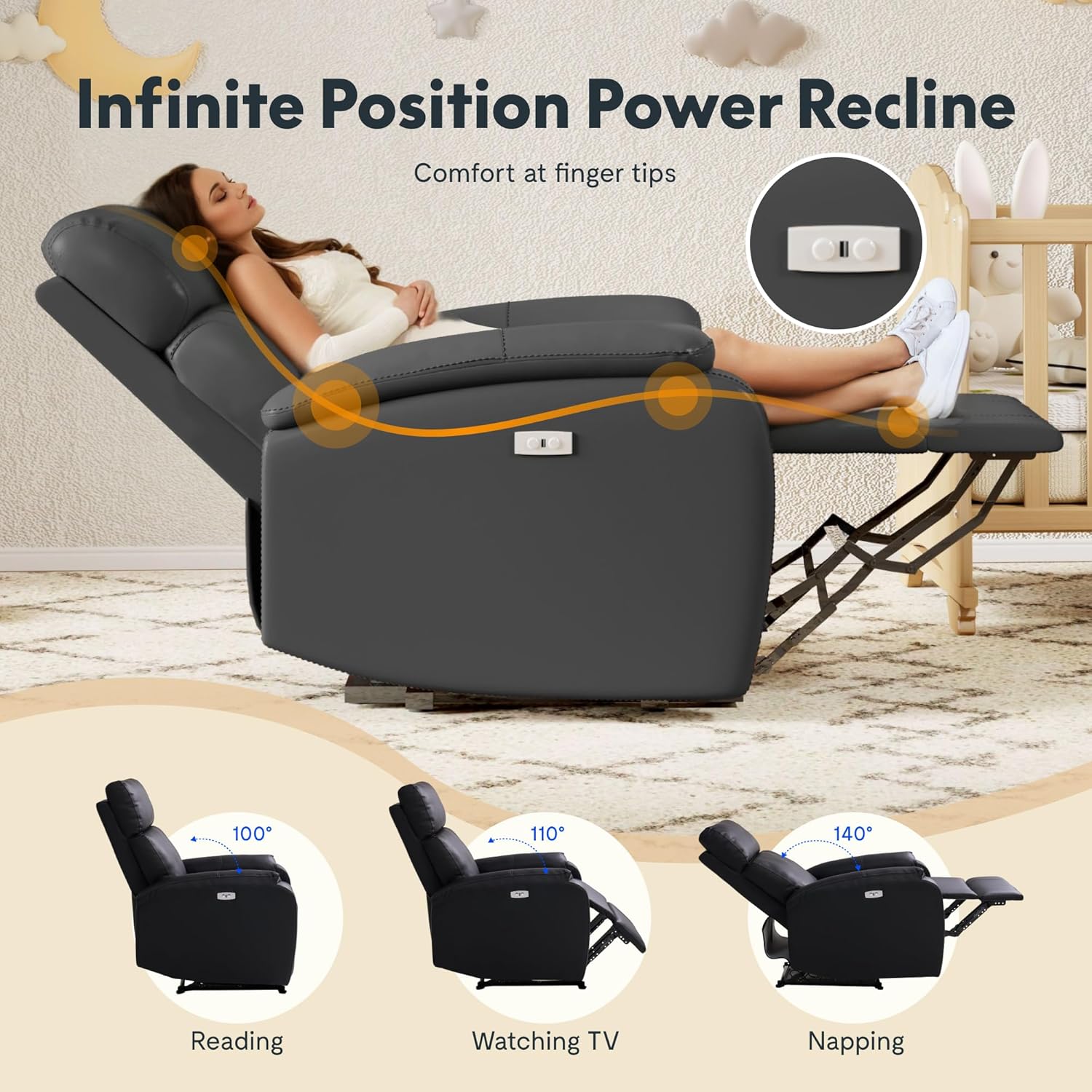
The FLEXISPOT X3 Power Recliner Chair offers customized comfort with its infinite position power recline feature, allowing smooth adjustments from 100° for reading, 110° for watching TV, to 140° for napping. It includes a built-in USB charging port for convenience and features high-density foam cushioning with a durable faux leather upholstery.
2. Safety Information
Please observe the following safety warnings to prevent injury or damage to the product:
- Keep children and pets away from the recliner's moving parts.
- Ensure no obstructions are present around the recliner when operating the recline function.
- Do not stand on the footrest or armrests.
- Avoid placing heavy objects on the recliner.
- Unplug the recliner from the power outlet before cleaning or maintenance.
- Do not attempt to disassemble or repair the electrical components yourself. Contact qualified service personnel.
- Maximum weight capacity: 300 lbs. Do not exceed this limit.
3. Package Contents
The FLEXISPOT X3 Power Recliner Chair is delivered in two boxes. Please verify that all components are present before beginning assembly:
- Backrest
- Seat Base with Armrests
- Power Adapter and Cable
- Instruction Manual
Note: Small parts may be located within the packaging of larger components. Please check all packaging thoroughly.
4. Setup and Assembly
Assembly typically requires two people. No special tools are required.
- Unpack Components: Carefully remove all parts from the packaging. Place them on a soft, clean surface to prevent scratches.
- Attach Backrest: Align the metal brackets on the backrest with the receivers on the seat base. Slide the backrest down firmly until it clicks into place. Ensure both sides are securely engaged.
- Connect Power: Locate the power cable from the recliner and connect it to the power adapter. Plug the power adapter into a standard wall outlet.
- Final Check: Ensure all connections are secure and the chair is stable before use.
5. Operating Instructions
5.1 Power Recline Function
The recliner features an electric recline mechanism for smooth and effortless adjustment.
- To Recline: Press and hold the 'Open Recliner' button located on the side of the chair. The chair will smoothly recline to your desired position. Release the button to stop at any angle.
- To Return Upright: Press and hold the 'Close Recliner' button. The chair will return to its upright position. Release the button to stop.

5.2 USB Charging Port
A convenient USB charging port is integrated into the side of the recliner to power your devices.
- Locate the USB port next to the recline control buttons.
- Plug your device's USB charging cable into the port.
- Ensure the recliner is plugged into a power outlet for the USB port to function.

6. Maintenance
Regular maintenance will help prolong the life and appearance of your recliner.
- Cleaning Faux Leather: Wipe the faux leather upholstery with a soft, damp cloth. For tougher stains, use a mild soap solution and wipe dry immediately. Avoid harsh chemicals or abrasive cleaners.
- Dusting: Regularly dust the chair with a soft, dry cloth.
- Inspecting Connections: Periodically check all power connections to ensure they are secure.
- Moving the Chair: When moving the chair, lift it rather than dragging it to prevent damage to the legs and frame.
7. Troubleshooting
If you encounter issues with your FLEXISPOT X3 Power Recliner Chair, refer to the following common solutions:
| Problem | Possible Cause | Solution |
|---|---|---|
| Recline function not working | Power cable disconnected; Power outlet not working; Motor malfunction. | Ensure power cable is securely plugged into the chair and wall outlet. Test the outlet with another device. If issues persist, contact customer support. |
| USB charging port not working | Recliner not powered; Device cable faulty. | Verify the recliner is plugged in and receiving power. Try a different USB cable or device to rule out cable/device issues. |
| Unusual noises during operation | Loose components; Obstruction in mechanism. | Inspect for any loose parts or foreign objects obstructing the recline mechanism. Do not force movement. Contact customer support if noise persists. |
If the problem persists after attempting these solutions, please contact FLEXISPOT customer support.
8. Specifications
- Brand: FLEXISPOT
- Model Name: X3 (Power Recliner)
- Item Model Number: X4L-BR
- ASIN: B0DRG8FH5J
- UPC: 810072872647
- Color: Black
- Product Dimensions: 54"D x 43"W x 40"H
- Seat Depth: 22 inches
- Back Style: Solid Back
- Arm Style: Standard
- Leg Style: Straight Leg
- Fill Material: Polyurethane Foam
- Upholstery Material: Faux Leather
- Reclining Position Count: Infinite (Adjustable from 100° to 140°)
- Item Weight: 108 pounds
- Maximum Weight Capacity: 300 lbs
- Room Type: Bedroom, Living Room, Home Theater
- Indoor/Outdoor Usage: Indoor
9. Warranty and Support
FLEXISPOT is committed to providing quality products and customer satisfaction.
9.1 Returns
You are allowed to return or exchange the furniture within 30 days of receiving it. Please refer to your purchase platform's return policy for detailed instructions.
9.2 Contact Support
For any questions, concerns, or technical assistance, please contact FLEXISPOT customer support:
- Email: contact@flexispot.com
- Phone: +1 (855) 585-5618
When contacting support, please have your purchase details and item model number (X4L-BR) ready.

