
Horavie KC201
Horavie Single Serve Coffee Maker Instruction Manual
Model: KC201
1. Introduction
This manual provides detailed instructions for the safe and efficient operation and maintenance of your Horavie Single Serve Coffee Maker. Please read this manual thoroughly before first use and retain it for future reference.
The Horavie Single Serve Coffee Maker is designed for convenient and quick brewing of single cups of coffee, accommodating both K-cup pods and ground coffee. Its compact design makes it suitable for various environments, including homes, offices, and travel.
2. Safety Information
- Always ensure the coffee maker is placed on a stable, level surface.
- Do not immerse the appliance, cord, or plug in water or other liquids.
- Unplug from the outlet when not in use and before cleaning. Allow to cool before putting on or taking off parts, and before cleaning the appliance.
- Do not operate any appliance with a damaged cord or plug, or after the appliance malfunctions or has been damaged in any manner.
- Do not open the top cover immediately after brewing to avoid burns from hot steam or coffee.
- Ensure the K-Pod holder or ground coffee filter is empty when performing descaling.
- Do not exceed the maximum water level indicated on the water tank.
3. Product Overview
The Horavie Single Serve Coffee Maker (Model KC201) is a compact and versatile appliance. Key components include:
- Main Unit: Houses the heating element and brewing mechanism.
- Water Tank: Integrated with a viewing window for water level monitoring.
- K-Pod Holder: Designed to fit standard K-cup coffee capsules.
- Reusable Filter: For use with ground coffee.
- Power Button: For initiating brewing and descaling.
- Descaling Reminder Light: Illuminates red when descaling is required.

Figure 1: Horavie Single Serve Coffee Maker with its K-cup and ground coffee filter accessories.

Figure 2: The compact dimensions of the coffee maker, measuring 7.85 inches deep, 4.33 inches wide, and 9.45 inches high. Note that cups over 5.7 inches high may not fit.
4. Setup
- Unpack: Carefully remove all components from the packaging.
- Clean: Before first use, clean the removable parts (K-Pod holder, reusable filter, drip tray) with warm, soapy water. Wipe the exterior of the main unit with a damp cloth.
- Initial Rinse: For the first use, it is recommended to run a brewing cycle with clean water only to clean the internal system and ensure optimal coffee taste.
- Place an empty mug on the drip tray.
- Open the top lid and fill the water tank with clean water up to the MAX 12oz line.
- Close the lid securely.
- Press the Power Button once to start the rinse cycle.
- Discard the hot water after the cycle is complete.
- Placement: Place the coffee maker on a stable, flat, heat-resistant surface near a power outlet.
5. Operating Instructions
5.1. Brewing with K-Cup Pods
- Place Mug: Position your coffee mug on the drip tray.
- Open Lid: Lift the top lid of the coffee maker.
- Insert K-Pod: Place a standard K-cup coffee pod into the K-Pod holder. Ensure it is seated correctly.

Figure 3: The 2-in-1 design allows for both K-Pod and ground coffee brewing. The K-Pod holder fits standard coffee capsules.
- Add Water: Pour fresh water into the water tank. Use the water level markings (6oz, 8oz, 10oz, 12oz) on the side of the tank to select your desired brew size. Do not exceed the MAX line.

Figure 4: The easy-refill water tank features clear viewing window and markings for 6oz, 8oz, 10oz, and 12oz brew sizes.
- Close Lid: Firmly close the top lid until it clicks into place.
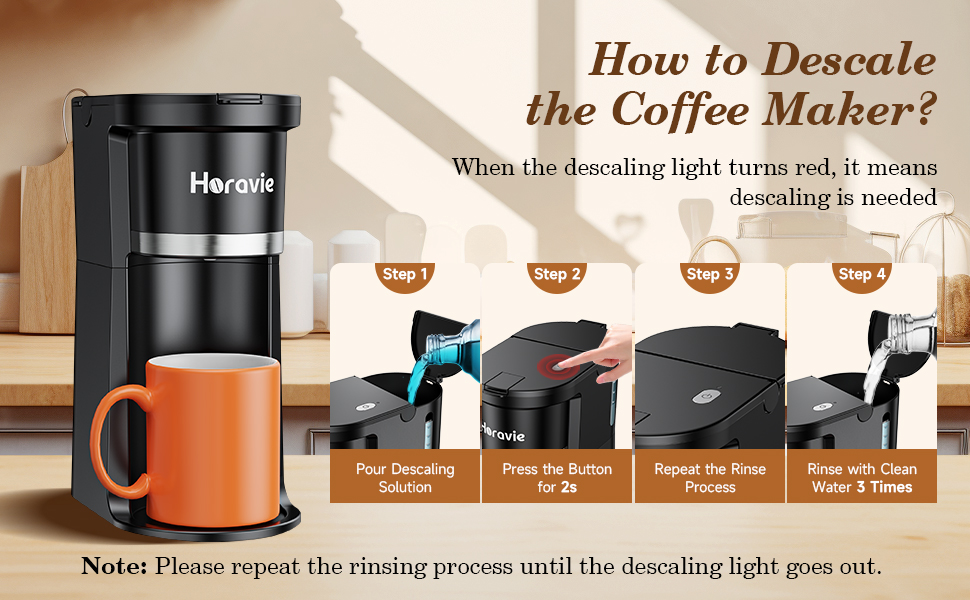
Figure 5: Ensure the lid is securely closed before brewing. The handle of the K-Pod holder and filter should be placed horizontally in the coffee machine slot, otherwise the top cover will not close properly.
- Start Brewing: Press the Power Button once. The indicator light will illuminate, and brewing will begin. The brewing process typically takes about 120 seconds.

Figure 6: The coffee maker brews at an ideal temperature of 180°F-190°F, completing a brew cycle in approximately 120 seconds.
- Enjoy: Once brewing is complete, the indicator light will turn off. Carefully remove your hot coffee.
5.2. Brewing with Ground Coffee
- Prepare Filter: Open the reusable filter and add your desired amount of ground coffee. Do not overfill.
- Insert Filter: Place the filled reusable filter into the coffee maker's brewing chamber.
- Follow Steps: Proceed with steps 1, 4, 5, 6, and 7 from the "Brewing with K-Cup Pods" section above.
6. Maintenance
6.1. Daily Cleaning
- After each use, unplug the coffee maker and allow it to cool.
- Remove and empty the K-Pod holder or reusable filter. Rinse it under running water.
- Empty and clean the drip tray and its cover.
- Wipe the exterior of the coffee maker with a damp, soft cloth. Do not use abrasive cleaners.
6.2. Descaling
The coffee maker features an automatic descaling reminder. The descaling reminder light will illuminate in red when cleaning is needed. Regular descaling helps prevent clogging and ensures optimal performance and longevity of your appliance.
- Prepare Solution: Fill the water tank with a descaling solution (e.g., a mixture of white vinegar and water, or a commercial descaling agent as per its instructions).
- Initiate Descaling: Ensure the K-Pod holder or ground coffee filter is empty. Place an empty mug on the drip tray. Press and hold the Power Button for 2 seconds to initiate the self-cleaning process.

Figure 7: The power button and descaling reminder light are located on the top of the unit for easy access.
- Repeat Rinse: Repeat the rinsing process with clean water 2-3 times, or until the descaling light goes out, to ensure all descaling solution is flushed from the system.
7. Troubleshooting
| Problem | Possible Cause | Solution |
|---|---|---|
| Coffee does not brew. | No water in tank; Lid not closed properly; Power not connected. | Fill water tank; Ensure lid is securely closed; Check power connection. |
| Coffee tastes weak. | Too much water for coffee amount; Coffee grounds too coarse. | Use less water or more coffee; Use finer ground coffee. |
| Coffee overflows. | Mug too small; Water tank overfilled. | Use a larger mug; Do not fill water past MAX line. |
| Descaling reminder light is on. | Mineral buildup in the system. | Perform descaling procedure as outlined in Section 6.2. |
8. Specifications
- Brand: Horavie
- Model Name: Coffee Maker (KC201)
- Color: Black
- Product Dimensions: 7.85"D x 4.33"W x 9.45"H
- Item Weight: 2.2 pounds
- Coffee Maker Type: Drip Coffee Machine
- Filter Type: Reusable
- Coffee Input Type: Capsule, Ground, Pod
- Brew Sizes: 6 to 12 oz.
- Special Features: Auto Shut-Off, Lightweight, Permanent Filter, Portable, Descaling Reminder
- Operation Mode: Fully Automatic
- Voltage: 120 Volts
Ask a question about this manual
Ask about setup, troubleshooting, compatibility, parts, safety, or missing instructions. Manuals+ will review the question and use this page’s manual context to help answer it.