
TOPUTURE TP1
TOPUTURE 2-in-1 Folding Treadmill User Manual
Model: TP1
Brand: TOPUTURE
1. Introduction
This manual provides essential information for the safe and effective operation, maintenance, and troubleshooting of your TOPUTURE 2-in-1 Folding Treadmill. Please read this manual thoroughly before initial use and retain it for future reference.
The TOPUTURE 2-in-1 Folding Treadmill is designed for both running and walking, offering a versatile fitness solution for home and office environments. Its foldable design allows for convenient storage, and the dual LED display provides comprehensive workout data.

Figure 1.1: TOPUTURE 2-in-1 Folding Treadmill in Running Mode and Folded for Storage.
2. Safety Instructions
Adherence to the following safety guidelines is crucial to prevent injury and ensure the longevity of your treadmill:
- Consult a physician before beginning any exercise program, especially if you have pre-existing health conditions.
- Always wear appropriate athletic footwear and clothing during operation.
- Ensure a clear area of at least 2 meters (6.5 feet) behind the treadmill and 0.6 meters (2 feet) on each side for safe operation.
- Familiarize yourself with the emergency stop function before starting your workout. The safety key must be attached to your clothing.
- Keep children and pets away from the treadmill during operation.
- Do not operate the treadmill if it is damaged or malfunctioning.
- Ensure the treadmill is placed on a flat, stable surface.
- Do not use the treadmill outdoors or in damp environments.
- Unplug the treadmill from the power outlet when not in use or before cleaning and maintenance.
3. Setup and Assembly
The TOPUTURE 2-in-1 Folding Treadmill is designed for minimal assembly, allowing for quick setup.
3.1 Unfolding the Treadmill
- Carefully remove the treadmill from its packaging.
- Place the treadmill on a flat, stable surface.
- For running mode, lift the handrail assembly until it locks into place. The handrail features a tool-free assembly with a snap-on design for stability.
- Ensure all locking mechanisms are securely engaged before use.

Figure 3.1: Tool-Free Handrail Assembly.
3.2 Power Connection
Connect the power cord to a grounded electrical outlet. Ensure the power switch is in the "ON" position.
4. Operating Instructions
Your TOPUTURE treadmill offers two primary operating modes: Running Mode and Walking Mode.
4.1 Running Mode
- Ensure the handrail is fully upright and locked.
- Speed range: 0.6 to 10 MPH (approximately 1 to 16 KM/H).
- Use the control panel or remote control to adjust speed.
4.2 Walking Mode (Under Desk)
- Fold down the handrail for under-desk use.
- Speed range: 0.6 to 5 MPH.
- Operate primarily with the remote control in this mode.

Figure 4.1: 2-in-1 Functionality: Running and Walking Modes.
4.3 Control Panel and Display
The treadmill features a dual LED display, providing real-time workout data.
- Time: Duration of your workout.
- Speed: Current speed in MPH or KM/H.
- Calories: Estimated calories burned.
- Distance: Distance covered during the workout.
- Heart Rate: Measured via integrated sensors (if applicable).
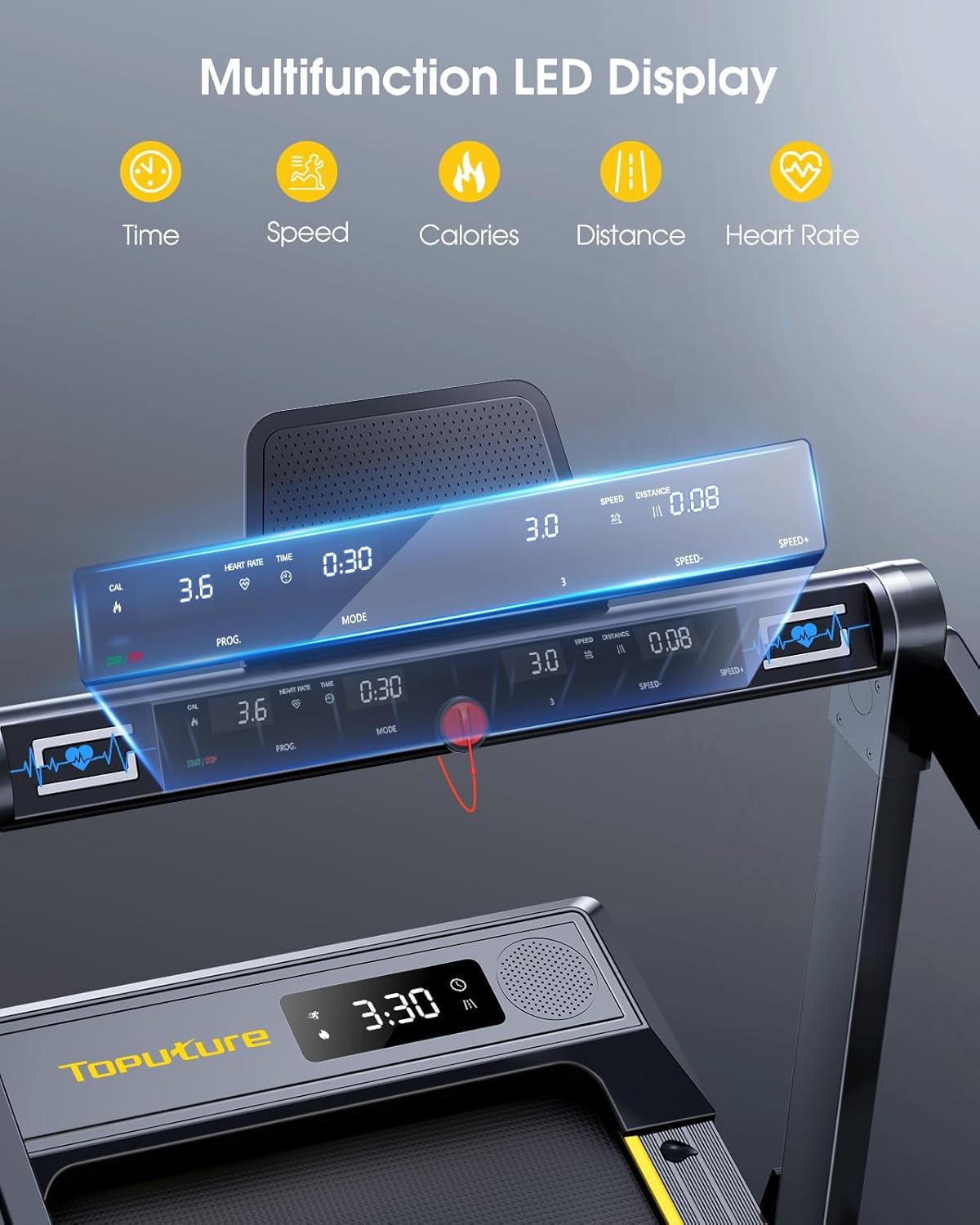
Figure 4.2: Multifunction LED Display.
4.4 Remote Control
The included remote control allows for convenient adjustment of speed and starting/pausing the treadmill, especially useful in walking mode.
- Start/Stop Button: Initiates or pauses the treadmill.
- Speed +/- Buttons: Adjusts the running/walking speed.
4.5 Smart App Connectivity
Enhance your workout experience by connecting the treadmill to compatible sports applications via Bluetooth. This allows for tracking progress, accessing preset programs, and interactive training.
- Compatible with apps like Kinomap and Zwift.
- Access 12 preset sports modes for varied workouts.

Figure 4.3: Smart App Control for Enhanced Workouts.
Video 4.1: Overview of TOPUTURE Foldable Treadmill Features. This video demonstrates the treadmill's key functionalities, including app connectivity, folding mechanism, and dual display.
5. Product Features
- Powerful and Quiet Motor: Equipped with a 2.5HP motor, providing smooth and quiet operation for an undisturbed workout experience.
- Spacious Running Area: Features an extra-wide running area measuring 41 inches in length and 16.5 inches in width, offering comfort and safety during exercise.
- Advanced Shock Absorption: Incorporates a 7-layer shock-absorbing running belt and 8 silicone shock-absorbers to protect knees and muscles, ensuring smooth movement and reducing impact.
- Integrated Bluetooth Speaker: Allows you to connect your device and play audio directly through the treadmill's speaker.
- Oil Filling Hole: Conveniently located for easy lubrication of the running belt, essential for maintenance.

Figure 5.1: Powerful and Quiet 2.5HP Motor.

Figure 5.2: Extra Wide Comfortable Running Area.

Figure 5.3: 7-Layer Shock Absorbing Running Belt.
6. Storage and Portability
The treadmill's foldable design and built-in transport wheels make it easy to move and store, even in compact spaces.
- Easy Folding: The handrail can be quickly folded down, transforming the treadmill into a compact walking pad.
- Transport Wheels: Equipped with wheels for effortless relocation.
- Space-Saving: Can be stored flat under a sofa or upright against a wall.

Figure 6.1: Convenient Folding Design and Storage Options.
7. Maintenance
Regular maintenance ensures optimal performance and extends the lifespan of your treadmill.
7.1 Lubrication
The running belt requires periodic lubrication to reduce friction and wear. Use silicone oil specifically designed for treadmills. Locate the oil filling hole for easy application.
- Frequency: Every 3-6 months, or after 50 hours of use, depending on usage.
- Application: Apply a small amount of silicone oil into the designated oil filling hole.
7.2 Cleaning
- Wipe down the treadmill surfaces with a damp cloth after each use.
- Periodically vacuum under the treadmill to remove dust and debris.
7.3 Belt Adjustment
If the running belt feels loose or is off-center, refer to the detailed instructions in the full user manual (included with purchase) for proper adjustment procedures. Incorrect adjustment can lead to damage.
8. Troubleshooting
This section addresses common issues you might encounter. For more complex problems, please contact customer support.
| Problem | Possible Cause | Solution |
|---|---|---|
| Treadmill does not start. | Power cord unplugged, safety key not in place, power switch off. | Ensure power cord is securely plugged in, safety key is attached, and power switch is ON. |
| Running belt slips or hesitates. | Belt too loose, insufficient lubrication. | Adjust belt tension (refer to full manual) or apply silicone oil. |
| Unusual noise during operation. | Loose components, motor issue, belt friction. | Check for loose screws, lubricate belt. If noise persists, contact support. |
| Display not working. | Loose connection, power issue. | Check power connections. If problem persists, contact support. |
9. Specifications
| Specification | Detail |
|---|---|
| Brand | TOPUTURE |
| Model Name | TP1 |
| Product Grade | Treadmill |
| Color | Black |
| Product Dimensions (LxWxH) | 52.3"D x 28.2"W x 5.1"H (Running Mode) |
| Folded Size | 52.3"x28.2"x5" |
| Item Weight | 30 Kilograms |
| Material | Alloy Steel |
| Maximum Speed | 10 Miles per Hour (approx. 16 KM/H) |
| Minimum Speed | 0.6 Miles per Hour |
| Maximum Horsepower | 2.5 Horsepower |
| Special Feature | No Assembly (minimal setup) |
| Recommended Uses | Treadmills for Home |
| Assembly Required | No |
| Display Type | LED (Dual Display) |
| Power Source | Corded Electric |
| Number of Programs | 12 |
| Included Components | User Manual |
| Metrics Measured | Speed, Calories Burned, Time, Distance, Heart Rate |
| Product Benefits | Weight Loss Support |
| Maximum Weight Recommendation | 300 Pounds |
| Deck Length | 41 Inches |
| Deck Width | 16.5 Inches |
| Frame Material | Alloy Steel |
| Screen Size | 14.9 Inches |
10. Warranty and Support
Your TOPUTURE 2-in-1 Folding Treadmill comes with a 12 Months Warranty from the date of purchase.
For warranty claims, technical support, or any inquiries regarding your product, please contact TOPUTURE customer service. Refer to the contact information provided in your purchase documentation or visit the official TOPUTURE website.
Please retain your proof of purchase for warranty validation.
Related documentsTP1


Ask a question about this manual
Ask about setup, troubleshooting, compatibility, parts, safety, or missing instructions. Manuals+ will review the question and use this page’s manual context to help answer it.