
AlienRider M902Pro
AlienRider M902Pro Motorcycle Smart Cornering Assist Spotlight User Manual
Model: M902Pro | Brand: AlienRider
1. Introduction
The AlienRider M902Pro Smart Cornering Assist Spotlight is designed to enhance motorcycle visibility and safety, particularly during night riding and cornering. Equipped with advanced technology, including a six-axis gyroscope and intelligent light sensors, this system provides dynamic illumination that adapts to your riding conditions. This manual provides detailed instructions for installation, operation, and maintenance to ensure optimal performance and longevity of your device.
2. Safety Information
- Professional Installation Recommended: For optimal safety and performance, professional installation by a qualified technician is recommended.
- Electrical System: Ensure the motorcycle's electrical system is compatible with the spotlight's power requirements (240W). Incorrect wiring can lead to damage or fire.
- Mounting Security: Always ensure the spotlights are securely mounted to prevent detachment during operation, which could cause accidents.
- Waterproof Rating: The device has an IP67 waterproof rating, meaning it is protected against dust and temporary immersion in water. Avoid prolonged submersion or high-pressure water jets.
- Heat Dissipation: The aluminum housing is designed for heat dissipation. Do not obstruct the cooling fins.
3. Package Contents
Verify that all components are present in your package:
- AlienRider M902Pro Spotlights (2 units)
- Power Box
- Main Control Box
- Handlebar Mounted Remote Control
- Universal Mounting Brackets (360° adjustable)
- Quick Release Bases and Keys
- Wiring Harness with Inline Fuse
- Allen Wrenches for Assembly
- 3M Tape and Zip Ties

4. Product Features
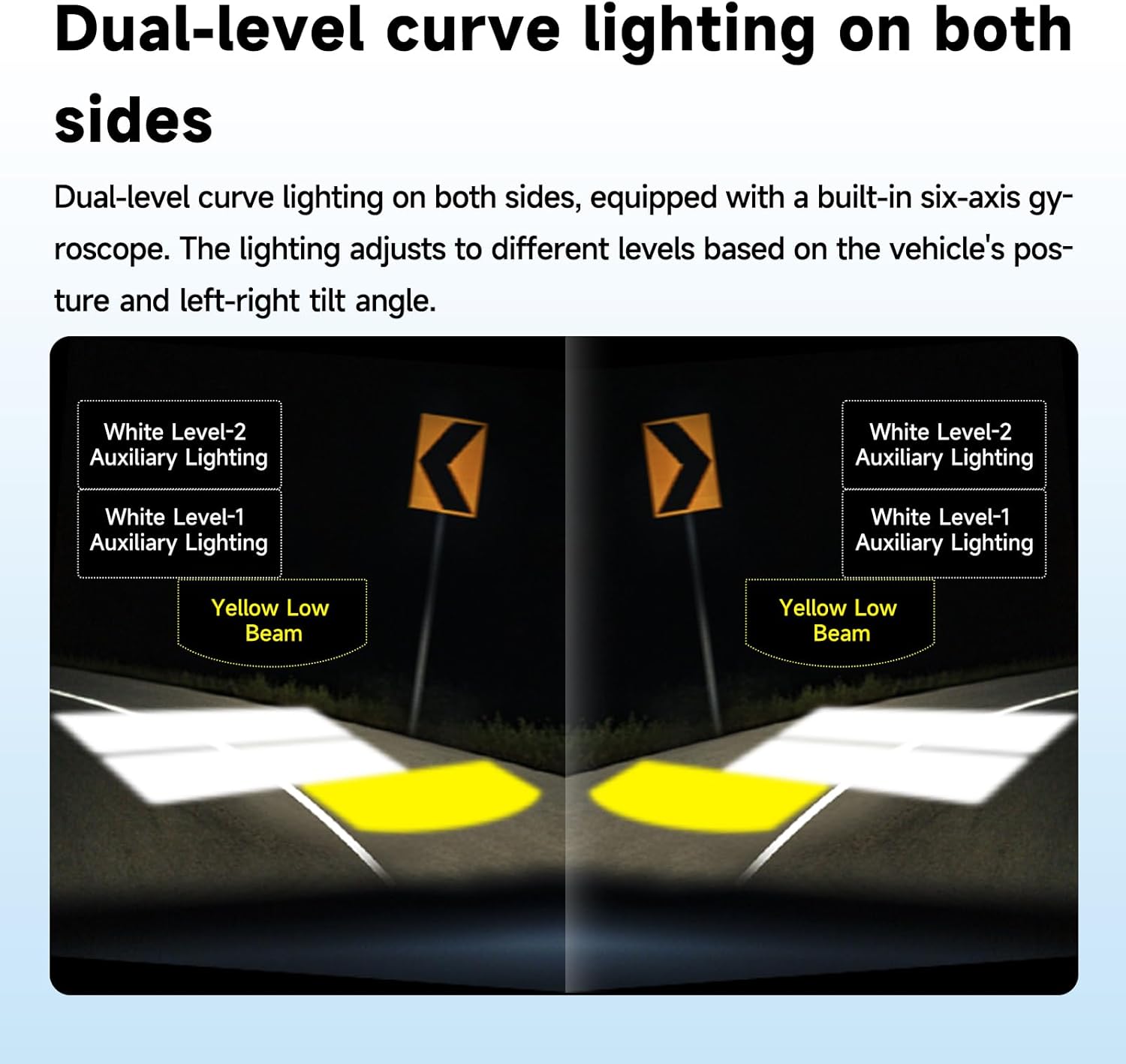
- Advanced Smart Cornering Light Technology: Integrated six-axis gyroscope automatically activates dual-level cornering lights based on motorcycle tilt angle, providing enhanced visibility around bends.
- High-Intensity Dual-Glass Lens Design: 240W power output with a high beam of 20,000 lumens, low beam of 15,000 lumens, and cornering lights up to 10,000 lumens. Features a 120-degree wide-angle illumination.
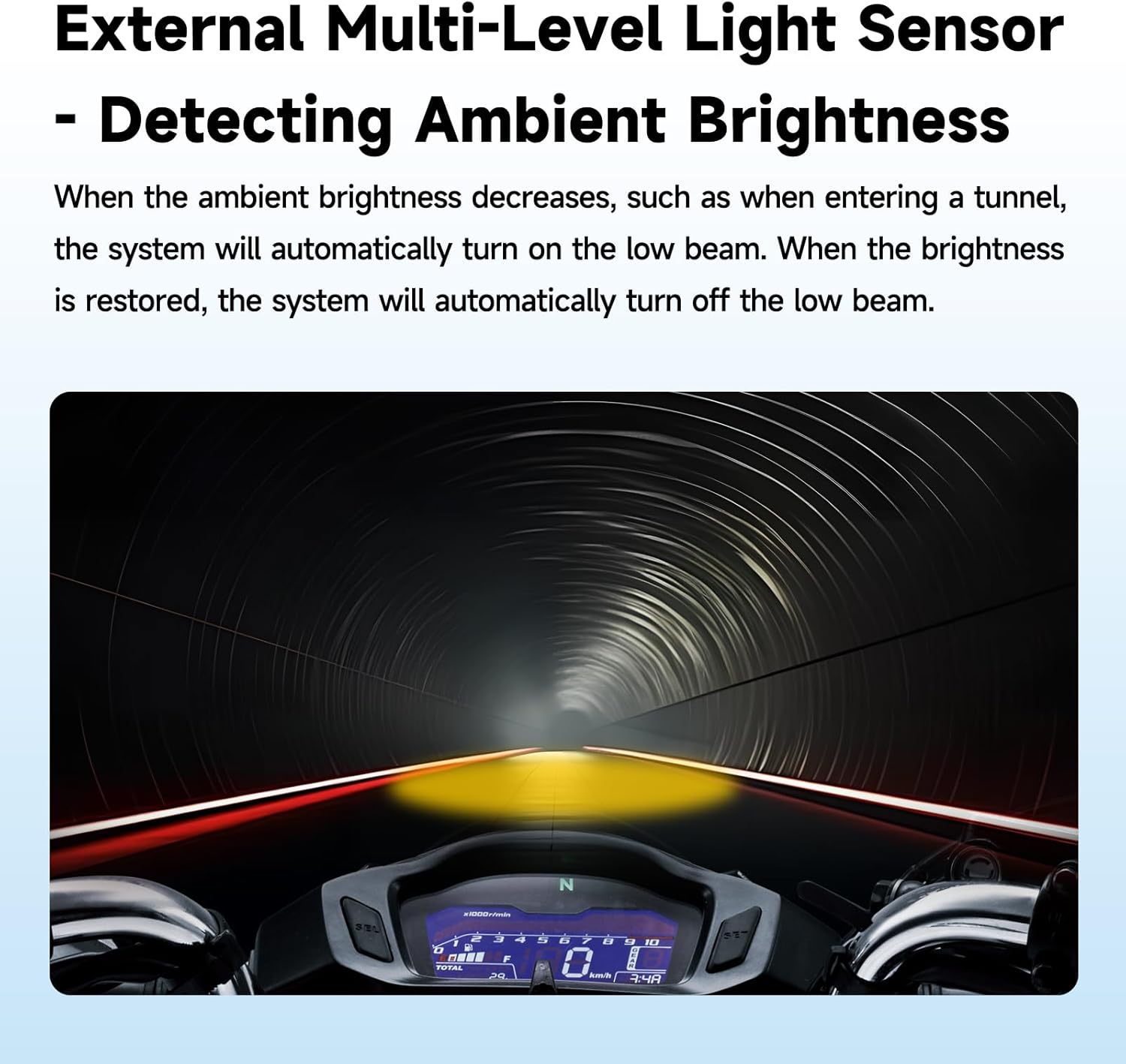
- Automatic Light Sensitivity Adjustment: External multi-pole light sensors detect ambient brightness, automatically switching to low beam in low-light conditions (e.g., tunnels) and turning off when brightness is restored.
- Durable and Weatherproof Construction: IP67 waterproof and dustproof aluminum alloy housing ensures resistance to harsh weather, high temperatures, and aging.
- Multi-Angle Mounting and Quick Release: 360° universal mount with flexible angle adjustments and a quick-release design for easy installation, removal, and maintenance.


5. Setup and Installation
Carefully follow these steps for proper installation of your AlienRider M902Pro spotlights.
5.1. Mounting the Spotlights
- Select a suitable mounting location on your motorcycle, typically on the handlebars or crash bars, ensuring clear light projection and no obstruction to steering or controls.
- Attach the universal mounting brackets to the desired location. The 360° universal mount allows for flexible angle adjustments.
- Secure the quick release base to the mounting bracket.
- Attach the spotlights to the quick release base. Ensure they are firmly locked in place. The quick-release mechanism allows for easy removal for maintenance or security.
- Adjust the angle of the spotlights to achieve optimal illumination.

5.2. Wiring Diagram and Connections
Refer to the wiring diagram below for correct electrical connections. It is crucial to connect the wires properly to avoid damage to the unit or your motorcycle's electrical system.

- Power Connection:
- Connect the Red wire (Positive Pole) to the motorcycle's positive battery terminal.
- Connect the Black wire (Negative Pole) to the motorcycle's negative battery terminal or a suitable ground point.
- Connect the Yellow wire (ACC) to an ignition-switched power source (e.g., ACC line) so the lights turn on/off with the ignition.
- Spotlight Connections: Connect the left and right spotlight connectors from the power box to their respective spotlights. Ensure secure, waterproof connections.
- Main Control Box and Buttons: Connect the main control box to the power box. Connect the handlebar-mounted control buttons to the main control box.
- Horn Signal Line (Optional): If desired, connect the horn signal line to integrate with the motorcycle's horn for specific light functions (refer to advanced settings in operating instructions).
- Cable Management: Use the provided zip ties to neatly secure all wiring, preventing interference with moving parts and protecting against damage.
6. Operating Instructions
The AlienRider M902Pro offers multiple smart modes and functions controlled via the handlebar remote.
6.1. Remote Control Functions
The handlebar remote typically features the following buttons:
- High/Low Beam Button: Toggles between high beam and low beam modes.
- Auto Button: Activates the automatic light sensitivity adjustment and smart cornering assist features.
- Flash Button: Engages a flashing light mode for increased visibility in emergencies or specific situations.
6.2. Smart Cornering Assist
When the Auto mode is active, the built-in six-axis gyroscope detects the motorcycle's lean angle. As you lean into a turn, the system automatically activates the first or second level of cornering lights on the corresponding side. This widens the illuminated field of view, enhancing safety during cornering.
6.3. Automatic Light Sensitivity
In Auto mode, external multi-pole light sensors continuously monitor ambient brightness. The system will automatically switch to low beam when entering low-light conditions (e.g., tunnels) and revert to the previous setting or turn off when surroundings brighten. This provides convenient, hands-free operation.
7. Maintenance
Regular maintenance ensures the longevity and optimal performance of your spotlights.
- Cleaning: Periodically clean the lenses with a soft, damp cloth to remove dirt and debris. Avoid abrasive cleaners that could scratch the lens surface.
- Connection Check: Regularly inspect all electrical connections for corrosion or looseness. Ensure waterproof connectors are properly sealed.
- Mounting Security: Verify that the spotlights and brackets remain securely fastened to the motorcycle. Tighten any loose bolts as needed.
- Wiring Inspection: Check the wiring harness for any signs of wear, fraying, or damage. Replace damaged wires immediately.
8. Troubleshooting
If you encounter issues with your AlienRider M902Pro, refer to the following troubleshooting guide:
| Problem | Possible Cause | Solution |
|---|---|---|
| Spotlights do not turn on. | No power, loose connection, blown fuse. | Check battery connections. Verify all wiring is secure. Inspect the inline fuse and replace if blown. Ensure ACC wire is connected to an active ignition source. |
| Cornering assist not activating or activating incorrectly. | Auto mode not enabled, gyroscope calibration issue, sensor obstruction. | Ensure the 'Auto' button is pressed. Check for any obstructions around the light sensors. If issues persist, contact support for gyroscope recalibration instructions. |
| Automatic light sensitivity not working. | Auto mode not enabled, light sensor obstructed or dirty. | Ensure 'Auto' mode is active. Clean the external light sensors. |
| Lights flicker or dim. | Loose wiring, insufficient power, faulty unit. | Check all electrical connections. Ensure the motorcycle's electrical system can support the 240W power draw. If problem persists, contact support. |
If the problem persists after attempting these solutions, please contact AlienRider customer support.
9. Specifications
| Feature | Specification |
|---|---|
| Model | M902Pro |
| Power Output | 240W |
| High Beam Brightness | 20,000 lumens |
| Low Beam Brightness | 15,000 lumens |
| Cornering Light Brightness | Up to 10,000 lumens (dual-level) |
| Light Source Type | Light Emitting Diode (LED) |
| Lens Type | Dual-Glass Lens, Optical Spherical Lens |
| Illumination Angle | 120 degrees wide-angle |
| Material | Aluminum Alloy |
| Color | Black |
| Waterproof Rating | IP67 |
| Mounting Type | 360° Universal Handlebar Mount |
| Product Dimensions (each light) | 2.8"L x 3.55"W x 2.8"H |
| Item Weight | Approximately 5.07 pounds (total package) |
| Power Source | Corded Electric (Motorcycle Battery) |
10. Warranty and Support
For warranty information, technical support, or any inquiries regarding your AlienRider M902Pro Smart Cornering Assist Spotlight, please contact the official AlienRider customer service or the seller from whom you purchased the product. Keep your purchase receipt as proof of purchase.
Seller: Alien-Rider Official
Ask a question about this manual
Ask about setup, troubleshooting, compatibility, parts, safety, or missing instructions. Manuals+ will review the question and use this page’s manual context to help answer it.