
BLUETTI BLUETTI Elite 200 V2
BLUETTI Elite 200 V2 Portable Power Station User Manual
Model: BLUETTI Elite 200 V2
1. Introduction
The BLUETTI Elite 200 V2 is a state-of-the-art portable power station designed to provide reliable and versatile power for a wide range of applications, from outdoor adventures like camping and travel to essential home backup during outages. Equipped with a high-capacity LFP battery, it offers exceptional durability and performance.
Key features include:
- High Capacity: 2073.6Wh battery to power multiple devices.
- Powerful Output: 2600W AC output, with a 3900W Power Lifting mode for demanding appliances.
- Long Lifespan: Over 6000 cycles, providing up to 17 years of use.
- Fast Charging: TurboBoost technology allows 80% charge in just 45 minutes with dual AC and DC input.
- Quiet Operation: Operates at a low noise level of 16 dB.
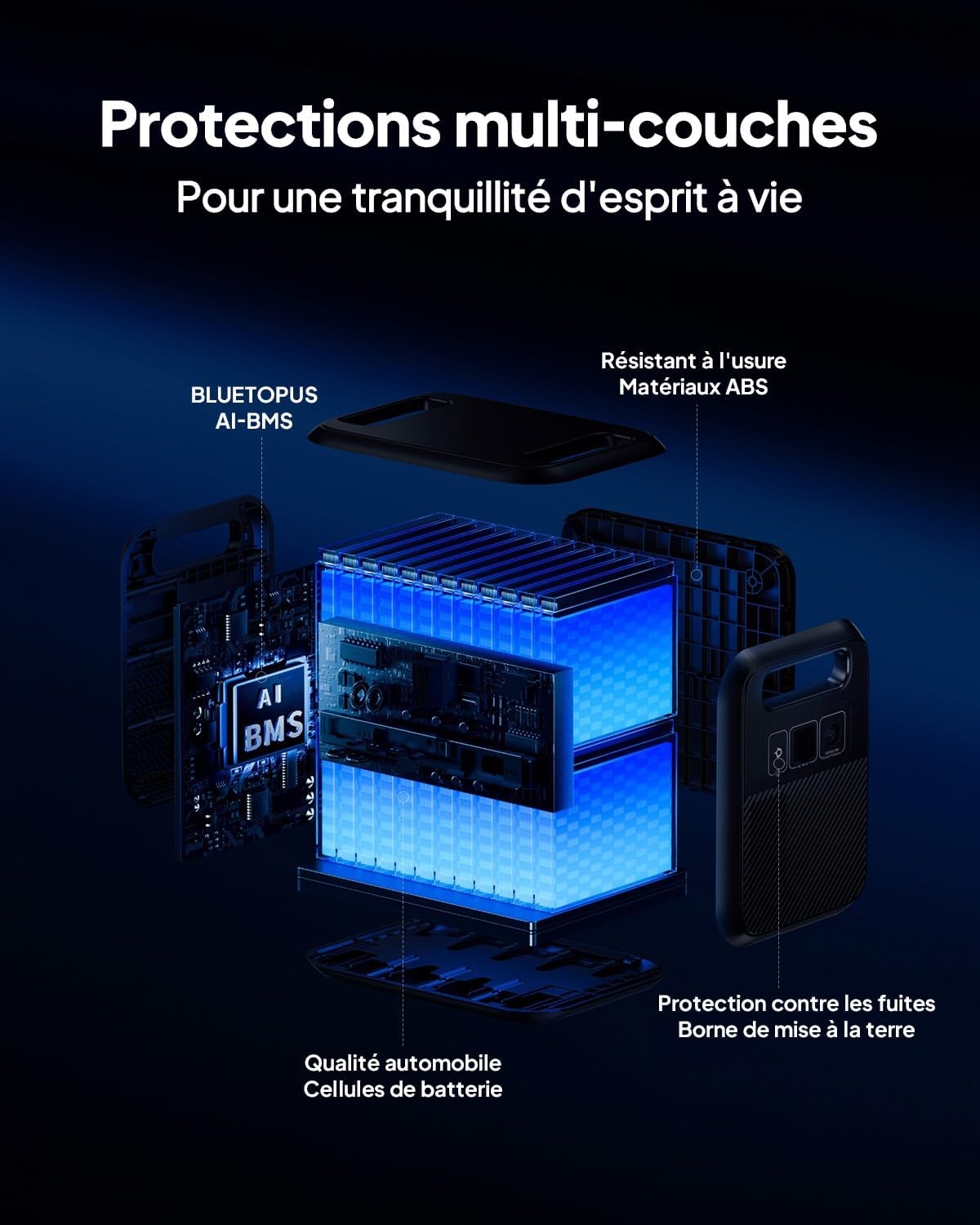
- Advanced Safety: Multi-layer protection and automotive-grade LFP cells ensure safe operation.

2. Product Overview
Familiarize yourself with the components and interfaces of your BLUETTI Elite 200 V2.

2.1. Ports and Controls

- DC/PV Input: For solar panel or car charging.
- AC Output: Two standard AC outlets for household appliances.
- USB-C Ports: Two 100W USB-C ports for fast charging compatible devices.
- USB-A Ports: Two 15W USB-A ports for standard USB charging.
- 12V Cigarette Lighter Port: For car appliances.
- LCD Display: Shows battery level, input/output power, and operational status.
3. Setup
3.1. Unboxing and Initial Inspection
Upon receiving your BLUETTI Elite 200 V2, carefully open the packaging and inspect the unit for any signs of damage. Ensure all components listed below are present:
- BLUETTI Elite 200 V2 portable power station
- AC charging cable
- Solar charging cable
- Grounding screw
- User manual (this document)
3.2. First Use and Charging
Before first use, it is recommended to fully charge the BLUETTI Elite 200 V2. Connect the provided AC charging cable to a wall outlet and the power station's AC input port. The LCD display will indicate the charging status. For optimal battery health, fully discharge and recharge the unit at least once every 3-6 months if not in regular use.
4. Operating Instructions
4.1. Powering On/Off
- To turn on the unit, press and hold the main power button for a few seconds until the LCD screen illuminates.
- To turn off the unit, press and hold the main power button again until the screen turns off.
- Individual AC and DC outputs can be enabled/disabled via their respective buttons on the control panel.
4.2. Connecting Devices
Connect your electronic devices to the appropriate output ports (AC, USB-A, USB-C, 12V DC). Ensure the total power consumption of connected devices does not exceed the power station's rated output (2600W continuous, 3900W Power Lifting mode).

4.3. Power Lifting Mode (3900W)
The Power Lifting mode allows the Elite 200 V2 to power high-wattage resistive loads up to 3900W, such as electric kettles, hair dryers, and heaters. This mode is specifically designed for pure resistive loads and should be used with caution. Refer to the LCD display for active power output.

4.4. BLUETTI App Control
Download the official BLUETTI app to monitor and control your power station remotely. The app provides real-time energy consumption data, allows you to switch working modes, and offers intuitive control over the unit's functions.

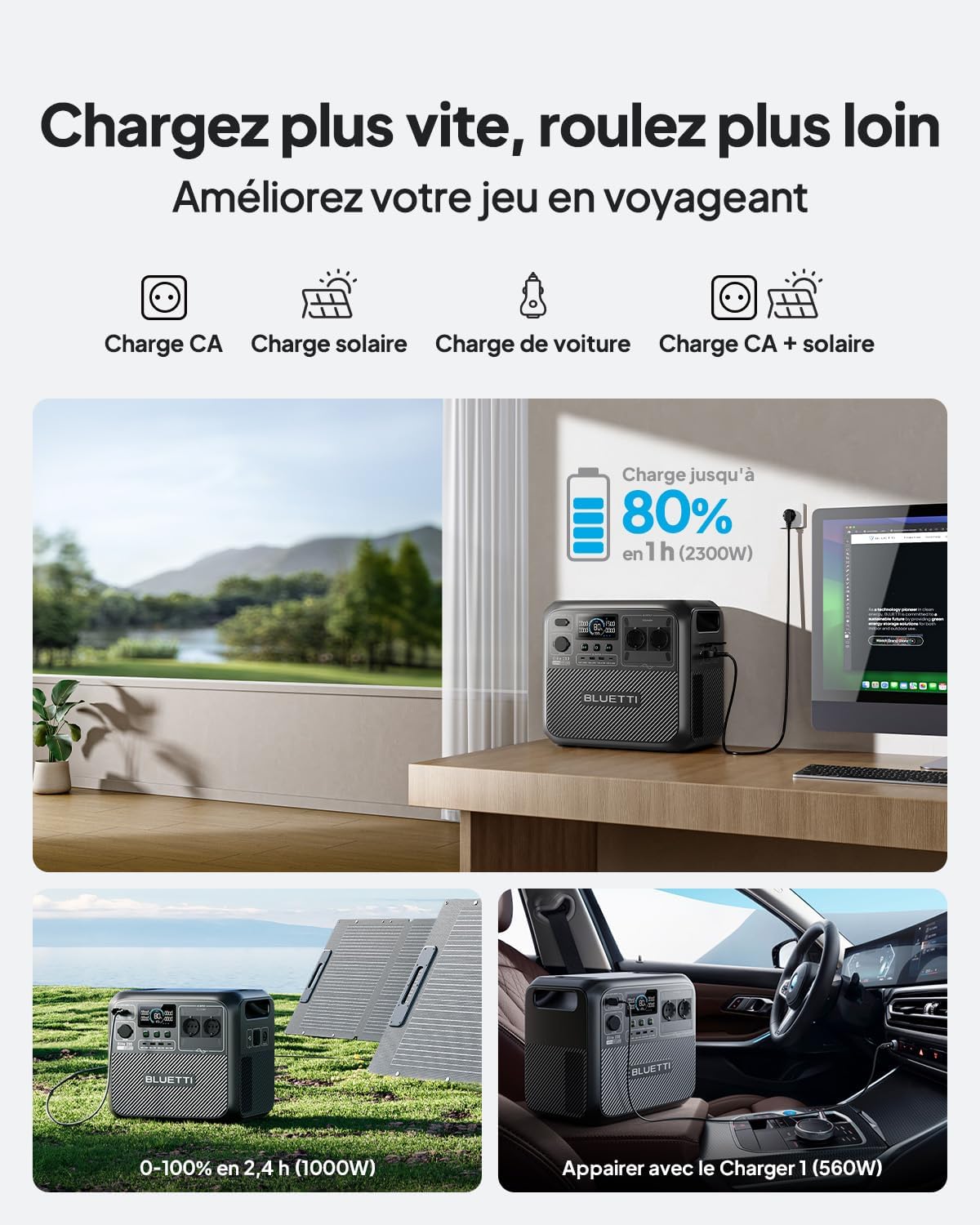
5. Charging the Power Station
The BLUETTI Elite 200 V2 supports multiple charging methods to ensure you always have power when you need it.
5.1. AC Charging
Utilize the included AC charging cable to charge the power station from a standard wall outlet. With TurboBoost technology, the unit can reach 80% charge in approximately 1 hour at 2300W input.

5.2. Solar Charging
Connect compatible solar panels (sold separately) to the DC/PV input port. The integrated MPPT controller ensures efficient solar charging, allowing a full charge in approximately 2.4 hours with 1000W solar input under optimal sunlight conditions.

5.3. Car Charging
Charge your power station on the go using your vehicle's 12V cigarette lighter port. With the BLUETTI Charger 1 (560W, sold separately), you can achieve a full charge in approximately 4.2 hours, significantly faster than traditional car charging methods.

5.4. AC + Solar Dual Charging
For the fastest charging experience, combine AC and solar input. This dual charging method can charge the unit from 0% to 80% in just 45 minutes with a combined input of 2400W.

6. Safety and Protection
The BLUETTI Elite 200 V2 is built with multiple safety features to ensure reliable and secure operation.
6.1. LiFePO4 Battery Technology
The power station utilizes automotive-grade LiFePO4 (Lithium Iron Phosphate) batteries, known for their exceptional safety, stability, and long cycle life. These batteries offer over 6000 charge cycles, providing a lifespan up to 17 years, which is 12 times longer than the industry average.

6.2. Multi-Layer Protection System
The Elite 200 V2 incorporates a sophisticated multi-layer protection system, including:
- BLUETOPUS AI-BMS: An intelligent Battery Management System that monitors and protects against overcharge, over-discharge, over-current, and short circuits.
- Durable ABS Materials: Wear-resistant housing for enhanced physical protection.
- Grounding Terminal: Provides protection against electrical leakage.
- Temperature Control: Ensures safe operation even in extreme temperatures.
6.3. Quiet Operation
Designed for minimal noise, the Elite 200 V2 operates at a whisper-quiet 16 dB under low loads, making it suitable for indoor use and quiet environments like bedrooms or tents.

6.4. Uninterruptible Power Supply (UPS) Function
The Elite 200 V2 features an Uninterruptible Power Supply (UPS) function with a switching time of less than 15ms. This ensures seamless power transition for sensitive electronics during power outages, protecting your devices from data loss or damage.

7. Maintenance
Proper maintenance will extend the lifespan and ensure optimal performance of your BLUETTI Elite 200 V2.
- Cleaning: Use a dry, soft cloth to wipe the exterior of the unit. Do not use harsh chemicals or abrasive materials.
- Storage: If storing for an extended period, charge the unit to 50-80% and recharge every 3-6 months to prevent battery degradation. Store in a cool, dry place away from direct sunlight and extreme temperatures.
- Ventilation: Ensure the ventilation vents are clear of obstructions during operation to prevent overheating.
8. Troubleshooting
This section addresses common issues you might encounter with your BLUETTI Elite 200 V2. If the problem persists, please contact customer support.
| Problem | Possible Cause | Solution |
|---|---|---|
| Unit does not turn on. | Battery is fully discharged; Power button not pressed long enough. | Charge the unit; Press and hold the power button for 3-5 seconds. |
| AC output not working. | AC output not enabled; Overload protection activated. | Press the AC button to enable; Reduce connected load, then restart AC output. |
| Slow charging. | Low input power (e.g., weak solar input); High ambient temperature. | Ensure sufficient input power; Charge in a cooler environment. |
| Display shows error code. | Internal fault or specific protection triggered. | Note the error code and refer to the BLUETTI app or contact customer support. |
9. Technical Specifications
Detailed specifications for the BLUETTI Elite 200 V2 Portable Power Station.
| Feature | Specification |
|---|---|
| Model | BLUETTI Elite 200 V2 |
| Battery Type | LiFePO4 (Lithium Iron Phosphate) |
| Capacity | 2073.6Wh |
| AC Output | 2600W (Pure Sine Wave), 3900W Power Lifting Mode |
| USB-C Output | 2 x 100W Max |
| USB-A Output | 2 x 15W Max |
| DC Output | 12V/10A (Cigarette Lighter Port) |
| AC Input | 2300W Max |
| Solar Input | 1000W Max, 12-60VDC, 20A |
| Dimensions (L x W x H) | 34 x 25 x 32 cm |
| Weight | 24.2 kg |
| Operating Temperature | -20°C to 40°C (-4°F to 104°F) |
| Display | LCD Screen |
10. Warranty and Support
10.1. Manufacturer's Warranty
The BLUETTI Elite 200 V2 comes with a 5-year manufacturer's warranty, covering defects in materials and workmanship under normal use. Please retain your proof of purchase for warranty claims.
10.2. Customer Support
For technical assistance, troubleshooting, or warranty inquiries, please contact BLUETTI customer support. You can typically find contact information on the official BLUETTI website or through your purchase platform.

11. Important Notes
No Official Product Videos Found: Based on the provided data, no official product videos from the seller (BLUETTI) were available for embedding in this manual. All media URLs provided were for images.
Related documentsBLUETTI Elite 200 V2


Ask a question about this manual
Ask about setup, troubleshooting, compatibility, parts, safety, or missing instructions. Manuals+ will review the question and use this page’s manual context to help answer it.