
1. Introduction
Thank you for choosing the Fenge Dual Monitor Stand. This manual provides detailed instructions for the assembly, operation, and maintenance of your new monitor stand. Please read this manual thoroughly before assembly and retain it for future reference.
2. Product Overview
The Fenge Dual Monitor Stand is designed to enhance your workspace by providing an ergonomic elevation for your monitors and additional storage. Its robust construction supports multiple devices, contributing to a more organized and comfortable work environment.

Image: The Fenge Dual Monitor Stand in a modern office setting, showcasing its design and functionality with a single monitor, headphones, and a small plant.
Key Features:
- Dual Monitor Support: Generous 90 x 23.5 cm surface accommodates two monitors, printers, or televisions.
- Ergonomic Design: Elevates screens to an optimal eye level of 14.2 cm, reducing neck and eye strain.
- Robust Construction: Made from 15mm MDF board with a reinforced crossbar, supporting up to 25 kg. The surface is anti-scratch for durability.
- Stable and Secure: Equipped with six anti-slip silicone pads for enhanced stability.
- Integrated Storage: Features two fabric drawers for organizing office supplies and personal items, keeping your desk tidy.
- Easy Assembly: Designed for straightforward assembly with included detailed instructions and necessary tools.
3. Safety Information
Please observe the following safety guidelines to ensure safe use and prevent damage to the product or injury.
- Load Capacity: Do not exceed the maximum load capacity of 25 kg (55 lbs). Distribute weight evenly across the stand.
- Stability: Ensure the stand is placed on a flat, stable surface. Avoid placing heavy items on the edges to prevent tipping.
- Assembly: Follow all assembly instructions carefully. Do not overtighten screws.
- Children and Pets: Keep small parts away from children and pets during assembly.
4. Package Contents
Before beginning assembly, please verify that all components listed below are present and undamaged. If any parts are missing or damaged, please contact customer support.
- Monitor Stand Top Panel (1x)
- Side Support Panels (2x)
- Reinforced Crossbar (1x)
- Fabric Drawers (2x)
- Assembly Hardware (screws, silicone pads, Allen key)
- Instruction Manual (1x)

Image: Detailed dimensions of the monitor stand and its fabric drawers, indicating overall size and individual component measurements.
5. Setup Instructions
Follow these steps for proper assembly of your Fenge Dual Monitor Stand.
- Unpack Components: Carefully remove all parts from the packaging and lay them out on a clean, soft surface to prevent scratches.
- Attach Side Panels: Secure the two side support panels to the main top panel using the provided screws. Ensure they are aligned correctly.
- Install Crossbar: Attach the reinforced crossbar between the two side panels for added stability.
- Apply Anti-slip Pads: Affix the six anti-slip silicone pads to the bottom of the side panels and the crossbar.
- Insert Drawers: Slide the two fabric drawers into their designated slots under the main top panel.
- Final Check: Ensure all screws are tightened and the stand is stable before placing any equipment on it.

Image: Visual guide illustrating the assembly process, from attaching the side supports to inserting the fabric drawers.

Image: Details of the stand's construction, highlighting the 15mm MDF board, the fabric drawers for storage, and the overall sturdy design.
6. Operating Instructions
Once assembled, the Fenge Dual Monitor Stand is ready for use. Follow these guidelines for optimal functionality.
- Placement: Position your monitor(s), laptop, printer, or TV on the top surface of the stand. Ensure the weight does not exceed 25 kg and is evenly distributed.
- Ergonomic Positioning: Adjust your seating to maintain an ergonomic posture, with your eyes level with the top third of your screen.
- Storage: Utilize the two fabric drawers to store office supplies, cables, or other small items, keeping your desk clutter-free.
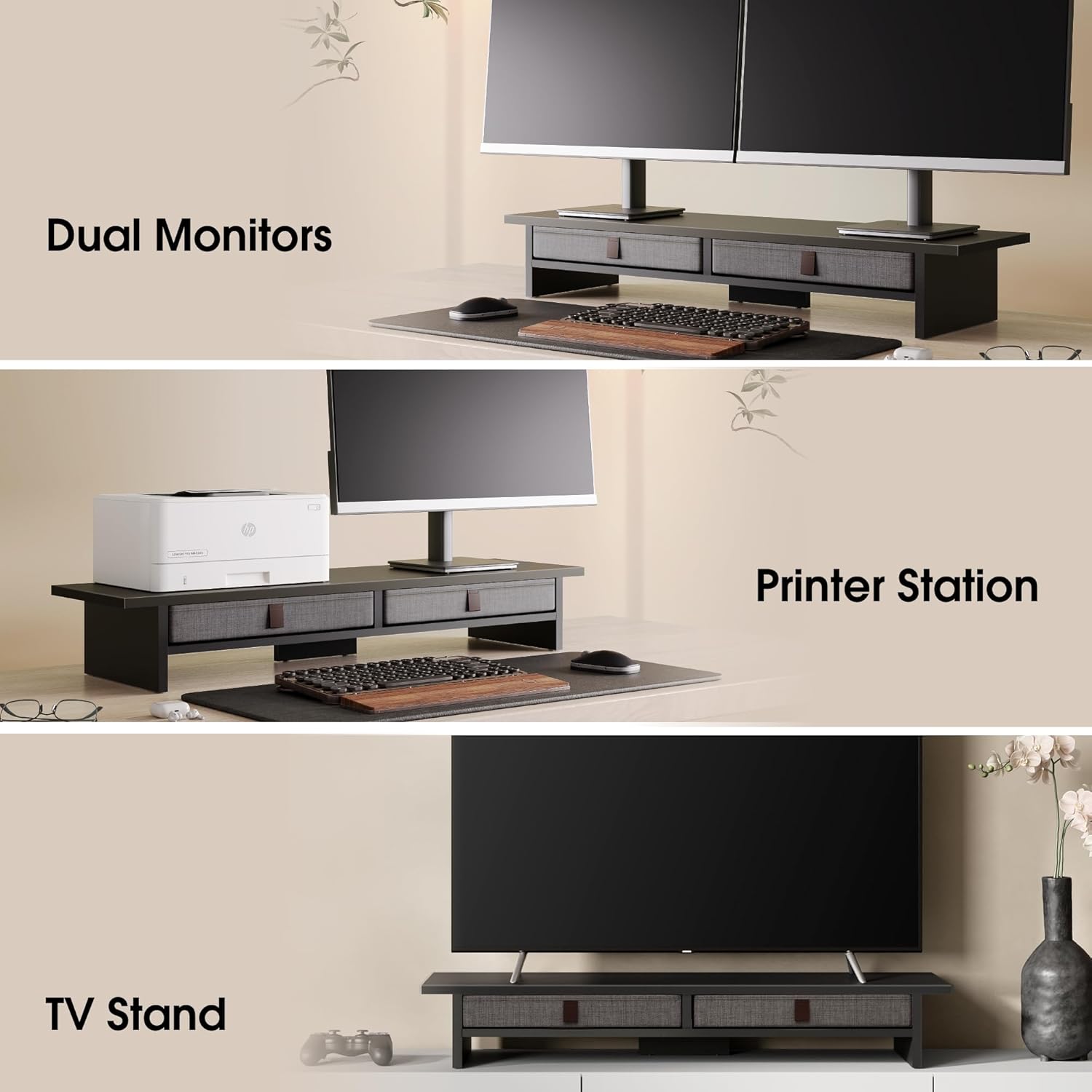
Image: Various usage scenarios demonstrating the versatility of the monitor stand, including supporting dual monitors, a printer, and functioning as a TV stand.

Image: A visual comparison of a desk before and after implementing the monitor stand, highlighting the significant improvement in desktop organization and space utilization.
7. Maintenance
To ensure the longevity and appearance of your Fenge Dual Monitor Stand, follow these simple maintenance tips:
- Cleaning: Wipe the surface with a soft, damp cloth. Avoid abrasive cleaners or harsh chemicals, as they may damage the anti-scratch finish.
- Dusting: Regularly dust the stand to prevent buildup.
- Drawer Care: The fabric drawers can be spot cleaned with a mild detergent and water. Allow them to air dry completely.
- Inspection: Periodically check all screws and connections to ensure they remain tight. Retighten if necessary.
8. Troubleshooting
If you encounter any issues with your monitor stand, please refer to the following common solutions:
| Problem | Possible Cause | Solution |
|---|---|---|
| Stand is wobbly or unstable. | Screws are loose; uneven surface; weight not distributed properly. | Ensure all screws are securely tightened. Place the stand on a flat, level surface. Redistribute items on the stand evenly. |
| Fabric drawers do not slide smoothly. | Drawers are overloaded; obstruction in the slot. | Reduce the weight in the drawers. Check for any objects blocking the drawer's path. |
| Scratches on the surface. | Sharp objects placed directly on the surface. | Use coasters or protective mats for items with sharp edges. While the surface is anti-scratch, extreme care is recommended. |
9. Specifications
| Feature | Detail |
|---|---|
| Model Number | G04B209-FR1 |
| Brand | Fenge |
| Color | Black |
| Material | MDF Wood |
| Overall Dimensions (L x W x H) | 90 cm x 23.5 cm x 14.2 cm (35.4 in x 9.3 in x 5.6 in) |
| Load Capacity | 25 kg (55 lbs) |
| Assembly Required | Yes |
| Country of Origin | China |
10. Warranty and Support
Fenge products are designed for quality and durability. For warranty information, please refer to the purchase documentation or contact your retailer.
If you have any questions, require assistance with assembly, or need to report a missing/damaged part, please do not hesitate to contact our customer support team. We are committed to providing excellent service.
Customer Support: Please refer to the contact information provided with your purchase or visit the official Fenge website for support options.
