
Introduction
This manual provides detailed instructions for the setup, operation, maintenance, and troubleshooting of your Alacrity Wearable 1D/2D Wireless Barcode Scanner, Model B0DRFRTHG6. Please read this manual thoroughly before using the device to ensure proper functionality and to maximize its lifespan.

Image: The Alacrity Wearable 1D/2D Wireless Barcode Scanner, a compact device designed for hands-free operation.
Package Contents
Verify that all items listed below are included in your package:
- Alacrity Wearable Barcode Scanner
- USB Charging Cable
- English User Manual

Image: Contents of the package, including the scanner, USB charging cable, and user manual.
Product Overview
The Alacrity Wearable Barcode Scanner is designed for efficiency and comfort, allowing for hands-free scanning.
Wearable Ring Design
The scanner features a compact, ring-shaped design that fits comfortably on your finger. This allows users to perform scanning tasks while keeping their hands free for other operations. An adjustable Velcro strap ensures a secure and comfortable fit for various finger sizes.

Image: The barcode scanner worn on a finger, demonstrating its wearable design.
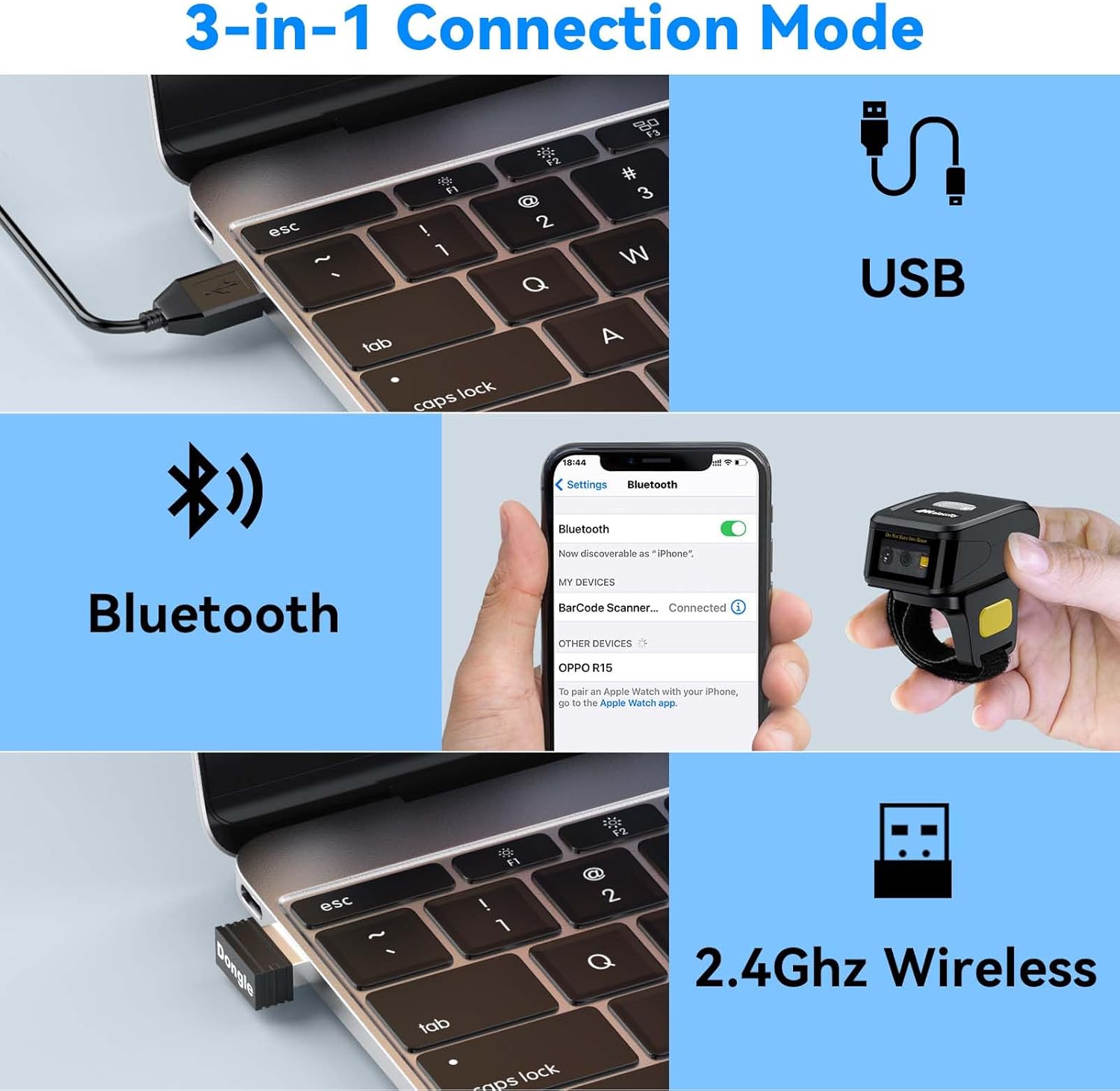
Image: The scanner in use, showing the scan beam and its ergonomic placement on the finger.
330° Rotating Head
The scanner head can rotate 330 degrees, providing flexibility for both left-handed and right-handed users. This feature allows for optimal scanning angles and improved user experience.

Image: Diagram illustrating the 330-degree rotation capability of the scanner head. Users should avoid excessive force when rotating.
Setup
Before initial use, ensure the scanner is fully charged. Connect the USB charging cable to the scanner and a power source. Once charged, select your preferred connection mode.
3-in-1 Connection Modes
The Alacrity scanner offers three versatile connection options:

Image: Visual representation of the three connection modes: USB, Bluetooth, and 2.4GHz Wireless.
1. Bluetooth Connectivity
Pair the scanner with Bluetooth-enabled devices such as laptops, desktop PCs, POS systems, smartphones, tablets, iPhones, and iPads. It is compatible with Windows XP/7/8/10/11, Mac OS, and Linux operating systems.
- Turn on the scanner.
- Activate Bluetooth on your host device.
- Search for "Barcode Scanner" in your device's Bluetooth settings and pair.
2. 2.4GHz Wireless Connectivity
For devices without Bluetooth, use the included 2.4GHz USB dongle for a wireless connection.
- Insert the 2.4GHz USB dongle into an available USB port on your computer or device.
- The scanner will automatically connect to the dongle.
3. Wired USB Connectivity
Connect the scanner directly to your device using the USB cable for a stable wired connection.
- Connect one end of the USB cable to the scanner and the other end to a USB port on your computer or device.
- The scanner will be recognized as a HID keyboard device.
Operating Modes
The scanner supports different modes for initiating scans:

Image: Illustration of the two primary scan modes: Trigger Mode and Auto Detection Mode.
1. Trigger Mode
In Trigger Mode, press the scan button on the device to activate the scanning beam and read a barcode.
2. Auto Detection Mode
In Auto Detection Mode, the scanner automatically detects and reads barcodes when they are presented within its scanning range, without requiring a button press.
Scanning Capabilities
The Alacrity scanner is designed for high-speed and precise capture of various 1D and 2D barcodes.

Image: Examples of various barcode types, including damaged, blurred, colored, 1D, 2D, inverse, and stacked barcodes, demonstrating the scanner's decoding capabilities.
Supported Barcode Types:
- 1D Barcodes: UPC/EAN, Code 39, Interleaved 2 of 5, Code 93, Code 128, Codabar, Industrial 25, Matrix 25, and more.
- 2D Barcodes: QR Code, Data Matrix, PDF417, Aztec Code, Maxicode.
The scanner's advanced decoding technology allows it to read damaged, misprinted, colorful, or reflective barcodes. It can also scan barcodes displayed on smartphone or computer screens.
Charging and Battery Life
The scanner is equipped with a long-lasting battery for extended use.
- Continuous Scanning: Up to 12 hours on a single charge.
- Standby Time: Up to 720 hours.
- Charging Time: Approximately 1.5 hours using the included USB cable.
To charge, connect the USB cable to the scanner's charging port and a standard USB power adapter or computer USB port.
Maintenance
To ensure optimal performance and longevity of your scanner:
- Keep the scanning window clean. Use a soft, lint-free cloth to gently wipe away dust or smudges.
- Avoid exposing the scanner to extreme temperatures, moisture, or direct sunlight.
- Do not use harsh chemicals or abrasive cleaners on the device.
- Store the scanner in a safe place when not in use to prevent physical damage.
Troubleshooting
Refer to the following common issues and solutions:

Image: A section from the FAQ, addressing common user queries.
Scanner Not Working / Not Scanning
- Check Battery: Ensure the scanner is fully charged.
- Check Connection: Verify that the scanner is properly connected via Bluetooth, 2.4GHz wireless, or USB. Re-pair or reconnect if necessary.
- Scanning Environment: Ensure the barcode is clear, well-lit, and within the scanner's optimal reading distance.
- Compatibility: Please note: This scanner is NOT COMPATIBLE with Square POS or Square Register systems. For other POS systems, refer to their respective websites for compatible barcode scanners.
Specifications
| Model | B0DRFRTHG6 |
| Brand | Alacrity |
| Connectivity Technology | Bluetooth, 2.4GHz Wireless, USB |
| Compatible Devices | Laptop, Desktop, Tablet, Smartphone, POS (excluding Square POS) |
| Power Source | Battery Powered (1 Lithium Polymer battery included) |
| Battery Life (Continuous Scan) | Up to 12 hours |
| Standby Time | Up to 720 hours |
| Charging Time | Approx. 1.5 hours |
| UPC | 735022451096 |
| ASIN | B0DRFRTHG6 |
Support
For technical assistance or further inquiries, please contact Alacrity support:
- Email: support@alacritydirect.com
- Website: Visit the official Alacrity website at alacritydirect.com