
1. Introduction
The BUUBO EBC-A20 is a versatile battery capacity tester designed for evaluating the performance of various battery types, including Lithium and Lead-Acid batteries. It features both charge and discharge functions, allowing for comprehensive testing of battery capacity, voltage, and current. The device supports PC software control for advanced data analysis, curve plotting, and firmware upgrades.
2. Safety Information
- Always ensure proper ventilation during operation, especially during discharge cycles, as batteries can generate heat.
- Connect batteries with correct polarity. Incorrect connections can damage the tester and the battery, and pose a safety risk.
- Use the specified power supply (DC 19V-24V, 3.5A or more) to prevent damage to the device.
- Do not exceed the maximum voltage (30V discharge, 18V charge) or current limits of the tester.
- Keep the device away from moisture, dust, and extreme temperatures.
- Do not attempt to disassemble or modify the tester. Refer servicing to qualified personnel.
3. Package Contents
Verify that all items are present in the package:
- EBC-A20 Battery Capacity Tester unit
- USB to TTL serial cable (for PC connection)
- Power adapter (not explicitly listed but implied for operation)
- Battery connection cables (e.g., alligator clips, not explicitly listed but implied for operation)
Note: Batteries are not included with the tester.
4. Setup
4.1 Power Connection
Connect the appropriate DC power supply (19V-24V, 3.5A or more) to the power input port on the rear of the EBC-A20 tester.
4.2 Battery Connection
The EBC-A20 uses a four-wire detection method to ensure accurate voltage and current measurements. Connect the battery to the designated ports on the rear of the tester. Ensure the positive (+) and negative (-) terminals are correctly matched.

Figure 4.2.1: Example of battery connection to the EBC-A20 tester. Note that the battery itself is not included.
4.3 PC Software Connection
For advanced control and data logging, connect the EBC-A20 to a computer using the dedicated USB to TTL serial cable. Install the provided PC software on your computer to enable features such as curve plotting, calibration, and firmware updates.

Figure 4.3.1: Angled view of the EBC-A20 tester, showing the front panel with LCD display and control buttons.
5. Operating Instructions
5.1 Device Overview
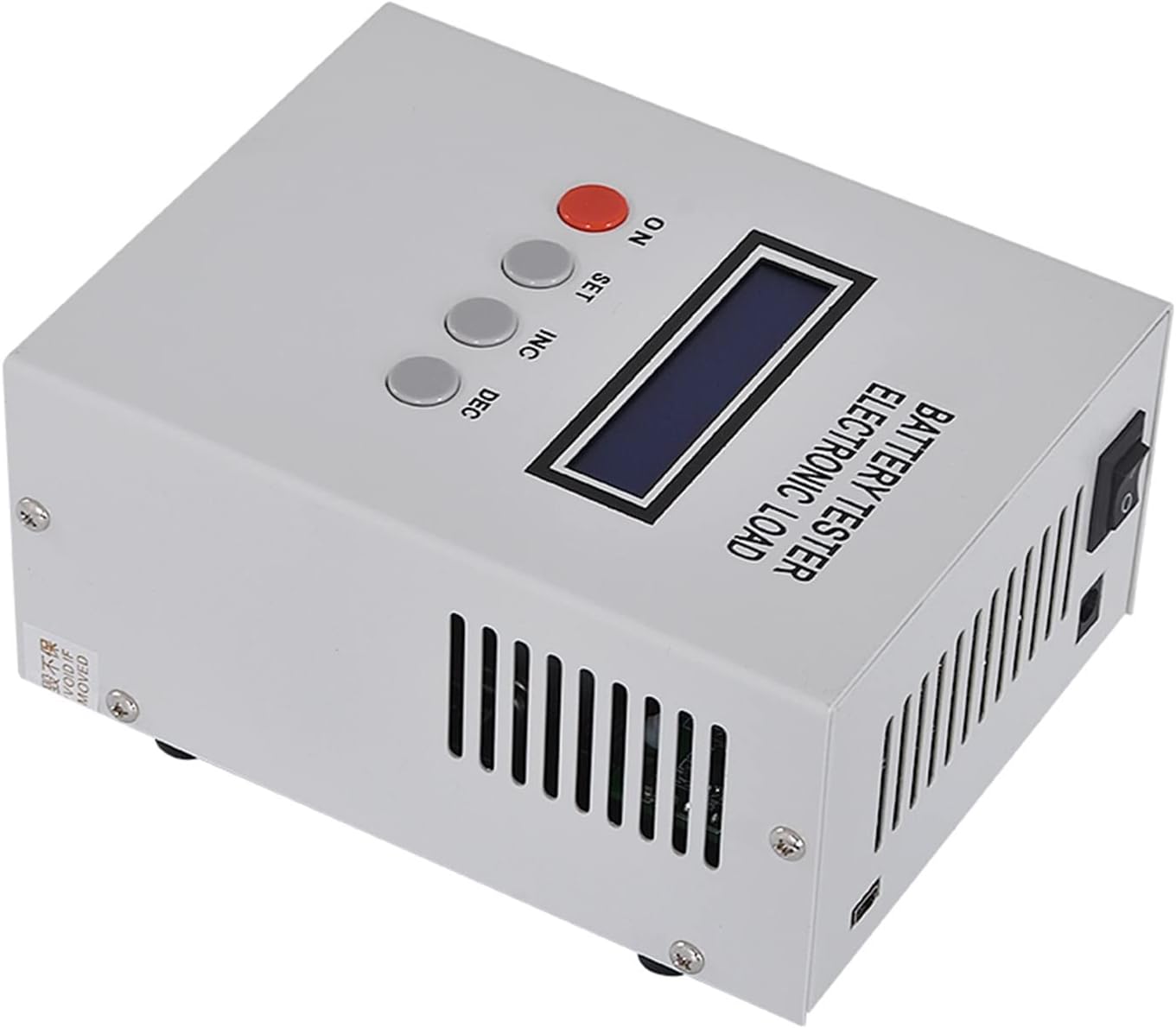
Figure 5.1.1: Top-down view of the EBC-A20 tester's front panel, highlighting the LCD and control buttons.

Figure 5.1.2: Rear view of the EBC-A20 tester, showing the cooling fan and battery connection ports.
5.2 Control Buttons
- ON: Power button to turn the device on/off.
- SET: Used to enter settings menus or confirm selections.
- INC (Increase): Used to increment values or navigate up in menus.
- DEC (Decrease): Used to decrement values or navigate down in menus.
5.3 LCD Display
The LCD displays real-time test data, including voltage, current, capacity, time, power, and energy. Refer to the on-screen prompts for specific information during different test modes.
5.4 Test Modes
The EBC-A20 supports various test modes:
- DSC-CC (Constant Current Discharge): Used to test battery capacity by discharging at a constant current.
- DSC-CP (Constant Power Discharge): Simulates constant power equipment discharge for specific applications.
- CHG-CV (Constant Current, Constant Voltage Charge): Supports charging for Lithium and Lead-Acid batteries.
- Automatic Charge and Discharge: Supports an automatic "charge-discharge-charge" cycle to test battery capacity and evaluate performance over multiple cycles.
5.5 PC Software Control
When connected to a PC, the dedicated software provides extended functionalities:
- Data Logging and Curve Plotting: Visualize battery performance over time.
- Measurement Benchmarks Calibration: Fine-tune the accuracy of measurements.
- Firmware Upgrades: Update the device firmware for new features and improvements.
- Cycle Charging and Discharging: Automate repetitive charge/discharge cycles for endurance testing.
6. Maintenance
- Cleaning: Use a soft, dry cloth to clean the exterior of the device. Do not use liquid cleaners or solvents.
- Storage: Store the EBC-A20 in a cool, dry place away from direct sunlight and corrosive materials when not in use.
- Ventilation: Ensure the ventilation openings are clear of obstructions during operation to prevent overheating.
7. Troubleshooting
- Device does not power on: Check the power supply connection and ensure the power adapter meets the specified voltage and current requirements.
- Incorrect readings: Verify that the battery connections are secure and correctly polarized. Ensure the four-wire detection method is properly implemented.
- PC software not connecting: Confirm the USB to TTL serial cable is correctly connected to both the tester and the computer. Ensure the necessary drivers and software are installed.
- Overheating: Ensure the device is placed in a well-ventilated area and that the cooling fan is operating correctly. Do not block the air vents.
8. Specifications
| Parameter | Value |
|---|---|
| Model | EBC-A20 |
| Power Supply Mode | DC 19V-24V, current 3.5A or more |
| Charging Voltage Setting | 0.00-18.00V (max 18V), min step 0.01V |
| Discharge Voltage Setting | 0.00-30.00V, min step 0.01V |
| Discharge Current Setting | 0.10-20.00A, min step 0.01A |
| Charging Current Setting | 0.10-5.00A, min step 0.01A |
| Maximum Discharge Power | 85W |
| Voltage Measurement (Low) | 0.000-4.500V, accurate to 0.003V, error +/-0.5% |
| Voltage Measurement (High) | 4.50V-30.00V, accurate to 0.01V, error +/-0.5% |
| Current Measurement | 0.10-20.00A, accurate to 0.01A, error +/-0.5% |
| Capacity Measurement Resolution (<10Ah) | 0.001Ah |
| Capacity Measurement Resolution (10-100Ah) | 0.01Ah |
| Capacity Measurement Resolution (>100Ah) | 0.1Ah |
| Item Weight | 4.41 pounds (approx. 2 kg) |
| Package Dimensions | 1.18 x 0.79 x 0.39 inches (approx. 3 x 2 x 1 cm) |

Figure 8.1: EBC-A20 Battery Tester with approximate dimensions indicated.
9. Warranty and Support
Specific warranty information and detailed support contact details are not provided in the available product data. Please refer to the seller or manufacturer's official website for warranty terms and customer support.