
1. Introduction
Welcome to the user manual for your new XIAOMI Poco X7 Pro 5G smartphone. This guide provides essential information on setting up, operating, maintaining, and troubleshooting your device. Please read this manual thoroughly to ensure optimal performance and longevity of your smartphone.
The Poco X7 Pro is a high-performance 5G smartphone featuring the MediaTek Dimensity 8400-Ultra chipset, built with a 4nm process technology and ARM Cortex-A725 CPU architecture. It is designed for speed and efficiency.
2. Package Contents
Upon unboxing your Poco X7 Pro, please verify that the following items are included:
- XIAOMI Poco X7 Pro 5G Smartphone
- Protective film (pre-applied or in box)
Note: Other accessories such as a power adapter, charging cable, or SIM ejector tool may be sold separately and are not always included in the standard package. Please check the product packaging for a complete list of included items.
3. Device Overview
Familiarize yourself with the physical components of your Poco X7 Pro 5G.

Figure 3.1: Front view of the Poco X7 Pro 5G smartphone, highlighting its storage capacity.
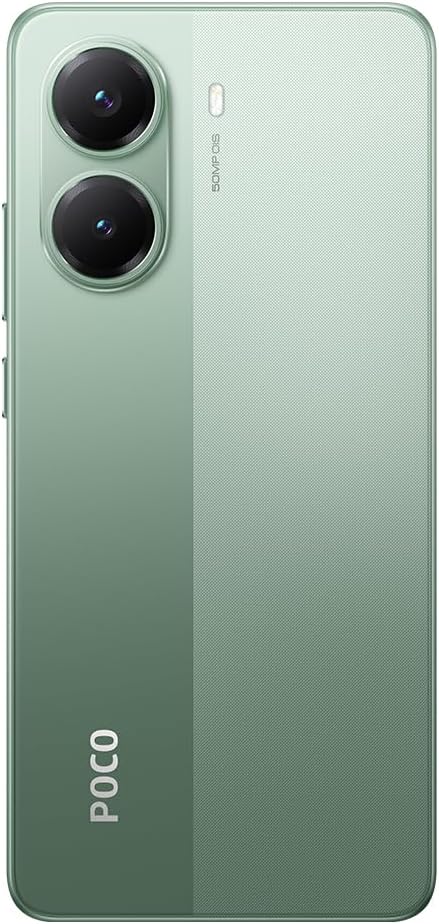
Figure 3.2: Rear view of the Poco X7 Pro 5G, showcasing the camera setup and design.
3.1. Physical Components
- Display: 6.67-inch AMOLED screen with 2712x1220 resolution and 120Hz refresh rate. Protected by Gorilla Glass 7i.
- Rear Camera: 50 MP main camera with OIS (Optical Image Stabilization) and f/1.5 aperture, utilizing a Sony IMX882 sensor. Supports 4K video recording at 60fps with dual OIS and EIS stabilization.
- Front Camera: (Specific MP not detailed in features, but typically located at the top center of the display).
- Buttons: Power button and volume rockers typically located on the side.
- Ports: USB-C port for charging and data transfer.
- SIM Tray: Slot for inserting SIM cards.
4. Initial Setup
4.1. Inserting the SIM Card
- Locate the SIM card tray on the side of your device.
- Insert the SIM ejector tool (if available, otherwise a thin pin) into the small hole next to the tray to open it.
- Place your Nano-SIM card(s) into the tray with the gold contacts facing down.
- Carefully push the tray back into the slot until it is flush with the device.
4.2. Powering On Your Device
- Press and hold the Power button (usually on the right side) until the XIAOMI logo appears on the screen.
- Follow the on-screen instructions to complete the initial setup, including selecting your language, connecting to Wi-Fi, and signing in to your Google account.
4.3. Charging the Battery
Your device comes with a 6,000 mAh battery. For optimal performance, fully charge the device before first use.

Figure 4.1: Illustration of the 6000 mAh battery and 90W HyperCharge capability, allowing a full charge in approximately 42 minutes.
- Connect a compatible USB-C charging cable to the device's charging port.
- Connect the other end of the cable to a compatible power adapter (sold separately) and plug it into a power outlet.
- The device supports 90W fast wired charging, capable of charging from 0% to 100% in approximately 42 minutes.
5. Basic Operation
5.1. Touchscreen Gestures
- Tap: Select an item or activate a function.
- Touch and Hold: Access contextual menus or move items.
- Swipe: Navigate through screens or lists.
- Pinch: Zoom in or out on images and web pages.
5.2. Camera Functions
Your Poco X7 Pro features an advanced camera system.

Figure 5.1: Detail of the 50 MP main camera with OIS and the 20 MP front camera.
- Rear Camera: The 50 MP main camera with OIS (Optical Image Stabilization) and f/1.5 aperture uses Sony's IMX882 sensor. It supports 4K video recording at 60fps with dual OIS and EIS stabilization for clear and steady footage.
- Front Camera: Capture high-quality selfies and video calls.
- Camera Modes: Explore various modes such as Portrait, Night, Pro, and Panorama for diverse photographic experiences.
5.3. Display Features
The device's display offers exceptional visual quality.

Figure 5.2: Key display specifications including brightness, refresh rate, and resolution.
- Brightness: Advertised to reach up to 3,200 nits of peak brightness for excellent visibility even in bright conditions.
- Refresh Rate: Features a 120Hz refresh rate for smooth scrolling and fluid animations.
- Touch Sampling Rate: Offers a 2,560 Hz touch sampling rate for highly responsive touch input.
- Resolution: 2712 x 1220 pixels, providing sharp and detailed visuals.
6. Maintenance
6.1. Cleaning Your Device
- Use a soft, lint-free cloth to gently wipe the screen and body of the phone.
- Avoid using harsh chemicals, abrasive cleaners, or compressed air.
- The Poco X7 Pro has an IP68 dust and water resistance rating, meaning it can withstand immersion in up to 1.5 meters of fresh water for up to 30 minutes. However, it is not recommended for use in water and water damage is not covered under warranty.
6.2. Software Updates
Regularly check for and install software updates to ensure your device has the latest features, security patches, and performance improvements. Your device runs on Android 15.
- Go to Settings > About phone > MIUI version (or similar) to check for updates.
- Ensure your device is connected to Wi-Fi and has sufficient battery charge before starting an update.
7. Troubleshooting
If you encounter issues with your device, try the following common solutions:
- Device not turning on: Ensure the battery is charged. Connect the device to a charger for at least 15 minutes, then try powering it on again.
- Apps crashing or freezing: Close the problematic app and reopen it. If the issue persists, restart your phone. You can also clear the app's cache or reinstall it.
- Poor network connectivity: Check if your SIM card is properly inserted. Try toggling Airplane Mode on and off. If the issue persists, contact your network provider.
- Battery draining quickly: Reduce screen brightness, disable unnecessary background apps, and turn off features like Bluetooth or GPS when not in use. Check battery usage in settings to identify power-hungry apps.
- Touchscreen unresponsive: Restart your device. If the screen remains unresponsive, a factory reset might be necessary (back up your data first).
For more complex issues, refer to the official XIAOMI support website or contact customer service.
8. Technical Specifications
Detailed specifications for the XIAOMI Poco X7 Pro 5G:
| Feature | Specification |
|---|---|
| Brand | XIAOMI |
| Model Name | POCO X7 PRO |
| Operating System | Android 15 |
| Processor Type | Snapdragon (MediaTek Dimensity 8400-Ultra) |
| Processor Speed | 3.25 GHz |
| RAM Size | 8 GB |
| Storage Capacity | 256 GB |
| Screen Size | 6.67 Inches |
| Display Type | AMOLED |
| Resolution | 2712 x 1220 |
| Refresh Rate | 120 Hz |
| Battery Capacity | 6000 mAh (Lithium-Ion) |
| Charging | 90W Fast Wired Charging |
| Rear Camera | 50 MP with OIS, f/1.5 aperture, Sony IMX882 sensor |
| Video Resolution | 4K at 60fps (with dual OIS and EIS stabilization) |
| Connectivity | 5G, Bluetooth, NFC, USB, Wi-Fi |
| Water/Dust Resistance | IP68 |
| Weight | 400 g |
| Year Model | 2025 |
9. Safety Information
Please observe the following safety precautions to prevent injury or damage to your device:
- Do not expose the device to extreme temperatures, direct sunlight, or open flames.
- Avoid dropping or subjecting the device to severe impact.
- Use only approved chargers and accessories.
- Do not attempt to disassemble or repair the device yourself. Refer to authorized service personnel.
- Keep the device away from medical devices, as it may interfere with their operation.
- Dispose of the device and its battery responsibly according to local regulations.
10. Warranty and Support
Your XIAOMI Poco X7 Pro 5G is covered by a limited warranty. For specific warranty terms and conditions, please refer to the warranty card included with your product or visit the official XIAOMI website.
For technical support, service, or further assistance, please contact XIAOMI customer service or visit their official support channels. You can find contact information on the XIAOMI website.


