1. Introduction
This manual provides comprehensive instructions for the setup, operation, and maintenance of your JTSIOV BD-669D 61-Key Electric Keyboard Piano. Please read this manual thoroughly before using the product to ensure proper function and longevity.
2. Package Contents
Verify that all items listed below are included in your package:
- 61-Key Electric Keyboard Piano
- Adjustable Piano Stand
- Piano Bench
- Music Stand
- Microphone
- Key Stickers
- Power Adapter
- Audio Cable
- User Manual
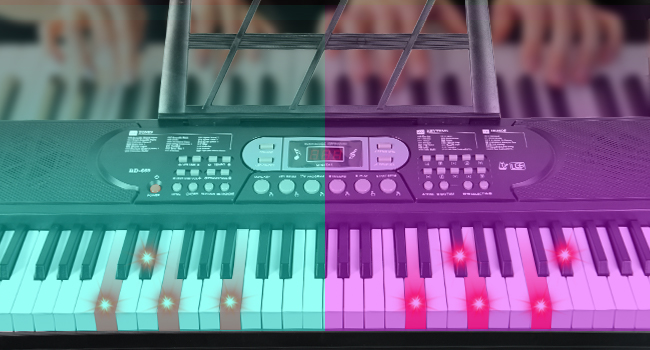
Figure 2.1: Included Accessories
3. Setup Instructions
- Assemble the Piano Stand: Follow the instructions provided with the stand to assemble it. Ensure all knobs are tightened for stability. The stand is adjustable to accommodate various heights.
- Assemble the Piano Bench: Assemble the bench according to its instructions.
- Place the Keyboard: Carefully place the 61-key electric keyboard onto the assembled stand.
- Attach the Music Stand: Insert the music stand into the designated slot on the keyboard. This holds sheet music or a tablet securely.
- Apply Key Stickers: For beginners, apply the provided key stickers to the white keys to assist with note recognition.
- Power Connection: Connect the power adapter to the DC5V port on the keyboard and plug it into a power outlet. Alternatively, the keyboard can be powered by 4 AA 1.5V batteries (not included) for portable use.
- Microphone Connection: Plug the microphone into the MIC input port on the keyboard.
- Headphone Connection: For private practice, connect headphones to the OUT port.
Video 3.1: Setup and Initial Operation of the 61-Key Keyboard Piano. This video demonstrates the assembly of the stand and bench, placement of the keyboard, and basic power-on and key functions.

Figure 3.1: Product Dimensions and Adjustable Stand

Figure 3.2: Connectivity Ports (Power, Audio In, Mic, Sustain)
4. Operating Instructions
4.1 Basic Functions
- Power On/Off: Press the POWER button to turn the keyboard on or off.
- Volume Adjustment: Use the VOLUME +/- buttons to adjust the master volume.
- Tone Selection: Select from 200 available tones using the TONE buttons and the numeric keypad.
- Rhythm Selection: Choose from 200 rhythms using the RHYTHM buttons and the numeric keypad.
- Tempo Adjustment: Adjust the speed of rhythms and demo songs using the TEMPO +/- buttons.
4.2 Learning Features
- Lighted Keys: The keyboard features lighted keys that illuminate to guide you through demo songs, making learning intuitive.
- Demo Songs: Access 70 built-in demo songs. Use the DEMO ONE or DEMO ALL buttons to play.
- Follow Mode: Engage the FOLLOW mode to learn songs by playing along with the lighted keys.

Figure 4.1: Light-Up Keys in Action
4.3 Advanced Functions
- Recording and Playback: Use the RECORD button to record your performances and the PLAY button for playback.
- Pitch Bend Wheel: Utilize the pitch bend wheel located on the left side of the keyboard to add expressive pitch variations to your notes.
- Dual Keyboard Mode: This mode allows two different instrument sounds to be played simultaneously across the keyboard.
- Metronome: Activate the metronome for timing assistance during practice.
- Sustain Function: Apply sustain to notes for a prolonged sound effect.

Figure 4.2: Control Panel Overview

Figure 4.3: Built-in Speakers and Pitch Bend Wheel
5. Maintenance
- Cleaning: Use a soft, dry cloth to clean the surface of the keyboard. Avoid using abrasive cleaners or solvents.
- Storage: When not in use, store the keyboard in a dry, dust-free environment. Avoid extreme temperatures and direct sunlight.
- Battery Care: If using batteries, remove them if the keyboard will not be used for an extended period to prevent leakage.
6. Troubleshooting
If you encounter any issues with your keyboard, refer to the following common solutions:
- No Power:
- Ensure the power adapter is securely connected to both the keyboard and a working power outlet.
- If using batteries, check that they are correctly inserted and not depleted.
- No Sound:
- Check the volume level using the VOLUME +/- buttons.
- If headphones are connected, disconnect them to check the built-in speakers.
- Ensure the correct tone is selected.
- Keys Not Lighting Up:
- Verify that the keyboard is in a learning mode that utilizes lighted keys.
- Microphone Not Working:
- Ensure the microphone is fully plugged into the MIC input.
If the issue persists, please contact customer support for further assistance.
7. Specifications
| Feature | Detail |
|---|---|
| Model Name | Keyboard Piano |
| Item Model Number | BD-669D |
| Brand | JTSIOV |
| Number of Keys | 61 |
| Age Range | Kid, Adult, Teen |
| Connectivity Technology | Auxiliary |
| Connector Type | 3.5mm Jack |
| Power Source | Battery and AC adapter |
| Special Features | Built-In Speaker, Multiple Voices, Pitch Bend Wheel, Portable |
| Body Material | Plastic |
| Color | Black |
| Item Weight | 18.56 pounds |
| Package Dimensions | 36.3 x 14 x 12 inches |
| UPC | 769310192514 |
8. Warranty and Support
For any product issues or inquiries, please contact the seller directly. They are committed to resolving any concerns you may have regarding your JTSIOV Electric Keyboard Piano.


