
1. Introduction
Thank you for choosing the ModernMate 71" L-Shaped Height Adjustable Standing Desk. This manual provides essential information for the safe assembly, operation, and maintenance of your new desk. Please read these instructions thoroughly before beginning assembly and retain them for future reference.
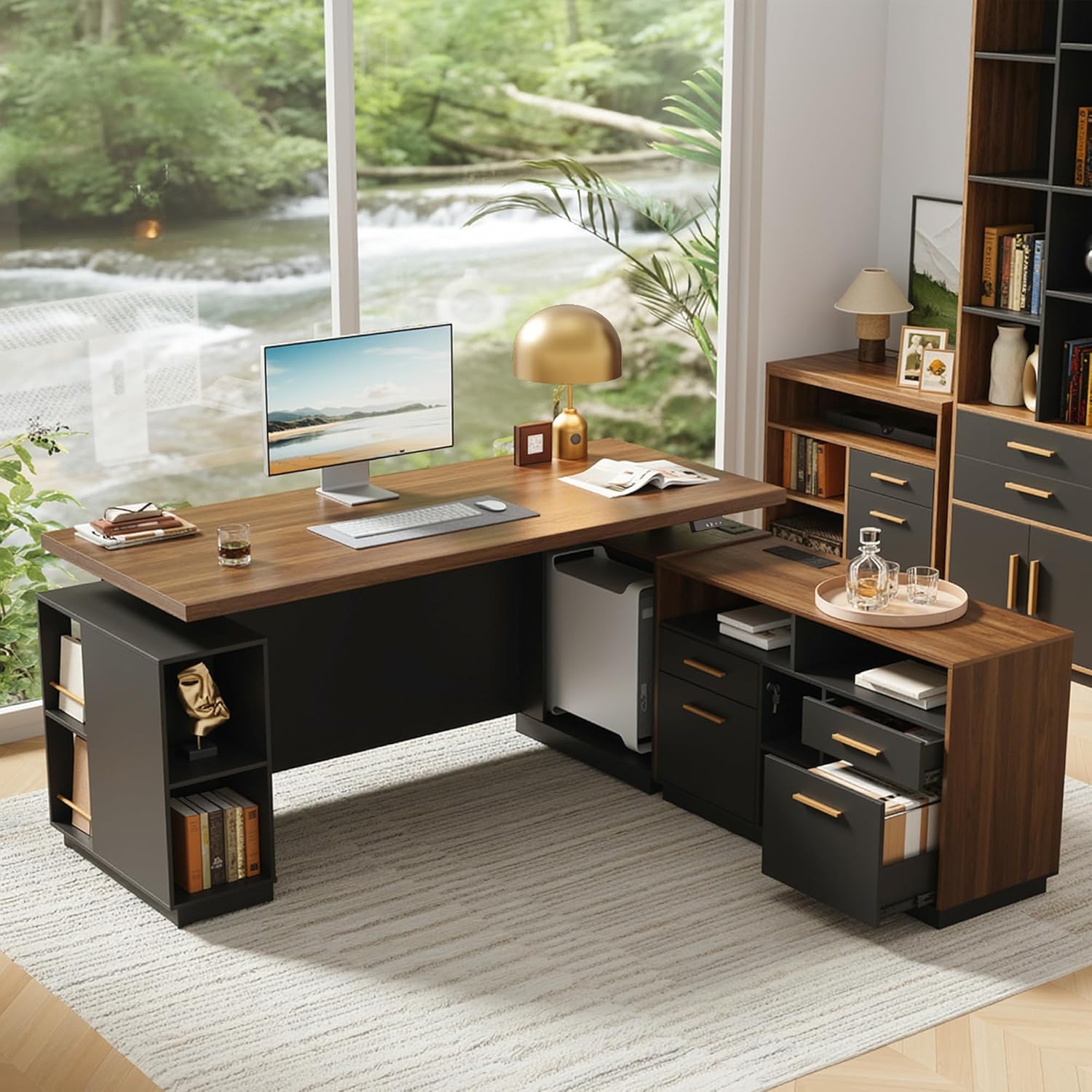
Figure 1.1: ModernMate 71" L-Shaped Standing Desk (Model F1)
2. Important Safety Information
- Always ensure the desk is properly anchored to the floor if applicable, or placed on a stable, level surface.
- Do not exceed the maximum weight limit of 176 pounds (80 kg) on the desktop.
- Keep children and pets away from the desk when it is in motion to prevent injury.
- Ensure no obstructions are present in the path of the desk's movement during height adjustment.
- Do not sit or stand on the desk.
- Disconnect power before cleaning or performing any maintenance.
3. Package Contents
Your ModernMate standing desk is shipped in 4 separate parcels to facilitate easier handling and delivery. Please ensure all packages have arrived before beginning assembly. Components include the desktop, cabinet parts, and frame. A detailed parts list is included within the packaging.

Figure 3.1: Packaging for the ModernMate Standing Desk
Note: Parcels may not arrive simultaneously. Please be patient if one or more packages are delayed.
4. Setup and Assembly
The ModernMate standing desk requires assembly. Detailed and clear instructions are provided within the packaging. Please follow these instructions step-by-step. All necessary tools for assembly are typically included.
4.1 Assembly Tips
- Clear a spacious area for assembly.
- Organize all parts and hardware before starting.
- Do not overtighten screws during initial assembly; tighten fully once all components are aligned.
- It is recommended to have two people for assembly due to the size and weight of some components.
4.2 Initial Power Connection
After assembly, connect the desk to a standard AC power outlet. The built-in power outlet on the desk provides convenient access to power for your devices.

Figure 4.1: Easy Height Adjustment Control and Built-in Power Outlet
5. Operating Instructions
5.1 Height Adjustment
The desk height can be adjusted electrically from 27.9 inches (70.9 cm) to 45.7 inches (116.1 cm). Use the up and down arrow buttons on the control panel to raise or lower the desk to your desired height. The current height is displayed digitally on the control panel.
Video 5.1: Demonstration of the ModernMate Standing Desk's electric height adjustment feature, showing smooth transition from sitting to standing positions.
5.2 Memory Presets
The control panel includes memory buttons (1, 2, 3) to save your preferred sitting and standing heights. To set a memory preset:
- Adjust the desk to your desired height using the up/down arrows.
- Press and hold one of the memory buttons (1, 2, or 3) until the display flashes or beeps, indicating the height has been saved.
To recall a saved height, simply press the corresponding memory button once.
5.3 AC/USB Power Outlets
The desk is equipped with integrated AC and USB power outlets for convenient charging and powering of your electronic devices. Ensure the desk is plugged into a wall outlet for these features to function.
6. Product Features
6.1 Ergonomic Design
The height-adjustable desk part allows you to seamlessly switch between sitting and standing positions, promoting better posture and reducing fatigue during long work sessions.
6.2 Integrated Storage System
The cabinet section of this L-shaped desk offers a powerful storage solution. It includes multiple open storage shelves for books and decorative items, along with file cabinet drawers designed for office documents.

Figure 6.1: File Cabinet Dimensions and Storage Options

Figure 6.2: Integrated Storage System Details
6.3 Durable Construction
Crafted from P2 engineered wood and cold-rolled steel, the desk features a well-structured design for stability and wobble-free performance. The motor is tested for 50,000 lift cycles, ensuring long-lasting and reliable support.

Figure 6.3: Wide One-piece Desktop
6.4 Whisper-Quiet Operation
The electric motor operates quietly, ensuring minimal disturbance in your work environment. Noise levels are typically below 50dB.

Figure 6.4: Noise Level Comparison for Desk Operation
6.5 Expended Front Privacy Panel
The desk includes an expended front privacy panel, designed to provide a more private and focused workspace.

Figure 6.5: Expended Front Privacy Panel
7. Maintenance
- Cleaning: Wipe surfaces with a soft, damp cloth. Avoid harsh chemicals or abrasive cleaners that may damage the finish.
- Inspection: Periodically check all screws and fasteners to ensure they are tight. Retighten as necessary.
- Motor Care: The electric motor is designed for long-term use and generally requires no special maintenance. Avoid spilling liquids on the motor or control panel.
8. Troubleshooting
If you encounter any issues with your ModernMate standing desk, please refer to the following common troubleshooting steps:
- Desk not moving: Check if the power cord is securely plugged into both the desk and the wall outlet. Ensure the wall outlet is functional.
- Uneven movement: Ensure the desk is not overloaded and that weight is distributed evenly. Check for any obstructions.
- Control panel unresponsive: Try unplugging the desk from the power outlet for 30 seconds, then plug it back in to reset the system.
If these steps do not resolve the issue, please contact ModernMate customer service for further assistance.
9. Specifications

Figure 9.1: Desk Dimensions and Frame Performance
| Feature | Detail |
|---|---|
| Brand | ModernMate |
| Model Number | F1 |
| Product Dimensions (D x W x H) | 30"D x 71"W x 30"H (76.2cm D x 180.3cm W x 76.2cm H) |
| Adjustable Height Range | 27.9" - 45.7" (70.9cm - 116.1cm) |
| Tabletop Thickness | 1.18 Inches (30mm) |
| Maximum Weight Capacity | 176 Pounds (80 kg) |
| Material | Engineered Wood (P2 Grade), Cold-Rolled Steel |
| Color | Black Walnut |
| Storage Options | 3 open shelves, 2 file cabinet drawers |
| Power Outlets | Integrated AC/USB |
| Assembly Required | Yes |
10. Warranty and Customer Support
ModernMate is committed to providing quality products and customer satisfaction. For any questions regarding assembly, operation, missing parts, or warranty claims, please contact our customer service team. Detailed contact information can be found on the product packaging or the ModernMate official website.
Please have your model number (F1) and purchase information ready when contacting support to ensure efficient service.
