
Surtime 8911-White-54
Surtime 137 cm Ceiling Fan with Light User Manual
Model: 8911-White-54
Brand: Surtime
1. Introduction
Thank you for choosing the Surtime 137 cm Ceiling Fan with Light. This modern ceiling fan is designed to provide powerful airflow and versatile lighting for your living spaces, including living rooms, kitchens, patios, and bedrooms. It features a quiet DC motor, reversible airflow for year-round comfort, dimmable LED lighting with adjustable color temperatures, and convenient control via both a remote and a mobile application.
Please read this manual thoroughly before installation and operation to ensure safe and efficient use of your new ceiling fan.
2. Safety Instructions
Always follow basic safety precautions when installing and operating electrical appliances to reduce the risk of fire, electric shock, and personal injury.
- Ensure the power is turned off at the circuit breaker before installation or maintenance.
- Installation must be performed by a qualified electrician or a person with sufficient electrical knowledge.
- The mounting structure must be capable of supporting the weight of the fan (approximately 8.08 kg). For plasterboard ceilings, use appropriate heavy-duty anchors.
- Ensure there is adequate clearance between the fan blades and any obstacles, including walls and furniture.
- Do not insert any objects into the fan blades while the fan is operating.
- Do not attempt to repair or modify the fan yourself. Contact qualified service personnel for repairs.
- This fan is designed for indoor and covered outdoor use. Do not expose it to direct water or extreme weather conditions.
3. Package Contents
Carefully unpack your ceiling fan and ensure all items are present and undamaged. If any items are missing or damaged, please contact customer support.
- Ceiling Fan Unit (Motor, Blades, Light Kit)
- Remote Control
- 10 cm Downrod
- 20 cm Downrod
- Mounting Hardware (screws, brackets, etc.)
- User Manual (this document)

Image: The Surtime 137 cm Ceiling Fan with Light installed in a living room setting, showcasing its modern design and integrated light.
4. Specifications
| Brand | Surtime |
| Model Number | 8911-White-54 |
| Dimensions (L x W x H) | 137 cm (Diameter) x 41.5 cm (Height with shortest rod) |
| Weight | Approximately 8.08 kg |
| Motor Type | DC Motor |
| Motor Power | 32W |
| Voltage | 90-265V |
| Fan Speeds | 6 adjustable speeds |
| Noise Level | Less than 35 dB |
| Light Type | Integrated LED |
| Light Power | 28W |
| Luminous Flux | 3640 LM |
| Color Temperatures | 3 (Warm Light 3000K, Natural Light 4500K, White Light 6000K) |
| Control Methods | Remote Control, Mobile Application |
| Timer Function | 2-hour timer |
| Reversible Airflow | Yes (Summer/Winter Mode) |

Image: Detailed diagram showing the dimensions of the ceiling fan, including the 10 cm and 20 cm suspension rods.
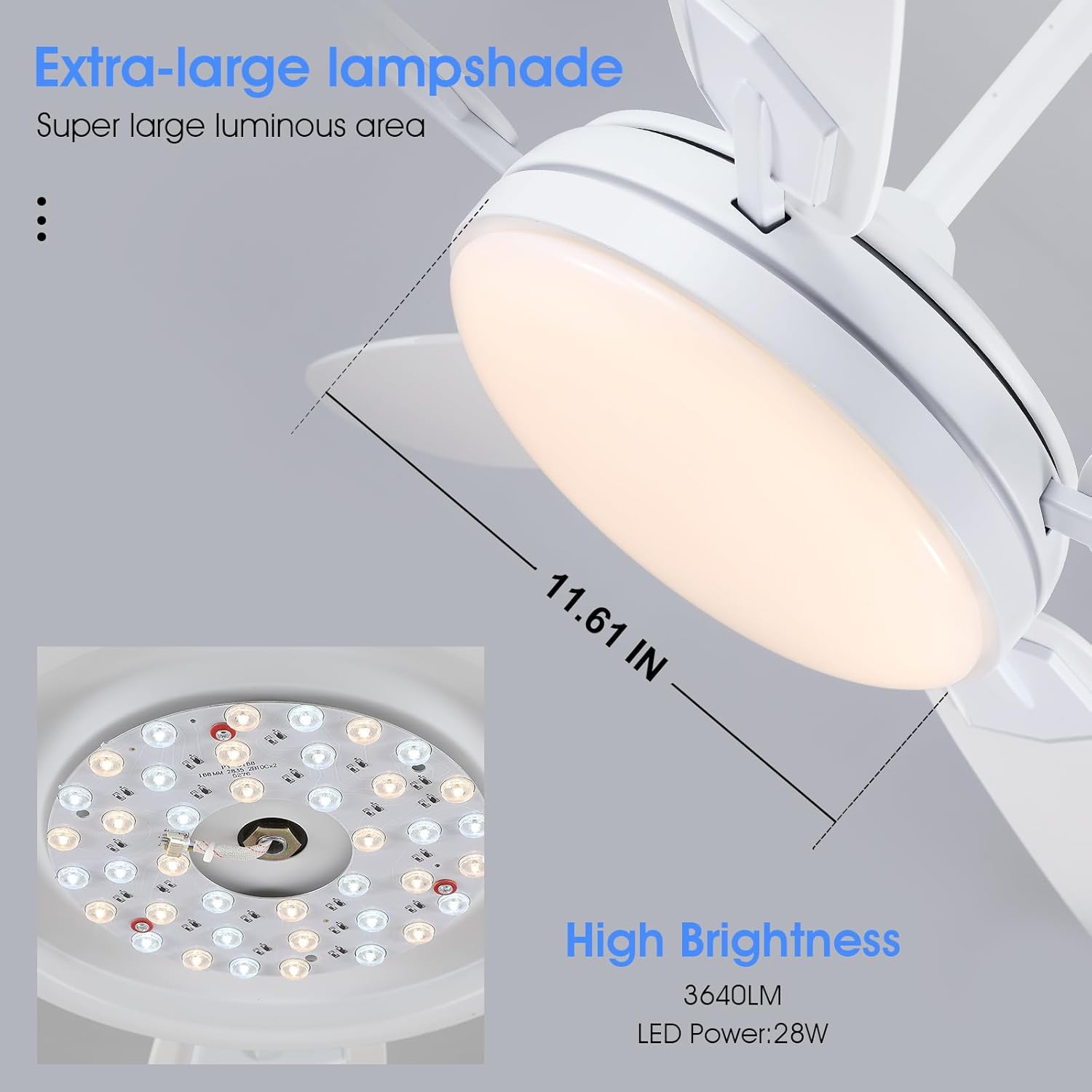
Image: Close-up view of the extra-large lampshade and the internal LED light board, highlighting the high brightness and wide illumination area.
5. Setup and Installation
Before beginning installation, ensure you have all necessary tools and that the power supply is disconnected. Due to the weight of the unit, it is recommended to have two people for installation.
5.1 Mounting the Fan
- Prepare the Mounting Location: Ensure the ceiling joist or support structure can safely hold the fan's weight. For plasterboard ceilings, use appropriate heavy-duty anchors (e.g., Molly bolts) as standard anchors may not suffice.
- Install the Mounting Bracket: Securely attach the mounting bracket to the ceiling outlet box or support structure using the provided screws.
- Assemble the Downrod: Choose either the 10 cm or 20 cm downrod based on your ceiling height and desired fan position. Feed the electrical wires through the chosen downrod.
- Attach Blades: Securely attach the fan blades to the motor housing.
- Hang the Fan: Carefully lift the fan assembly and hang it from the mounting bracket.
- Wire Connections: Connect the electrical wires according to the wiring diagram in the detailed manual (refer to the video guide for visual assistance). Ensure all connections are secure.
- Secure the Canopy: Slide the canopy up to the ceiling and secure it to the mounting bracket, covering the wiring.
- Install Light Kit: Attach the light kit to the bottom of the fan motor housing and connect the light wires.
5.2 Installation Video Guide
For a detailed visual guide on the installation process, please refer to the official installation video:
Video: Official installation guide for the Surtime Ceiling Fan. This video provides step-by-step instructions for mounting and wiring the fan.
6. Operating Instructions
Your Surtime ceiling fan can be controlled using the included remote control or a dedicated mobile application.
6.1 Remote Control Operation
The remote control allows full functionality of your fan and light. Ensure batteries are correctly inserted.

Image: Diagram illustrating the layout and functions of the remote control for the ceiling fan.
- Power On/Off: Press the ON/OFF button to turn the fan and light on or off.
- Fan Speed Control: Use buttons 1-6 to select desired fan speed. Speed 1 is the lowest, Speed 6 is the highest.
- Light On/Off: Press the Light On/Off button to toggle the light.
- Color Temperature Adjustment: Use the 3 Colors button to cycle through Warm Light (3000K), Natural Light (4500K), and White Light (6000K).
- Brightness Adjustment: Use the Luminosity + and Luminosity - buttons to adjust the light brightness continuously.
- Reverse Mode (Summer/Winter): Press the F/R (Forward/Reverse) button to switch between downdraft (summer) and updraft (winter) modes.
- Summer Mode (Downdraft): Blades rotate counter-clockwise, pushing cool air downwards for a refreshing effect.
- Winter Mode (Updraft): Blades rotate clockwise, drawing warm air up and distributing it evenly throughout the room, helping to reduce heating costs.
- Timer Function: Press the 2H button to set a 2-hour timer for the fan to automatically turn off.
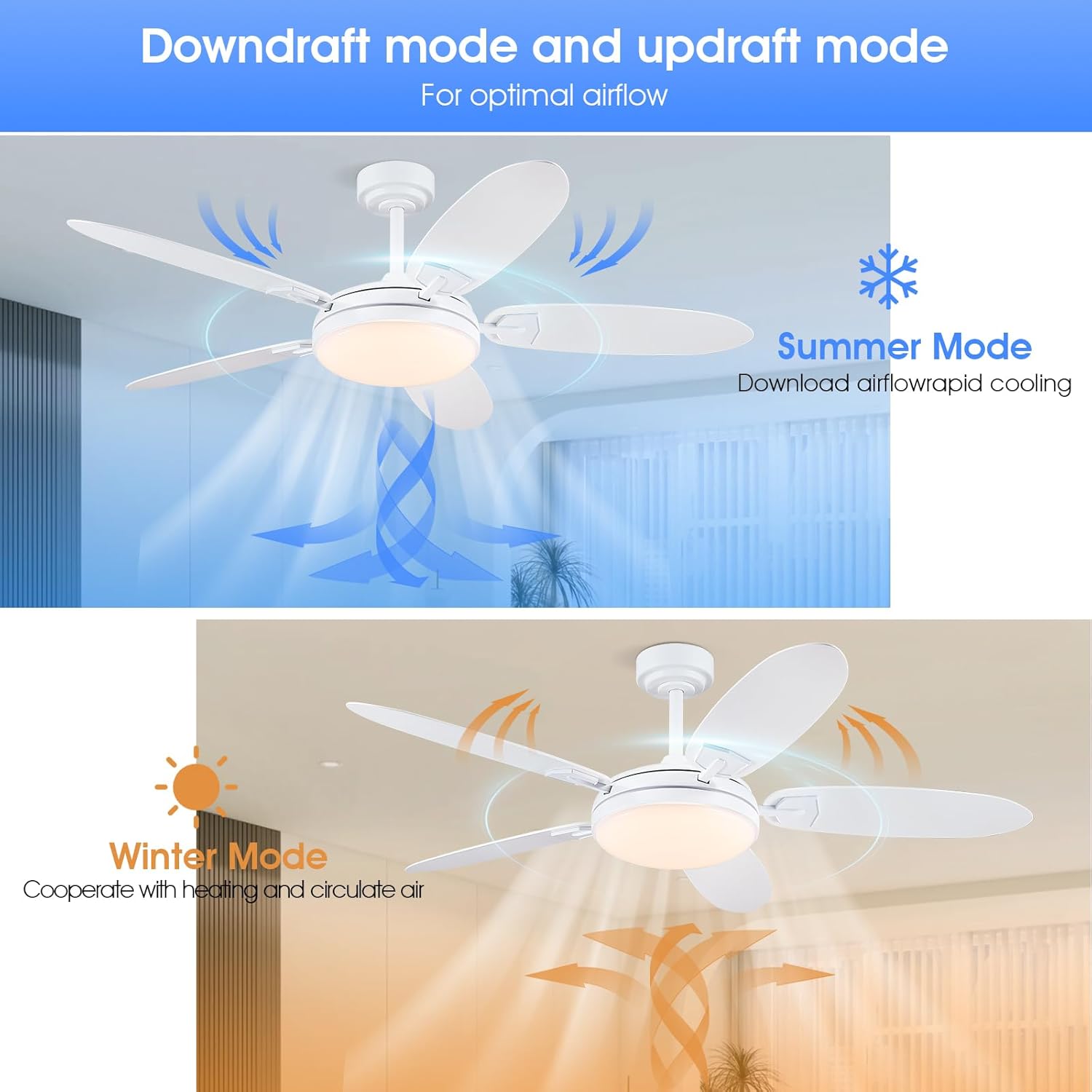
Image: Visual representation of the airflow patterns for Summer Mode (downdraft) and Winter Mode (updraft).

Image: Illustration showing the three adjustable light color temperatures: Warm Light (3000K), Natural Light (4500K), and White Light (6000K).
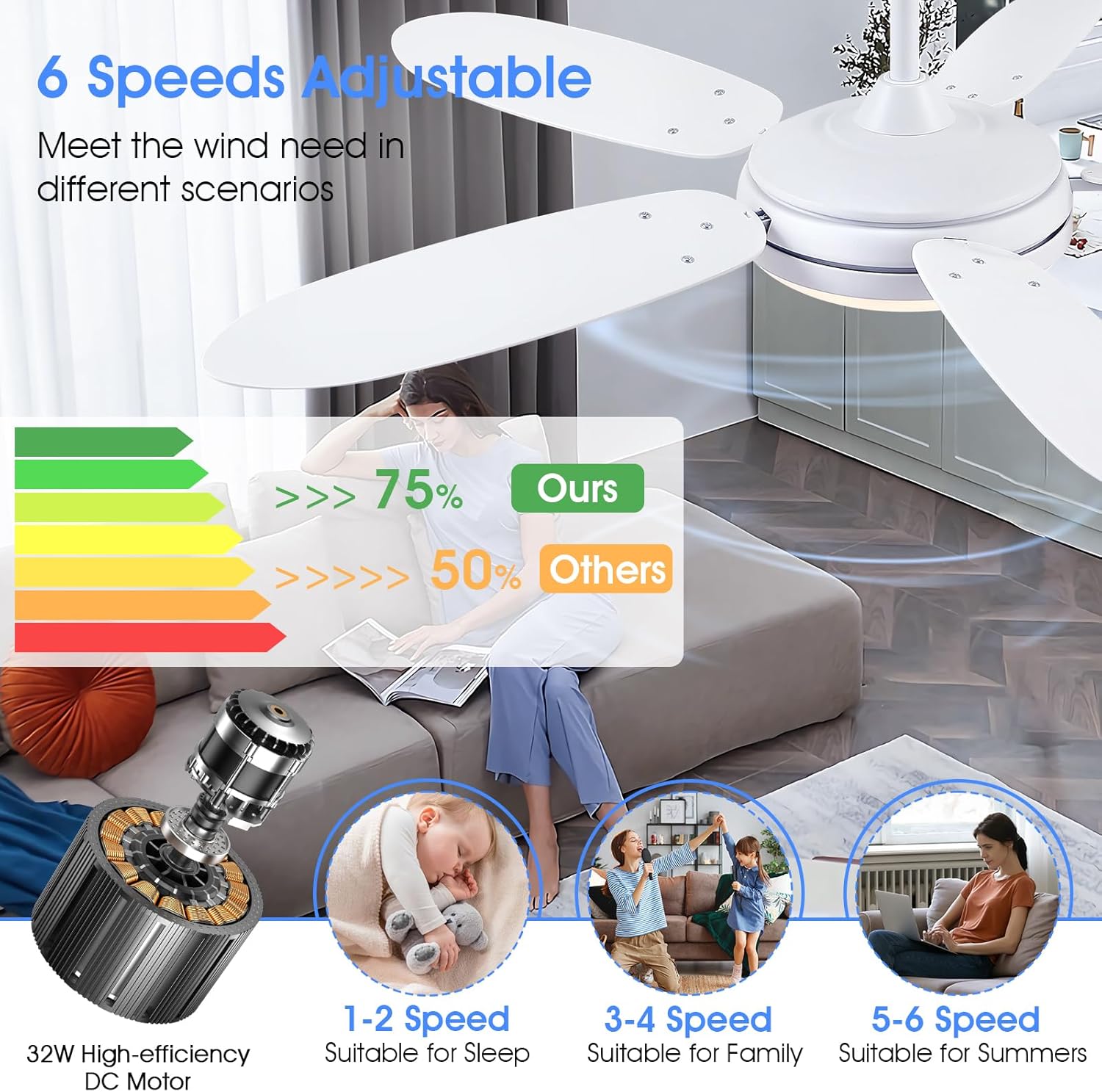
Image: Guide for recommended fan speeds: 1-2 for sleep, 3-4 for family activities, and 5-6 for summer cooling.
6.2 Mobile Application Control
For enhanced control and convenience, you can download the dedicated mobile application. Scan the QR code below to download the "FanLamp Pro" app:
Download FanLamp Pro App:
https://www.jasonghost.com/fanlamppro/(This link will direct you to the app download page.)
Follow the in-app instructions to pair your fan. The app provides similar controls to the remote, including fan speed, light settings, timer, and reverse mode.
7. Maintenance
Regular maintenance helps ensure the longevity and optimal performance of your ceiling fan.
- Cleaning: Before cleaning, ensure the power is turned off at the circuit breaker. Use a soft, damp cloth to wipe down the fan blades and motor housing. Do not use abrasive cleaners or solvents.
- Blade Balance: If the fan wobbles, check that all blade screws are tightened. Minor wobbling can sometimes be corrected using a fan balancing kit (not included).
- Light Source: The LED light source is integrated and designed for long life. Do not attempt to replace individual LEDs.
- General Inspection: Periodically check all connections and mounting hardware to ensure they remain secure.
8. Troubleshooting
If you encounter any issues with your ceiling fan, please refer to the following common problems and solutions before contacting customer support.
| Problem | Possible Cause | Solution |
|---|---|---|
| Fan does not start. | No power supply; Loose wiring; Remote control battery low/dead; Fan not paired with remote/app. | Check circuit breaker. Ensure all wiring connections are secure. Replace remote control batteries. Re-pair remote/app with fan (refer to pairing instructions in the full manual or app). |
| Light does not turn on. | Loose wiring; Light function off on remote/app. | Check light wiring connections. Ensure light is turned on via remote or app. |
| Fan wobbles. | Loose blade screws; Unbalanced blades; Loose mounting bracket. | Tighten all blade screws. Check if blades are bent or damaged. Ensure mounting bracket is securely fastened to the ceiling. Consider using a blade balancing kit. |
| Remote control not working. | Low/dead batteries; Obstruction between remote and receiver; Remote not paired. | Replace batteries. Ensure clear line of sight to the fan's receiver. Re-pair the remote control with the fan. |
| Fan is noisy. | Loose screws; Motor issue; Blades hitting an obstruction. | Check and tighten all screws. Ensure no wires or objects are touching the fan blades or motor. If noise persists and is excessive, contact customer support. (Note: This fan is designed for quiet operation, <35dB). |
9. Warranty and Support
Your Surtime 137 cm Ceiling Fan with Light comes with a limited warranty. Please refer to your purchase documentation for specific warranty terms and conditions. In case of product defects or issues not covered by the troubleshooting guide, please contact Surtime customer support.
For returns or replacements, a 30-day refund/replacement policy is typically available from the point of purchase. Please check with your retailer for their specific return policy.
Manufacturer: Zhongshan Mengzhilan Lighting Co., Ltd.
Seller: Surtime
For support, please visit the seller's page on Amazon or contact them directly through the Amazon platform.
Related documents8911-White-54


Ask a question about this manual
Ask about setup, troubleshooting, compatibility, parts, safety, or missing instructions. Manuals+ will review the question and use this page’s manual context to help answer it.