
OSCAL OSCAL FLAT 2C Mobile Phones
OSCAL FLAT 2C Mobile Phone User Manual
Your guide to getting started and maximizing your device's potential.
1. Introduction
Welcome to the OSCAL FLAT 2C Mobile Phone user manual. This guide provides essential information to help you set up, operate, maintain, and troubleshoot your new device. The OSCAL FLAT 2C is designed for reliable performance and ease of use, featuring a long-lasting battery, ample storage, and the latest Android 14 Go operating system.
2. What's in the Box
Upon unboxing your OSCAL FLAT 2C Mobile Phone, please verify that all the following items are included:
- 1 x OSCAL FLAT 2C Mobile Phone
- 1 x Charger
- 1 x Type C Charging Cable
- 1 x Transparent Phone Case
- 1 x Screen Protector (pre-applied or separate)
- 1 x Card Pin (for SIM/TF card tray)
- 1 x User Manual
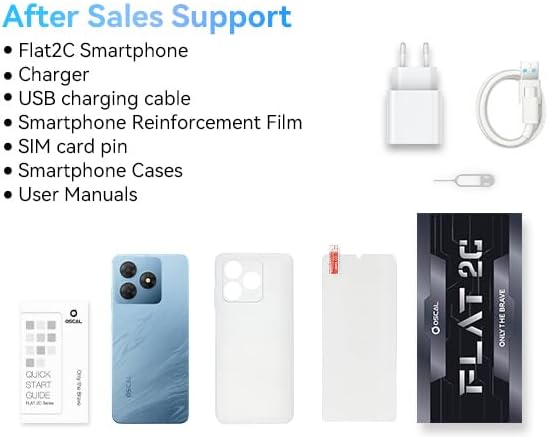
If any items are missing or damaged, please contact customer support immediately.
3. Product Overview
The OSCAL FLAT 2C is designed with user convenience and performance in mind. Below are key physical and internal features:
3.1 Design and Display
The device features an 8.75mm ultra-slim profile and a lightweight design at 193g, making it comfortable to hold. The back cover has a fluid sand-textured finish that is anti-scratch and smudge-free.

It boasts a 6.56-inch HD+ Ultra-large IPS Display with 16.7 million colors and a 60Hz refresh rate, offering an 89% screen-to-body ratio and 178° IPS Full View for an immersive visual experience.

3.2 Camera System
The OSCAL FLAT 2C is equipped with an 8MP front camera and a 13MP rear camera (Samsung ISOCELL 4H7), allowing for clear photos and 1080P video recording. Various shooting modes are available, including HDR, Beauty Mode, Portrait Mode, Night Mode, Pro Mode, and Panorama Mode.

3.3 Performance and Storage
Powered by an Octa-core Unisoc T603 Processor (1.6GHz), the phone offers smooth multitasking. It comes with 6GB RAM (2GB physical + 4GB virtual expansion) and 64GB of internal storage, expandable up to 2TB via a TF card.

3.4 Battery
The device is equipped with a robust 5000mAh battery, providing up to 624 hours of standby time, 23 hours of calling, 22 hours of music, 9.5 hours of web browsing, 5.5 hours of gaming, or 7 hours of video playback on a single charge.

4. Setup
4.1 Inserting SIM and TF Cards
- Locate the SIM card tray on the side of the phone.
- Insert the provided card pin into the small hole next to the tray to eject it.
- Place your 4G SIM cards (up to two) and/or a TF (microSD) card into the designated slots on the tray. Ensure they are correctly oriented as indicated on the tray.
- Gently push the tray back into the phone until it is flush with the side.
4.2 Initial Charging
Before first use, it is recommended to fully charge your OSCAL FLAT 2C. Connect the Type C charging cable to the phone's charging port and the other end to the provided charger. Plug the charger into a power outlet. The battery indicator on the screen will show charging progress. A full charge typically takes several hours.
5. Operating Your Device
5.1 Power On/Off and Restart
- Power On: Press and hold the Power button until the OSCAL logo appears.
- Power Off: Press and hold the Power button, then select "Power off" from the options.
- Restart: Press and hold the Power button, then select "Restart" from the options.
5.2 Navigating Android 14 Go
The OSCAL FLAT 2C runs on Android 14 Go, optimized for smooth operation and enhanced privacy. This version offers personalized customization options and a comprehensive Permission Manager to control app access to your data.

5.3 Display Settings
To enhance viewing comfort, the phone includes an Eye Comfort Mode which reduces blue light, minimizing eye strain, especially in low-light conditions. This can be activated in the display settings.
5.4 Camera Operation
To take photos or videos:
- Open the Camera application.
- Select your desired shooting mode (e.g., Portrait, Night, Panorama).
- Tap the shutter button to capture a photo or start/stop video recording.
- Utilize Face ID for quick and secure unlocking of your device.
5.5 Storage Management
To optimize performance, you can expand the virtual RAM. Navigate to Settings > About Phone > RAM, then adjust the slider and restart the phone to apply changes. Regularly manage your 64GB internal storage by deleting unnecessary files or moving them to an external TF card (up to 2TB supported).
5.6 Connectivity
The OSCAL FLAT 2C supports dual 4G SIM cards for flexible network usage. It also features a 3.5mm audio jack for wired headphones and integrates GPS/Glonass/Galileo for precise navigation.
6. Maintenance
Proper maintenance ensures the longevity and optimal performance of your OSCAL FLAT 2C Mobile Phone:
- Cleaning: Use a soft, lint-free cloth to clean the screen and body. Avoid abrasive materials or harsh chemicals.
- Protection: Always use the provided transparent phone case and screen protector to guard against scratches and minor impacts.
- Temperature: Avoid exposing the phone to extreme temperatures (hot or cold) or direct sunlight for prolonged periods.
- Water Exposure: The device is not waterproof. Keep it away from water and high humidity.
- Software Updates: Regularly check for and install system updates to ensure your device has the latest security patches and performance improvements.
7. Troubleshooting
This section addresses common issues you might encounter with your OSCAL FLAT 2C Mobile Phone.
7.1 Device Not Turning On
- Ensure the battery is charged. Connect the phone to the charger and wait a few minutes before attempting to power on.
- Press and hold the Power button for at least 10-15 seconds to force a restart.
7.2 Poor Battery Life
- Close unused applications running in the background.
- Reduce screen brightness or enable adaptive brightness.
- Disable Wi-Fi, Bluetooth, or GPS when not in use.
- Limit background data usage for apps.
7.3 Apps Crashing or Slow Performance
- Clear the cache of the problematic app (Settings > Apps > [App Name] > Storage > Clear cache).
- Ensure you have sufficient free storage space. Delete unnecessary files or apps.
- Restart the phone.
- Consider expanding virtual RAM as described in Section 5.5.
7.4 Wi-Fi Connectivity Issues
- Toggle Wi-Fi off and on again.
- Restart your Wi-Fi router.
- Forget the Wi-Fi network on your phone and reconnect.
- Ensure your phone's software is up to date.
7.5 GPS/Location Inaccuracy
- Ensure Location Services are enabled in your phone's settings.
- Check that the GPS signal is not obstructed (e.g., by buildings or indoors).
- Restart the device.
For issues not covered here, please refer to the Warranty and Support section.
8. Specifications
Below are the detailed technical specifications for the OSCAL FLAT 2C Mobile Phone:
| Feature | Specification |
|---|---|
| Model Name | OSCAL FLAT 2C Mobile Phones |
| Operating System | Android 14 Go |
| RAM Memory Installed Size | 6 GB (2GB physical + 4GB virtual) |
| Memory Storage Capacity | 64 GB (Expandable up to 2TB via TF card) |
| CPU Speed | 1.6 GHz (Octa-core Unisoc T603) |
| Screen Size | 6.56 Inches |
| Resolution | 720 x 1600 |
| Refresh Rate | 60 Hz |
| Rear Camera | 13 MP |
| Front Camera | 8 MP |
| Battery | 5000 mAh |
| Wireless Carrier | Unlocked for All Carriers |
| SIM Support | Dual 4G SIM |
| Audio Jack | 3.5mm |
| Navigation | GPS/Glonass/Galileo |
| Package Dimensions | 17.9 x 9 x 6.7 cm |
| Item Weight | 192 g |
| Manufacturer | OSCAL |
| Country of Origin | China |
9. Warranty and Support
OSCAL is committed to providing high-quality products and excellent customer service.
9.1 Warranty Information
Your OSCAL FLAT 2C Mobile Phone comes with a 2-year warranty. This includes a 24-month free repair warranty from the date of purchase. Please retain your proof of purchase for warranty claims.
9.2 Customer Support
For any questions, technical assistance, or warranty claims, our dedicated customer support team is available 24/7. You can reach us through the contact information provided on the OSCAL official website or through your point of purchase. We also offer lifetime technical support for your device.