
Introduction
This manual provides detailed instructions for the safe and efficient use of your OIZNIAT YZ-004 Portable Charger. Please read this manual thoroughly before operating the device and retain it for future reference.
Package Contents
- 1 x OIZNIAT 10000 mAh Portable Power Bank
- 1 x USB-C to Lightning Cable
- 1 x European Standard Plug Adapter
- 1 x British Standard Plug Adapter
- 1 x Australia Standard Plug Adapter
- 1 x Indian Standard Plug Adapter

Image Description: The OIZNIAT YZ-004 Portable Charger in white, featuring a built-in USB-C cable and US wall plug. Alongside it are the included USB-C to Lightning cable and four international plug adapters (EU, UK, AU, IND).
Product Overview
Familiarize yourself with the components and features of your OIZNIAT Portable Charger.
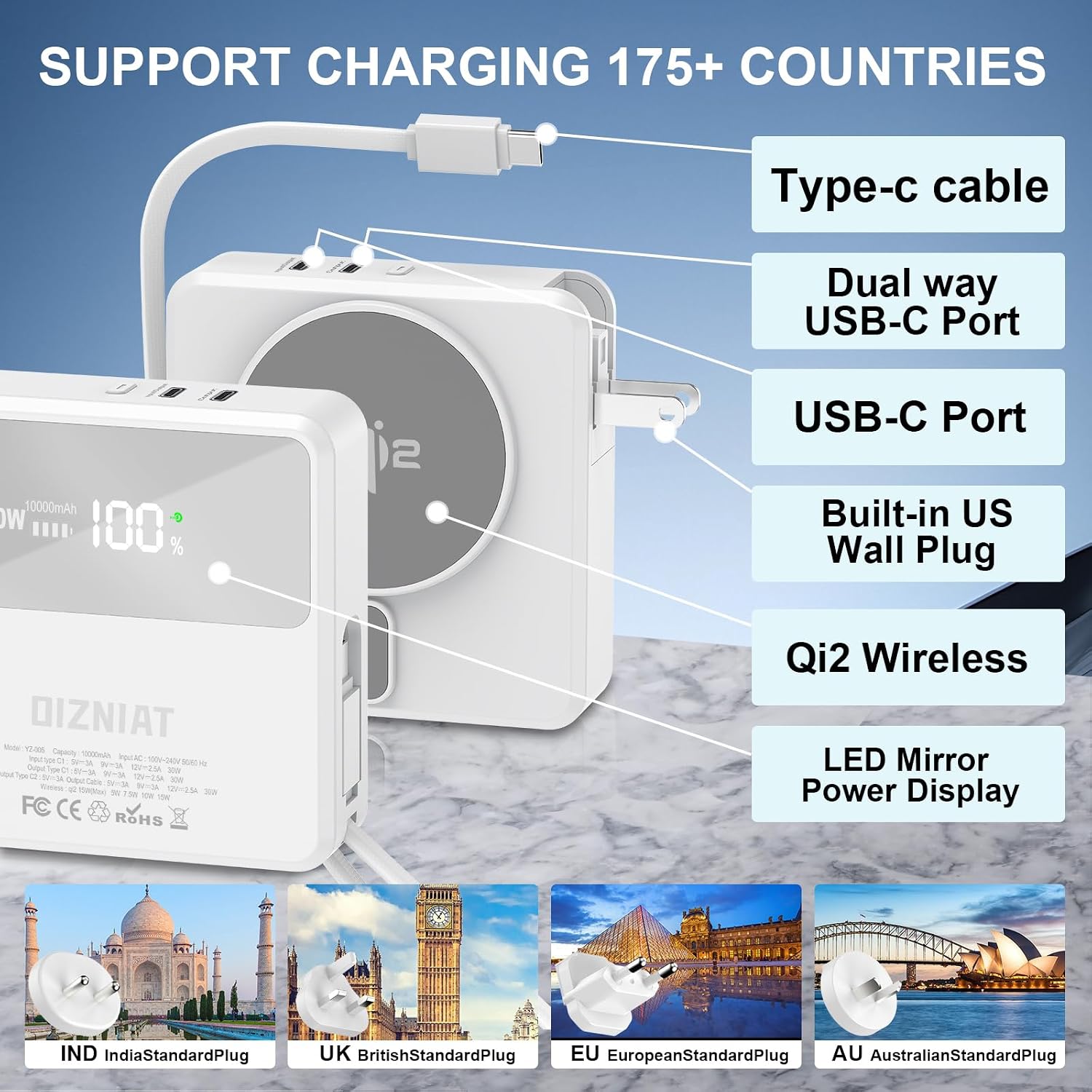
Image Description: A detailed view of the OIZNIAT YZ-004 Portable Charger highlighting its features: Type-C cable, dual-way USB-C port, USB-C port, built-in US wall plug, Qi2 wireless charging pad, and LED mirror power display. The image also shows icons for India, UK, EU, and AU standard plugs, indicating global compatibility.
Key Features:
- 10,000mAh Capacity: Provides multiple charges for various devices.
- Qi2 15W Magnetic Wireless Charging: Secure and efficient wireless power delivery with 11N magnetic pull.
- 30W Two-Way Fast Charging: Supports Power Delivery (PD) via USB-C port for rapid charging of devices and the power bank itself.
- Built-in Cables: Integrated USB-C cable for convenience.
- Built-in Wall Plug: Direct wall charging capability (US standard).
- International Plug Adapters: Includes adapters for UK, EU, AU, and India for global travel.
- LED Digital Display: Shows real-time battery percentage.
- Integrated Carrying Handle: The built-in USB-C cable doubles as a convenient handle.
Setup
Initial Charging
Before first use, fully charge your OIZNIAT Portable Charger. This can be done using the built-in wall plug or a USB-C cable.
- Using the Built-in Wall Plug: Extend the US wall plug from the side of the power bank and plug it directly into a standard wall outlet. The LED display will show the charging progress.
- Using a USB-C Cable: Connect a USB-C cable to the power bank's USB-C input/output port and the other end to a compatible USB wall adapter (not included).
Attaching International Adapters
For international travel, attach the appropriate adapter to the built-in US wall plug.
- Identify the correct adapter for your region (UK, EU, AU, or India).
- Align the adapter with the US wall plug and firmly push it into place until it clicks securely.
- Plug the assembled unit into the wall outlet.

Image Description: Two methods of charging the OIZNIAT YZ-004 Portable Charger are shown. On the left, the power bank is plugged directly into a wall outlet. On the right, it is being charged via a USB-C cable connected to a wall adapter.
Operating Instructions
The OIZNIAT Portable Charger offers multiple ways to charge your devices:
1. Wired Charging
- Using the Built-in USB-C Cable: Connect the integrated USB-C cable directly to your compatible device.
- Using External USB-C Ports: Connect your device's charging cable to one of the two USB-C output ports on the power bank.
- Using the Included USB-C to Lightning Cable: For Apple devices, use the provided USB-C to Lightning cable with one of the USB-C output ports.

Image Description: The OIZNIAT YZ-004 Portable Charger simultaneously charging four devices: an iPhone via wireless charging, a smartphone via the built-in USB-C cable, another smartphone via an external USB-C cable, and wireless earbuds via an external USB-C cable.
2. Wireless Charging (Qi2 Magnetic)
The power bank features Qi2 certified 15W magnetic wireless charging.
- Ensure your device is compatible with Qi2 magnetic wireless charging (e.g., iPhone 12-16 series running iOS 17.4 or later).
- Align your device with the magnetic charging pad on the power bank. The strong magnetic pull (11N) will secure your device in place.
- The LED display will indicate active wireless charging.

Image Description: An iPhone is magnetically attached to the OIZNIAT YZ-004 Portable Charger for wireless charging. The image emphasizes the secure 11N magnetic attachment and Qi2 compatibility for iPhone 12-16 series (iOS 17.4 and later).

Image Description: The OIZNIAT YZ-004 Portable Charger is shown attached to an iPhone, demonstrating compatibility with magnetic cases for iPhone 12, 13, 14, 15, and 16 series. A note indicates that it only works with iPhone-compatible magnetic cases, not non-magnetic ones.
LED Digital Display
The LED screen on the power bank displays the remaining battery percentage in real-time, allowing you to monitor its charge level.
Maintenance
- Cleaning: Use a soft, dry cloth to clean the surface of the power bank. Avoid using harsh chemicals or abrasive materials.
- Storage: Store the power bank in a cool, dry place away from direct sunlight and extreme temperatures.
- Battery Care: For optimal battery life, fully charge the power bank at least once every three months if not in regular use.
Troubleshooting
- Device Not Charging:
- Ensure the power bank has sufficient charge.
- Verify that cables are securely connected to both the power bank and the device.
- For wireless charging, ensure your device is properly aligned with the magnetic pad and is Qi2 compatible.
- Try a different cable or port.
- Power Bank Not Charging:
- Ensure the wall plug or USB-C cable is securely connected to a working power source.
- Check if the wall outlet is functional.
- If using the built-in wall plug, ensure it is fully inserted and supported, especially if the power bank feels heavy in the outlet.
- Charging Stops at 80% (iPhone):
This is a feature of iOS 17's thermal control strategy to protect your iPhone's battery if it gets too warm during charging. Charging will resume once the device cools down. Moving your iPhone to a cooler area may help.

Image Description: An iPhone screen displaying a "Charging On Hold" notification, explaining that charging will resume when the iPhone returns to normal temperature, a feature designed to protect the battery from overheating.
- Magnetic Attachment Issues:
- Ensure your device has magnetic charging capabilities or is using a compatible magnetic case.
- Remove any non-magnetic cases or accessories that might interfere with the magnetic connection.
Specifications
| Feature | Detail |
|---|---|
| Model Number | YZ-004 |
| Battery Capacity | 10,000 mAh |
| Wireless Charging Output | Qi2 15W (Max) |
| USB-C PD Output/Input | 30W Two-Way Fast Charging |
| Built-in Cable Output | 30W (Max) |
| Wall Plug Charging Input | 20W |
| Product Dimensions | 3.35 x 3.35 x 0.98 inches |
| Item Weight | 1.12 pounds |
| Connectivity | USB Type C, Wireless |
| Special Features | Built-in Cable, Built-in Wall Plug, Digital Display, Fast Charging, Wireless Charging |
Safety Information
- Do not expose the power bank to extreme temperatures, direct sunlight, or fire.
- Do not disassemble, modify, or attempt to repair the device.
- Keep out of reach of children.
- Avoid dropping or subjecting the power bank to strong impacts.
- Do not use if the device is damaged or swollen.
- Dispose of the product responsibly according to local regulations.
Warranty and Support
For warranty information or technical support, please refer to the contact details provided with your purchase or visit the official OIZNIAT website. Please retain your proof of purchase for warranty claims.