
Surtime 8911-White-54
Surtime 137 cm Ceiling Fan with Lights and Remote Control
Model: 8911-White-54
1. Introduction
Thank you for choosing the Surtime 137 cm Ceiling Fan. This modern ceiling fan combines efficient air circulation with versatile lighting, designed to enhance comfort in living rooms, kitchens, patios, and other covered outdoor areas. Featuring a silent reversible DC motor, 6 adjustable speeds, and a dimmable LED light with 3 color temperatures, this fan offers year-round comfort and convenience. This manual provides essential information for safe installation, operation, and maintenance of your new ceiling fan.

Figure 1.1: The Surtime 137 cm Ceiling Fan with integrated light, shown installed in a contemporary living space. The fan features five white blades and a central LED light fixture.
2. Safety Information
Please read all safety instructions carefully before installation and use. Failure to follow these instructions may result in electric shock, fire, or serious personal injury.
- Electrical Safety: Always disconnect power at the main circuit breaker before attempting any installation, maintenance, or repair. Ensure all wiring is done in accordance with national and local electrical codes. If you are unsure about wiring, consult a qualified electrician.
- Mounting Surface: The mounting surface must be capable of supporting the fan's weight (approximately 8.08 kg). For secure installation, the fan should be mounted to a structural ceiling component such as a concrete slab or a wooden beam. Do not mount to plasterboard or drywall without proper reinforcement.
- Blade Clearance: Ensure there is adequate clearance between the fan blades and any obstacles (walls, furniture, etc.). A minimum clearance of 2.3 meters (7.5 feet) from the floor to the bottom of the fan blades is recommended.
- Fan Operation: Do not insert any objects into the path of the rotating blades. Keep hands, hair, and clothing away from the fan blades during operation.
- Children and Pets: Keep children and pets away from the fan during operation and installation.
3. Package Contents
Carefully unpack all components and check against the list below. If any items are missing or damaged, contact your retailer immediately.
- Ceiling Fan Unit with Integrated LED Light
- Remote Control (with batteries)
- Downrods (10 cm and 20 cm lengths)
- Mounting Hardware (screws, brackets, etc.)
- User Manual (English)
4. Setup and Installation
Installation requires basic electrical knowledge and DIY skills. It is recommended to have two people for installation due to the fan's weight. Ensure power is disconnected before starting.
4.1 Choosing the Right Location
Select a location with a strong ceiling structure (concrete or wood beam) capable of supporting the fan. Ensure sufficient clearance from walls and other objects for optimal airflow and safety.
4.2 Assembly Steps
- Prepare Mounting Bracket: Secure the mounting bracket to the ceiling joist or a suitable electrical junction box.
- Assemble Downrod: Choose either the 10 cm or 20 cm downrod based on your ceiling height and desired fan position. Attach the chosen downrod to the fan motor assembly.
- Wire Connections: Carefully connect the fan's electrical wires to your household wiring according to the provided wiring diagram. Ensure all connections are secure and insulated.
- Mount Fan: Lift the fan assembly and hang it onto the mounting bracket. Secure it firmly with the provided screws.
- Attach Blades: Securely attach the five fan blades to the motor housing.
- Install Lampshade: Attach the extra-large lampshade to the fan's light fixture.

Figure 4.1: Product dimensions and mounting options. The fan has a diameter of 137 cm and can be installed with 10 cm or 20 cm downrods, offering total heights of 31.5 cm or 41.5 cm respectively. It also illustrates flush mount and angled mount possibilities.
For a visual guide, please refer to the official installation video:
Watch Installation Video GuideThis link directs to an external video guide for installation assistance.
5. Operating Instructions
Your Surtime ceiling fan can be controlled via the included remote control or a dedicated smartphone application.
5.1 Remote Control Functions

Figure 5.1: The remote control layout with labeled buttons for fan and light functions. It also shows QR codes for the companion app and an installation video.
- Light On/Off: Press to turn the light on or off.
- 3 Colors Switch: Cycle through Warm Light (3000K), Natural Light (4500K), and White Light (6000K).
- Brightness +/-: Adjust the light intensity (continuous dimming).
- Color Temperature +/-: Fine-tune the light color temperature.
- Code Matching: Used for pairing the remote with the fan.
- Forward/Reverse (F/R): Changes the direction of blade rotation for summer (downdraft) or winter (updraft) modes.
- Wind Speed Control (1-6): Select from 6 fan speeds. Speed 1-2 for sleep, 3-4 for family, 5-6 for summer cooling.
- Timer (2H): Set the fan to turn off automatically after 2 hours.
- Night Light: Activates a low-intensity light mode.
- Fan Off: Turns off the fan motor.
5.2 App Control
Download the official Surtime fan app by scanning the QR code provided on the remote control diagram (Figure 5.1) or by visiting the link below. The app offers full control over all fan and light functions, similar to the remote control.
This link directs to the official application download page.
5.3 Fan Modes (Summer/Winter)
Your fan features a reversible DC motor for year-round use:
- Summer Mode (Downdraft): Blades rotate counter-clockwise, pushing cool air downwards to create a refreshing breeze.
- Winter Mode (Updraft): Blades rotate clockwise, drawing warm air up towards the ceiling and distributing it evenly throughout the room, helping to circulate heated air.
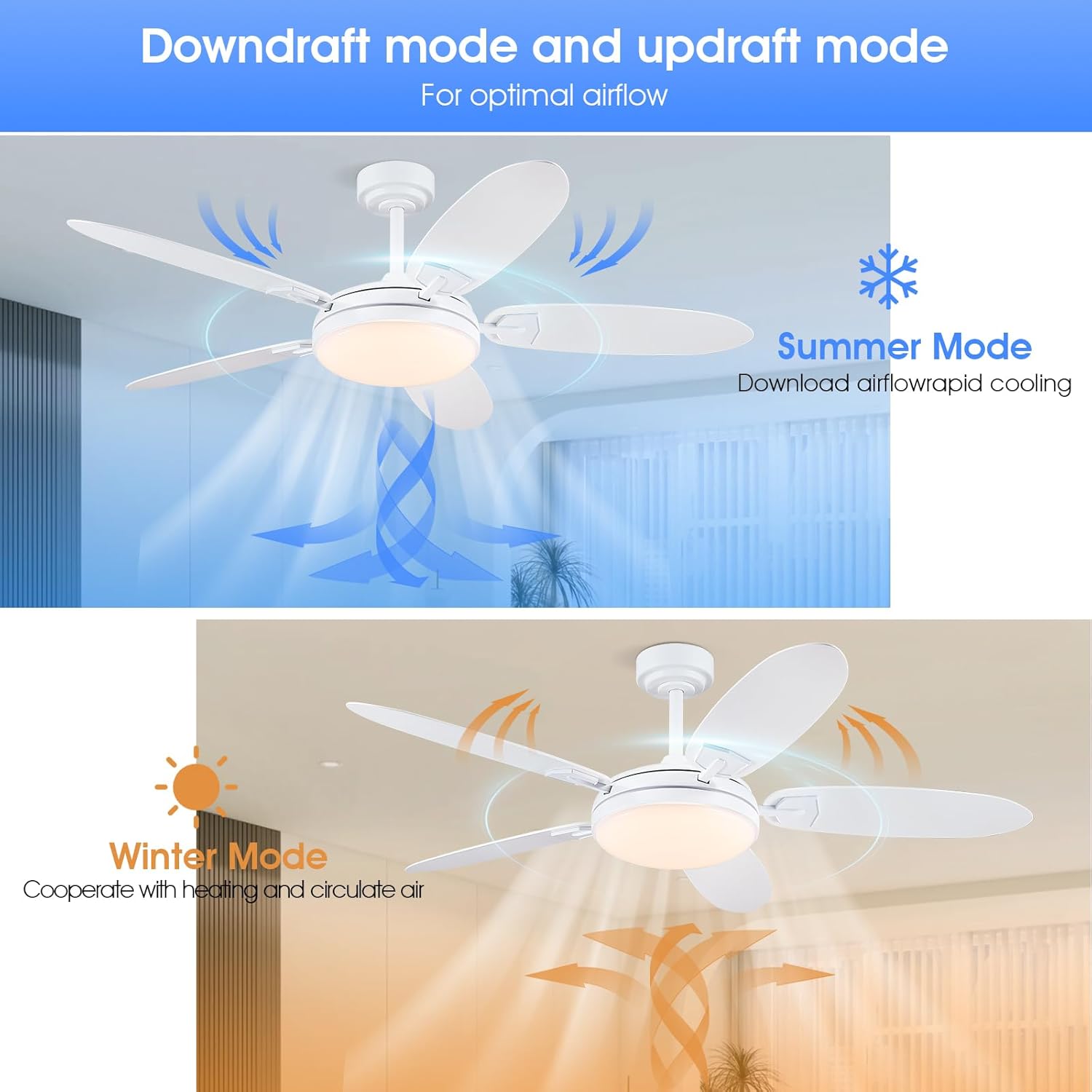
Figure 5.2: Visual representation of the fan's downdraft (summer) and updraft (winter) modes, showing airflow patterns.
5.4 Light Functions
The integrated LED light offers customizable illumination:
- Color Temperatures: Choose between Warm Light (3000K), Natural Light (4500K), and White Light (6000K) to suit your mood or activity.
- Continuous Dimming: Adjust the brightness smoothly from 0% to 100%.
- Memory Function: The light will remember your last brightness and color temperature setting when turned off and on again.

Figure 5.3: Examples of the fan's customizable light effect, displaying warm, natural, and white light options.
6. Maintenance
Regular maintenance ensures optimal performance and longevity of your ceiling fan.
- Cleaning: To clean the fan, wipe surfaces with a soft, damp cloth. Do not use abrasive cleaners or solvents, as they may damage the finish. Ensure the fan is completely dry before resuming operation.
- Blade Cleaning: Dust the fan blades regularly to prevent dust buildup, which can affect balance and airflow.
- Tighten Screws: Periodically check and tighten all screws on the fan and mounting hardware to ensure secure operation.
- No Lubrication Required: The DC motor is permanently lubricated and does not require additional oiling.
7. Troubleshooting
If you encounter any issues with your fan, refer to the following common problems and solutions:
| Problem | Possible Cause | Solution |
|---|---|---|
| Fan does not start | No power supply; Loose wire connections; Remote control battery low. | Check circuit breaker; Ensure all wires are securely connected; Replace remote control batteries. |
| Light does not work | Loose wire connection; LED module issue. | Check light wiring connections; Contact customer support if LED module is faulty. |
| Fan wobbles | Loose blade screws; Unbalanced blades; Loose mounting bracket. | Tighten all blade screws; Check blade balance (balancing kit may be needed); Ensure mounting bracket is secure. |
| Remote control not responding | Low battery; Not paired with fan. | Replace batteries; Follow code matching instructions in Section 5.1. |
| Excessive noise | Loose screws; Motor issue; Obstruction. | Check and tighten all screws; Ensure no objects are interfering with blades; Contact support if motor noise persists. |
8. Specifications
| Feature | Detail |
|---|---|
| Brand | Surtime |
| Model Number | 8911-White-54 |
| Dimensions (Diameter x Height) | 137 cm x 41.5 cm (with 20cm downrod) |
| Weight | Approx. 8.08 kg |
| Color | White |
| Motor Type | High-efficiency Reversible DC Motor |
| Motor Power | 30W - 32W |
| Voltage Compatibility | 90-265 Volts |
| Noise Level | <35 dB |
| Number of Blades | 5 |
| Fan Speeds | 6 adjustable speeds |
| Light Type | Integrated LED |
| LED Power | 28W |
| Luminous Flux | 3640LM |
| Color Temperatures | 3000K (Warm), 4500K (Natural), 6000K (White) |
| Control Methods | Remote Control, Smartphone App |
| Special Features | Timer (2H), Memory Function for Light, Reversible Airflow |
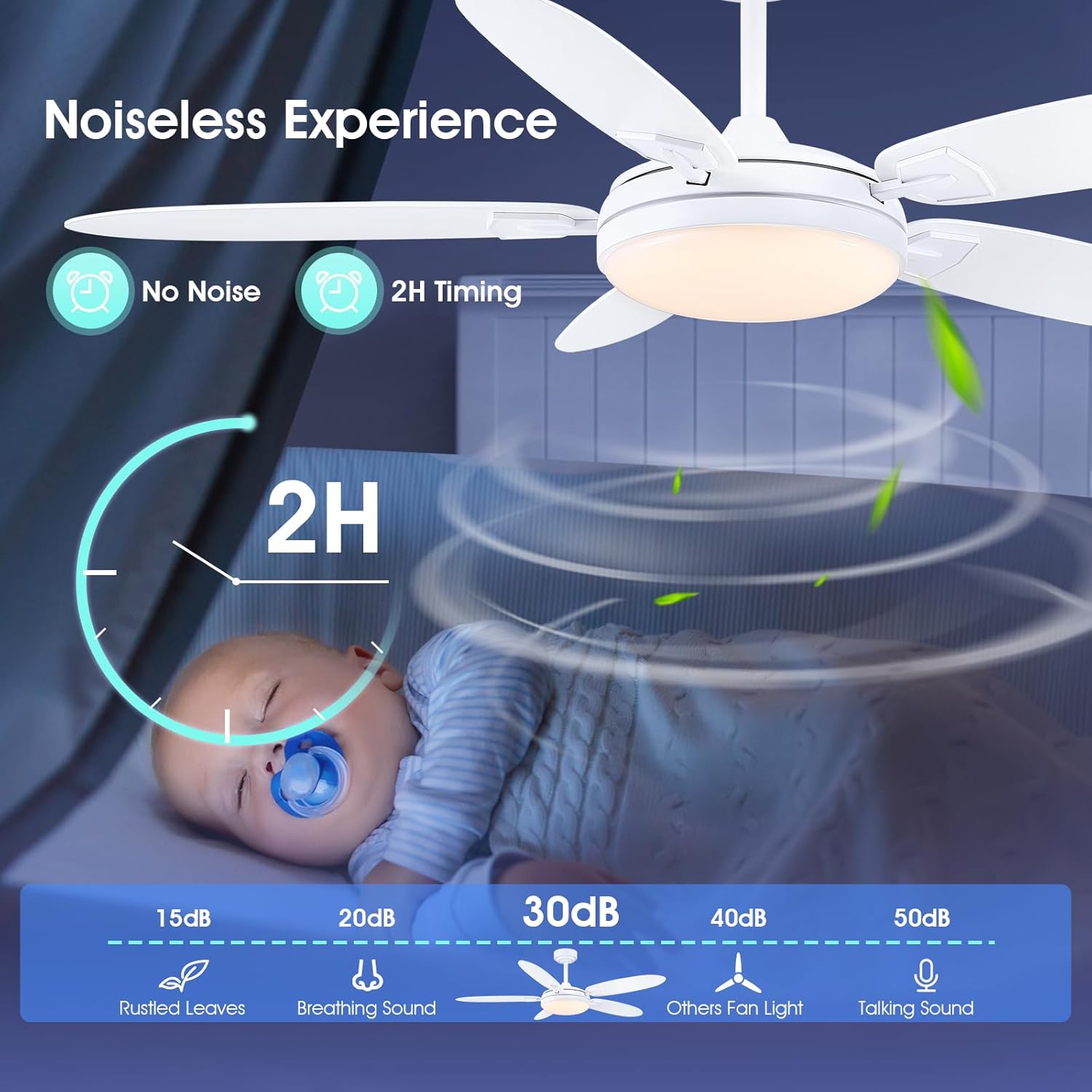
Figure 8.1: The fan's quiet operation, demonstrating noise levels below 35 dB, comparable to rustling leaves or breathing sounds.
9. Warranty and Support
For warranty information, please refer to the documentation provided at the time of purchase or contact your retailer. For technical support or further assistance, please reach out to Surtime customer service.
This manual and the online video guide are designed to assist you with installation and operation. Should you require additional help, do not hesitate to contact us.
Related documents8911-White-54


Ask a question about this manual
Ask about setup, troubleshooting, compatibility, parts, safety, or missing instructions. Manuals+ will review the question and use this page’s manual context to help answer it.