
Introduction
The Aokeo AK-58 low profile adjustable microphone boom arm stand is designed to enhance your audio recording and streaming experience by providing extreme stability and reducing visual obstruction. Its robust metal construction ensures durability and reliable performance for various microphones.
The low-profile design allows the microphone arm to extend from beneath your computer screen, saving valuable desktop space and minimizing distractions. With flexible adjustment options and integrated cable management, the AK-58 stand offers a clean and efficient setup for gaming, podcasting, recording, and streaming.
Package Contents
Please verify that all items listed below are included in your package:
- Arm stand (x1)
- Arm base (x1)
- 3/8" to 1/4" adapter (x1)
- Nut (x1)
- 5/8" to 3/8" adapter (x1)
- Microphone Clip (x1)
- Hook and Loop Strip (x1)
- User Manual (x1)
- Packing box (x1)

Figure 1: Visual representation of the Aokeo AK-58 package contents, including the arm stand, base, adapters, and accessories.
Setup Instructions
1. Mounting the Desk Clamp
The desk clamp is designed for extreme stability and can be securely attached to tables with a thickness of less than 7cm (2.75 inches). Ensure the clamp is tightened firmly to prevent any movement during use.
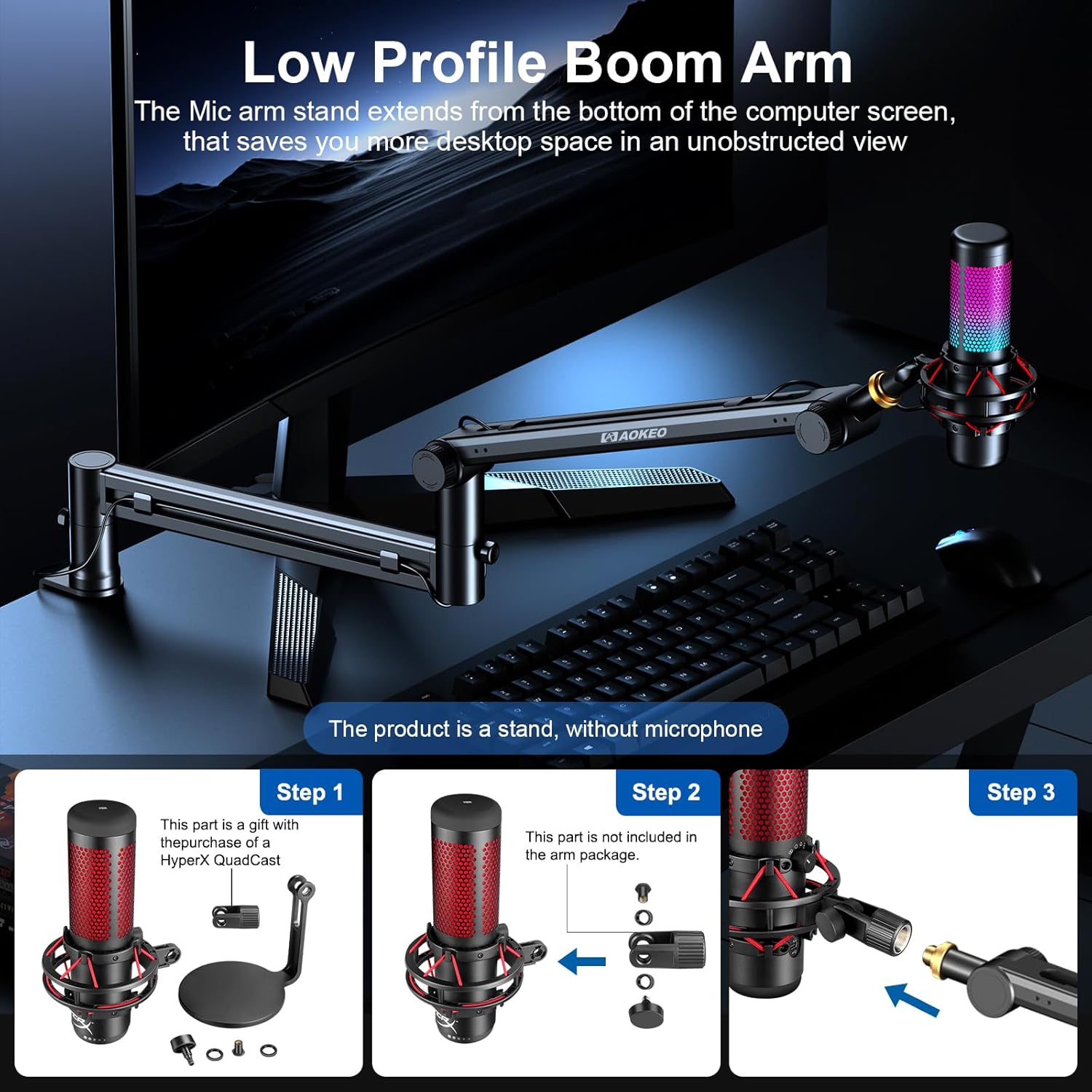
Figure 2: Step-by-step guide for installing the desk clamp onto a table surface.
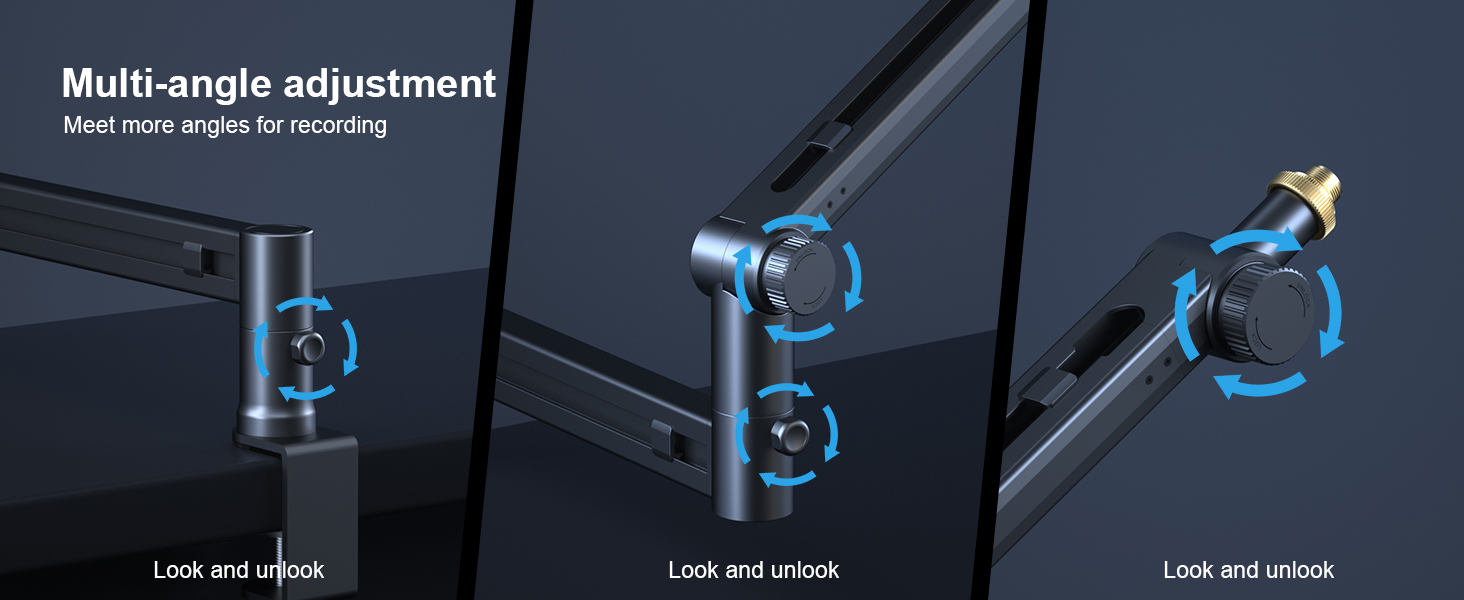
Figure 3: Illustration detailing the maximum compatible table thickness for the desk clamp (70mm / 2.75 inches).
2. Assembling the Boom Arm
Insert the main boom arm into the desk clamp's vertical slot. The arm features multiple joints for flexible positioning. Use the provided screws to fix the bracket arm and prevent shaking.

Figure 4: Overview of the boom arm's dimensions and load-bearing capacity (up to 2KG / 4.4 lbs).
3. Attaching the Microphone
The AK-58 mic stand desk comes with 3/8'' to 1/4'' and 3/8'' to 5/8'' adapters, ensuring compatibility with most microphones or microphone shock mounts on the market. Screw your microphone or shock mount onto the end of the boom arm. Ensure it is securely fastened.

Figure 5: Demonstrates the wide compatibility of the boom arm with various microphones using the included adapters.

Figure 6: Instructions for using the fixing screws to secure the microphone at the desired angle.
Operating Instructions
1. Flexible Adjustment
Both arms of the stand can rotate 360°, and the arm with the microphone attached can swing up and down 180°. This allows for precise positioning of your microphone to suit your needs, whether for gaming, podcasting, or recording.

Figure 7: Visual guide to the 360° rotation and 180° swing capabilities of the boom arm.

Figure 8: Detailed view of the multi-angle adjustment points on the boom arm.
2. Cable Management
The boom arm features a clever subsection design with detachable lock catches (x6) to hide and secure your microphone cable. This reduces line-of-sight distractions and maintains a tidy workspace.

Figure 9: Illustration of the integrated cable management system with detachable lock catches.
Maintenance
To ensure the longevity and optimal performance of your Aokeo AK-58 microphone boom arm stand, follow these simple maintenance guidelines:
- Cleaning: Wipe down the arm and clamp regularly with a soft, dry cloth to remove dust and debris. Avoid using harsh chemicals or abrasive cleaners, as these may damage the finish.
- Joints: Periodically check the tightness of all adjustment knobs and screws. If you notice any looseness, gently tighten them to maintain stability. Do not overtighten.
- Cable Management: Ensure cables are properly routed through the designated channels and secured with the hook and loop strips or detachable catches. This prevents strain on the cables and keeps your workspace organized.
- Load Capacity: Do not exceed the maximum load capacity of 2KG (4.4 lbs) to prevent damage to the arm and ensure stability.
Troubleshooting
If you encounter any issues with your Aokeo AK-58 microphone boom arm stand, please refer to the following common troubleshooting tips:
- Arm is unstable or sags:
- Ensure the desk clamp is securely tightened to the table.
- Check all adjustment knobs and screws on the arm joints and tighten them if loose.
- Verify that the microphone's weight does not exceed the maximum load capacity of 2KG (4.4 lbs).
- Microphone does not fit:
- Confirm you are using the correct adapter (3/8" to 1/4" or 3/8" to 5/8") for your microphone or shock mount.
- Ensure the adapter is fully screwed into both the arm and the microphone/shock mount.
- Cables are not staying in place:
- Utilize all provided detachable lock catches and hook and loop strips to secure the cable along the arm's channels.
- Ensure the cable is properly seated within the arm's cable management channels.
Specifications
| Feature | Detail |
|---|---|
| Model Number | AK-58 |
| Material | Metal |
| Item Weight | 3.59 pounds |
| Package Dimensions | 16.97 x 9.33 x 3.07 inches |
| Maximum Load Capacity | 2KG (4.4 lbs) |
| Desk Clamp Compatibility | Tables less than 7cm (2.75 inches) thick |
| Rotation (Arm Joints) | 360° |
| Swing (Microphone Arm) | 180° |
| Connector Type | 3/8-inch threaded mount (with 1/4" and 5/8" adapters) |
Official Product Videos
Aokeo AK-58 Desk Low Profile Adjustable Mic Boom Arm Stand Overview
Video 1: An official product video from Aokeo US demonstrating the features and functionality of the AK-58 microphone boom arm stand.
AK-58i Microphone Stand Demonstration
Video 2: An official product video from Aokeo Technology Limited showcasing the AK-58i microphone stand, which shares similar features with the AK-58 model.
Warranty and Support
This Aokeo product provides one year after-sales service. If you have any questions or require assistance, please feel free to contact us. Our support team is available to help with any inquiries regarding your microphone boom arm stand.