
arungo M4
arungo M4 MP3 Player Instruction Manual
Model: M4
Introduction
This manual provides detailed instructions for the safe and efficient use of your arungo M4 MP3 Player. Please read this manual thoroughly before operating the device and retain it for future reference.

Image: Front view of the arungo M4 MP3 Player, showcasing its compact design and screen.
Package Contents
Verify that all items are present in your package:
- 1 x arungo M4 Bluetooth MP3 Player (8GB built-in memory)
- 1 x 128GB Micro SD Card (pre-inserted)
- 1 x Earphones
- 1 x Charging Cable (USB)
- 1 x User Manual
Device Overview
The arungo M4 MP3 Player features a 2.4-inch screen and touch-sensitive controls for easy navigation. It includes a built-in speaker and supports various functions.
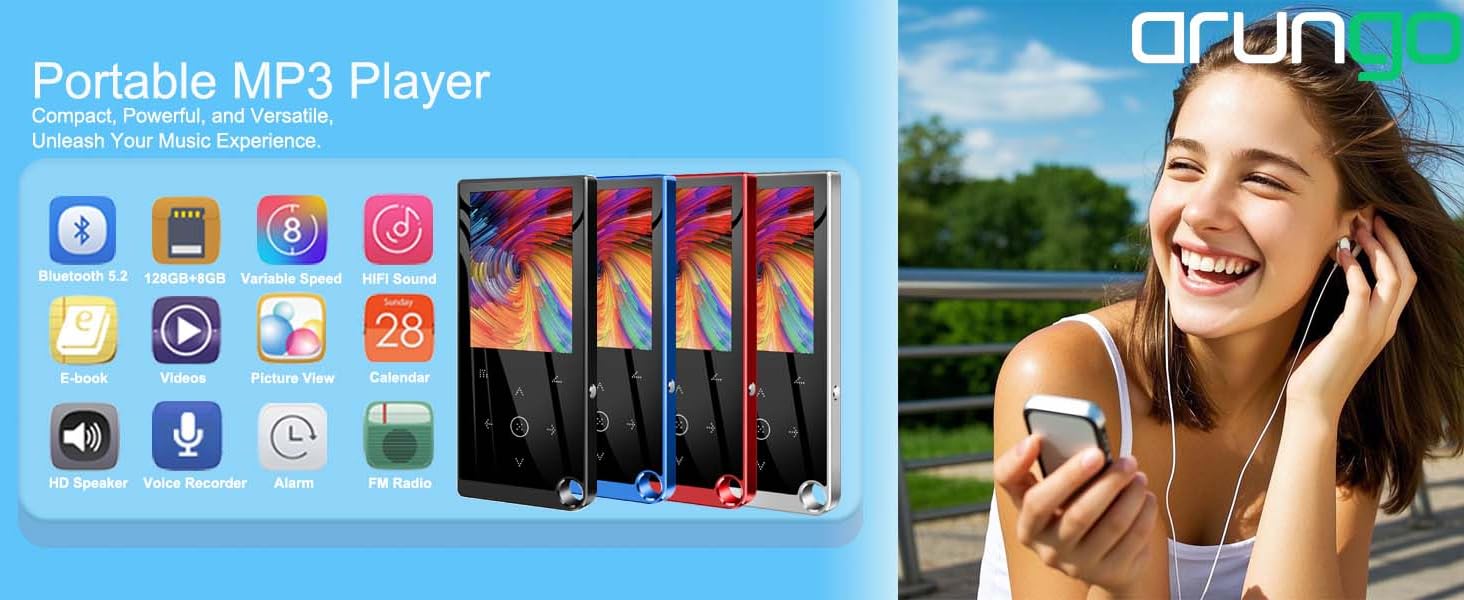
Image: Overview of the MP3 player's main functions including Music, Video, FM Radio, Bluetooth, Recording, E-book, Folder View, Tools, and Settings.
Key Features:
- Large Storage Capacity: 8GB built-in memory with an included 128GB Micro SD card, totaling 136GB.
- Bluetooth 5.2: For stable connection with Bluetooth headsets or speakers. Note: Does not support connection to car or phone Bluetooth.
- HiFi Lossless Sound Quality: Supports MP3, WMA, WAV, APE, FLAC audio formats.
- Multifunctional: FM Radio, Voice Recording, Picture Browsing, Video Playing, E-Book (TXT format), Time Screensaver, One-button Lock Screen.
- Built-in Speaker: For audio playback without earphones.
Setup
1. Charging the Device
Before first use, fully charge the MP3 player. Use the provided USB charging cable to connect the device to a computer's USB port or a compatible USB wall adapter (not included).
- The battery indicator on the screen will show charging status.
- A full charge typically takes 2-3 hours.
- The device uses 1 P76 battery (included).
2. Power On/Off
- To power on: Press and hold the power button until the screen lights up.
- To power off: Press and hold the power button, then select "Power Off" on the screen.
- To lock/unlock screen: Briefly press the power button.
3. Inserting/Managing the Micro SD Card
Your device comes with a 128GB Micro SD card pre-inserted. If you need to remove or insert a different card:
- Locate the Micro SD card slot on the side of the player.
- To remove: Gently push the card inward until it clicks, then release. The card will spring out.
- To insert: Align the card with the slot (gold contacts facing down) and push it in until it clicks into place.
Image: Diagram illustrating the 8GB built-in memory and the 128GB TF card included, highlighting the total 136GB storage and 2.4-inch screen.
4. Connecting Earphones
Plug the included earphones into the 3.5mm audio jack on the player. For FM radio functionality, wired earphones must be connected as they serve as the antenna.
Operating Instructions
1. Basic Navigation
The player uses touch-sensitive buttons for navigation. The central button is for selection/play/pause, and the surrounding buttons are for directional movement (up, down, left, right), menu, and back functions.

Image: Close-up of the MP3 player's touch keys, indicating high sensitivity for user-friendly navigation.
2. Music Playback
- From the main menu, select "Music".
- Browse your music by Artist, Album, Songs, Playlists, etc.
- Select a song to begin playback.
- Use the navigation buttons to play/pause, skip tracks, or adjust volume.
- Supported audio formats include MP3, WMA, WAV, APE, and FLAC.

Image: Icon indicating HiFi Sound quality, supporting MP3, WMA, APE, FLAC, and WAV formats.
3. Bluetooth Connection
- From the main menu, select "Bluetooth".
- Turn Bluetooth "On".
- The player will search for nearby Bluetooth devices.
- Select your Bluetooth headset or speaker from the list to pair.
- Once paired, audio will be routed to the connected device.
Important: The arungo M4 MP3 Player supports Bluetooth 5.2 for connecting to headphones and speakers only. It cannot connect to car Bluetooth systems or smartphones.

Image: Depicts the MP3 player connecting to various Bluetooth devices like headphones and speakers, emphasizing stable Bluetooth 5.2 connectivity.
4. FM Radio
- Ensure wired earphones are connected; they serve as the antenna.
- From the main menu, select "FM Radio".
- You can choose between Manual Tuning, Auto Tuning, or preset stations.

Image: Screen displaying the FM Radio interface with frequency tuning, and a note about wired earphones being required for antenna function.
5. Voice Recorder
- From the main menu, select "Recording".
- Choose "Start Voice Recording" to begin.
- Press the appropriate button to pause or stop recording.
- Recordings are saved and can be accessed via the "Recordings Library".
Image: Depicts the MP3 player being used as a portable voice recorder, emphasizing its small and convenient design.
6. E-Book Function
The player supports E-books in TXT format.
- Transfer TXT files to the "E-book" folder on the device.
- From the main menu, select "E-book".
- Select a file to open and read.
7. Video Playback
The player supports AVI/AMV video formats. If your video files are in other formats, conversion software may be required.
- Transfer compatible video files to the "Video" folder on the device.
- From the main menu, select "Video".
- Select a video file to play.

Image: Icon indicating support for AVI/AMV video formats, with a note about potential conversion software.
8. Other Functions
- Picture Browsing: View image files stored on the device.
- File Browser: Access and manage files and folders directly on the player.
- Time Screensaver: Configure the screen to display time when idle.
- One-button Lock Screen: Quickly lock the screen to prevent accidental touches.
- AB Repeat: Repeat a specific section of an audio track.
- Speed Playback: Adjust playback speed (e.g., for audiobooks).
- Equalizer: Customize audio output settings.
Maintenance
- Cleaning: Use a soft, dry cloth to clean the device. Avoid liquid cleaners or abrasive materials.
- Storage: Store the MP3 player in a cool, dry place away from direct sunlight and extreme temperatures.
- Battery Care: To prolong battery life, avoid fully discharging the battery frequently. Charge the device regularly, even if not in use for extended periods.
- Avoid Impact: Protect the device from drops and impacts, especially the screen, which can be fragile.
Troubleshooting
Device Not Turning On
- Ensure the device is fully charged. Connect it to a power source for at least 30 minutes.
- Press and hold the power button for 10-15 seconds to perform a hard reset.
Bluetooth Connection Issues
- Ensure Bluetooth is enabled on both the MP3 player and the target device (headset/speaker).
- Make sure the target device is in pairing mode.
- Verify that you are not attempting to connect to a car or phone Bluetooth, as these are not supported.
- Move the devices closer to each other to ensure they are within range.
No Sound
- Check the volume level on the player and any connected Bluetooth devices.
- Ensure earphones are properly plugged in or Bluetooth is correctly paired.
- If using earphones, try a different pair to rule out faulty earphones.
- If using the built-in speaker, ensure it is enabled and not muted.
Device Freezes or Becomes Unresponsive
- Press and hold the power button for an extended period (10-15 seconds) to force a restart.
- If the issue persists, connect the device to a computer and try to access its storage.
Cannot Play Certain Files
- Verify that the file format is supported (e.g., MP3, WMA, WAV, APE, FLAC for audio; AVI/AMV for video; TXT for e-books).
- Ensure the file is not corrupted. Try playing another file.
- For video files, ensure they are in AVI/AMV format. Conversion may be necessary for other formats.
Specifications
| Feature | Detail |
|---|---|
| Product Dimensions | 0.3 x 1.9 x 4.2 inches |
| Item Weight | 4.2 ounces |
| Item Model Number | M4 |
| Batteries | 1 P76 battery (included) |
| Brand | arungo |
| Model Name | M4 |
| Special Features | Built-In Speaker, FM Radio, Video Playback, Voice Recorder |
| Connectivity Technology | Aux, Bluetooth, USB |
| Memory Storage Capacity | 136 GB (8GB built-in + 128GB Micro SD card) |
| Color | Blue |
| Screen Size | 2.4 Inches |
| Compatible Devices | Headphone, Personal Computer, Speaker |
| Media Type | Micro SD |
Warranty and Support
arungo products undergo strict quality inspection. If you encounter any usage issues or require support, please contact arungo customer service.
- Contact: Send a message to the Amazon seller message box or use the after-sales email provided with your purchase.
- Response Time: Customer service typically replies within 24 hours.
Ask a question about this manual
Ask about setup, troubleshooting, compatibility, parts, safety, or missing instructions. Manuals+ will review the question and use this page’s manual context to help answer it.