
1. Introduction
The Kaedear KDR-E2 is a motorcycle junction power relay designed to simplify the management and distribution of power to multiple electrical accessories on your motorcycle. This unit allows for easy connection of up to four electrical components, providing a total output of 20A at DC12V, activated by the ACC power. Its compact design and waterproof features make it suitable for various installation environments.

An overview of the Kaedear KDR-E2 Motorcycle Junction Power Relay, highlighting its compact design and multiple output terminals.
2. Product Features
- Direct Connection: Each of the four output terminals allows direct wiring connection without the need for crimp terminals. Simply strip the wire insulation, insert the copper wire, and tighten the bolt. This design simplifies the addition of electrical components.
- Compact Design: The unit's small size makes it easy to install even in narrow spaces, such as under the motorcycle seat.
- Key-ON Interlock & High-Capacity Power Supply: The relay utilizes ACC power, enabling it to distribute a total of 20A to up to four systems, ensuring accessories are powered only when the ignition is on.
- Waterproof Silicone Cap: Equipped with a silicone cap to help prevent rain ingress. Please note that the product is not completely waterproof. For optimal drainage, ensure wiring is installed downwards.
- Easy Fuse Management: Fuses are easily accessible by flipping up the silicone cap, allowing for convenient inspection and replacement using a circuit tester.
- Integrated Accessory Management: Ideal for managing power to various motorcycle accessories such as smartphone holders (with Qi charging or USB power), grip heaters, and other USB-powered devices.
3. Package Contents
Verify that all the following items are included in your package:
- 4-output relay unit (with 5A fuses x 4)
- Crimp terminal conversion cable
- Electrical tap x 3
- Mount base
- Double-sided tape
- Cable ties x 2
- Waterproof cover
- Rubber ring
- Low-profile fuses (2A / 3A)
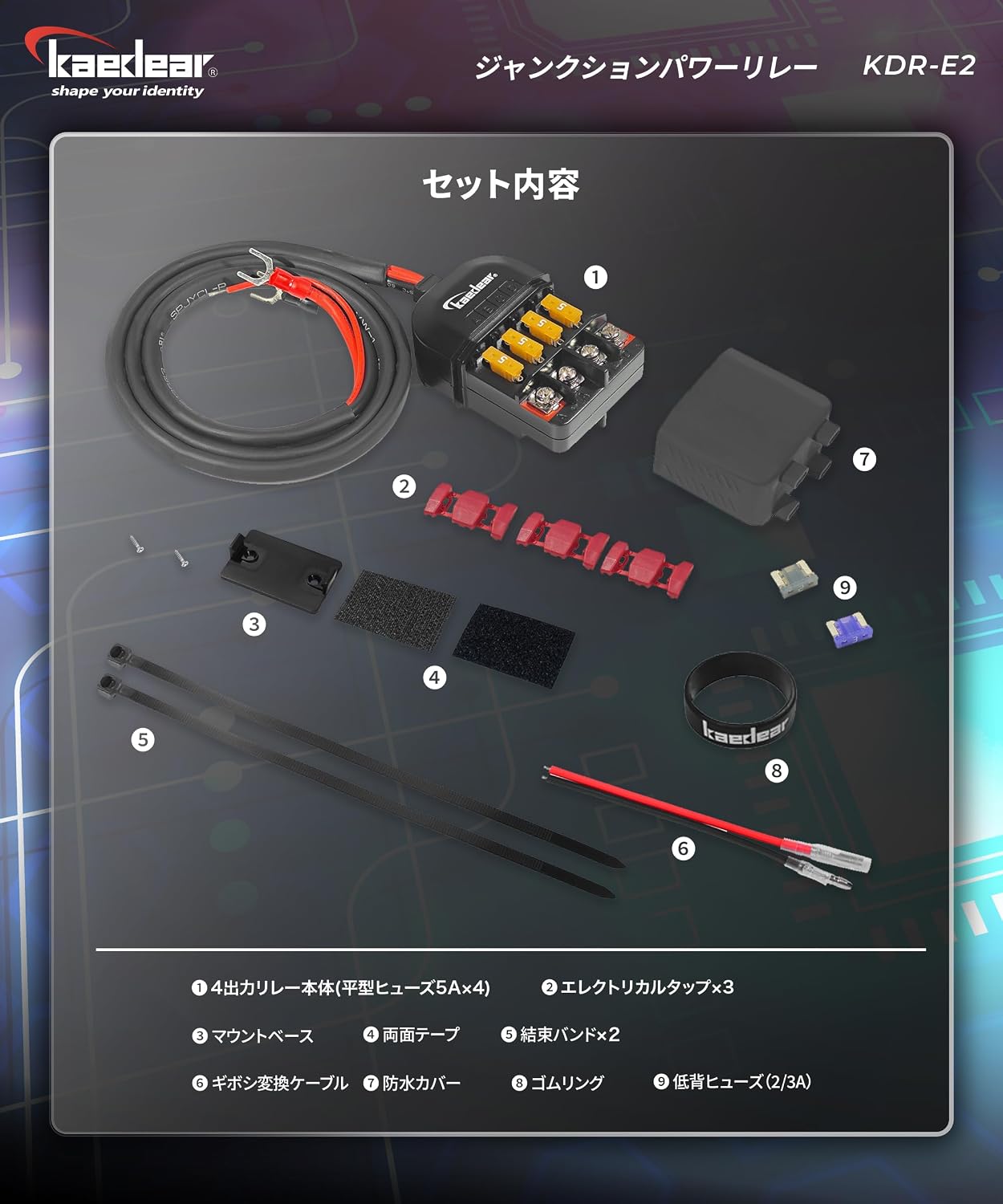
A complete view of all items provided with the Kaedear KDR-E2, including the relay unit, fuses, cables, mounting hardware, and waterproof accessories.
4. Safety Precautions
- Professional Installation Recommended: Installation requires specialized knowledge and skills. If you are unsure, please consult a qualified technician.
- Wiring Direction: To prevent water immersion, always ensure the wiring is installed with a downward orientation for proper drainage.
- Corrosion Risk: While the terminals are rust-proofed, corrosion may occur depending on the specific usage environment. Regular inspection is recommended.
- Fuse Handling: Low-profile fuses are delicate. Handle them with care when removing or inserting to prevent damage.
- Voltage Drop: When connecting accessories, ensure proper grounding and check for any significant voltage drop, especially if using non-standard terminals.

Visual guidance on correct and incorrect wiring practices, emphasizing the importance of proper grounding and checking for voltage drop.
5. Setup and Installation
5.1 Direct Wiring Connection
The KDR-E2 features a direct connection system for its output terminals:
- Strip approximately 5-7mm of insulation from the end of the accessory wire.
- Insert the exposed copper wire into the desired output terminal (A, B, C, or D).
- Tighten the screw on the terminal firmly to secure the wire.
This method eliminates the need for crimp terminals, simplifying the wiring process.

Illustrates how to connect wires directly to the relay terminals by stripping the insulation and tightening the bolts, eliminating the need for crimp terminals.
5.2 Mounting the Unit
The compact design of the KDR-E2 allows for flexible mounting. Use the provided mount base and screws or the double-sided tape to secure the unit in a suitable location, such as under the seat or within a fairing. Ensure the chosen location is protected from direct exposure to heavy water spray.

Shows the compact dimensions (60x40x25mm) of the relay and options for mounting using the included mount base or double-sided tape, suitable for narrow spaces.
5.3 Waterproof Cover Installation
To enhance water resistance, install the silicone waterproof cover and rubber ring:
- Pass the main wiring through the waterproof cover.
- Connect the wires to the main unit as described in section 5.1.
- Fit the waterproof cover onto the unit.
- Secure the cover with the provided rubber ring.
Remember to orient the wiring downwards for drainage.

Step-by-step guide on how to install the silicone waterproof cover and secure it with the rubber ring to protect against rain. Note: The product is not completely waterproof.
6. Operating Instructions
The Kaedear KDR-E2 is designed for simple operation, integrating with your motorcycle's ACC power circuit. Once correctly installed, the relay will automatically provide power to connected accessories when the motorcycle's ignition is turned to the 'ON' position (Key-ON interlock). Power will be cut when the ignition is turned 'OFF'.
This ensures that your accessories do not drain the battery when the motorcycle is not in use.

A visual representation of the relay's ability to distribute a total of 20A to four systems, activated by the ACC power, with a wiring length of 265mm.
Official video demonstrating the functionality and wiring of the Kaedear KDR-E2 Junction Power Relay, illustrating its power distribution capabilities.
7. Maintenance
7.1 Fuse Management
The KDR-E2 is designed for easy fuse inspection and replacement. If an accessory stops working, the fuse for that circuit may have blown:
- Carefully lift the silicone cap to expose the fuses.
- Visually inspect the fuses for a broken filament. A circuit tester can also be used for more precise diagnosis.
- If a fuse is blown, gently pull it out. Remember that low-profile fuses are fragile, so handle with care.
- Replace the blown fuse with a new fuse of the correct amperage (e.g., 5A, 2A, or 3A as supplied). Using a fuse with an incorrect amperage can damage the unit or connected accessories.
- Ensure the silicone cap is properly re-seated after maintenance to maintain water resistance.
7.2 General Care
Periodically check the wiring connections for tightness and inspect the unit for any signs of corrosion, especially in harsh environments. Keep the unit clean and free from excessive dirt or debris.
8. Troubleshooting
- No Power to Accessories:
- Check if the motorcycle ignition is in the 'ON' position.
- Inspect the fuses as described in the Maintenance section. Replace any blown fuses.
- Verify all wiring connections (battery +, -, ACC, and accessory outputs) are secure and correctly connected.
- Ensure there is no significant voltage drop in the wiring.
- Intermittent Power:
- Check for loose wiring connections at the relay terminals or accessory side.
- Inspect for any signs of corrosion on the terminals or wires.
- Water Ingress:
- Ensure the waterproof silicone cap and rubber ring are correctly installed and sealed.
- Verify that the wiring is routed downwards from the unit to facilitate drainage.
If problems persist, please refer to the online instruction manual or contact Kaedear customer support.
9. Specifications
| Specification | Value |
|---|---|
| Input Voltage | 12-16V |
| Maximum Output | 4 systems, total 20A |
| Body Size | 60 × 40 × 25 mm |
| Wiring Length | 265 mm |
| Material | Polycarbonate |
| Connection Method | Battery +, -, ACC (Accessory Power) |
10. Warranty and Support
10.1 Manufacturer Warranty
The Kaedear KDR-E2 comes with a 1-year manufacturer's warranty from the date of purchase. This warranty covers defects in materials and workmanship under normal use. If a product defect is diagnosed, Kaedear will provide free repair or replacement in accordance with its warranty policy.
For commercial use, the warranty period is halved (e.g., 6 months for a 1-year warranty). Please refer to the detailed manufacturer's warranty policy on the official Kaedear website for full terms and conditions.
10.2 Customer Support
Kaedear is committed to customer satisfaction and provides support even after purchase. For any product inquiries or assistance with motorcycle installation, our staff, who hold national maintenance qualifications, are available to provide expert advice.
Please feel free to contact us with any questions or concerns, even after installation or use. As a Japanese manufacturer, we strive to provide excellent service with a spirit of hospitality.
10.3 Online Instruction Manual
In an effort to reduce environmental impact, a paper instruction manual is not included with the product. The full instruction manual can be viewed or downloaded from the official Kaedear website.
Access Steps:
- Visit the official Kaedear website: https://www.kaedear.com/
- Navigate to the product page for the KDR-E2.
- Look for the option to view or download the instruction manual.

Details on how to view or download the digital instruction manual from the official Kaedear website using a QR code or by searching the product page.