
1. Introduction
Thank you for choosing the ZEBRONICS PIXAPLAY 65 Android Projector. This manual provides essential information for setting up, operating, and maintaining your projector to ensure a premium home theater experience. Please read this manual thoroughly before use and keep it for future reference.
2. What's in the Box
Verify that all items are present in the package:
- Projector - 1 unit
- Remote Control - 1 unit
- Power Cord - 1 unit
- HDMI Cable - 1 unit
- Cotton Swab Pack - 1 unit

Image: The ZEBRONICS PIXAPLAY 65 projector shown with its included remote control, illustrating the main components of the package.
3. Product Overview & Features
The ZEBRONICS PIXAPLAY 65 is an advanced Android projector designed for versatile home entertainment. Key features include:
- Large Screen Projection: Enjoy a screen size of up to 508 cm (200 inches) for an immersive viewing experience.
- High Brightness & Resolution: Features an 8500 lumens LED lamp with 1080p FHD native resolution and 4K support for clear and detailed images.
- Built-in Speaker: Integrated powerful speaker for audio playback without external speakers.
- Long LED Lamp Life: The LED lamp offers a lifespan of 50,000 hours.
- Electronic Focus: Adjust image focus precisely using the remote control.
- Miracast Support: Seamlessly mirror content from Android devices.
- Dual-band WiFi: Supports both 2.4GHz and 5GHz WiFi for stable streaming.
- Quad-core Processor: Ensures smooth operation and quick processing of media.

Image: A graphic summarizing key features of the Pixaplay 65, including 8500 Lumens, 50,000H Lifelong LED Lamp, up to 508cm screen size, Quad-Core Processor, 1080p FHD (Native) resolution, and Miracast capability.

Image: A visual representation demonstrating the projector's 4K Ultra HD support, showing a comparison of 4K, 2K, and FHD resolutions with a motocross scene.

Image: The projector placed on a small stool, with a person sitting nearby, highlighting the built-in speakers and their audio output.
4. Setup Guide
4.1 Placement
Place the projector on a stable, flat surface. Ensure there is adequate ventilation around the unit. For optimal viewing, position the projector perpendicular to the projection surface (wall or screen).
4.2 Power Connection
- Connect the power cord to the projector's power input port.
- Plug the other end of the power cord into a suitable power outlet.
- The power indicator light on the projector will illuminate.
4.3 Initial Power On
Press the power button on the projector or the remote control to turn on the device. The projector will boot up and display the home screen.
5. Operating Instructions
5.1 Navigation
Use the directional buttons (Up, Down, Left, Right) and the OK button on the remote control to navigate through the Android interface and select options.
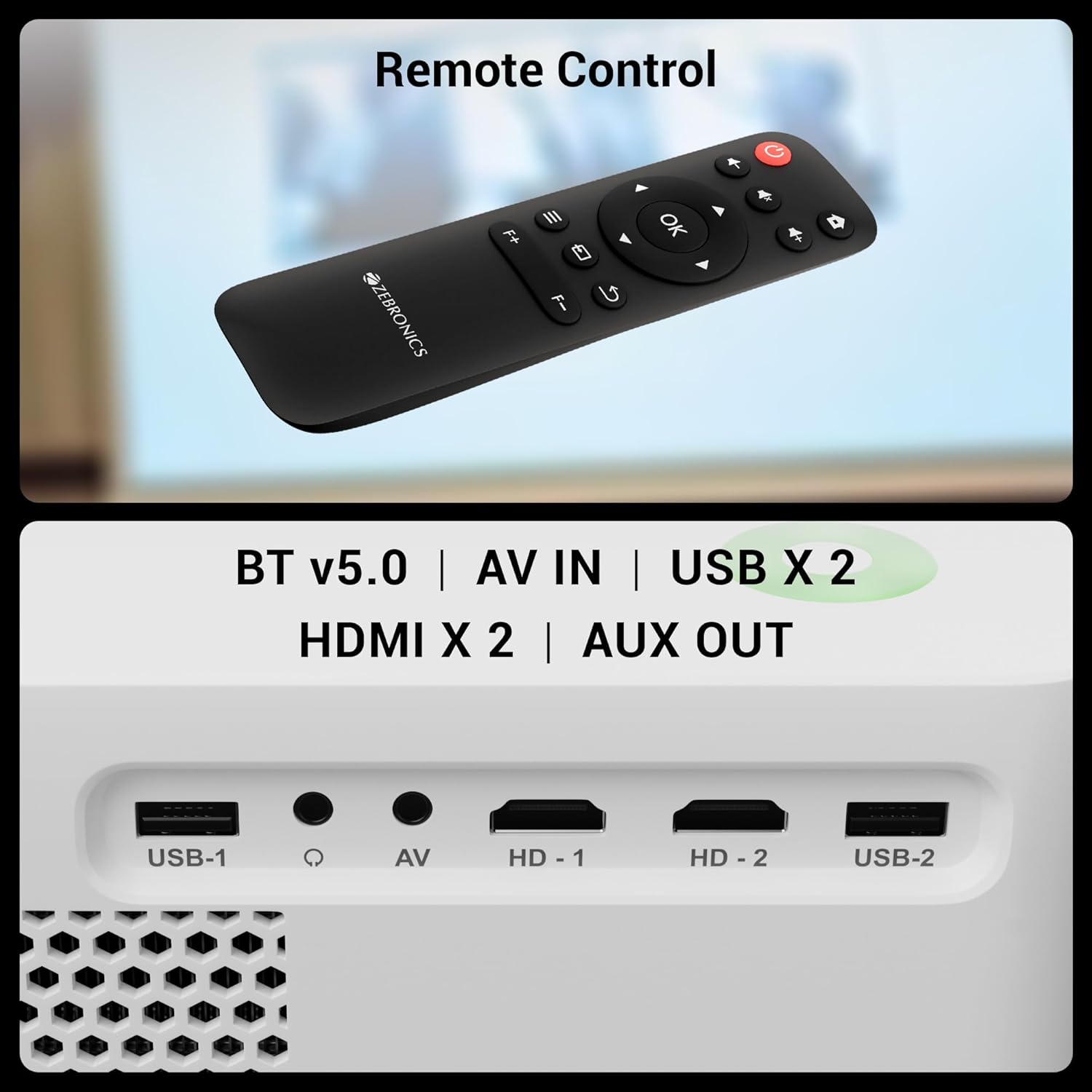
Image: The remote control for the Pixaplay 65 is shown alongside a detailed view of the projector's connectivity ports, including USB, AV IN, and HDMI.
5.2 Electronic Focus Adjustment
To achieve a clear image, use the dedicated focus buttons (F+ / F-) on the remote control to adjust the electronic focus until the projected image is sharp.
5.3 App Management
The projector runs on Android, allowing you to install and manage various applications. Access the app drawer from the home screen to view and launch installed apps. Connect to WiFi to download new applications from the pre-installed app store.

Image: The projector displaying its smart interface with various application icons, emphasizing its app support and dual-band WiFi capabilities.
6. Connectivity
The PIXAPLAY 65 offers multiple connectivity options:
- HDMI (x2): Connect Blu-ray players, gaming consoles, laptops, and other HDMI-enabled devices.
- USB (x2): Play media directly from USB drives.
- AV IN: Connect older devices using an AV cable.
- AUX OUT: Connect external audio systems or headphones.
- Bluetooth v5.0: Pair with Bluetooth speakers or headphones for wireless audio.
- WiFi (2.4GHz & 5GHz): Connect to your home network for online streaming and app downloads.
- Miracast: Wirelessly mirror your Android smartphone or tablet screen to the projector.

Image: A smartphone mirroring a racing game to the projector screen, demonstrating the Miracast functionality for wireless content sharing.
7. Maintenance
7.1 Cleaning the Lens
Use the provided cotton swab pack or a soft, lint-free cloth specifically designed for optical lenses to gently clean the projector lens. Do not use abrasive cleaners or excessive force.
7.2 General Cleaning
Wipe the exterior of the projector with a soft, dry cloth. Avoid using liquid cleaners directly on the device.
7.3 Storage
When not in use for extended periods, store the projector in a cool, dry place, away from direct sunlight and excessive dust.
8. Troubleshooting
8.1 No Power
- Ensure the power cord is securely connected to both the projector and the power outlet.
- Check if the power outlet is functioning correctly.
8.2 No Image or Distorted Image
- Verify the input source is correctly selected (e.g., HDMI 1, USB).
- Adjust the electronic focus using the remote control.
- Ensure the projector lens is clean.
- Check the HDMI or other connection cables for secure fit.
8.3 No Sound
- Increase the volume on the projector and the connected source device.
- If using an external audio system, ensure it is properly connected to the AUX OUT port.
- Check if Bluetooth audio is connected and functioning correctly.
8.4 Remote Control Not Working
- Ensure there are no obstructions between the remote and the projector.
- Replace the batteries in the remote control.
9. Specifications
Detailed technical specifications for the ZEBRONICS PIXAPLAY 65 Projector:
| Feature | Specification |
|---|---|
| Brand | ZEBRONICS |
| Model Name | Zeb-Pixaplay 65 |
| Product Dimensions | 17.3 x 22.6 x 8.6 cm |
| Item Weight | 1.35 kg |
| Display Type | LCD LED |
| Native Resolution | 1920 x 1080 (FHD) |
| Max. Supported Resolution | 3840 x 2160 (4K) |
| Brightness | 8500 Lumens |
| Aspect Ratio | 16:9 |
| Refresh Rate | 60 Hz |
| Lamp Life | 50,000 hours |
| Connectivity Technology | HDMI (x2), AV IN, USB (x2), AUX OUT, Bluetooth v5.0, WiFi (2.4GHz & 5GHz) |
| Compatible Devices | Laptops, Smartphones, Gaming Consoles, Media Players, Blu-ray Players |
| Form Factor | Portable |

Image: A diagram illustrating the physical dimensions of the ZEBRONICS PIXAPLAY 65 projector: 17.3cm (height), 22.6cm (width), and 8.6cm (depth).
10. Warranty and Support
The ZEBRONICS PIXAPLAY 65 Projector comes with a 1 Year Warranty from the date of purchase. Please retain your purchase receipt as proof of warranty.
For technical support, service, or warranty claims, please contact ZEBRONICS customer service through their official website or authorized service centers. Refer to the product packaging or official ZEBRONICS website for the most current contact information.