
1. Product Overview
The EWEADN G98 RGB Gaming Keyboard is a wired membrane keyboard designed for an enhanced gaming and typing experience. It features a compact 96% layout with 98 keys, including a dedicated number pad and a versatile media knob. The keyboard offers vibrant RGB backlighting and an ergonomic design for comfortable long-term use.
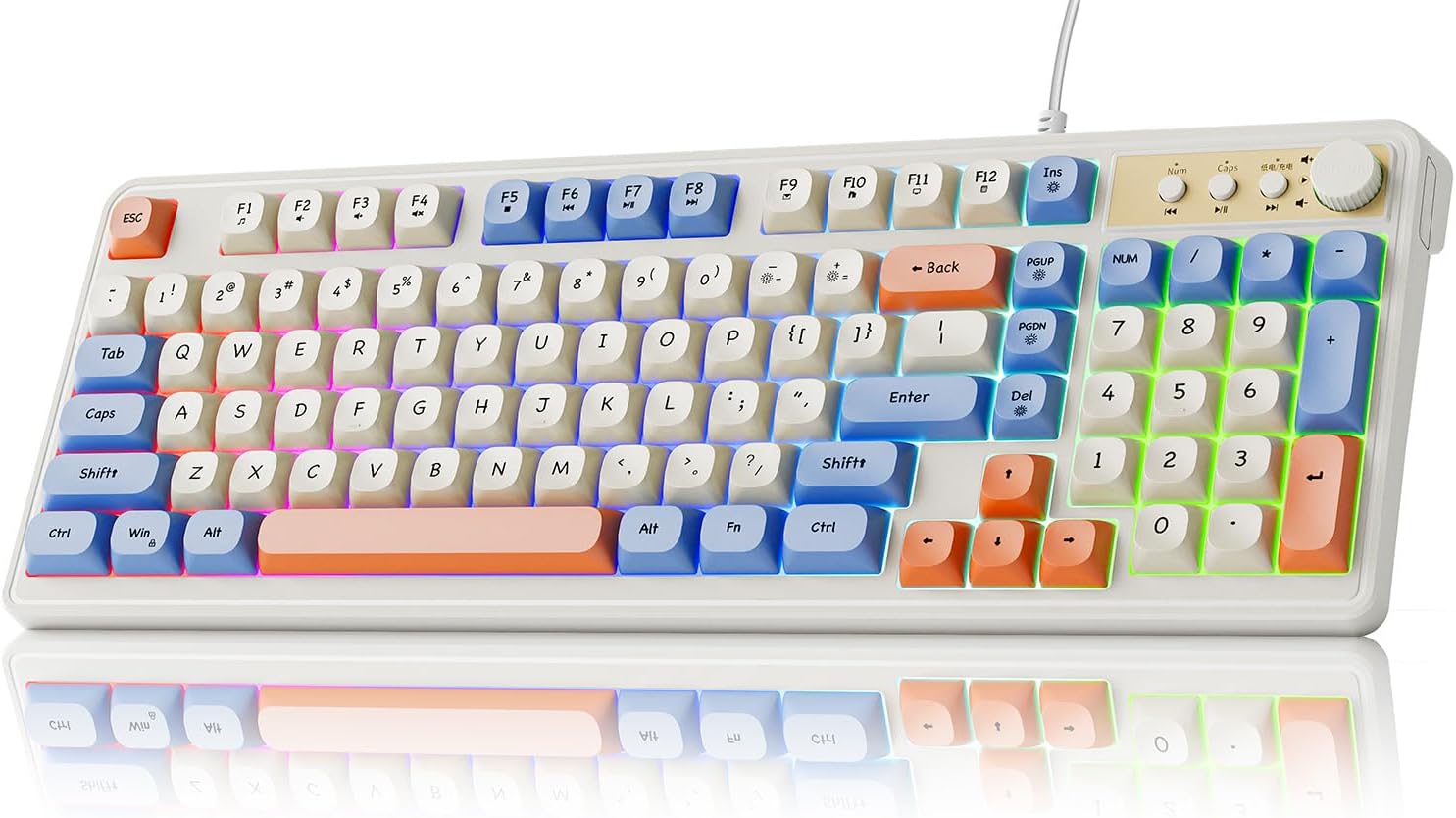
Figure 1.1: EWEADN G98 RGB Gaming Keyboard (White & Blue variant).
2. Setup Guide
Follow these steps to set up your EWEADN G98 RGB Gaming Keyboard:
- Unpack the Keyboard: Carefully remove the keyboard from its packaging.
- Connect to Device: Locate the USB-A cable attached to the keyboard. Plug the USB-A connector into an available USB port on your computer (PC, Laptop, or Tablet).
- Driver Installation: The keyboard is plug-and-play and typically does not require additional driver installation. Your operating system should automatically recognize the device.
- Adjust Keyboard Angle: Utilize the dual-stage adjustable feet on the underside of the keyboard to set your preferred typing angle for optimal comfort. The keyboard features an 11° tilt angle for a natural wrist position.

Figure 2.1: Connecting the keyboard to a computer via USB cable.
3. Operating Instructions
3.1. Media Knob Functionality
The 2-in-1 function knob located on the top right of the keyboard provides convenient control over media and backlighting:
- Volume Control: Rotate the knob clockwise to increase volume and counter-clockwise to decrease volume.
- Mute/Unmute: Press the knob to mute or unmute audio.
- Backlight Mode/Brightness: The knob can also be used to switch backlight modes and adjust brightness. Refer to the RGB Backlighting section for specific controls.

Figure 3.1: Detailed view of the multi-function knob and media control buttons.
3.2. Multimedia Shortcut Keys
The keyboard includes dedicated multimedia shortcut keys for quick access to common functions:
- Previous Song: Press the button to the left of the knob.
- Play/Pause: Press the middle button next to the knob.
- Next Song: Press the button to the right of the knob.

Figure 3.2: Location of multimedia shortcut keys (F1-F12).
3.3. RGB Backlighting Control
Customize your keyboard's RGB backlighting with the following key combinations:
- FN + INS: Toggle Backlight On/Off.
- FN + DEL: Switch between different Backlight Modes.
- FN + -: Decrease Light Speed.
- FN + =+: Increase Light Speed.
- FN + PGUP: Increase Backlight Brightness.
- FN + PGDn: Decrease Backlight Brightness.

Figure 3.3: Key combinations for controlling RGB backlighting.
3.4. N-Key Rollover
The EWEADN G98 supports N-key rollover, which means that every key press is registered independently, regardless of how many keys are pressed simultaneously. This feature prevents ghosting and ensures accurate input during fast typing or intense gaming sessions.

Figure 3.4: N-key rollover ensures all simultaneous key presses are registered.
4. Maintenance
Proper maintenance ensures the longevity and optimal performance of your keyboard:
- Cleaning the Keyboard: Regularly clean the keyboard surface and between the keycaps using a soft, dry cloth or a can of compressed air to remove dust and debris.
- Keycap Care: The keyboard features durable ABS ball keycaps. Avoid using harsh chemicals or abrasive materials when cleaning them, as this may damage the finish.
- Cable Management: Ensure the wired connection cable is not kinked or strained to prevent internal damage.

Figure 4.1: The keyboard features durable ABS Ball Keycaps.
5. Troubleshooting
If you encounter issues with your EWEADN G98 keyboard, refer to the following common problems and solutions:
| Problem | Possible Cause | Solution |
|---|---|---|
| Keyboard not responding | Loose USB connection, faulty USB port, driver issue. | Ensure the USB cable is securely plugged into both the keyboard and the computer. Try a different USB port. Restart your computer. |
| RGB backlighting not working | Backlight turned off, brightness set to minimum. | Press FN + INS to toggle the backlight. Increase brightness using FN + PGUP. |
| Media knob not functioning correctly | Software conflict, temporary glitch. | Ensure no other media control software is interfering. Restart your computer. If the issue persists, contact customer support. |
| Keys are sticky or unresponsive | Debris under keycaps, excessive dust. | Clean the keyboard thoroughly using compressed air. If necessary, gently remove keycaps (refer to maintenance section) and clean underneath. |
If the problem persists after attempting these solutions, please refer to the Warranty and Support section for further assistance.
6. Specifications
Detailed specifications for the EWEADN G98 RGB Gaming Keyboard:
| Model Number | EWEADN-G98 |
| Brand | SEUNKWANG (Manufacturer: EWEADN) |
| Product Dimensions | 16.1 x 6.1 x 1.4 inches (40.9 x 15.5 x 3.6 cm) |
| Item Weight | 1.74 pounds (0.79 kg) |
| Connectivity Technology | Wired (USB-A) |
| Keyboard Description | Gaming, Membrane |
| Key Layout | 96% (98-key) with Number Pad |
| Keycap Type | ABS Ball Keycaps |
| Backlighting | RGB (16.8 million colors) |
| Special Features | Backlit, Ergonomic, Lightweight, Silent, Media Knob, Adjustable Feet, N-key Rollover |
| Compatible Devices | Laptop, PC, Tablet (Windows, Mac, Xbox compatible) |
| Recommended Uses | Business, Gaming, Programming |
7. Warranty and Support
7.1. Return Policy
This product is typically eligible for a 30-day return or replacement policy from the date of purchase. Please refer to the retailer's specific return policy for detailed terms and conditions.
7.2. Customer Support
For any questions, technical assistance, or warranty claims, please contact SEUNKWANG customer support:
- Via Amazon: Visit the SEUNKWANG Store on Amazon and click the "Ask a question" option on the seller's page.
- Email: You can also reach out via email at zack@eweadn.cn.

Figure 7.1: Contact options for customer support.