
1. Introduction
This manual provides detailed instructions for the setup, operation, and maintenance of your FKPCAM FK40 Trail Camera. The FK40 is designed for outdoor security and wildlife observation, featuring 4K video capture, advanced night vision, and an integrated solar panel for extended operation. Please read this manual thoroughly before using the device to ensure proper functionality and longevity.
2. Safety Information
- Do not expose the camera to extreme temperatures or direct sunlight for prolonged periods beyond its operational limits.
- Ensure all covers and seals are properly closed to maintain water resistance, especially in wet conditions.
- Use only recommended power sources and charging methods.
- Keep the camera out of reach of children.
- Avoid disassembling the camera, as this will void the warranty and may cause damage.
3. Package Contents
Verify that all items are present in your package:
- 1 x FKPCAM FK40 Trail Camera
- 1 x Solar Panel (integrated or separate, depending on model variant)
- 1 x Mounting Plate
- 1 x Tree Strap
- 1 x USB-C Cable
- 1 x User Manual (this document)
4. Product Overview
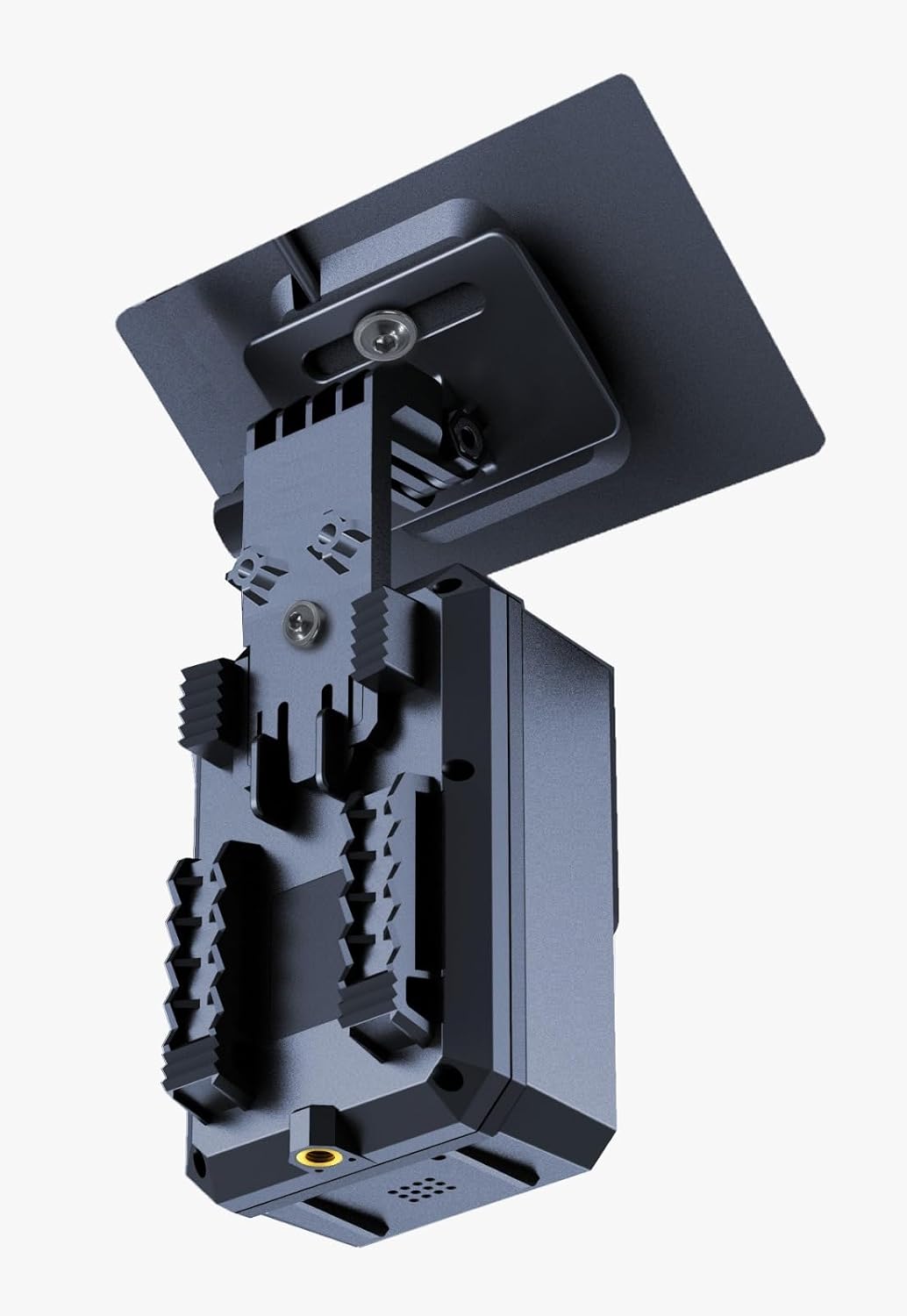
The FKPCAM FK40 Trail Camera is designed for robust outdoor performance. Familiarize yourself with its components:


5. Setup
5.1. Powering the Camera
The FK40 Trail Camera is equipped with a built-in 5000mAh rechargeable battery and an integrated solar panel for continuous power. For initial use or after prolonged storage, ensure the battery is fully charged.
- Solar Charging: Position the camera so the solar panel receives maximum direct sunlight.
- USB-C Charging: Connect the camera to a 5V USB power adapter, laptop, or power bank using the provided USB-C cable.

5.2. Installation
The camera comes with a tree mount and strap for easy installation.
- Attach the mounting plate to the back of the camera.
- Secure the camera to a tree or pole using the provided tree strap. Ensure the camera is stable and pointed towards the desired monitoring area.
- Adjust the angle of the camera and solar panel to optimize sunlight exposure and field of view.

5.3. Initial Configuration
After powering on, the camera can be configured via its built-in display and buttons, or through the dedicated mobile application.
- App Control: Download the 'TrailCam Go' app (or similar, as specified in the product packaging) on your smartphone. Connect to the camera's built-in WiFi via Bluetooth for initial pairing, then use the app to adjust settings, view live feed, and manage recordings.
- On-Device Configuration: Use the navigation buttons (UP, DOWN, LEFT, RIGHT) and the OK button to navigate the camera's menu on its display.
6. Operating Instructions
6.1. Recording Modes
The FK40 supports various recording modes:
- Video Recording: Captures 4K Ultra HD video.
- Photo Capture: Takes high-resolution still images.
- Time-Lapse: Records images at set intervals to create a time-lapse video.
- Motion Detection: The camera utilizes a PIR (Passive Infrared) motion sensor with a 130° sensing angle to trigger recording when movement is detected.

6.2. Night Vision
The FK40 features advanced night vision with 850nm infrared LEDs, providing a night vision range of up to 15 meters (approximately 50 feet). This allows for clear footage capture even in complete darkness.

7. Maintenance
- Cleaning: Gently wipe the lens and solar panel with a soft, dry cloth. Avoid abrasive cleaners.
- Battery Care: For optimal battery life, avoid fully discharging the battery frequently. Recharge regularly, especially if the camera is stored for extended periods.
- Storage: When not in use, store the camera in a cool, dry place away from direct sunlight.
8. Troubleshooting
- Camera not powering on: Ensure the battery is charged. Connect to a USB-C power source to confirm charging.
- Poor image/video quality: Check if the lens is clean. Ensure the camera is within the effective range for night vision if applicable.
- Motion detection not working: Verify PIR sensitivity settings in the menu or app. Ensure there are no obstructions in front of the sensor.
- App connectivity issues: Ensure your smartphone's Bluetooth and Wi-Fi are enabled. Re-pair the camera with the app if necessary. Remember the camera's WiFi is for direct connection, not home network.
9. Specifications
| Feature | Specification |
|---|---|
| Model Name | FK40 |
| Video Capture Resolution | 4K (Effective 4000), 1080p, 720p |
| Connectivity Technology | Wireless (Wi-Fi) |
| Special Features | HD Resolution, Motion Sensor, Night Vision, Portable, Time-Lapse |
| Indoor/Outdoor Usage | Outdoor |
| Compatible Devices | Desktop, Laptop, Smartphone, Tablet |
| Power Source | Battery Powered (Built-in 5000mAh rechargeable battery, Solar Panel) |
| Controller Type | Android (via app) |
| Mount Type | Tree Mount |
| Viewing Angle | 120 Degrees |
| Night Vision Range | 15 Meters |
| Item Dimensions | 13 x 7 x 8 centimetres |
| Built-In Media | Mounting Plate, Solar Panel, Trail Camera, Tree strap, USB-C Cable |
10. Warranty and Support
For warranty information and technical support, please refer to the contact details provided with your purchase documentation or visit the manufacturer's official website. Keep your purchase receipt as proof of purchase for any warranty claims.


