
Introduction
The hygger Sun Moon LED Aquarium Light Model HG178 is designed to provide optimal lighting for planted and freshwater aquariums. This full-spectrum LED light features a day-night dual timer, adjustable brightness, and multiple color options to simulate natural light cycles and promote healthy plant growth. Please read this manual thoroughly before installation and operation to ensure proper use and longevity of your product.
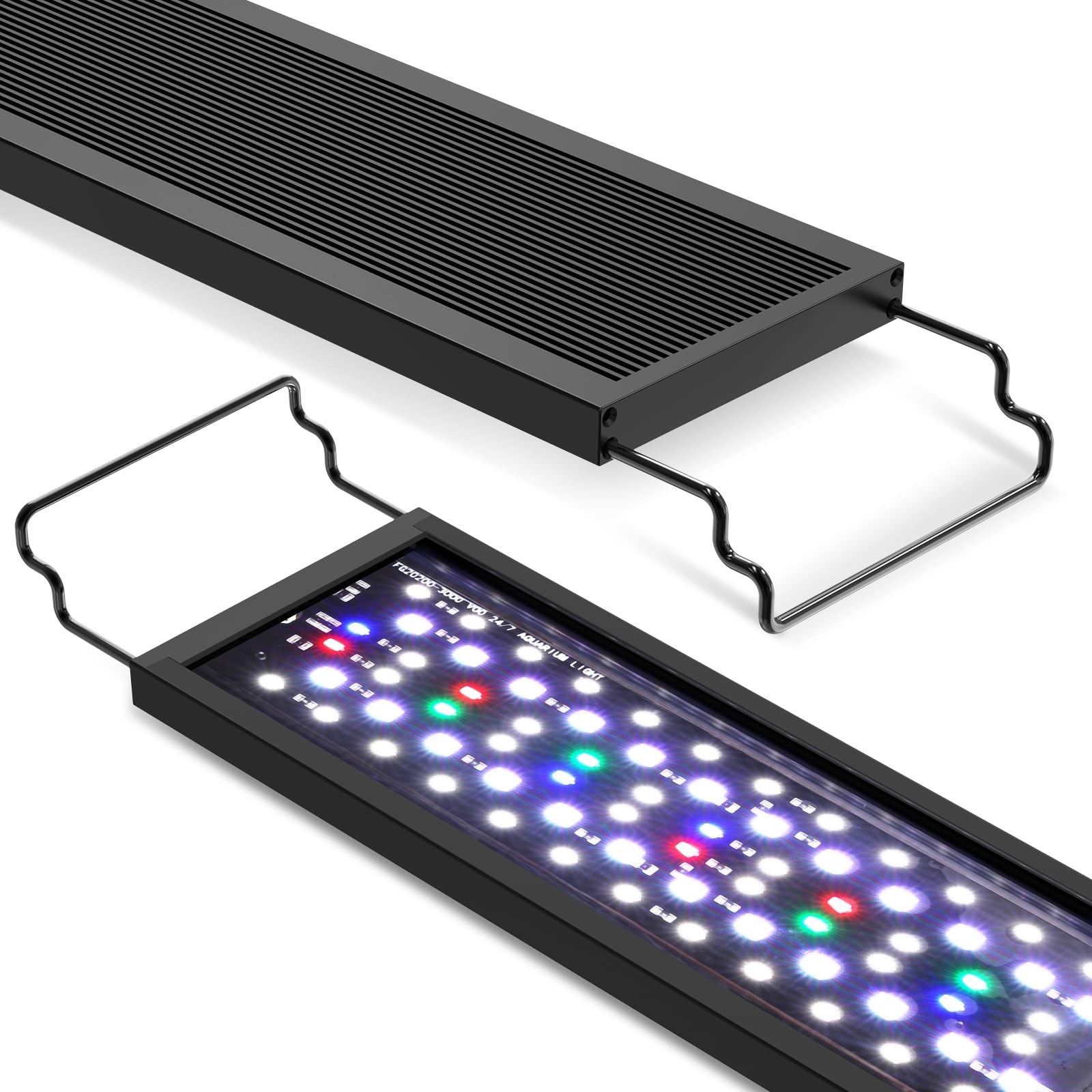
Image: hygger Sun Moon LED Aquarium Light installed on an aquarium.
Safety Instructions
- Always disconnect the power supply before performing any maintenance or cleaning on the light or aquarium.
- Do not immerse the power adapter or controller in water. The light fixture itself is splash-resistant but not submersible.
- Ensure the power cord is not damaged or pinched. Do not operate the light with a damaged cord or plug.
- Keep out of reach of children.
- This product is designed for indoor use only, specifically for aquariums. Do not use for other purposes.
- Avoid direct eye exposure to the LED lights, as intense light can be harmful.
Package Contents
Verify that all items are present in the package:
- hygger Sun Moon LED Aquarium Light
- External Controller
- Power Adapter
- Adjustable Brackets
- Instruction Manual (this document)
Product Features
- Full Spectrum Lighting: Features blue, green, and red light beads to promote plant growth, restore natural colors, and enhance photosynthesis, suitable for planted and freshwater aquariums.
- Multiple Operating Modes: Choose from Daylight Only, Moonlight Only, Combined Daylight and Moonlight, or Manual (always-on) control.
- Daylight Lighting with Timer: Offers 3 timer options (6H/10H/12H) with a simulated sunrise-sunset gradient (orange to full spectrum white and back to orange). Brightness and color are fixed in this mode.
- Adjustable Moonlight Lighting: Provides 3 timer options (3H/5H/12H), 10 brightness levels (10%-100%), and 9 color choices (red, orange, yellow, green, cyan, blue, purple, full spectrum white, or cycle colors).
- 24/7 Timer Function: Each time period of daylight lighting includes a 24/7 light gradient process, offering a dynamic light cycle.
- Durable and Waterproof Design: Fully sealed and waterproof LED lamp beads prevent water ingress, rust, short circuits, and damage, ensuring long-term use in humid aquarium environments.
- Efficient Heat Dissipation: The modern all-black aluminum lamp housing features a concave-convex surface design to increase heat dissipation and extend the lifespan of the lamp beads.
- User-Friendly Controller: An external controller with clear button functions and indicator lights simplifies setup and operation.
- Compatibility: Available in various sizes with extendable brackets to fit aquariums from 12 inches to 55 inches in length.

Image: Spectrogram illustrating the full spectrum light output, highlighting peaks for plant growth, natural color restoration, and photosynthesis.

Image: Illustration of the lamp bead durability and splash resistance, showing sealed LEDs and water droplets.
Setup Instructions
- Unpack: Carefully remove all components from the packaging. Inspect for any damage.
- Attach Brackets: Slide the adjustable brackets onto the ends of the light fixture.
- Position Light: Place the light fixture on top of your aquarium, ensuring the brackets are securely resting on the tank edges. Adjust the brackets to fit your tank length.
- Connect Controller: Connect the light fixture cable to the external controller.
- Connect Power: Plug the power adapter into the controller, then plug the power adapter into a suitable electrical outlet. Ensure a drip loop is formed with the power cord to prevent water from running into the outlet.

Image: Diagram showing the light fixture's dimensions and how it sits on an aquarium with extendable brackets.
Operating Instructions
The hygger Sun Moon LED Aquarium Light features an external controller for easy programming and adjustment. Familiarize yourself with the controller buttons:
- Sun Icon Button: Activates Daylight Lighting mode.
- Moon Icon Button: Activates Moonlight Lighting mode.
- Sun/Moon Icon Button: Activates Combined Daylight + Moonlight mode.
- Power/Mode (U/M) Button: Toggles between manual mode and programmed modes, and cycles through colors in Moonlight mode.
- Brightness Adjustment (+/-) Buttons: Adjusts brightness levels in Moonlight mode.

Image: Detailed diagram of the external controller, showing buttons for daylight, moonlight, combined mode, power/color adjustment, and brightness adjustment, along with a brightness indicator.
Daylight Lighting Mode
Press the Sun Icon Button to enter Daylight Lighting mode. You can select one of three timer options:
- 6H: Light cycle runs for 6 hours.
- 10H: Light cycle runs for 10 hours.
- 12H: Light cycle runs for 12 hours.
In this mode, the light simulates a natural sunrise and sunset, transitioning from warm orange to full spectrum white light and back to warm orange. Brightness and color are preset and cannot be manually adjusted.

Image: Graphs showing the brightness progression for 6-hour, 10-hour, and 12-hour daylight cycles, including warm orange and full spectrum white phases.
Moonlight Lighting Mode
Press the Moon Icon Button to enter Moonlight Lighting mode. You can set a timer, brightness, and color:
- Timer Options: 3H, 5H, or 12H.
- Brightness: Use the Brightness Adjustment (+/-) Buttons to select from 10 levels (10% to 100%). The brightness indicator lights will show the current level.
- Colors: Press the Power/Mode (U/M) Button to cycle through 9 color options: red, orange, yellow, green, cyan, blue, purple, full spectrum white, or a continuous color cycle.

Image: Graph illustrating the brightness curve for moonlight-only settings and a visual representation of the combined daylight and moonlight cycle.
Combined Daylight + Moonlight Mode
Press the Sun/Moon Icon Button to activate this mode. The light will automatically run the selected daylight cycle followed by the selected moonlight cycle. This provides a complete 24-hour simulation of natural light conditions.
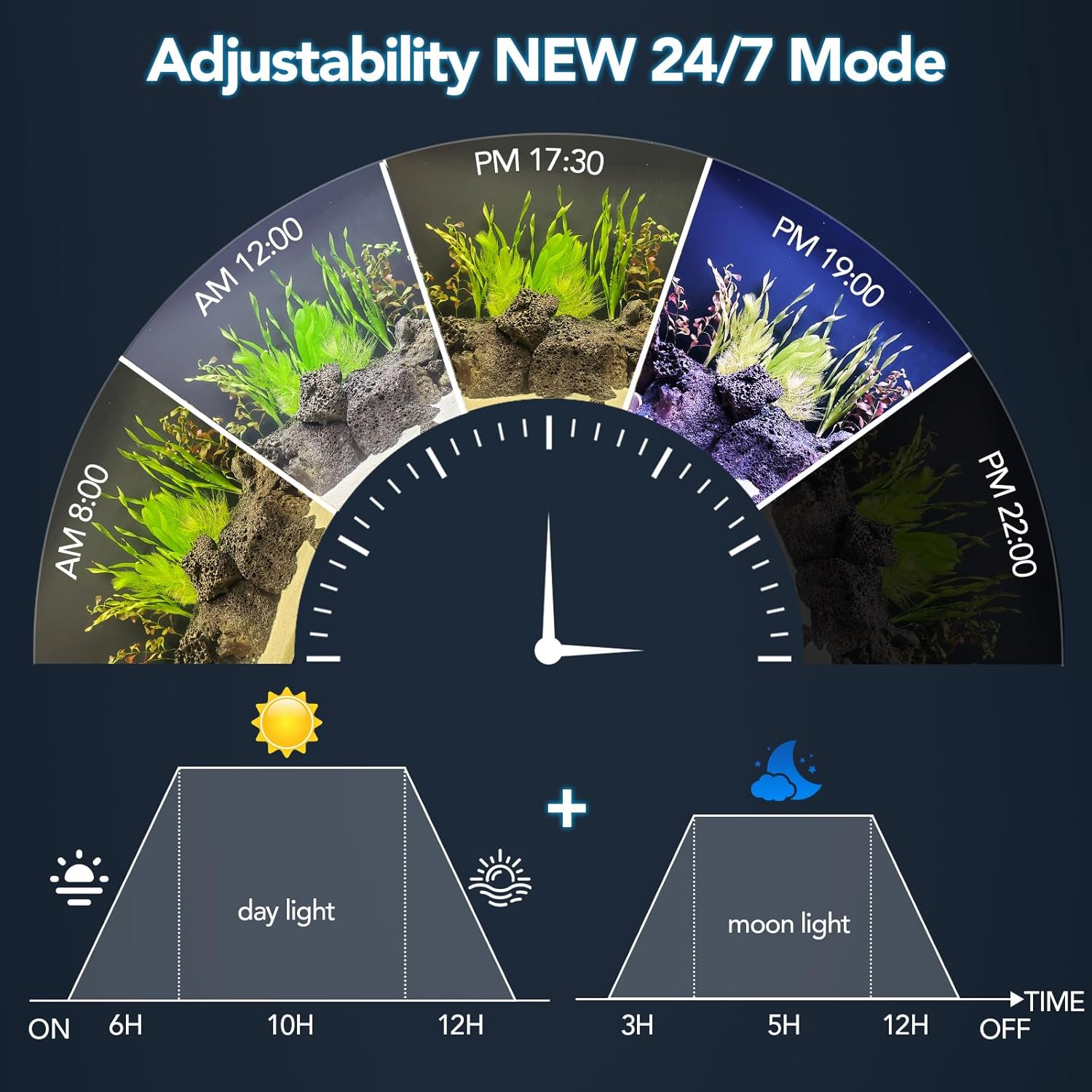
Image: A circular diagram illustrating the 24/7 light cycle, depicting transitions from sunrise, through daytime, to moonlight, with corresponding time markers.
Manual Control (Always-On Mode)
To manually control the light, press the Power/Mode (U/M) Button until the desired light setting is achieved. In manual mode, the light will remain on until manually turned off or a timed mode is selected. You can adjust brightness and color in this mode similar to Moonlight mode.
Video: An official product video demonstrating the features and operation of the hygger Sun Moon LED Aquarium Light, including various lighting modes and color adjustments.
Maintenance
- Cleaning: Regularly wipe the light fixture with a soft, damp cloth to remove dust and water spots. Ensure the light is unplugged before cleaning. Do not use abrasive cleaners or solvents.
- Inspection: Periodically check the power cord and connections for any signs of wear or damage. Replace immediately if damage is found.
- Water Exposure: While the lamp beads are waterproof, avoid submerging the entire fixture or the controller. If water splashes on the controller, wipe it dry immediately.
Troubleshooting
| Problem | Possible Cause | Solution |
|---|---|---|
| Light does not turn on. | No power supply; loose connection; faulty adapter. | Check power outlet, ensure all connections are secure. Test with another outlet. |
| Timer function not working correctly. | Incorrect timer setting; power interruption. | Re-program the desired timer mode. Ensure consistent power supply. |
| Brightness or color cannot be adjusted. | Operating in Daylight mode (fixed settings); controller malfunction. | Ensure you are in Moonlight or Manual mode for adjustments. If issue persists, contact support. |
| Light gets hot during operation. | Normal operation; insufficient ventilation. | Some heat is normal due to LED operation. Ensure the light is not covered and has adequate airflow around its housing. |
Specifications
| Feature | Detail |
|---|---|
| Model Number | HG178 |
| Wattage | 20 Watts (for 18-24in tank variant) |
| Light Source Type | LED (Full Spectrum) |
| Number of Light Sources | 6 rows of lamp beads |
| Input Voltage | AC100-240V |
| Output Voltage | DC20V |
| Color Temperature | 6500-10000K |
| Lumens | 1260 (for 20W variant) |
| Power Cord Length | 4.7ft + 2.1ft |
| Material | Aluminum (housing), Plastic (shade) |
| Mounting Type | Table Mount (with extendable brackets) |
Warranty and Support
The hygger Sun Moon LED Aquarium Light Model HG178 comes with a 1-year manufacturer's warranty. This warranty covers defects in materials and workmanship under normal use.
For warranty claims, technical support, or any questions regarding your product, please contact hygger customer service through the retailer where you purchased the product or visit the official hygger website for contact information.
Please retain your proof of purchase for warranty validation.

