
1. Product Overview
The Midea 12,000 BTU ASHRAE (8,000 BTU SACC) Portable Air Conditioner is a versatile 3-in-1 unit designed to cool or dehumidify home or office spaces quietly, quickly, and efficiently. Ideal for rooms up to 350 sq. ft., this unit offers cooling, fan, and dehumidification modes. It features smart control capabilities via the SmartHome app, Amazon Alexa, and Google Assistant, along with an easy-to-use LED display and a compact remote control.

Figure 1: Midea 12,000 BTU Portable Air Conditioner with remote and app interface.
Key Features:
- SMARTCOOL: Delivers fast, effective cooling for spaces up to 350 sq. ft. with fan and dehumidification functions.
- SMART CONTROL: Control your portable AC from anywhere using the SmartHome app (iOS and Android) or voice commands with Amazon Alexa and Google Assistant.
- EFFORTLESS OPERATION: Features an easy-to-read LED display and a compact remote control for setting time, temperature, and mode.
- EASY INSTALLATION: Includes exhaust hose, window kit, and instructions for quick setup without extra tools.
- Air Quality: Indicator light for filter cleaning, removable and reusable air filter to protect from dust and pet hairs.
- Portability: Equipped with wheels for easy movement.
2. Setup and Installation
The Midea Portable Air Conditioner is designed for easy installation with the included window kit. Follow these steps for optimal performance:
- Connect adapters to the exhaust hose.
- Slide the hose into the back of the AC unit.
- Adjust the sealing board to fit your window opening.
- Attach the exhaust hose to the sealing board port.
- Extend the exhaust hose and insert it into the window kit.
- Install the sealing board into the window frame, ensuring a secure fit to prevent air leakage.

Figure 2: Step-by-step guide for window kit installation.
The unit is equipped with wheels for easy portability, allowing you to move it between rooms as needed. Ensure the unit is placed on a stable, level surface.

Figure 3: Components included in the product box for setup.
3. Operating Instructions
The Midea Portable Air Conditioner offers multiple operating modes and control options for your convenience.
Control Panel and Remote:
The unit features an intuitive LED display and control panel on top. A compact remote control is also included for easy adjustments from a distance.
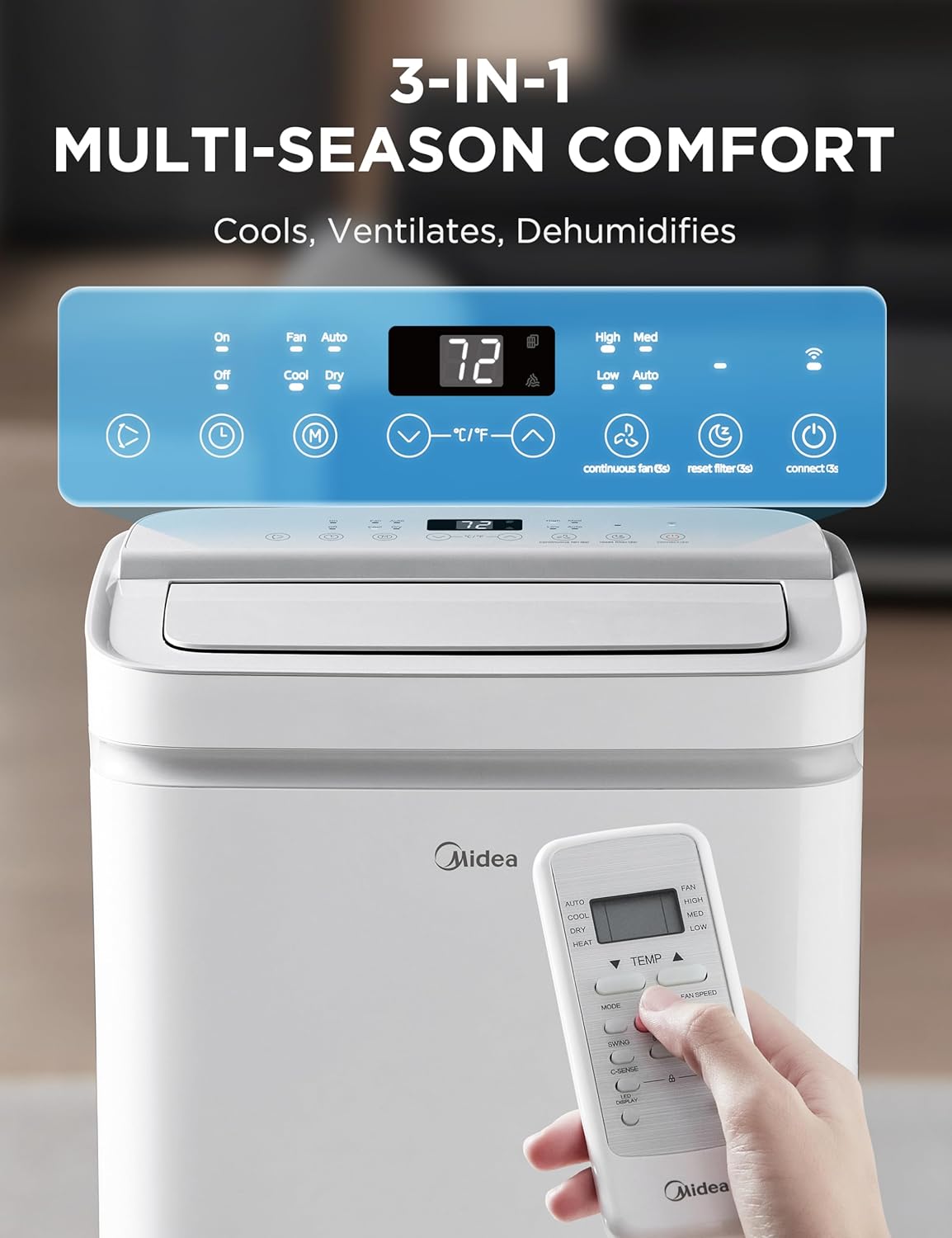
Figure 4: Digital control panel and remote for the unit.
Smart Control via App and Voice Assistants:
For enhanced control, download the SmartHome app for iOS and Android devices. This allows you to switch modes, set schedules, and monitor the unit remotely. The air conditioner can also be paired with Amazon Alexa or Google Assistant for convenient voice control.

Figure 5: Smart control capabilities via the SmartHome app and voice assistants.
Modes and Fan Speeds:
- Cool Mode: Provides effective cooling for your space.
- Dehumidifier Mode: Reduces humidity levels in the room.
- Fan Mode: Circulates air without cooling.
- Adjust fan speeds (Low, Medium, High) to tailor your comfort.

Figure 6: Tailor your cool with 3 fan speeds and modes.
4. Maintenance
Regular maintenance ensures the longevity and efficient operation of your Midea Portable Air Conditioner.
Filter Cleaning:
The unit is equipped with a removable and reusable air filter. An indicator light will notify you when it's time to clean the internal filter. Regularly cleaning the filter helps maintain air quality and optimal cooling performance.

Figure 7: The unit's design allows for easy access to filters for cleaning.
Water Drainage:
The unit has an internal plate that catches water and evaporates it automatically. In very humid conditions, manual drainage may be required. A drain hose is provided for this purpose.
5. Troubleshooting
This section provides general guidance for common issues. For detailed troubleshooting steps, please refer to the full User Manual PDF linked in the Support section.
- Unit not cooling effectively: Check if the exhaust hose is properly installed and sealed. Ensure the air filter is clean. Verify that the room size is within the recommended cooling area (up to 350 sq. ft.).
- Unit is noisy: Ensure the unit is placed on a flat, stable surface. Check for any obstructions around the air intake or exhaust.
- Water leakage: If the unit is leaking water, ensure the drain plug is securely closed. In high humidity, the internal reservoir might fill up, requiring manual drainage.
- Smart control issues: Verify Wi-Fi connectivity and ensure the SmartHome app is updated. Re-pair with Alexa or Google Assistant if necessary.
6. Specifications
| Feature | Detail |
|---|---|
| Brand | Midea |
| Model Number | MAP08S1XWT-A |
| Cooling Power (ASHRAE) | 12,000 BTU |
| Cooling Power (SACC) | 8,000 BTU |
| Cools Up To | 350 Sq. Ft. |
| Functions | Cool, Dehumidifier, Fan |
| Control Type | Remote Controlled, WiFi Enabled (SmartHome App, Alexa, Google Assistant) |
| Item Weight | 69.7 pounds |
| Product Dimensions | 13.74"D x 17.44"W x 28.66"H |
| Voltage | 115 Volts |
| Wattage | 1365 watts |
| Sound Level | 51.5 dB |
| Material | Plastic |
| Color | Gray |
| Refrigerant | R-32 |

Figure 8: EnergyGuide for the Midea Portable Air Conditioner.
7. Warranty and Support
Warranty Information:
This Midea Portable Air Conditioner comes with a One Limited Year Warranty from the original purchase date.
Customer Support:
For further assistance, detailed instructions, or troubleshooting not covered in this manual, please refer to the official User Manual PDF or visit the Midea Store.
- Official User Manual (PDF): Download PDF
- Visit the Midea Store: Midea Store on Amazon


