
GTRACING GT901-NEW
GTRACING Gaming Chair with Footrest Instruction Manual
Model: GT901-NEW
1. Introduction
Thank you for choosing the GTRACING Gaming Chair with Footrest. This manual provides detailed instructions for assembly, operation, maintenance, and troubleshooting to ensure you get the most out of your new chair. Designed for both gaming and office use, this chair offers ergonomic support and comfort for extended periods.
2. Safety Information
MAXIMUM WEIGHT CAPACITY: Do not exceed 300 lbs (136 kg).
ASSEMBLY: Follow the provided instructions carefully to ensure safe and proper assembly. Incorrect assembly can lead to instability and potential injury.
USAGE: Avoid standing on the chair or using it as a step stool. Do not lean excessively to one side, as this may cause the chair to tip over. Keep children and pets away from the chair during assembly and adjustment.
3. Package Contents
Please verify that all components are present before beginning assembly. If any parts are missing or damaged, please contact GTRACING customer support.
- Backrest
- Seat Cushion with Armrests
- Star Base
- Casters (5x)
- Gas Lift Cylinder
- Gas Lift Cover
- Mechanism Plate
- Headrest Pillow
- Lumbar Support Pillow
- Retractable Footrest Assembly
- Hardware Pack (screws, washers, Allen wrench)
- Instruction Manual
4. Assembly Instructions
Assembly is straightforward and typically takes about 30-60 minutes. It is recommended to assemble the chair on a soft, clean surface to prevent damage.
4.1. Attach Casters to Base
Insert the five casters into the holes at the end of each leg of the star base. Push firmly until they click into place.
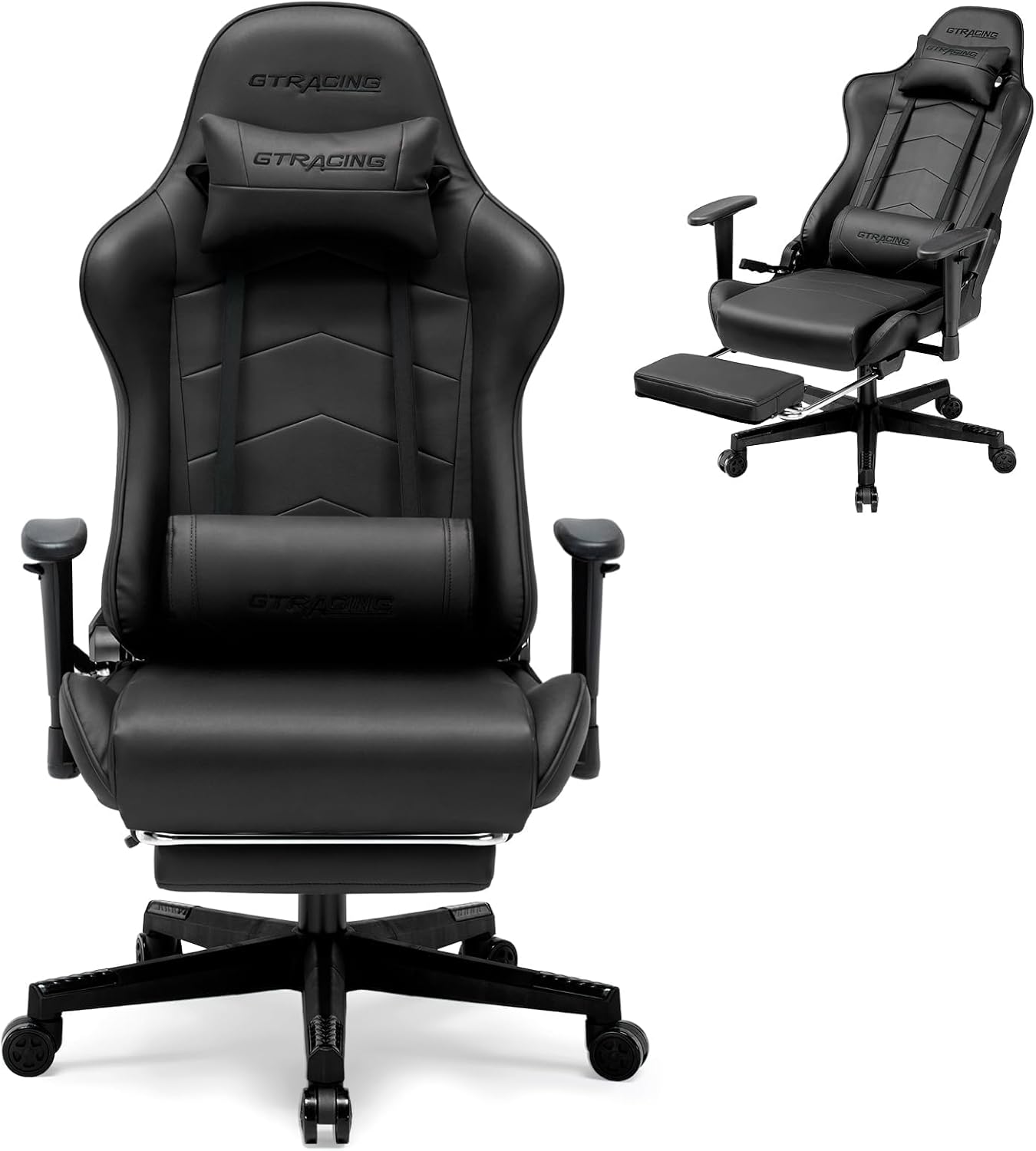
Image: Main view of the GTRACING Gaming Chair, showing the star base with casters.
4.2. Install Gas Lift
Place the gas lift cylinder into the center hole of the star base. Cover it with the gas lift cover.
4.3. Attach Mechanism to Seat
Align the mechanism plate with the screw holes on the underside of the seat cushion. Secure it using the provided screws. Ensure the front of the mechanism faces the front of the seat.
4.4. Attach Backrest to Seat
Align the backrest with the metal brackets on the seat cushion. Secure it using the appropriate screws. Make sure all screws are tightened evenly.
4.5. Attach Assembled Seat to Gas Lift
Carefully place the assembled seat onto the gas lift cylinder. The tapered end of the gas lift should fit securely into the mechanism on the seat.
4.6. Attach Pillows
Attach the headrest pillow to the top of the backrest using its straps. Position the lumbar support pillow on the lower backrest, adjusting its height for optimal comfort.

Image: The GTRACING Gaming Chair in a reclined position with the footrest extended, demonstrating its comfort features.
4.7. Assembly Video Guide
For a visual guide on the assembly process, please refer to the official video below:
Video: Official GTRACING video demonstrating the assembly and features of the gaming chair with footrest.
5. Key Features
- Ergonomic Racing Style: Inspired by racing seats, this gaming chair features a wrap-around design that fully supports your lumbar, shoulders, and back. It reduces pressure from long sitting, minimizes fatigue, and supports better spinal health.
- Premium Quality Materials: Made with high-grade PVC leather and high-density foam, this gaming chair delivers a luxurious look and exceptional comfort. The durable and soft materials ensure a cozy seating experience, easy maintenance and long-lasting performance for gaming and office use.
- Heavy-Duty Build for Maximum Support: Built with a sturdy metal frame and reinforced base, this office chair provides superior stability and durability. It supports up to 300 lbs, offering reliability and safety during long gaming or work hours.
- Adjustable Reclining Backrest: The backrest reclines from 90° to 160°, offering customizable comfort to suit your needs. Paired with a retractable footrest, it’s perfect for working, gaming, or relaxing. Adjust to your ideal position with ease.
- Adjustable Lumbar Support: The included lumbar pillow can be adjusted to provide targeted support for your lower back, enhancing comfort during prolonged use.
- Adjustable Headrest: The headrest pillow can be positioned to support your neck and head, promoting a natural sitting posture.
- Retractable Footrest: A convenient pull-out footrest allows for full recline and relaxation.
- Adjustable Armrests: The armrests can be adjusted to your preferred height for optimal arm and shoulder support.

Image: Detailed dimensions and 300 lbs maximum weight capacity of the GTRACING Gaming Chair.

Image: Close-up view of the adjustable 2D armrests on the GTRACING Gaming Chair, highlighting their height adjustment feature.
6. Operating Instructions
6.1. Height Adjustment
To adjust the chair's height, locate the lever on the right side, beneath the seat. Pull the lever up while sitting on the chair to lower it, or stand up and pull the lever to raise it. Release the lever at your desired height.
6.2. Reclining Backrest
To recline the backrest, pull the lever on the left side of the chair upwards. Lean back to your desired angle (90° to 160°). Release the lever to lock the backrest in place. To return to an upright position, pull the lever and lean forward.
6.3. Retractable Footrest
To use the footrest, pull it out from underneath the seat. Extend it fully for maximum comfort when reclining. Push it back in when not in use.
6.4. Armrest Adjustment
The armrests can be adjusted vertically. Locate the button or lever on the side of each armrest. Press or pull it and move the armrest up or down to your preferred height. Release to lock.
6.5. Operational Video Guide
See the chair's features and adjustments in action:
Video: Official GTRACING video showcasing the racing style and various adjustable features of the gaming chair.
7. Maintenance
To ensure the longevity and appearance of your GTRACING Gaming Chair, follow these simple maintenance tips:
- Cleaning: Wipe clean with a damp cloth. Avoid harsh chemicals or abrasive cleaners, as they may damage the PVC leather.
- Regular Checks: Periodically check all screws and bolts to ensure they are tight. Re-tighten if necessary.
- Caster Care: Keep casters free of debris (hair, dust) to ensure smooth rolling.
- Avoid Direct Sunlight: Prolonged exposure to direct sunlight can cause the material to fade or crack.
8. Troubleshooting
If you encounter any issues with your chair, please refer to the following common problems and solutions:
- Chair Sinks or Won't Stay Up: The gas lift cylinder may be faulty. Contact customer support for a replacement.
- Chair Wobbles: Ensure all screws are securely tightened, especially those connecting the mechanism to the seat and the backrest to the seat.
- Casters Not Rolling Smoothly: Check for hair or debris wrapped around the caster wheels and remove them.
- Difficulty Reclining/Adjusting: Ensure the adjustment levers are fully engaged or disengaged. Check for any obstructions.
For persistent issues, please contact GTRACING customer support.
9. Specifications
| Feature | Detail |
|---|---|
| Brand | GTRACING |
| Model Name | GT901-NEW |
| Color | Black |
| Product Dimensions | 27.95"D x 27.26"W x 48.8"H |
| Item Weight | 41.9 pounds |
| Maximum Weight Recommendation | 300 Pounds |
| Material | PVC Leather, High-Density Foam, Metal Frame |
| Reclining Angle | 90° to 160° |
| Special Features | Adjustable Lumbar, Adjustable Height, Adjustable Headrest, Adjustable Backrest, Retractable Footrest |
10. Warranty & Support
GTRACING is committed to customer satisfaction. This gaming chair includes a detailed installation guide for easy setup. If you have any questions, the GTRACING support team is ready to assist and will respond within 24 hours to ensure your satisfaction.
For specific warranty details and to contact support, please refer to the warranty card included in your package or visit the official GTRACING website.
Ask a question about this manual
Ask about setup, troubleshooting, compatibility, parts, safety, or missing instructions. Manuals+ will review the question and use this page’s manual context to help answer it.