
Jocoevol kitchen pantry cabinet
Jocoevol Corner Cabinet Instruction Manual
Model: kitchen pantry cabinet
1. Product Overview
The Jocoevol Corner Cabinet is a versatile storage solution designed to maximize space in various rooms. Its unique 90-degree corner design allows it to fit snugly into unused areas, providing ample storage without occupying significant floor space. Featuring a farmhouse style with a grey finish, it blends aesthetic appeal with practical functionality.
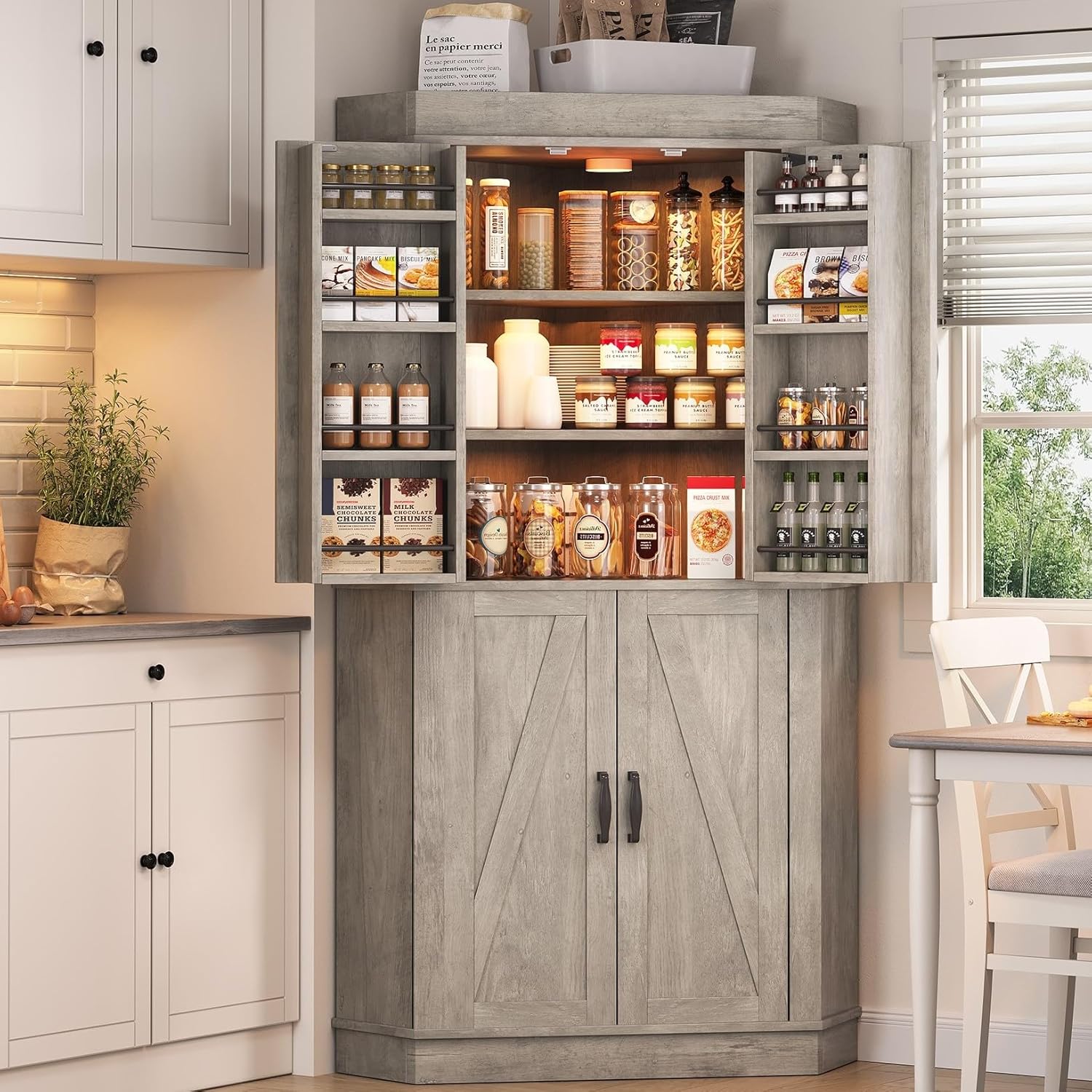
Image: Jocoevol Corner Cabinet, fully assembled and open, displaying its storage capacity.
2. Key Features
- Space-Saving Marvel: Designed to fit snugly into any 90° corner, this kitchen corner cabinet is the perfect solution for maximizing limited space. Its compact size and efficient design turn unused corners into functional storage areas.
- Ample Storage Capacity: Featuring two spacious cabinets with four doors, this corner pantry has 8 door shelves and 4 interior shelves. Two shelves are adjustable to meet your storage needs for varying heights.
- Charming Farmhouse Style: Bring a touch of farmhouse charm to your space with its timeless rustic design. Its weathered finish and metal accents combine rustic charm with modern elegance.
- Stability and Safety Guaranteed: Designed for stability and safety, this corner cabinet features a 90-degree right-angle design that fits securely against two walls. A sturdy base and anti-tipper hardware provide maximum stability.
- Easy Assembly: Includes clear instructions, numbered parts, and pre-drilled holes for quick and accurate setup.
3. Package Contents
Before beginning assembly, please ensure all parts and hardware are present and undamaged. Refer to the detailed parts and hardware lists provided in the assembly video for verification.
3.1. Parts List
The cabinet consists of various wooden panels, including top, bottom, side, and shelf pieces, along with four barn-door style cabinet doors. Each piece is numbered for easy identification during assembly.
3.2. Hardware List
The hardware package includes screws, dowels, cam locks, hinges, handles, and anti-tipping hardware. Each hardware item is labeled with a letter for easy matching with the instructions.
4. Assembly Instructions
Follow these step-by-step instructions carefully. It is recommended to have a second person for certain steps, especially when lifting and aligning larger sections.
Video: Official Assembly Guide for the Corner Pantry Cabinet.
This video provides a visual walkthrough of the entire assembly process, from unboxing to final door installation.
- Prepare the Door Shelves: Attach the long support bars (parts 29, 30) to the smaller vertical dividers (parts 31, 32) using cam locks (A) and dowels (C). Secure with screws (B). Repeat for all four door shelf units.
- Assemble the Cabinet Doors: Attach the handles (H) to the front of the doors (parts 25, 26, 27, 28) using screws (I). Then, attach the magnetic plates (M) to the designated spots on the doors using screws (K).
- Attach Door Shelves to Doors: Carefully align and attach the assembled door shelf units to the inside of the cabinet doors (parts 25, 26, 27, 28) using screws (B). Ensure they are securely fastened.
- Construct the Main Cabinet Sections (Top and Bottom): Begin by assembling the base and top panels (parts 1, 11, 12) by inserting cam locks (A) into the pre-drilled holes. Attach the side panels (parts 21, 22) and inner support panels (parts 9, 10, 18, 19) using dowels (C) and screws (E). Ensure all connections are tight.
- Assemble the Top and Bottom Frames: Connect the frame pieces (parts 2, 3, 4, 5, 6, 13, 14, 15, 16, 17) using cam locks (A) and dowels (C). Secure the corners with brackets (J) and screws (K). These frames will sit on top of the main cabinet sections.
- Combine Cabinet Sections: Carefully place the top cabinet section onto the bottom cabinet section. Align the pre-drilled holes and secure them together using cam locks (A) and dowels (C). Ensure the sections are perfectly aligned for stability.
- Install Magnetic Catches: Attach the magnetic catches (L) to the interior base of the cabinet and the underside of the top shelf using screws (N). These will help keep the doors securely closed.
- Attach Hinges to Cabinet: Secure the decorative hinges (F) to the cabinet frame using screws (G). Ensure they are aligned with the pre-drilled holes on the cabinet doors.
- Mount Cabinet Doors: Carefully align the cabinet doors (parts 25, 26, 27, 28) with the hinges on the cabinet frame. Attach the doors to the hinges using screws (G). Test the doors to ensure they open and close smoothly.
- Install Anti-Tipping Hardware: For added safety, especially in homes with children or pets, install the anti-tipping hardware (P, Q) to the top rear of the cabinet and secure it to a wall stud.
5. Usage Guidelines
Your Jocoevol Corner Cabinet is designed for versatile storage. Here are some tips for optimal use:
- Weight Distribution: Distribute weight evenly across shelves. Place heavier items on lower shelves to maintain stability.
- Adjustable Shelves: Utilize the adjustable shelves to accommodate items of varying heights, from tall bottles to small appliances.
- Door Storage: The door shelves are ideal for smaller items like spices, condiments, or small jars, keeping them easily accessible.
- Corner Placement: Ensure the cabinet is placed firmly in a 90-degree corner for maximum stability and to utilize its space-saving design effectively.
6. Care and Maintenance
To keep your Jocoevol Corner Cabinet in excellent condition, follow these care instructions:
- Cleaning: Wipe surfaces with a soft, damp cloth. Avoid harsh chemicals or abrasive cleaners, as they may damage the finish.
- Spills: Clean up spills immediately to prevent staining or warping of the wood.
- Sunlight Exposure: Avoid prolonged exposure to direct sunlight, which can cause fading or discoloration of the finish.
- Humidity: Maintain a stable humidity level in the room to prevent wood expansion or contraction.
- Hardware Check: Periodically check all screws and fasteners to ensure they are tight. Tighten if necessary to maintain structural integrity.
7. Troubleshooting
7.1. Cabinet Wobbles After Assembly
- Check Connections: Ensure all cam locks, dowels, and screws are fully tightened. Loose connections are a common cause of wobbling.
- Level Surface: Verify that the floor where the cabinet is placed is level. Use shims if necessary to stabilize the cabinet.
- Anti-Tipping Hardware: Ensure the anti-tipping hardware is correctly installed and anchored to a wall stud.
7.2. Doors Do Not Close Properly
- Hinge Alignment: Check if the hinges are properly aligned and securely fastened to both the door and the cabinet frame. Adjust if needed.
- Magnetic Catches: Ensure the magnetic catches are installed correctly and are making full contact with the door's magnetic plate.
- Obstructions: Clear any items on the shelves or door shelves that might be preventing the doors from closing fully.
7.3. Missing or Damaged Parts
- Contact Support: If you find any missing or damaged parts upon unboxing, please contact Jocoevol customer support immediately for assistance. Do not attempt to assemble with incomplete or damaged parts.
8. Specifications
| Brand | Jocoevol |
| Color | Grey |
| Product Dimensions | 29.9"D x 13.38"W x 68"H |
| Material | Engineered Wood |
| Item Weight | 36 Pounds |
| Number of Shelves | 12 (including door shelves) |
| Assembly Required | Yes |
| Mounting Type | Floor Mount |
9. Warranty and Support
Jocoevol is dedicated to providing excellent service. If you have any questions, concerns, or require assistance with your Corner Cabinet, please do not hesitate to contact our customer support team.
- Customer Service: Please refer to your purchase documentation or the Jocoevol official website for specific contact details and warranty information.
- Online Resources: Visit the Jocoevol Store on Amazon for additional product information and support.
Ask a question about this manual
Ask about setup, troubleshooting, compatibility, parts, safety, or missing instructions. Manuals+ will review the question and use this page’s manual context to help answer it.