
1. Introduction
The MDWXDOFP DT-859B is a professional multifunctional environmental testing instrument designed for comprehensive measurement of various environmental parameters. This device integrates five key functions: noise level measurement, illumination intensity, wind speed, temperature, and humidity. Its compact design and ease of use make it suitable for a wide range of applications in industrial, agricultural, and environmental protection fields.
2. Product Features
- Five-in-One Measurement: Simultaneously measures noise, illumination, wind speed, temperature, and humidity.
- Wide Backlit LCD Display: Provides clear readings in various lighting conditions.
- Data Logging Function: Records maximum, minimum, and average values.
- USB Interface: Allows connection to a computer for data transfer and analysis.
- Low Battery Indicator: Alerts the user when battery replacement is needed.
- Automatic Shutdown Mode: Conserves battery life when not in use.
3. Components and Controls
The DT-859B consists of a main unit and several external probes for specialized measurements.
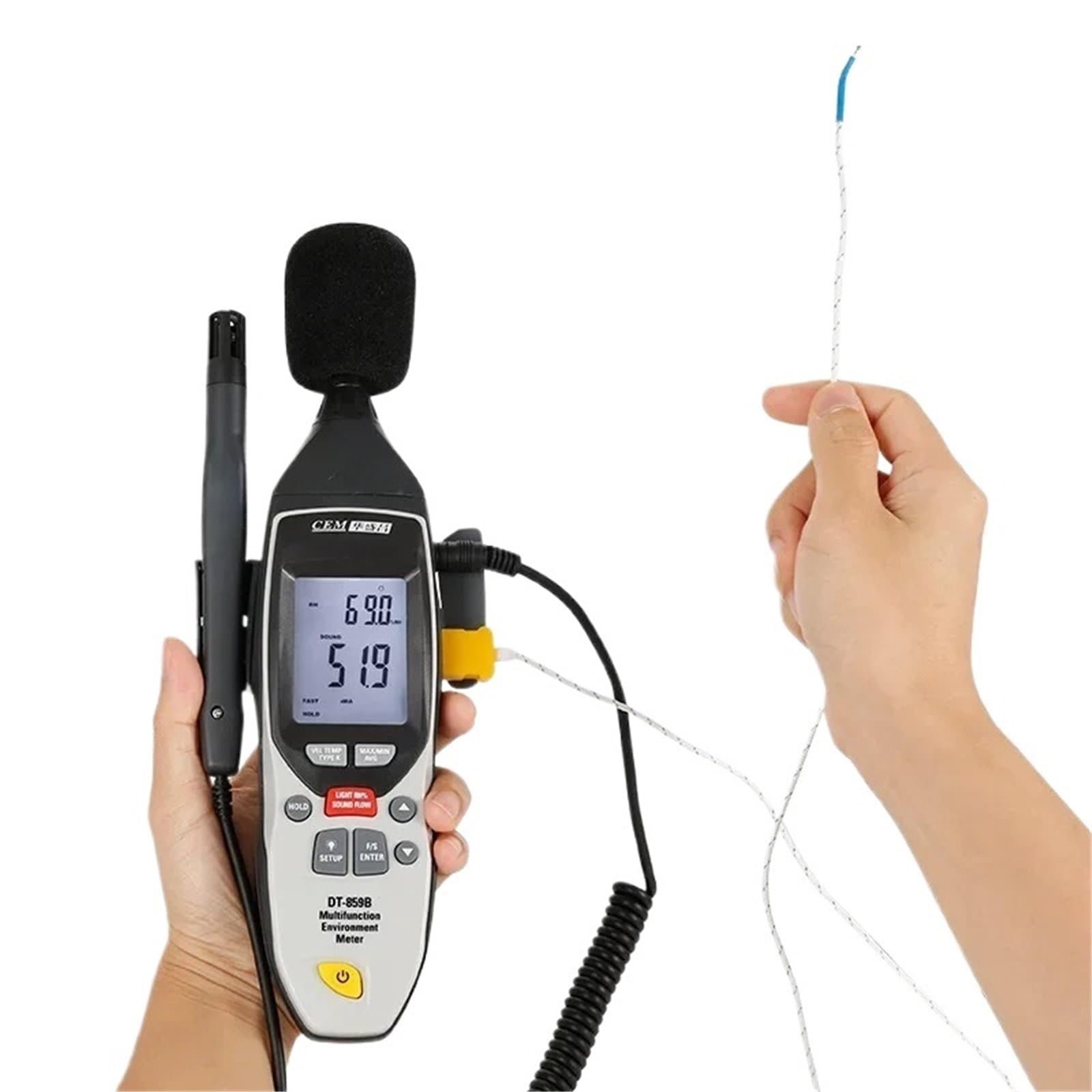
Figure 3.1: The MDWXDOFP DT-859B main unit with all external probes connected, including the anemometer, light sensor, temperature/humidity probe, and sound level microphone. This image illustrates the complete setup of the multifunctional environmental test meter.

Figure 3.2: A close-up view of the DT-859B's LCD display and control panel. Key buttons visible include HOLD, SETUP, F/S ENTER, power button, and mode selection buttons for VEL/TEMP/TYPE K, LIGHT/RH%/SOUND/FLOW, and MAX/MIN/AVG functions. The display shows current readings for sound and relative humidity.

Figure 3.3: The MDWXDOFP DT-859B main unit being held, with the anemometer (vane probe) connected and ready for wind speed measurement. This demonstrates the portability and ergonomic design of the device during operation.
4. Setup
- Battery Installation: Open the battery compartment on the back of the main unit. Insert the required batteries (typically AA or AAA, refer to the battery compartment label for specifics) ensuring correct polarity. Close the compartment securely.
- Probe Connection: Connect the desired measurement probes (e.g., anemometer, light sensor, temperature/humidity probe, sound microphone) to their respective ports on the main unit. Ensure connections are firm to prevent inaccurate readings.
- Power On: Press and hold the power button (U) to turn on the device. The backlit LCD display will illuminate.
5. Operating Instructions
5.1. Basic Measurement
- Select Measurement Mode: Use the mode selection buttons (e.g., VEL/TEMP/TYPE K, LIGHT/RH%/SOUND/FLOW) to cycle through the available measurement functions (Wind Speed, Temperature, Humidity, Illumination, Noise). The active mode will be indicated on the display.
- Position Probes: Direct the relevant probe towards the environment to be measured. For example, point the light sensor towards the light source, place the anemometer in the airflow, or position the sound microphone towards the noise source.
- Read Display: The current measurement will be shown on the LCD display.
5.2. Data Hold Function
Press the HOLD button to freeze the current reading on the display. Press HOLD again to release and resume live measurement.
5.3. Maximum, Minimum, and Average Readings
Press the MAX/MIN/AVG button to cycle through the maximum, minimum, and average values recorded since the device was powered on or the function was reset. Press and hold the button to reset these values.
5.4. Backlight Control
The display backlight can be activated or deactivated for improved visibility in low-light conditions. Refer to the device's specific button layout for the backlight control (often integrated with the power button or a dedicated light button).
5.5. Data Logging and PC Connection
The DT-859B features a USB interface for connecting to a computer. This allows for data transfer, real-time monitoring, and further analysis using compatible software (software not included, typically provided by manufacturer or available for download). Consult the manufacturer's website for software availability and instructions.
6. Maintenance
- Cleaning: Wipe the device and probes with a soft, dry cloth. Do not use abrasive cleaners or solvents.
- Battery Replacement: Replace batteries when the low battery indicator appears on the display to ensure accurate operation.
- Storage: Store the instrument in a cool, dry place away from direct sunlight and extreme temperatures. Disconnect probes and remove batteries if storing for extended periods.
- Probe Care: Handle probes with care. Avoid bending or damaging the sensitive elements. Keep the sound microphone foam cover clean and intact.
7. Troubleshooting
- Device does not power on: Check battery installation and ensure batteries are not depleted. Replace if necessary.
- Inaccurate readings: Ensure probes are correctly connected and clean. Verify that the correct measurement mode is selected. Calibrate the device if necessary (refer to advanced settings or manufacturer guidelines).
- Display issues: If the display is dim or flickering, replace batteries. If segments are missing, contact customer support.
- No data transfer via USB: Ensure the USB cable is securely connected to both the device and the computer. Verify that the correct drivers and software are installed on the computer.
8. Specifications
| Model Number | DT-859B |
| Measurement Functions | Noise, Illumination, Wind Speed, Temperature, Humidity |
| Display | Wide Backlit LCD |
| Data Logging | MAX/MIN/AVG values |
| Interface | USB |
| Power Indicator | Low Battery Indicator |
| Auto Shutdown | Yes |
| Package Dimensions | 1.18 x 0.79 x 0.39 inches |
| Item Weight | 1.76 ounces |
| Assembly Required | No |
| Number of Pieces | 1 |
9. Warranty and Support
Specific warranty information for the MDWXDOFP DT-859B is not provided in the product details. For warranty claims, technical support, or service inquiries, please contact the manufacturer or your point of purchase directly. Keep your purchase receipt as proof of purchase.