
Salton AF2136
Salton Glass Basket Digital Air Fryer - 4.5L User Manual
Model: AF2136
Introduction
This manual provides essential information for the safe and efficient operation, maintenance, and troubleshooting of your Salton Glass Basket Digital Air Fryer. Please read all instructions thoroughly before first use and retain this manual for future reference.

This image shows the Salton Glass Basket Digital Air Fryer from the front, featuring its sleek black design and the transparent borosilicate glass basket filled with french fries, demonstrating the visibility during cooking.
Important Safeguards
When using electrical appliances, basic safety precautions should always be followed to reduce the risk of fire, electric shock, and/or injury to persons, including the following:
- Always ensure the appliance is placed on a stable, heat-resistant surface.
- Do not immerse the appliance body, cord, or plug in water or other liquids.
- Keep hands and face away from the steam vents when the appliance is in use.
- Unplug from outlet when not in use and before cleaning. Allow to cool before putting on or taking off parts.
- This appliance features a 12-hour timer with automatic shut-off for safety.
- Equipped with temperature control and overheat protection to prevent damage.
- The cool touch handle ensures safe handling of the basket during and after cooking.
Setup
Before First Use
- Remove all packaging materials, stickers, and labels from the appliance.
- Clean the glass basket and the removable air frying rack with warm, soapy water. Rinse thoroughly and dry completely.
- Wipe the exterior of the appliance with a damp cloth. Do not immerse the main unit in water.
- Place the air fryer on a stable, level, heat-resistant surface, ensuring adequate clearance (at least 6 inches) from walls or other appliances to allow for proper air circulation.

This image displays the removable air frying rack, designed to be placed inside the glass basket for optimal air circulation during cooking. It is made of durable material and is easy to clean.
Operating Instructions
Control Panel Overview
The Salton Glass Basket Digital Air Fryer features an intuitive digital display and touch controls for easy operation.
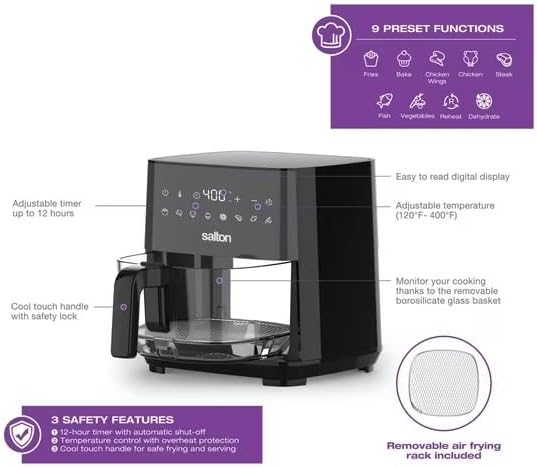
An angled view of the air fryer with annotations pointing to its key features: the easy-to-read digital display for temperature (120°F-400°F) and time (up to 12 hours), nine preset functions, the transparent glass basket for monitoring cooking, a cool-touch handle with safety lock, and three integrated safety features including automatic shut-off and overheat protection. A removable air frying rack is also shown.
- Power Button: Turns the appliance on/off.
- Temperature Controls (+/-): Adjust cooking temperature from 120°F to 400°F (50°C-200°C).
- Timer Controls (+/-): Adjust cooking time up to 12 hours.
- Preset Function Icons: Select from 9 pre-programmed cooking modes.
Basic Air Frying Operation
- Plug the air fryer into a grounded electrical outlet. The display will illuminate.
- Carefully pull out the glass basket using the cool-touch handle.
- Place the removable air frying rack inside the glass basket.
- Place your food onto the air frying rack. Do not overfill the basket to ensure proper air circulation.
- Slide the glass basket back into the air fryer until it clicks into place.
- Press the Power button to turn on the appliance.
- Select a preset function or manually set the desired temperature and time using the +/- buttons.
- Press the Start/Pause button (often the Power button after initial selection) to begin cooking.
- Monitor cooking progress through the transparent glass basket.
- Once cooking is complete, the air fryer will beep and automatically shut off. Carefully remove the basket and transfer food.
Preset Functions
The air fryer includes 9 convenient preset functions for common dishes:
- Fries
- Bake
- Chicken Wings
- Chicken
- Steak
- Fish
- Vegetables
- Reheat
- Dehydrate (adjustable up to 12 hours)
Maintenance and Cleaning
Regular cleaning ensures optimal performance and extends the lifespan of your air fryer. Always unplug the appliance and allow it to cool completely before cleaning.
Cleaning the Glass Basket and Rack
- The borosilicate glass basket and the removable air frying rack are dishwasher safe for convenient cleaning.
- Alternatively, wash them with warm, soapy water and a non-abrasive sponge. Rinse thoroughly and dry completely before reassembling.
Cleaning the Exterior
- Wipe the exterior of the air fryer with a soft, damp cloth.
- Do not use abrasive cleaners or scouring pads, as they may damage the surface.
- Ensure no water enters the appliance's electrical components.
Troubleshooting
If you encounter issues with your air fryer, consult the table below for common problems and solutions.
| Problem | Possible Cause | Solution |
|---|---|---|
| Appliance does not turn on. | Not plugged in; Power outlet malfunction; Appliance not assembled correctly. | Ensure the power cord is securely plugged into a working outlet. Check the circuit breaker. Ensure the basket is fully inserted. |
| Food is not cooked thoroughly. | Temperature too low; Cooking time too short; Basket overloaded. | Increase temperature or cooking time. Cook food in smaller batches. |
| White smoke coming from the appliance. | Grease residue from previous use; High fat content food. | Clean the basket and rack thoroughly after each use. For high-fat foods, drain excess fat during cooking. |
| Food is not crispy. | Too much moisture in food; Basket overloaded. | Pat food dry before air frying. Cook in smaller batches to allow for better air circulation. |
Specifications
Detailed technical specifications for the Salton Glass Basket Digital Air Fryer.
| Feature | Detail |
|---|---|
| Model Name | AF2136 |
| Brand | Salton |
| Capacity | 4.5 Liters |
| Output Wattage | 1350 Watts |
| Product Dimensions (DxWxH) | 12.13"D x 11.57"W x 12.05"H |
| Item Weight | 7.7 Pounds |
| Material | Glass |
| Color | Black |
| Temperature Range | 120°F - 400°F (50°C - 200°C) |
| Timer Range | Up to 12 hours |
| Special Features | Temperature Control, Automatic Shut-Off, 9 Preset Functions |
| UPC | 061283117724 |
| Manufacturer | Farberware |
| Country of Origin | China |
Warranty and Customer Support
This Salton appliance is designed and manufactured to the highest quality standards. For information regarding warranty coverage, terms, and conditions, please refer to the warranty card included with your product packaging or visit the official Salton website. For technical assistance, troubleshooting beyond this manual, or to inquire about replacement parts, please contact Salton customer support directly.
Please have your model number (AF2136) and proof of purchase ready when contacting customer support.
Related documentsAF2136

Ask a question about this manual
Ask about setup, troubleshooting, compatibility, parts, safety, or missing instructions. Manuals+ will review the question and use this page’s manual context to help answer it.