
Introduction
Thank you for choosing the NUTIKAS Desk Shelves Desktop Organizer Shelf. This manual provides detailed instructions for the assembly, operation, and maintenance of your new desktop organizer. Please read these instructions carefully before assembly and use to ensure proper function and longevity of the product.
Safety Information
Important Safety Warnings:
- Ensure all components are securely fastened during assembly.
- Do not overtighten screws, as this may damage the panel surface.
- The maximum weight capacity for this shelf is 5 pounds. Do not exceed this limit to prevent collapse or damage.
- Use the anti-fall locking bolts to maintain stability when adjusting the shelf's width or angle.
- Place the organizer on a stable, flat surface to prevent tipping.
- Be aware of exposed screws on the bottom of the unit, which may scratch delicate surfaces. Consider placing protective pads underneath.
Package Contents
Before beginning assembly, verify that all parts are present and undamaged. The package should include:
- Wood boards (various sizes for shelves and supports)
- Screws and fasteners
- Anti-fall locking bolts
- Assembly tool (screwdriver, if included)
If any parts are missing or damaged, please contact customer support.
Setup and Assembly
Assembly is required for this desktop organizer. Follow these steps carefully:
- Unpack Components: Carefully remove all parts from the packaging. Lay them out on a clean, soft surface to prevent scratches.
- Identify Parts: Refer to the included diagram (if available) to identify each wood board and hardware piece.
- Assemble Base Units: Begin by connecting the main shelf sections according to the provided instructions. Ensure screws are tightened firmly but avoid overtightening to prevent damage to the wood panels.
- Attach Vertical Supports: Secure the vertical support panels to create the multi-level structure.
- Install Anti-Fall Locking Bolts: Insert the locking bolts into the designated slots. These bolts are crucial for maintaining the shelf's stability when adjusting its width or angle.
For a visual guide, an installation video is available. Scan the QR code provided in the product packaging with your phone's camera to access the video demonstration. Remember not to overtighten screws, which could crack the panel surface.
Operating Instructions
The NUTIKAS Desk Shelves Desktop Organizer is designed for versatile use and can be adjusted to fit various spaces and organizational needs.
Adjusting Size and Configuration
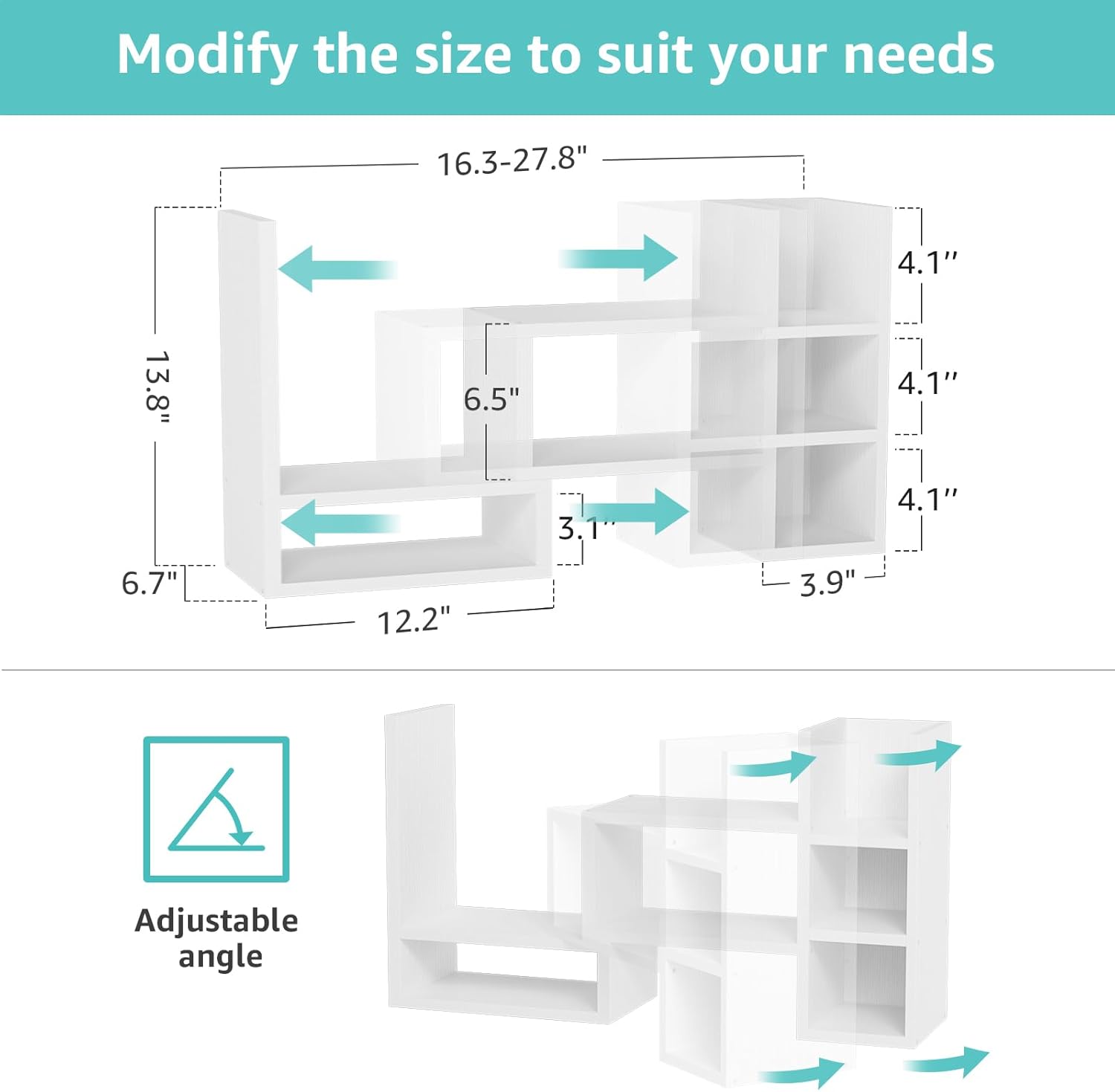
The organizer features an adjustable design, allowing you to modify its width and angle. To adjust:
- Unlock: Gently pull out the anti-fall locking bolts.
- Adjust: Slide the two main sections of the shelf to achieve your desired width (ranging from 16.2 to 27.8 inches) or angle. You can arrange it in a straight line or an L-shape for corner use.
- Lock: Re-insert the anti-fall locking bolts into the nearest available slots to secure the new configuration. Ensure the bolts are fully engaged for stability.


Organizing Your Items
The various compartments and shelves are designed to hold a range of office supplies and decorative items. Utilize the different sections for:
- Books and notebooks
- Pens, pencils, and other stationery
- Small plants or decorative trinkets
- Cosmetics or personal care items


Maintenance
To ensure the longevity and appearance of your NUTIKAS Desk Shelves Desktop Organizer, follow these simple maintenance guidelines:
- Cleaning: Wipe the surface with a soft, damp cloth. Avoid using abrasive cleaners, harsh chemicals, or excessive moisture, as these can damage the lacquered finish.
- Dusting: Regularly dust the shelves with a dry, soft cloth to prevent buildup.
- Inspection: Periodically check all screws and locking bolts to ensure they remain tight and secure. Retighten if necessary, but do not overtighten.
- Weight Distribution: Distribute items evenly across the shelves and avoid placing heavy objects on a single point to prevent stress on the structure.
Troubleshooting
If you encounter any issues with your desktop organizer, refer to the following common problems and solutions:
| Problem | Possible Cause | Solution |
|---|---|---|
| Shelf feels unstable or wobbly. | Locking bolts are not fully engaged or screws are loose. Uneven surface. | Ensure all anti-fall locking bolts are securely inserted. Check and tighten all assembly screws. Place the organizer on a flat, level surface. |
| Scratches on desk surface. | Exposed screws on the bottom of the unit. | Apply felt pads or other protective material to the bottom edges of the organizer to prevent direct contact with your desk. |
| Panel surface cracked during assembly. | Screws were overtightened. | Avoid overtightening screws during assembly. If damage has occurred, contact customer support for replacement parts. |
| Difficulty adjusting width/angle. | Locking bolts are stuck or not fully disengaged. | Ensure locking bolts are completely pulled out before attempting to slide the sections. Apply gentle, even pressure when adjusting. |
Specifications
| Feature | Detail |
|---|---|
| Brand | NUTIKAS |
| Model Name | DOS-W3-01 |
| Material | Wood |
| Color | White |
| Product Dimensions (D x W x H) | 6.7"D x 16.2"~27.8"W x 13.8"H (Adjustable Width) |
| Item Weight | 4.5 pounds |
| Number of Shelves | 3 |
| Weight Capacity | Maximum 5 pounds |
| Mounting Type | Tabletop Mount |
| Special Feature | Adjustable |
| Finish Type | Lacquered |
Warranty and Support
For warranty information or technical support, please contact NUTIKAS customer service through the retailer where the product was purchased or visit the official NUTIKAS website. Please have your model number (DOS-W3-01) and purchase date available when contacting support.