
1. Introduction
Thank you for choosing the Comfheat Portable Graphene Heating Pad. This device is designed to provide targeted heat and vibration massage for relief from menstrual cramps, lower back pain, and muscle tension. Its cordless and discreet design allows for use at home or on the go. Please read this manual thoroughly before first use to ensure safe and optimal operation.
What's Included:
- Comfheat Portable Graphene Heating Pad
- 5000mAh Rechargeable Power Bank
- USB Charging Cable
- Instruction Manual

Image 1.1: The Comfheat Portable Graphene Heating Pad with its included 5000mAh power bank.
2. Safety Information
Your safety is paramount. Please adhere to the following guidelines:
- Always follow the provided directions.
- Do not use while sleeping or for extended periods to prevent burns.
- Keep away from children and pets.
- Do not use if you are pregnant or have any medical conditions that may be affected by heat exposure. Consult a physician if unsure.
- Unplug and allow the pad to cool before storing.
- Do not immerse in water or expose to extreme temperatures.
- This product is intended for external use only.
- Discontinue use immediately if you experience discomfort, excessive heat, or skin irritation.
3. Setup
3.1 Charging the Power Bank
- Connect the provided USB charging cable to the 5000mAh power bank.
- Plug the other end of the USB cable into a compatible USB power adapter (not included) or a computer USB port.
- The indicator lights on the power bank will illuminate to show charging status. A full charge is indicated when all lights are solid.
- Allow sufficient time for a full charge before first use (typically several hours).
3.2 Connecting the Power Bank to the Heating Pad
- Locate the USB connector on the heating pad.
- Insert the charged 5000mAh power bank into the designated pocket on the heating pad.
- Connect the USB cable from the heating pad to the power bank. Ensure a secure connection.
Video 3.1: Demonstrates how to connect the power bank to the Comfheat heating pad and secure the belt. This video is provided by Comfheat.
3.3 Adjusting the Belt
- Wrap the heating pad belt around your waist or the desired area.
- Adjust the strap to achieve a snug, comfortable fit. The belt is adjustable for waist sizes up to 43 inches.
- Ensure the heating element is positioned directly over the area requiring relief.

Image 3.2: Illustration of the adjustable belt for a secure and comfortable fit.
4. Operating Instructions
The Comfheat heating pad features separate controls for heat and vibration, allowing for customized comfort.

Image 4.1: Overview of the control panel with power, heat, and vibration buttons.
4.1 Power On/Off
- To turn on the device, press and hold the Power button (⑂) for a few seconds until the indicator light illuminates.
- To turn off the device, press and hold the Power button again until the indicator light turns off.
4.2 Heat Settings
The heating pad offers 3 adjustable heat levels:
- With the device powered on, press the Heat button (⑂) to cycle through the heat levels.
- Each press will change the heat level, indicated by the color of the light:
- Level 1 (Low): Approximately 103℉ - 113℉ (40℃ - 45℃)
- Level 2 (Medium): Approximately 121℉ - 131℉ (49℃ - 55℃)
- Level 3 (High): Approximately 139℉ - 149℉ (59℃ - 65℃)
- Select the desired heat level for your comfort.
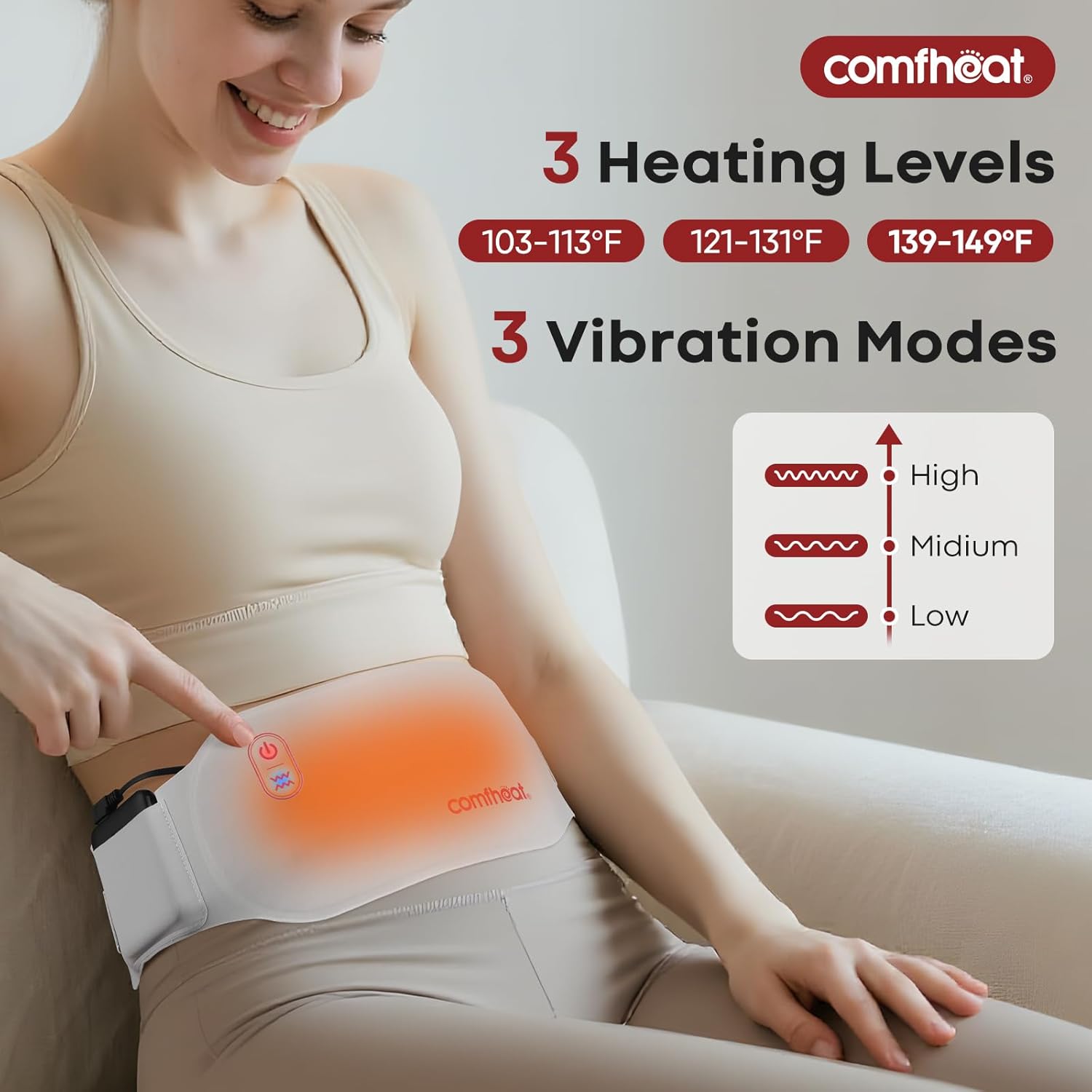
Image 4.2: Visual representation of the three heat levels and their corresponding temperature ranges.
4.3 Vibration Massage Modes
The device offers 3 vibration massage modes:
- With the device powered on, press the Vibration button (≋) to cycle through the massage modes.
- Each press will change the vibration mode, indicated by the light.
- Select the desired vibration intensity (Low, Medium, High).
Image 4.3: Visual representation of the three vibration modes.
4.4 Automatic Shut-off
For safety and energy conservation, the heating pad is equipped with a 45-minute auto shut-off feature. The device will automatically turn off after 45 minutes of continuous operation. You can restart it if further use is desired, ensuring to follow safety guidelines regarding extended use.

Image 4.4: Safety features including 45-minute auto shut-off and NTC overheat protection.
5. Maintenance
5.1 Cleaning
- Ensure the device is turned off and disconnected from the power bank before cleaning.
- Spot clean the heating pad with a damp cloth. Do not use harsh chemicals or abrasive cleaners.
- Do not immerse the heating pad or power bank in water.
- Allow the device to air dry completely before storing or reconnecting the power bank.
5.2 Storage
- Store the heating pad and power bank in a cool, dry place away from direct sunlight and extreme temperatures.
- Ensure the device is clean and dry before storage.
- Avoid placing heavy objects on the heating pad during storage.
6. Troubleshooting
| Problem | Possible Cause | Solution |
|---|---|---|
| Device does not turn on. | Power bank is not charged or not connected properly. | Ensure the power bank is fully charged and securely connected to the heating pad. Press and hold the power button to turn on. |
| Heat is not felt or is too low. | Incorrect heat setting selected; low power bank charge. | Cycle through heat settings to a higher level. Recharge the power bank if necessary. Ensure the pad is directly against the skin (over light clothing). |
| Vibration is not working. | Vibration mode not activated or low power bank charge. | Press the vibration button to activate or change modes. Recharge the power bank if necessary. |
| Device turns off unexpectedly. | 45-minute auto shut-off activated; low power bank charge. | This is a safety feature. Restart the device if needed. Recharge the power bank. |
7. Specifications
| Feature | Detail |
|---|---|
| Model Number | US-148 |
| Brand | Comfheat |
| Material | Polyester |
| Color | Grey |
| Heat Levels | 3 (103℉-113℉, 121℉-131℉, 139℉-149℉) |
| Vibration Modes | 3 |
| Battery Capacity | 5000mAh (included) |
| Voltage | 5 Volts |
| Wattage | 10 watts |
| Auto Shut-off | 45 minutes |
| Additional Features | Graphene heating, Overheat Protection, Thin, Wearable |
| Adjustable Waist | Up to 43 inches |
| Item Weight | 0.28 Kilograms (approx. 9.91 ounces) |
| Package Dimensions | 10.31 x 5.51 x 1.42 inches |
8. Warranty and Support
For warranty information and customer support, please refer to the packaging or contact Comfheat directly through their official website or the retailer where the product was purchased. Keep your purchase receipt as proof of purchase.
Manufacturer: Wuhanxilianpingxinxikejiyouxiangongsi