
Introduction
Thank you for choosing the WSKEN H04 Portable Small Humidifier. This ultrasonic cool mist humidifier is designed to provide comfortable humidification for various environments, including bedrooms, offices, cars, and during travel. Please read this manual carefully before use to ensure proper operation and maintenance.
Package Contents:
- 1X WSKEN H04 Humidifier (Black)
- 1X Type-C Charging Cable
- 1X Instruction Guide
- 1X After-sales Protection Card
Product Features
- Dual Nozzle Technology: Provides powerful cool mist output with three modes: single nozzle, alternating dual nozzles, and simultaneous dual nozzles.
- Clean Mist Technology: Features an advanced alloy ion plate to maintain water mist purity.
- Whisper-Quiet Operation: Operates at a noise level below 16 decibels for undisturbed sleep or work.
- Ambiance Lighting: Offers 4 lighting modes (Rainbow Flow, Gradual Cycle, Rainbow Flash, and Off) for customizable atmosphere.
- Smart Car Mode: Automatically activates while driving and shuts off one minute after stopping when 'Car Mode' is enabled.
- Portable Design: Compact (2.95'' x 2.95'' x 7.32''), handheld, anti-slip, and leak-proof, ideal for travel.
- Long-lasting Battery: Equipped with a 4000mAh battery and 350ml capacity, providing up to 6 hours of continuous mist.
- Safety Features: Automatic shut-off when water or power is low.
Setup
Initial Preparation (First Use)
Before using the humidifier for the first time, it is crucial to properly prepare the cotton swabs to ensure optimal mist output. Failure to do so may result in no mist or weak mist.
- Turn the humidifier counter-clockwise to open the top section.
- Carefully remove the cotton sticks. Be cautious not to lose the small springs located at the bottom of each cotton stick. These springs are essential for proper function.
- Place the cotton sticks in water and soak them completely for at least 30 minutes. Ensure they are thoroughly saturated.
- Reinsert the wet cotton sticks, ensuring the springs are in place and the sticks are aligned with the holes.
- Add water to the humidifier tank.
- Close the humidifier by turning the top section clockwise until secure.
- If misting is weak, gently shake the humidifier back and forth to help the cotton swabs absorb water fully.
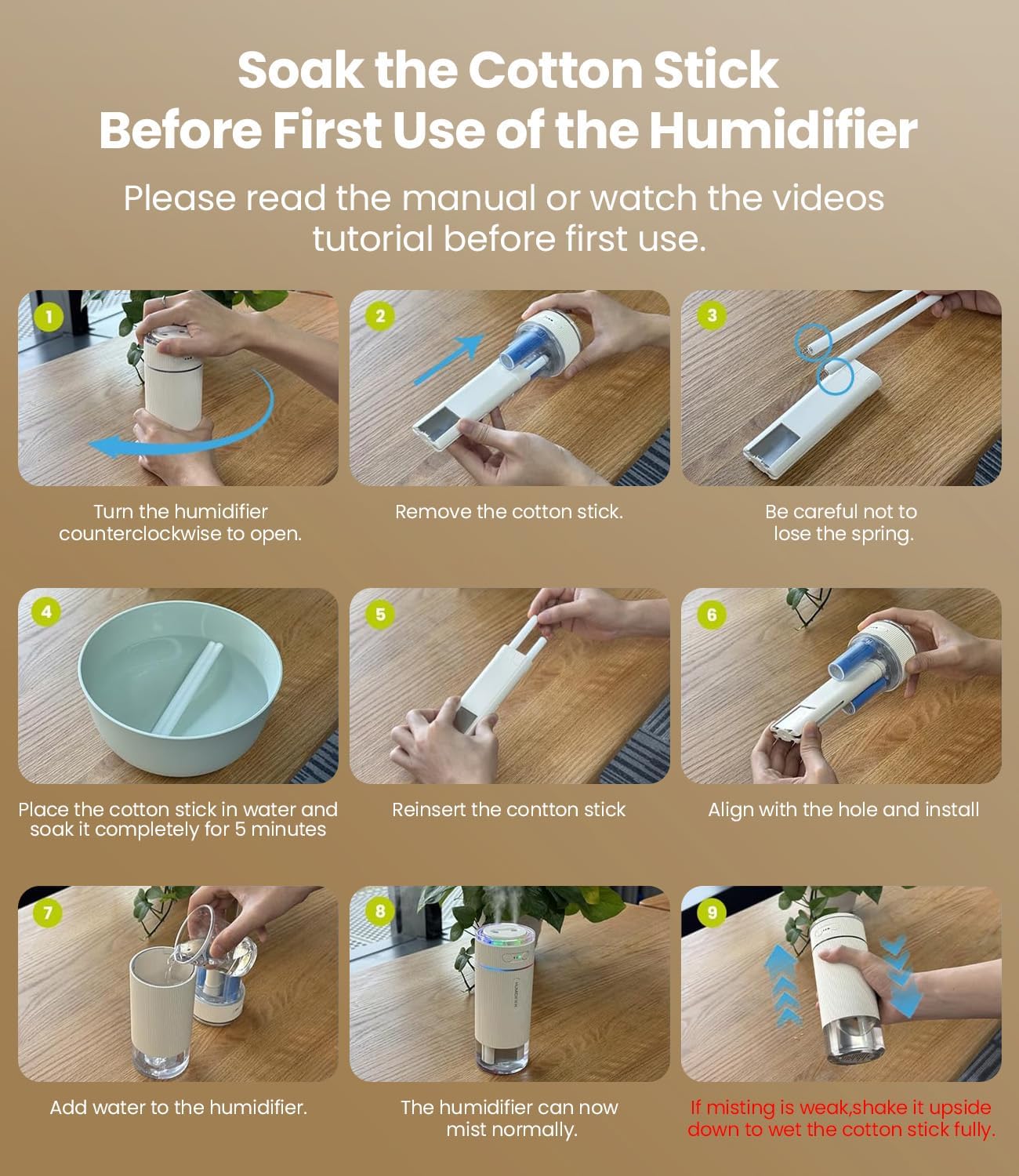
Image: Step-by-step guide for preparing cotton sticks before initial use.
Filling the Water Tank
To fill the humidifier with water:
- Twist the top section of the humidifier counter-clockwise to separate it from the water tank.
- Pour clean tap water into the transparent water tank. Do not add water beyond the "MAX" mark to prevent overflow.
- Reattach the top section by aligning it and twisting clockwise until it is securely closed.
Video: Demonstrates how to soak the cotton swab for first use and eliminate potential faults.
Operating Instructions
Power On/Off
Press the power button once to turn the humidifier on. Press it again to cycle through mist modes or turn off the device.
Mist Modes
The WSKEN H04 offers three mist modes:
- Single Nozzle Spray: Provides mist from one nozzle.
- Alternating Dual Nozzles Spray: Mist alternates between the two nozzles.
- Simultaneous Dual Nozzles Spray: Mist is emitted from both nozzles at the same time for maximum output.
Press the 'Home' button to cycle through these mist modes.

Image: Illustration of the dual nozzle system and three mist modes.
Ambiance Lighting Modes
The humidifier features 4 distinct lighting modes to enhance your environment:
- Rainbow Flow: Colors transition smoothly.
- Gradual Cycle: Colors fade in and out.
- Rainbow Flash: Colors flash dynamically.
- Off: Lights are turned off.
To change the lighting mode, press and hold any button for 1.5 seconds.

Image: Visual representation of the four ambiance lighting modes.
Smart Car Mode
The Smart Car Mode provides convenient, automatic humidification while driving:
- Press the 'Car Mode' button to activate this feature.
- The humidifier will automatically activate and begin misting when it senses vehicle vibration (driving).
- It will automatically shut off one minute after the vehicle stops (no vibration detected).

Image: WSKEN H04 humidifier in a car, illustrating the Smart Car Mode.
Video: Overview of the WSKEN Small Humidifier, highlighting dual orifice and large cool mist features.
Video: Demonstrates the operating instructions for the humidifier.
Maintenance
Cleaning
Regular cleaning helps maintain the humidifier's performance and extends its lifespan:
- Unplug the humidifier before cleaning.
- Empty any remaining water from the tank.
- Wipe the inside of the water tank with a soft cloth. For mineral buildup, use a Q-tip dipped in vinegar to gently swab the mist outputs, then clean with water.
- Do not immerse the main unit in water.
Cotton Swab Replacement
Cotton swabs should be replaced periodically, typically every 1-3 months depending on usage and water quality. Replacement cotton swabs can be purchased separately.
- Follow the initial preparation steps to remove and replace the cotton swabs.
- Ensure the new cotton swabs are thoroughly soaked before first use.
Troubleshooting
If you encounter issues with your WSKEN H04 humidifier, please refer to the following common problems and solutions:
| Problem | Possible Cause | Solution |
|---|---|---|
| No mist or weak mist | Dry cotton swabs; insufficient water absorption; mineral buildup on mist outlets. | Ensure cotton swabs are fully soaked (refer to Setup section). Shake humidifier to aid water absorption. Clean mist outlets with a vinegar-dipped Q-tip. |
| Humidifier not turning on | Low battery; not plugged in; power button not pressed correctly. | Charge the humidifier using the provided Type-C cable. Ensure the power button is pressed firmly. |
| Yellow light flashes 3 times, then automatic shutdown | Low water level. | Refill the water tank to the MAX line. |
| Humidifier leaks | Water tank overfilled; top section not securely closed. | Do not fill water beyond the MAX mark. Ensure the top section is twisted clockwise until securely closed. |
Specifications
- Brand: WSKEN
- Model Name: H04
- Color: Black
- Operation Mode: Ultrasonic
- Product Dimensions: 2.95"D x 2.95"W x 7.32"H
- Item Weight: 14.6 ounces
- Room Type: Bedroom, Kids Room, Living Room, Office
- Voltage: 5 Volts
- Wattage: 5 watts
- Control Method: Touch
- Shape: Cylindrical
- Capacity: 350 Milliliters
- Special Features: Auto Shut Off, Leakproof, Low Water Indicator, Night Light, Quiet
Warranty and Support
Warranty
The WSKEN H04 Portable Small Humidifier comes with a 360-day warranty for your peace of mind. Please retain your purchase receipt as proof of purchase.
Customer Support
If you have any questions, concerns, or require assistance with your humidifier, please do not hesitate to contact WSKEN customer support. Refer to the 'After-sales Protection Card' included in your package for contact details or visit the official WSKEN website.