1. Introduction
Thank you for choosing the Ohniyou 72 Inch Industrial Ceiling Fan. This manual provides essential information for the safe installation, operation, and maintenance of your new ceiling fan. Please read it thoroughly before installation and keep it for future reference.
This 72-inch ceiling fan features 8 premium metal fan blades, a quiet DC motor, integrated LED lighting with 3 color temperatures, and convenient control via both a remote and a smartphone app. It is designed for large spaces such as living rooms, shops, garages, offices, warehouses, gyms, and covered outdoor patios.

Image 1.1: The Ohniyou 72 Inch Industrial Ceiling Fan installed in a contemporary living room, showcasing its large size and included remote control and app interface.
2. Important Safety Instructions
To reduce the risk of fire, electric shock, or personal injury, please follow these safety guidelines:
- Read all instructions and safety information before installing your new fan.
- All wiring must be in accordance with national and local electrical codes. If you are unfamiliar with wiring, consult a qualified electrician.
- Before installation, disconnect power by turning off the circuit breakers at the main fuse box.
- Ensure the installation site allows the fan blades to rotate without obstruction and provides a minimum clearance of 7 feet (2.1 meters) from the floor to the blade trailing edge.
- The outlet box and support structure must be securely mounted and capable of reliably supporting a minimum of 35 lbs (15.9 kg).
- Do not operate the fan with damaged blades or any visible defects.
- Avoid placing objects in the path of the fan blades.
- This fan is suitable for indoor and covered outdoor use (damp rated). Do not expose to direct water spray.
3. Package Contents
Verify that all components listed below are included in your package:
- Ceiling Fan with Integrated LED Light
- Remote Control
- Down-rods (8-inch and 20-inch)
- Mounting Bracket
- Hardware Pack (screws, wire nuts, etc.)
- User Manual
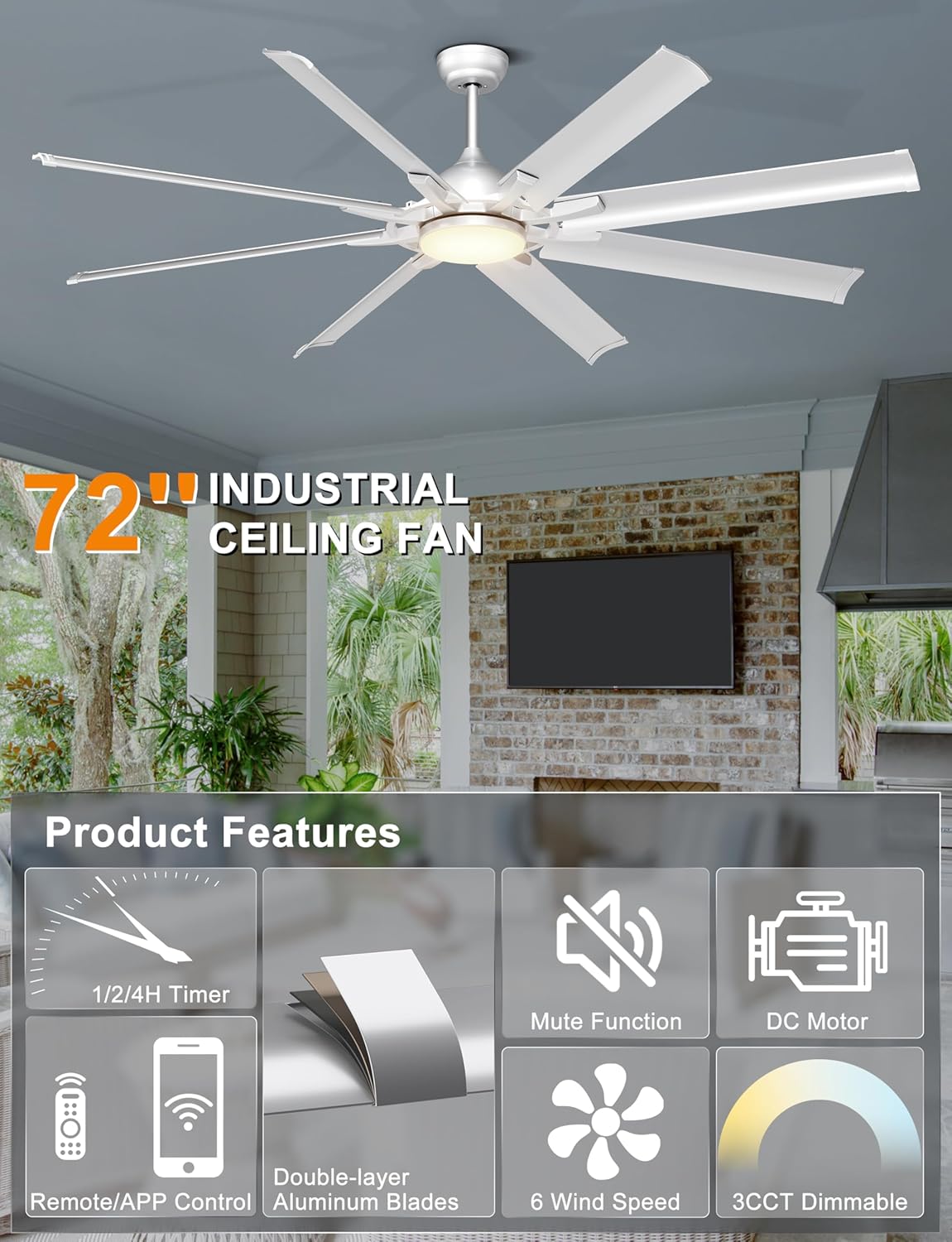
Image 3.1: Overview of the Ohniyou 72 Inch Industrial Ceiling Fan's main features and components.
4. Setup and Installation
The installation process is designed to be straightforward. For detailed visual guidance, refer to the installation video available on the product page (if applicable) or consult a qualified electrician.
4.1 Mounting Options
This fan comes with two down-rods (8-inch and 20-inch) to accommodate various ceiling heights and types. It is suitable for:
- Flat ceilings
- High ceilings
- Slanted ceilings with an angle of up to 15 degrees

Image 4.1: Fan dimensions and compatibility with different ceiling types (flat and sloped up to 15 degrees). Recommended room size: 18ft x 18ft to 25ft x 25ft. Damp rated for covered outdoor use.

Image 4.2: Examples of downrod mounting for different ceiling configurations.
4.2 General Installation Steps (Summary)
- Prepare for Installation: Turn off power at the circuit breaker. Ensure the mounting location is secure and can support the fan's weight.
- Install Mounting Bracket: Secure the mounting bracket to the ceiling outlet box.
- Assemble Down-rod and Fan: Attach the chosen down-rod to the fan motor assembly. Feed electrical wires through the down-rod.
- Hang the Fan: Carefully lift the fan and hang it on the mounting bracket.
- Wire Connections: Connect the fan's electrical wires to the household wiring according to the wiring diagram provided in the full installation guide.
- Secure Canopy: Slide the canopy up and secure it to cover the wiring and mounting bracket.
- Attach Blades: Securely attach the 8 aluminum blades to the motor housing.
- Install Light Kit: Connect and secure the LED light kit to the fan.
- Restore Power: Turn on power at the circuit breaker and test the fan.
5. Operating Instructions
Your Ohniyou ceiling fan can be controlled using the included remote control or a smartphone application.
5.1 Remote Control Functions
The remote control provides comprehensive command over your fan's settings.
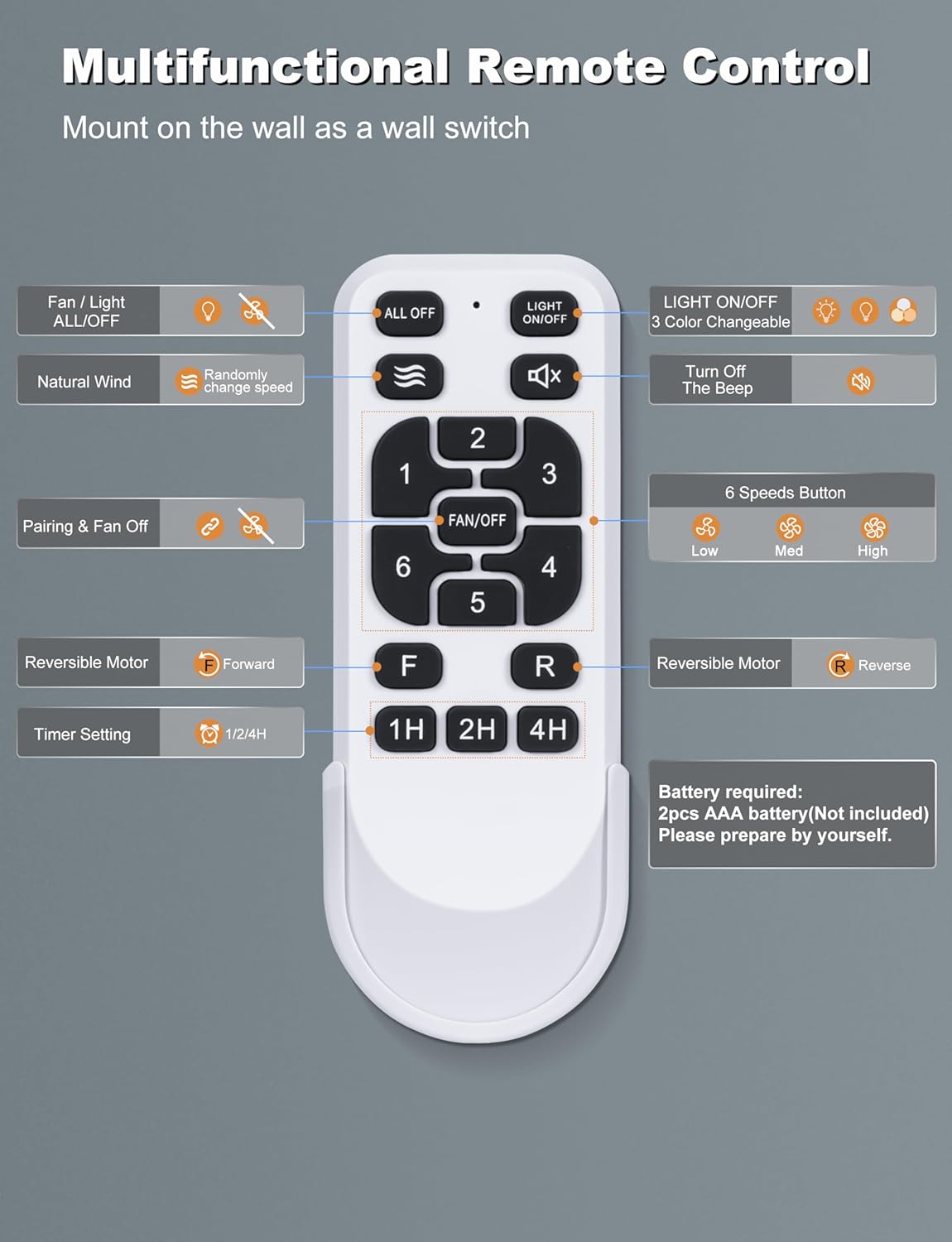
Image 5.1: Multifunctional Remote Control layout and button descriptions.
- Fan / Light ALL/OFF: Turns both fan and light on/off.
- Natural Wind: Activates a mode where fan speed changes randomly to simulate natural breeze.
- Pairing & Fan Off: Used for pairing the remote and turning the fan off.
- Reversible Motor (F/R): Switches between forward (summer) and reverse (winter) modes.
- Timer Setting (1H/2H/4H): Sets the fan to turn off automatically after 1, 2, or 4 hours.
- Light ON/OFF: Turns the LED light on or off independently.
- 3 Color Changeable: Cycles through the three color temperature options (3000K, 4500K, 6000K).
- Turn Off The Beep: Mutes the audible feedback from the fan.
- 6 Speeds Button (1-6): Adjusts the fan speed from 1 (lowest) to 6 (highest).
5.2 Smart APP Control
Control your fan conveniently from your smartphone. The app allows you to adjust fan speeds, light color temperatures, and set timers hands-free.

Image 5.2: Scan the QR code to download the app and view its interface for fan and light control.
To learn how to use the APP, scan the QR code in Image 5.2 or visit https://www.jasonghost.com/tinysmart/.
How to match the APP:
- Turn on your phone's Bluetooth.
- Return to the APP interface.
- Turn off the wall switch. After 5 seconds, turn it on again.
- Hit the Pair button in the app to connect.
5.3 Fan Speed and Reversible Motor
The fan offers 6 distinct speeds for optimal airflow. The reversible DC motor allows for year-round use:
- Summer Mode (Forward): Downward airflow creates a cooling effect.
- Winter Mode (Reverse): Upward airflow circulates warm air trapped near the ceiling, improving heat distribution.

Image 5.3: Explanation of the 6-speed reversible motor for summer cooling and winter air circulation.

Image 5.4: Airflow capacity and speed levels (Soft, Natural, Cool Wind).
5.4 Customizable Lighting
The integrated LED light offers three color temperature options to suit different moods and scenarios:
- 3000K: Warm White
- 4500K: Natural White
- 6000K: Cool White
The LED light provides 28W of bright, soft, and non-dazzling illumination.

Image 5.5: Visual representation of the 3 color temperature options (3000K, 4500K, 6000K).

Image 5.6: Detailed view of the LED light and its color temperature range.
Light Memory Function
The fan's light has a memory function that recalls the last used color temperature setting.

Image 5.7: Steps to activate and use the light memory function.
6. Maintenance
Regular maintenance ensures optimal performance and longevity of your ceiling fan.
- Cleaning: Periodically clean the fan blades and motor housing with a soft, damp cloth. Do not use abrasive cleaners or solvents. Ensure the fan is turned off and power is disconnected before cleaning.
- Blade Inspection: Check fan blades for any cracks or damage. Replace damaged blades immediately.
- Tighten Fasteners: Periodically check all screws and fasteners on the fan and mounting hardware to ensure they are tight.
- No Lubrication Needed: The DC motor is permanently lubricated and does not require additional oiling.
7. Troubleshooting
If you encounter issues with your fan, refer to the following common problems and solutions:
| Problem | Possible Cause | Solution |
|---|---|---|
| Fan does not start | No power to the fan Loose wire connections Remote control battery low/dead | Check circuit breaker and wall switch Verify all wire connections are secure (ensure power is off first) Replace remote control batteries |
| Fan wobbles | Loose blade screws Unbalanced blades Loose mounting bracket | Tighten all blade screws Ensure blades are installed correctly and use a balancing kit if necessary Tighten mounting bracket screws |
| Light does not work | Loose wire connection to light kit LED driver issue | Check light kit wiring (ensure power is off first) Contact customer support if LED driver is suspected to be faulty |
| Remote control not working | Batteries low/dead Remote not paired with fan Obstruction between remote and receiver | Replace batteries Follow pairing instructions in Section 5.2 Ensure clear line of sight to fan's receiver |
| Fan makes excessive noise | Loose screws Motor housing rubbing Improper installation | Check and tighten all screws Ensure no parts are rubbing against each other Review installation steps or consult a professional |
If the problem persists after attempting these solutions, please contact Ohniyou customer support.
8. Specifications
| Feature | Specification |
|---|---|
| Brand | Ohniyou |
| Model Name | GLX107 |
| Color | Sliver with Lights |
| Electric Fan Design | Ceiling Fan |
| Power Source | AC/DC |
| Style | Industrial |
| Product Dimensions | 30.5"D x 11.8"W x 9.45"H |
| Room Type | Garage, Living Room, Outdoor Patio, Shop |
| Special Features | App Operable, LED Light, Quiet DC Motor, Remote Controlled, Timer |
| Recommended Uses | Air Circulation, Cooling |
| Noise Level | 35 dB (rated), less than 30 dB (actual operation) |
| Wattage | 65 watts |
| Number of Blades | 8 |
| Air Flow Capacity | 6616 Cubic Feet Per Minute |
| Blade Length | 28.7 Inches |
| Speed (Max) | 84 RPM |
| Voltage | 120 Volts (DC) |
| Item Weight | 15 Pounds |
| Included Components | Ceiling Fan with Light, Remote |
| Indoor/Outdoor Usage | Indoor, Outdoor (Covered) |
| Control Method | App, Remote |
| Efficiency | High (DC Motor saves 80% energy compared to traditional AC motor) |
| Number of Power Levels | 6 |
| Manufacture Year | 2025 |
| Size | 72 INCH |

Image 8.1: Illustration of the quiet operation and energy efficiency of the DC motor.
9. Warranty and Support
Ohniyou stands behind the quality of its products. While specific warranty details are not provided in this manual, please retain your proof of purchase for any warranty claims.
For technical assistance, troubleshooting beyond this guide, or warranty inquiries, please contact Ohniyou customer support through the retailer where the product was purchased or visit the official Ohniyou store page.
Ohniyou Store: https://www.amazon.com/stores/Ohniyou/page/D0CEBDFD-197D-47C8-B1CF-91B773CED66C


