
Introduction
Welcome to the user manual for your new Doro Live L11 mobile phone. This 4G mobile phone is designed with ease of use and excellent sound quality, making it ideal for seniors. It features contrast-strong, separate buttons, a large 2.4-inch landscape screen, and a particularly loud and clear sound to simplify daily calls and text messages. The Doro Live L11 also includes a 2MP camera with flash for capturing and sharing photos, a soft-touch surface for a secure grip, HD voice support, hearing aid compatibility (HAC), a built-in flashlight, splash-proof design, and an emergency call button with GPS position sharing for enhanced safety.

Figure 1: Doro Live L11 mobile phone with its charging dock, showing both the front and back of the device.
Package Contents
Please check the box for the following items:
- Doro Live L11 Mobile Phone
- Charging Dock
- USB-C Cable
- User Manual (this document)
Setup
1. Inserting the SIM Card and Battery
- Carefully remove the back cover of the phone.
- Insert your SIM card into the designated slot. Ensure it is correctly oriented as indicated by the diagram near the slot.
- Insert the battery, aligning the gold contacts with the phone's terminals.
- Replace the back cover, pressing firmly until it clicks into place.
2. Charging the Phone
- Connect the USB-C cable to the charging dock.
- Plug the other end of the USB-C cable into a compatible USB power adapter (not included) and then into a wall outlet.
- Place the Doro Live L11 phone into the charging dock. Ensure it is seated correctly and the charging indicator appears on the screen.
- Allow the phone to charge fully before first use. A full charge typically takes approximately 2-3 hours.

Figure 2: The Doro Live L11 phone in red, highlighting its simple interface and 4G connectivity.
Operating Instructions
1. Powering On/Off
- To power on: Press and hold the red power button (usually located on the top right of the keypad) until the screen lights up.
- To power off: Press and hold the red power button, then follow the on-screen prompts to confirm power off.
2. Making and Receiving Calls
- To make a call: Dial the number using the keypad and press the green call button.
- To receive a call: Press the green call button when the phone rings.
- To end a call: Press the red end call button.
3. Sending and Receiving SMS
- Navigate to the "Messages" menu.
- Select "New Message" and enter the recipient's number or select from contacts.
- Type your message using the keypad.
- Press the send option (usually indicated by an envelope icon or a soft key).
4. Using the Camera
- Access the "Camera" application from the main menu.
- Frame your shot using the screen as a viewfinder.
- Press the designated camera button (or OK button) to take a photo.
5. Emergency Help Button with GPS
- The Doro Live L11 features a dedicated help button (often on the back or side of the phone).
- In an emergency, press and hold this button.
- The phone will automatically send an SMS alert with your GPS position to pre-set trusted contacts, followed by calls to these contacts until one answers.
- Ensure your emergency contacts are set up in the phone's settings for this feature to function correctly.
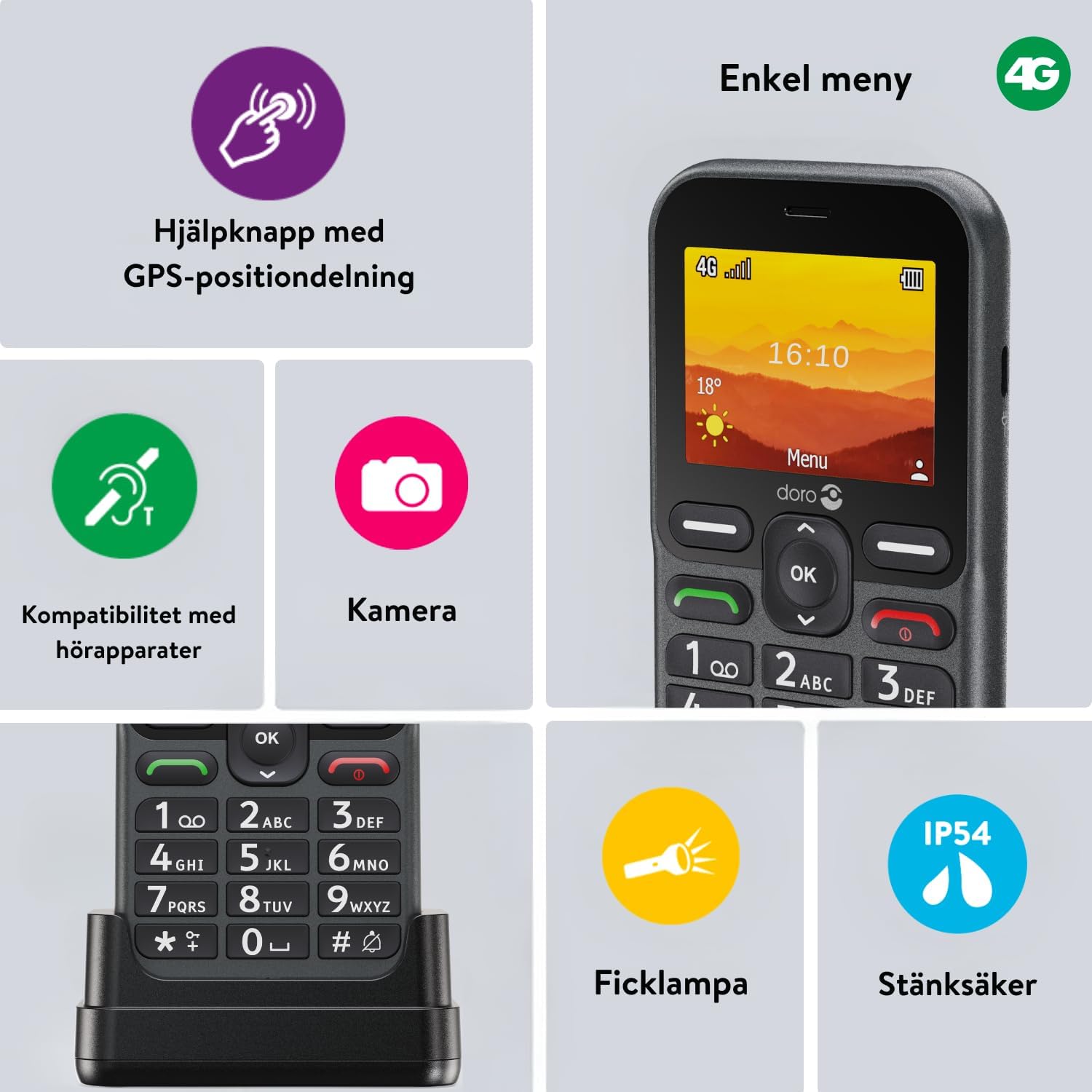
Figure 3: Key features of the Doro Live L11, including the help button with GPS, hearing aid compatibility, camera, flashlight, and splash-proof rating (IP54).
Maintenance
1. Cleaning Your Phone
- Use a soft, lint-free cloth to wipe the screen and body of the phone.
- Do not use harsh chemicals, cleaning sprays, or abrasive materials.
- The phone is splash-proof (IP54 rated), but it is not waterproof. Avoid submerging it in water.
2. Battery Care
- To maximize battery life, avoid exposing the phone to extreme temperatures.
- Charge the phone regularly using the provided charging dock and USB-C cable.
- If the phone will not be used for an extended period, charge it to about 50% before storing.
Troubleshooting
| Problem | Possible Cause | Solution |
|---|---|---|
| Phone does not turn on | Low battery; Battery not inserted correctly | Charge the phone; Re-insert the battery |
| Cannot make/receive calls | No network signal; SIM card issue | Move to an area with better signal; Check SIM card insertion |
| Poor sound quality | Volume too low; Obstruction in speaker/microphone | Increase volume; Clean speaker/microphone openings |
| Emergency button not working | Emergency contacts not set up; GPS signal weak | Set up emergency contacts in settings; Ensure clear view of sky for GPS |
Specifications
| Feature | Detail |
|---|---|
| Model Name | Doro Live L11 |
| Model Number | 8742 |
| Display Size | 2.4 Inches |
| Display Type | LCD |
| Resolution | 240 x 320 Pixels |
| Camera | 2 MP with Flash |
| Cellular Technology | 4G |
| Battery Capacity | 1150 mAh |
| Internal Storage | 64 MB Flash Memory, 50 MB Digital Storage |
| RAM | 64 MB |
| Special Features | Built-In GPS, Hearing Aid Compatibility (HAC), Flashlight, Splash-proof (IP54) |
| Included Components | USB Cable, Charging Dock |
Warranty Information
Doro products are covered by a limited warranty. Please refer to the warranty card included in your product packaging or visit the official Doro website for detailed warranty terms and conditions specific to your region. Keep your purchase receipt as proof of purchase for warranty claims.
Support
For further assistance, technical support, or to find answers to frequently asked questions, please visit the official Doro support website or contact Doro customer service. Contact details can typically be found on the Doro website or in the product packaging.
Online Support: www.doro.com/support