
Doro L31
Doro Live L31 Mobile Phone User Manual
Model: L31 (8749)
Introduction
This manual provides comprehensive instructions for the Doro Live L31 mobile phone, designed for ease of use and reliability. It covers essential information for setting up, operating, maintaining, and troubleshooting your device. Please read this manual carefully to ensure optimal performance and safety.
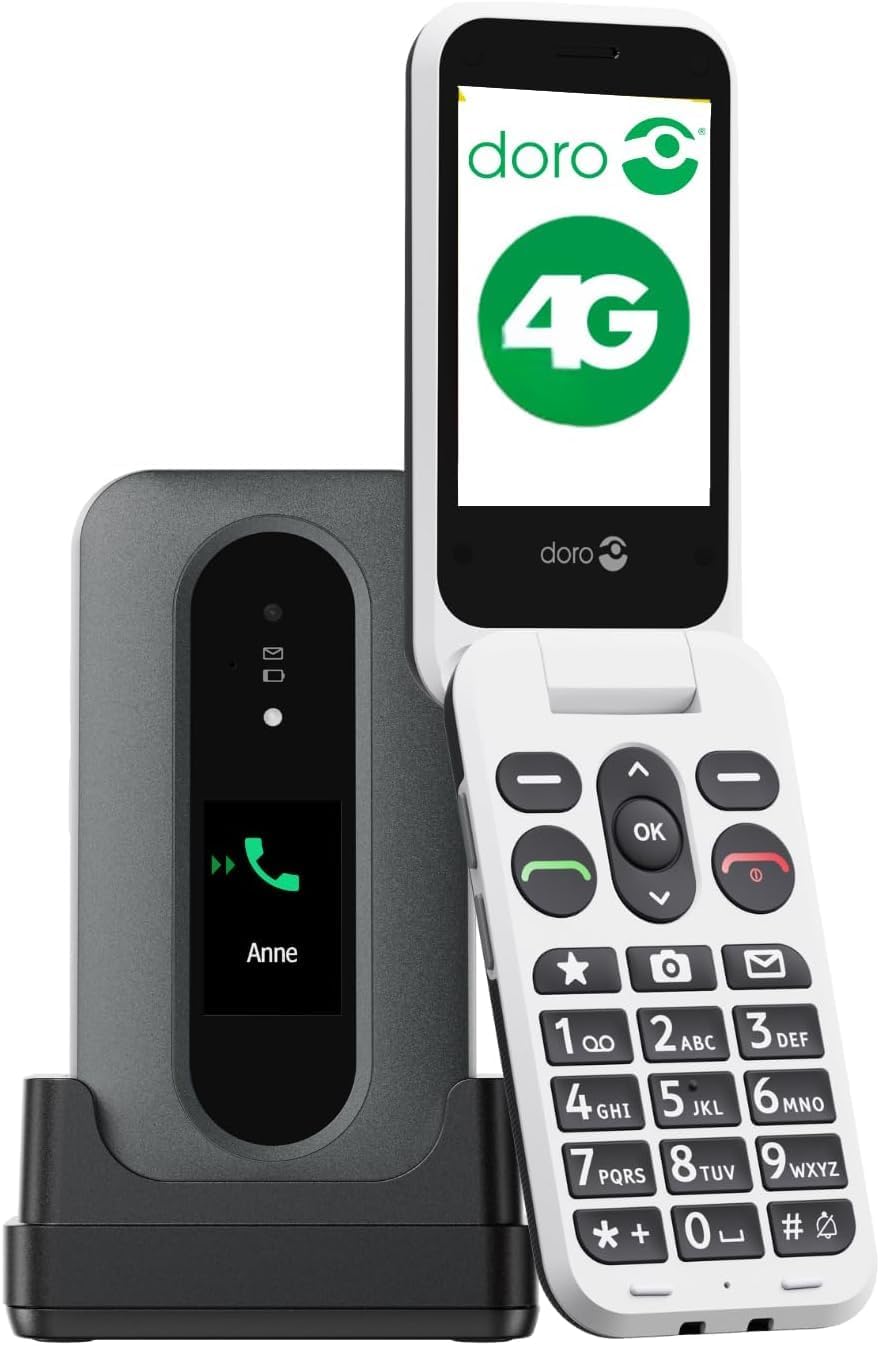
Image: The Doro Live L31 phone, open and displaying its screen and large keypad, positioned next to its dedicated charging dock.
Key Features:
- External Call Identification Screen: View caller ID, missed calls, and messages without opening the phone.
- GPS Help Button: Send alert SMS with location and call trusted contacts in emergencies.
- HD Voice Technology: Enjoy clear calls, compatible with hearing aids (HAC).
- 2MP Camera with Flash: Capture photos and use the built-in flashlight.
- Charging Dock and USB-C Cable: Convenient charging solutions.
- Foldable Design: Answer and end calls by simply opening and closing the phone.
- High Contrast Keys: Large, easy-to-read buttons for effortless dialing.
- Splash Resistant (IP54): Provides protection against splashes of water.
Setup
1. Unboxing and Initial Charge
Your Doro Live L31 package includes the mobile phone, a charging dock, and a USB-C cable. Before first use, ensure the phone is fully charged.
- Connect the USB-C cable to the charging dock and a power adapter (not included) or a USB port.
- Place the Doro Live L31 phone into the charging dock. Ensure it is seated correctly and the charging indicator appears on the screen.
- Allow the phone to charge until the battery icon indicates a full charge. This may take several hours for the initial charge.
2. SIM Card Insertion
The Doro Live L31 requires a Nano-SIM card to make calls and send messages. Ensure the phone is powered off before inserting or removing the SIM card.
- Locate the SIM card slot, typically on the side or under the battery cover.
- Carefully open the SIM card tray or cover.
- Insert the Nano-SIM card with the gold contacts facing down and the cut corner aligned with the slot.
- Close the SIM card tray or cover securely.
3. Powering On for the First Time
After charging and SIM card insertion, you can power on your phone.
- Press and hold the red power button (usually located on the side or keypad) until the Doro logo appears on the screen.
- Follow any on-screen prompts for initial setup, such as language selection or date/time settings.
Operating Instructions
Basic Functions
- Power On/Off: Press and hold the red power button.
- Making a Call: Enter the phone number using the keypad and press the green call button.
- Answering a Call: Open the phone or press the green call button.
- Ending a Call: Close the phone or press the red end call button.
- Adjusting Volume: Use the volume buttons on the side of the phone during a call or when playing media.
External Call Identification Screen
The external screen provides quick access to important information without needing to open the phone.
- Caller ID: Displays the name or number of an incoming call.
- Missed Calls: Indicates if you have missed calls.
- New Messages: Notifies you of unread text messages.

Image: A visual representation of the Doro Live L31 highlighting its key features such as dual screen, GPS help button, clear sound, hearing aid compatibility, and direct keys.
Help Button with GPS
The dedicated Help Button is a crucial safety feature. In an emergency, it can alert pre-selected contacts and share your location.
- Activation: Press and hold the Help Button (usually located on the back of the phone) for a few seconds.
- Alert SMS: The phone will automatically send an alert SMS containing your GPS location to up to five pre-programmed trusted contacts.
- Emergency Calls: After sending the SMS, the phone will sequentially call these contacts until one answers.

Image: The Doro Live L31 phone illustrating the Help Button's function, showing how it connects to multiple pre-set contacts in an emergency.
Camera and Flashlight
- Camera: Access the 2MP camera through the phone's menu to capture photos.
- Flashlight: The built-in flashlight can be activated via a dedicated button or through the phone's menu for convenience in low-light conditions.

Image: A collection of icons depicting key features of the Doro Live L31, including GPS help, hearing aid compatibility, camera, simple menu navigation, flashlight, and IP54 splash resistance.
Hearing Aid Compatibility (HAC) and HD Audio
The Doro Live L31 is designed with HD Voice technology and is compatible with hearing aids, ensuring clear and comfortable conversations.

Image: A woman happily using the Doro Live L31 phone, illustrating the benefit of Doro ClearSound technology for improved audio clarity during calls.
Foldable Design
The clamshell design of the Doro Live L31 offers a simple way to manage calls.
- Answer Call: Simply open the phone to answer an incoming call.
- End Call: Close the phone to end an active call.

Image: A pair of hands demonstrating the intuitive action of opening and closing the Doro Live L31 phone to answer and end telephone calls.
Maintenance
Cleaning Your Phone
- Use a soft, dry, lint-free cloth to clean the phone's screen and body.
- Avoid using harsh chemicals, cleaning sprays, or abrasive materials, as these can damage the phone's surface.
- For stubborn marks, slightly dampen the cloth with water, then wipe dry immediately.
Battery Care
- To prolong battery life, avoid exposing the phone to extreme temperatures.
- Charge the phone regularly using the provided charging dock or USB-C cable.
- Do not attempt to replace the battery yourself; contact authorized service personnel if battery issues arise.
Water Resistance (IP54)
The Doro Live L31 is rated IP54, meaning it is protected against dust ingress and splashing water from any direction. It is not waterproof and should not be submerged in water.
- Avoid exposing the phone to heavy rain or direct jets of water.
- If the phone gets wet, wipe it dry immediately with a clean cloth.
Troubleshooting
If you encounter issues with your Doro Live L31, refer to the following common problems and solutions:
| Problem | Possible Solution |
|---|---|
| Phone does not turn on | Ensure the battery is charged. Connect to the charger and wait a few minutes before attempting to power on again. |
| Cannot make or receive calls | Check if the SIM card is correctly inserted. Verify that you have network coverage. Contact your service provider if the issue persists. |
| Poor call quality | Move to an area with better network reception. Ensure the earpiece/microphone is not obstructed. |
| Help Button not working | Ensure emergency contacts are correctly programmed. Check if the phone has GPS signal. |
| External screen not displaying information | Ensure the phone is not in a power-saving mode that disables the external screen. Restart the phone. |
If these solutions do not resolve the issue, please refer to the support section for further assistance.
Specifications
| Feature | Detail |
|---|---|
| Brand | Doro |
| Model Name | Doro Live L31 |
| Item Model Number | 8749 |
| Form Factor | Bar (Clamshell) |
| Cellular Technology | 4G |
| Operating System | OxygenOS (Note: This OS is typically associated with smartphones. For a feature phone, this might refer to a simplified custom OS.) |
| Processor Speed | 1 GHz |
| Processor Type | Snapdragon |
| RAM Memory Installed Size | 64 MB |
| Flash Memory Installed Size | 64 MB |
| Digital Storage Capacity | 50 MB |
| Memory Storage Capacity | 1 GB |
| Standing Screen Display Size | 2.8 Inches |
| Display Type | LCD |
| Resolution | 320 x 240 |
| Refresh Rate | 60 Hz |
| Video Capture Resolution | 720p |
| Special Features | Built-In GPS, External Call Identification Screen, Help Button, Camera, Flashlight, Hearing Aid Compatible (HAC) |
| Included Components | USB Cable, Charging Dock |
| Battery Capacity | 1150 Milliamp Hours |
| IP Rating | IP54 (Splash Resistant) |
| Package Dimensions | 19 x 9 x 6 cm; 340 g |
Warranty and Support
Warranty Information
Your Doro Live L31 mobile phone is covered by a manufacturer's warranty. Please refer to the warranty card included in your product packaging or visit the official Doro website for detailed terms and conditions regarding warranty coverage and duration.
Customer Support
For technical assistance, troubleshooting beyond this manual, or service inquiries, please contact Doro customer support:
- Visit the official Doro website for support resources, FAQs, and contact information.
- Refer to the contact details provided in your product packaging.
Related documentsL31


Ask a question about this manual
Ask about setup, troubleshooting, compatibility, parts, safety, or missing instructions. Manuals+ will review the question and use this page’s manual context to help answer it.