
1. Product Overview
The FiiO S15 is a high-fidelity streamer network player designed for comprehensive audio playback and streaming. It integrates an open Android 12 operating system with a custom horizontal screen interface, allowing for versatile application use and seamless integration into existing audio systems. The S15 features advanced audio components and a wide array of connectivity options.
Key Features:
- Operating System: Open Android 12 with custom horizontal screen interface.
- Processor: Snapdragon 660 for smooth operation.
- Digital-to-Analog Converter (DAC): AKM flagship combination (AK4191+AK4499EX) with a newly designed fully separated digital/analog architecture for enhanced signal-to-noise ratio and reduced noise.
- Clock System: Dual ACCUSILICON AS318-B series ultra-low phase noise femtosecond oscillators (45.1584MHz and 49.1520MHz) for high fidelity decoding and precise digital output.
- Display: 7.84-inch automotive-grade large color display.
- Connectivity: Supports Roon Ready, AirPlay, DLNA, Bluetooth network streaming, UPNP, SMB, WebDAV protocols for NAS/LAN/cloud server playback.
- Local Playback: Direct playback via built-in storage, TF cards, USB drives, or external hard drives.
- Interfaces: I2S output, AES input/output, coaxial input/output, HDMI input/output/ARC, RCA line output, optical input/output, XLR balanced line output.
- Power Supply: Custom high-quality 35W low-noise linear transformer with four 4700uF ELNA audio capacitors.
- Construction: Full-sized, all-metal body with a standard width of 430mm and stable non-slip feet.
- Control: Local operation via dual knobs and dual virtual buttons, Bluetooth remote control, and app-based remote control.

Image 1.1: Front view of the FiiO S15 Streamer Network Player, showcasing the central 7.84-inch display and dual control knobs on either side.
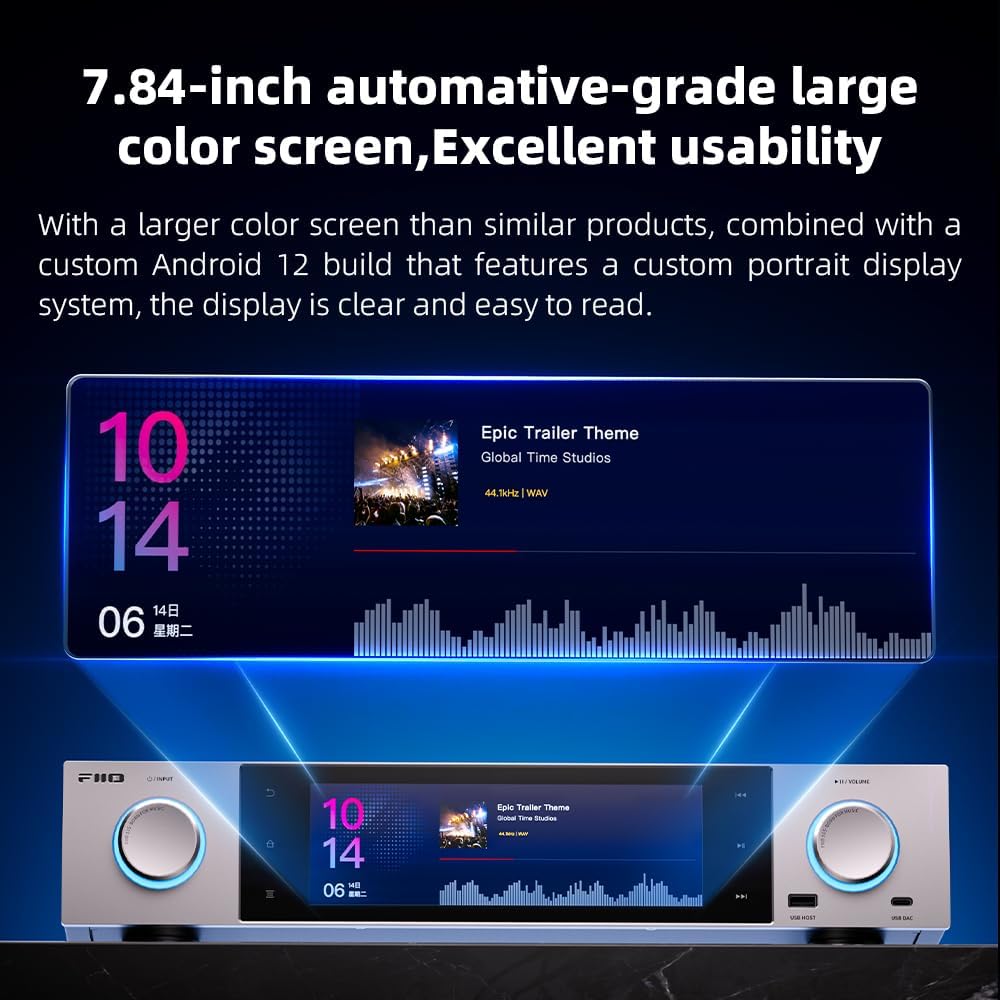
Image 1.2: Rear panel of the FiiO S15, illustrating the comprehensive array of input and output ports including HDMI, XLR, RCA, Coaxial, Optical, and USB connections.
2. Setup
2.1 Unpacking and Initial Inspection
Carefully remove the FiiO S15 from its packaging. Inspect the unit for any signs of damage. Ensure all accessories, including the power cable and remote control, are present.
2.2 Power Connection
- Connect the provided power cable to the AC IN port on the rear of the S15.
- Plug the other end of the power cable into a suitable AC power outlet.
2.3 Network Connection
The S15 supports both wired and wireless network connections.
- Wired (Ethernet): Connect an Ethernet cable from your router or network switch to the LAN port on the rear of the S15.
- Wireless (Wi-Fi): After powering on, navigate to the system settings on the S15 display to configure your Wi-Fi connection. Select your network and enter the password.
2.4 Audio Output Connections
Connect the S15 to your amplifier, active speakers, or external DAC using the appropriate audio output ports.
- RCA Line Out: For unbalanced analog audio output.
- XLR Balanced Line Out: For balanced analog audio output, offering improved noise rejection.
- HDMI Out: For digital audio and video output to a display or AV receiver.
- Coaxial Out: For digital audio output.
- Optical Out: For digital audio output.
- I2S Out: For high-quality digital audio output to compatible DACs.
- AES Out: For professional digital audio output.
2.5 Audio Input Connections
The S15 can also function as a DAC for external sources.
- Coaxial In: For digital audio input from external devices.
- Optical In: For digital audio input from external devices.
- HDMI In/ARC: For digital audio and video input, including Audio Return Channel functionality from compatible displays.
- AES In: For professional digital audio input.
- USB DAC: Connect a computer or other USB audio source to the front-panel USB DAC port for high-quality audio playback through the S15.
2.6 Storage Expansion
The S15 supports various external storage options:
- TF Card: Insert a TF (microSD) card into the designated slot on the rear panel.
- USB Drives/External Hard Drives: Connect USB storage devices to the USB HOST ports (front or rear). Note that NVMe drives require a USB-to-NVMe dongle and will operate at USB speeds.
3. Operating Instructions
3.1 Powering On/Off
Press the power button located on the front panel to turn the S15 on or off. A brief press will initiate power-on or standby, while a long press will offer power-off options.
3.2 Navigating the FiiO OS
The S15 features a 7.84-inch touch-sensitive display running a custom FiiO OS based on Android 12. This interface is optimized for landscape viewing and provides access to various functions and applications.

Image 3.1: The 7.84-inch automotive-grade large color screen of the FiiO S15, displaying music playback information and a visualizer.

Image 3.2: The FiiO S15 showcasing its new FiiO OS landscape display system, optimized for a clear and intuitive user experience.
3.3 Control Methods
The S15 offers multiple ways to control its functions:
- Dual Knobs:
- Left Knob: Rotate to switch between applications. Press to open the selected application. Long press to choose the operating mode.
- Right Knob: Rotate to adjust volume. Press to play/pause.
- Dual Virtual Keys: Located near the display, these keys provide quick access to functions like Return/Return to Home/Operating Mode, Previous Track, Play/Pause, and Next Track.
- Bluetooth Remote Control: Use the included Bluetooth remote for convenient control from a distance. Ensure the remote is paired in the system settings.
- App-Based Remote Control: Download the FiiO Control app on your smartphone for remote operation.

Image 3.3: Diagram illustrating the functions of the dual knobs and virtual keys on the FiiO S15 for local control.
3.4 Music Playback and Streaming
The S15 supports various methods for accessing and playing music:
- Streaming Services: Install and use major streaming music apps directly on the S15.
- Network Streaming: Utilize Roon Ready, AirPlay, DLNA, and Bluetooth for network-based audio streaming.
- LAN Playback: Access music files from Network Attached Storage (NAS), local area networks, or cloud servers using UPNP, SMB, and WebDAV protocols.
- Local Playback: Play music stored on the S15's internal storage, TF cards, USB drives, or external hard drives.

Image 3.4: Visual representation of the FiiO S15's capability to handle various streaming media and LAN playback options, with icons of popular music services.
3.5 HDMI/ARC Functionality
The S15 supports HDMI 2.0 decoding, HDMI output, and HDMI Audio Return Channel (ARC) capabilities. This allows it to integrate with your audiovisual setup for both audio and video transmission.

Image 3.5: Diagram illustrating the HDMI and HDMI ARC decoding capabilities of the FiiO S15, showing its integration into a home theater system.
3.6 Customizable Home Screen
The FiiO OS allows for customization of the home screen, enabling users to arrange applications and shortcuts for personalized access.
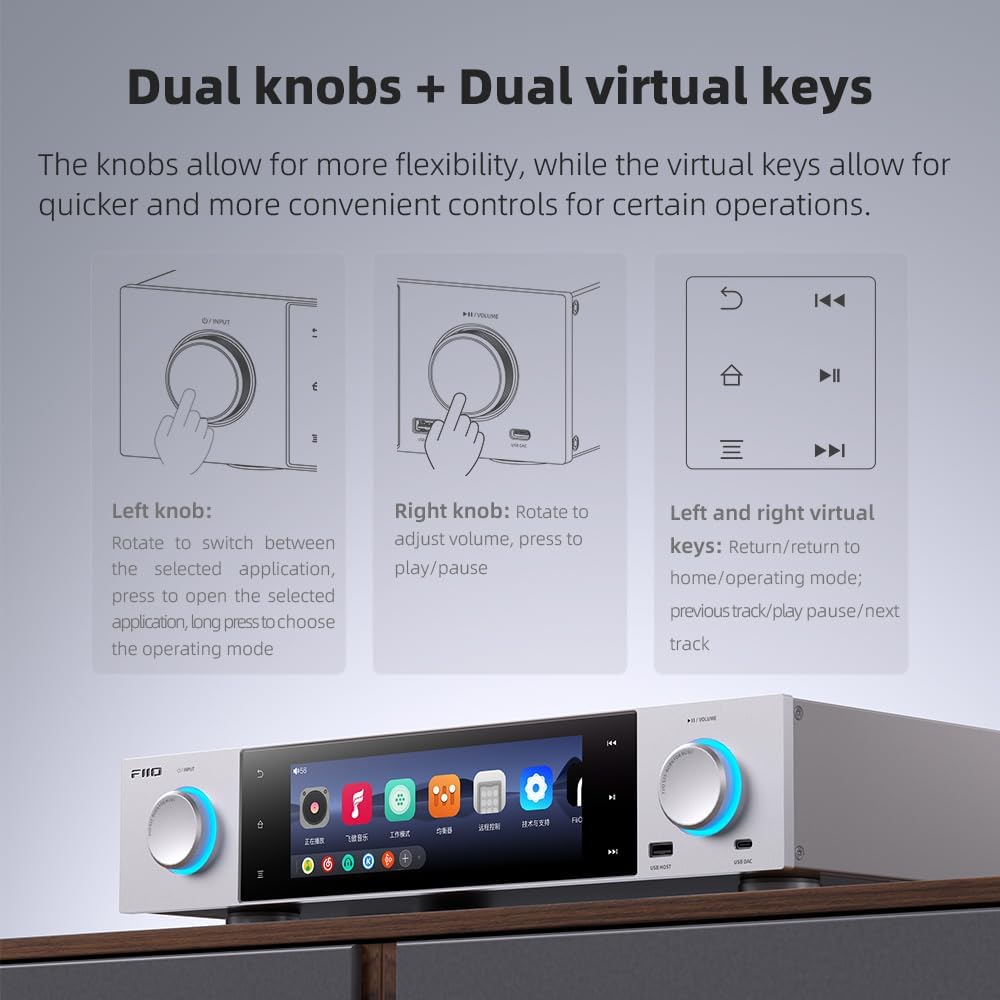
Image 3.6: Screenshots demonstrating the custom landscape version of FiiO Music and the customizable home screen interface on the S15.
4. Maintenance
4.1 Cleaning
To maintain the appearance and functionality of your FiiO S15:
- Use a soft, dry, lint-free cloth to wipe the exterior surfaces.
- For stubborn marks, slightly dampen the cloth with water or a mild, non-abrasive cleaner. Avoid harsh chemicals or solvents.
- Do not spray cleaning liquids directly onto the device.
- Keep the display clean using a screen-specific cleaning cloth.
4.2 Software Updates
FiiO may release firmware updates to improve performance, add features, or address issues. It is recommended to periodically check for and install available updates:
- Navigate to the system settings on your S15.
- Look for a 'System Update' or 'About Device' section.
- Follow the on-screen instructions to download and install any new firmware. Ensure the device is connected to a stable power source during updates to prevent interruption.
5. Troubleshooting
This section addresses common issues that may arise during the use of the FiiO S15.
5.1 General Issues
- Device not powering on: Ensure the power cable is securely connected to both the S15 and a working power outlet. Try a different outlet.
- No sound output: Check all audio cable connections. Verify the correct input source is selected on your amplifier/speakers. Ensure the volume on the S15 is not muted or set too low.
- Network connection issues: For Wi-Fi, re-enter the password in settings. For Ethernet, ensure the cable is properly connected and your router is functioning. Restart the S15 and your network equipment.
5.2 Specific Operational Concerns
- Remote Control Unresponsive: The remote may not be pre-paired. Access the S15 system settings to pair the Bluetooth remote. Ensure there are no obstructions between the remote and the S15.
- FiiO Control App Connection Errors: Ensure both the S15 and your smartphone are connected to the same Wi-Fi network. Check for app updates on your phone and firmware updates on the S15. Restart both devices.
- User Interface (UI) Display Issues (e.g., small fonts, content not fitting screen): While the FiiO OS is optimized, some third-party apps may not scale perfectly. Check display settings within the S15 for font size or display scaling options.
- Volume Jumps Significantly on First Adjustment: This may be a software characteristic. Adjust volume gradually using the knob or remote. Ensure the latest firmware is installed, as updates may address such behaviors.
- VU Meter Not Displaying for Streaming/Coaxial Connections: The VU meter functionality may be limited to specific playback modes or native applications. Check the FiiO Control app for 'Independent control' mode, which might enable VU meter and equalizer options for various inputs.
- USB DAC Input on Front Panel: The front-facing USB DAC port is by design. For permanent setups, consider cable management solutions to integrate it aesthetically.
- NVMe Drive Speed Limitations: NVMe support is via a USB-to-NVMe dongle, which means the drive will operate at USB speeds, not native NVMe speeds. This is an inherent hardware design and not a malfunction.
6. Specifications
Detailed technical specifications for the FiiO S15 Streamer Network Player.
| Feature | Specification |
|---|---|
| Brand | FiiO |
| Model | S15 |
| Operating System | Android 12 |
| Processor | Snapdragon 660 |
| DAC Chipset | AK4191+AK4499EX |
| Display | 7.84-inch Color Display |
| Connectivity Technology | Bluetooth, HDMI, USB, Wi-Fi, Ethernet |
| Audio Output Mode | Surround |
| Surround Sound Channel Configuration | 5.1 |
| Total HDMI Ports | 2 |
| Output Wattage | 35 Watts |
| Dimensions (L x W x H) | 16 x 12 x 4 inches |
| Item Weight | 17.46 pounds |
| Special Features | DLNA, USB Recording (DVR) |
| Controller Type | App Control, Remote Control |
| Compatible Devices | Television, Blu-ray Player, Gaming Console, Amplifier, Speaker, Personal Computer |
| Video Encoding | H.264, H.265/HEVC |

Image 6.1: Internal view of the FiiO S15 highlighting the 35W low-noise linear power supply and ELNA audio capacitors.

Image 6.2: The FiiO S15 integrated into a living room audio setup, demonstrating its full-sized, all-metal construction and seamless integration with other equipment.
7. Warranty and Support
7.1 Warranty Information
For detailed warranty information regarding your FiiO S15, please refer to the manufacturer's official website (www.fiio.com) or the warranty card included with your product. Warranty terms and conditions may vary by region and retailer.
7.2 Technical Support
If you encounter any issues not covered in this manual or require further assistance, please contact FiiO customer support through their official website. You may find FAQs, troubleshooting guides, and contact information for technical support services there.


