
Introduction
The Braun Series 7 BT7525 Beard Trimmer is engineered for professional precision and effortless grooming. It features a durable, ultra-sharp ProBlade and innovative AutoSense technology to handle various beard types. With 40 length settings and a locking button, it provides precise control for trimming, outlining, and detailing.
Important Safety Information
Always read these safety instructions before using the appliance.
- Always unplug the trimmer before cleaning.
- Keep the appliance away from water. Do not immerse in water while charging.
- Do not use on infants or children.
- Avoid contact with eyes and skin.
- Always replace guards and accessories after use.
- Do not use the appliance if it is damaged.
- Follow all instructions in this user manual for safe operation.
Package Contents
Verify that all items are present in the package:
- 1x Braun Series 7 BT7525 Beard Trimmer
- 2x Trimmer Combs (e.g., 0.5-10mm, 10.5-20mm)
- 1x Precision Shaver Head
- 1x Beard Stencil
- 1x Charging Stand
- 1x Pouch
- 1x Cleaning Brush
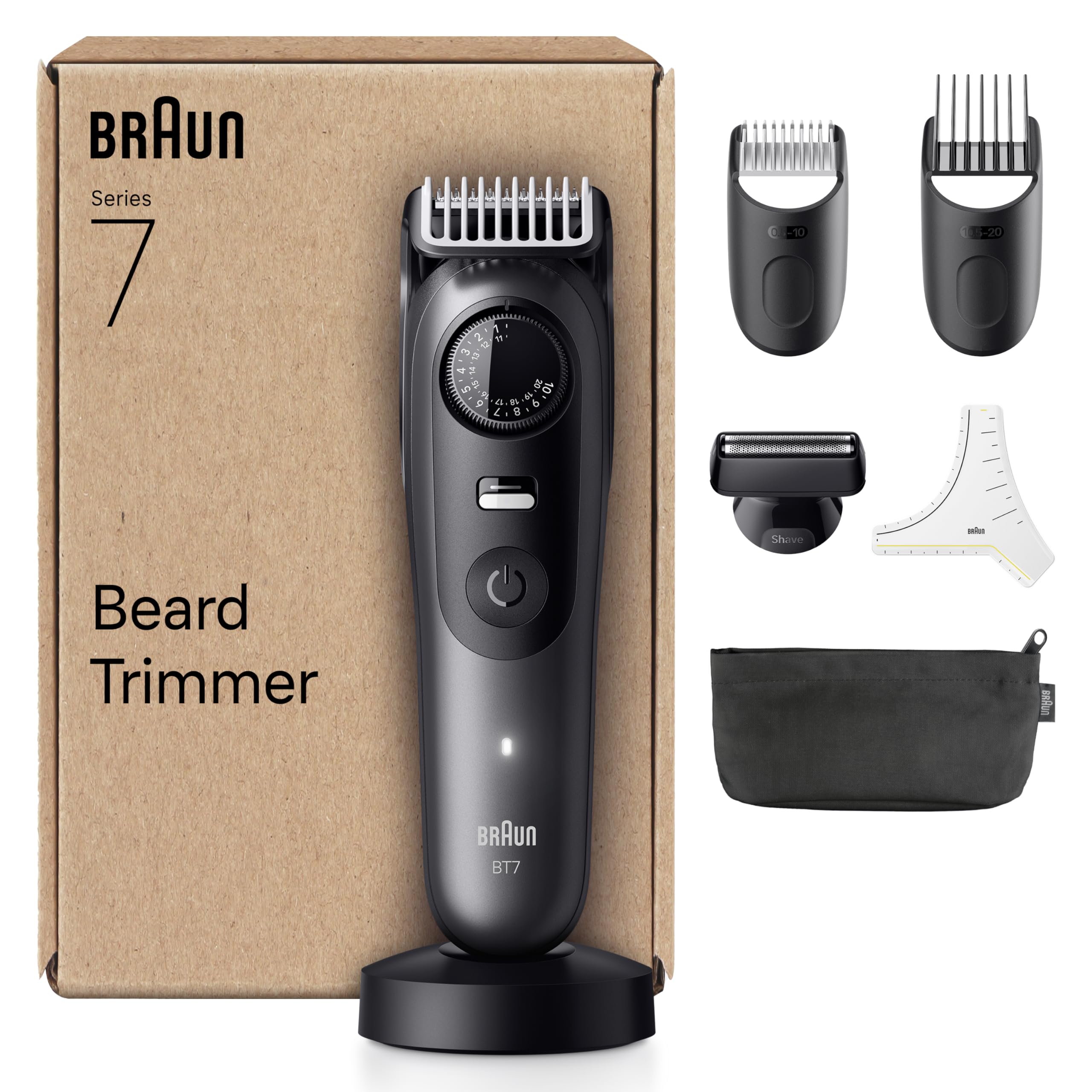
Image: The Braun Series 7 BT7525 beard trimmer shown with its full set of accessories, including the trimmer unit, various comb attachments, precision shaver head, beard stencil, charging stand, pouch, and cleaning brush.
Setup
Charging the Trimmer
- Connect the charging cord to the charging stand.
- Place the trimmer onto the charging stand.
- Plug the power adapter into an electrical outlet.
- The charging indicator light will illuminate. A full charge provides up to 120 minutes of cordless operation.
Attaching/Detaching Accessories
- To attach a comb or shaver head, align it with the trimmer head and press firmly until it clicks into place.
- To detach, gently pull the accessory away from the trimmer head.
Operating Instructions
Powering On/Off
Press the power button once to turn the trimmer on. Press it again to turn it off.
Adjusting Length Settings
The trimmer features a precision dial with 40 length settings in 0.5mm increments.
- Attach the desired comb.
- Rotate the precision dial to select your preferred trimming length.
- Engage the locking button to secure the selected length, preventing accidental changes during use.

Image: Close-up view of the precision dial and the locking button on the Braun Series 7 trimmer, illustrating the 40 length settings and the mechanism to secure the chosen length.
Using the ProBlade and AutoSense Technology
The ultra-sharp ProBlade ensures efficient cutting. The integrated AutoSense technology adapts the motor power to your beard density, providing consistent performance regardless of hair thickness.

Image: A detailed view of the Braun ProBlade, highlighting its sharp edges designed for precise and efficient hair cutting.
Trimming and Styling
Use the appropriate comb for your desired beard length. For outlining and precise edges, remove the comb and use the trimmer head directly. The precision shaver head is ideal for clean shaves on smaller areas or for defining sharp lines.

Image: A man demonstrating beard styling with the Braun Series 7 trimmer, showcasing its use for achieving precise and professional results.
Maintenance
Cleaning the Trimmer
The Braun Series 7 BT7525 is 100% waterproof, allowing for easy cleaning under running water.
- Ensure the trimmer is turned off and unplugged from the power source.
- Remove any attached comb or shaver head.
- Rinse the trimmer head and any attachments under warm running water.
- Use the provided cleaning brush to remove any trapped hairs from the blades and combs.
- Allow all parts to air dry completely before reassembling or storing.
Blade Care
For optimal performance, regularly oil the blades with a drop of light machine oil (not included) after cleaning, especially if you notice any decrease in cutting efficiency.
Troubleshooting
- Trimmer does not turn on: Ensure the battery is charged. Connect to the charger and allow it to charge for at least 10 minutes before attempting to turn it on again.
- Poor trimming performance: Clean the trimmer head and blades thoroughly. Ensure no hair is trapped. The blades may require oiling. If performance does not improve, the blades might be worn and require replacement.
- Trimmer not charging: Check that the charging cord and adapter are securely connected to both the trimmer stand and the electrical outlet. Ensure the outlet is functional.
Specifications
| Feature | Specification |
|---|---|
| Model Number | BT7525 |
| Brand | Braun |
| Power Source | Battery Powered (Li-ion) |
| Battery Life | Up to 120 minutes cordless |
| Length Settings | 40 (in 0.5mm increments) |
| Blade Material | Stainless Steel (ProBlade) |
| Waterproof | Yes, 100% waterproof |
| Dimensions (L x W x H) | 16 x 6.3 x 25.2 cm |
| Weight | 376 Grams |
| Recommended Use | Face |
Warranty and Support
For warranty information and customer support, please refer to the warranty card included in your product packaging or visit the official Braun website. Keep your proof of purchase for any warranty claims.


