
1. Introduction
This manual provides detailed instructions for the proper use and maintenance of your Casio G-Shock DW5000R-1A Digital Watch. The DW5000R-1A model is a modern re-creation of the original G-SHOCK design, incorporating advanced Casio technologies while retaining its iconic shock-resistant structure. Please read this manual thoroughly to ensure optimal performance and longevity of your watch.
2. Key Features
- Shock Resistant: Engineered to withstand impacts and vibrations.
- 200-meter Water Resistance: Suitable for swimming, snorkeling, and diving.
- Tough Solar Power: Charges using light, eliminating the need for regular battery changes.
- Mineral Glass: Durable and scratch-resistant watch face.
- Screw Lock Back: Ensures superior water resistance and durability.
- 1/100-second Stopwatch: For precise time measurement.
- Countdown Timer: Useful for various timed activities.
- Multi-function Alarm: Set daily alarms for reminders.
- Flash Alert: Flashes with a buzzer for alarms, hourly time signals, and countdown timer end.
- LED Backlight (Super Illuminator): Provides clear visibility in low-light conditions.
- Full Auto-calendar (to year 2099): Automatically adjusts for different month lengths and leap years.
- 12/24-hour Format: Choose your preferred time display format.
- Bio-based Resin: Environmentally conscious material used for the band and bezel.
3. Watch Components
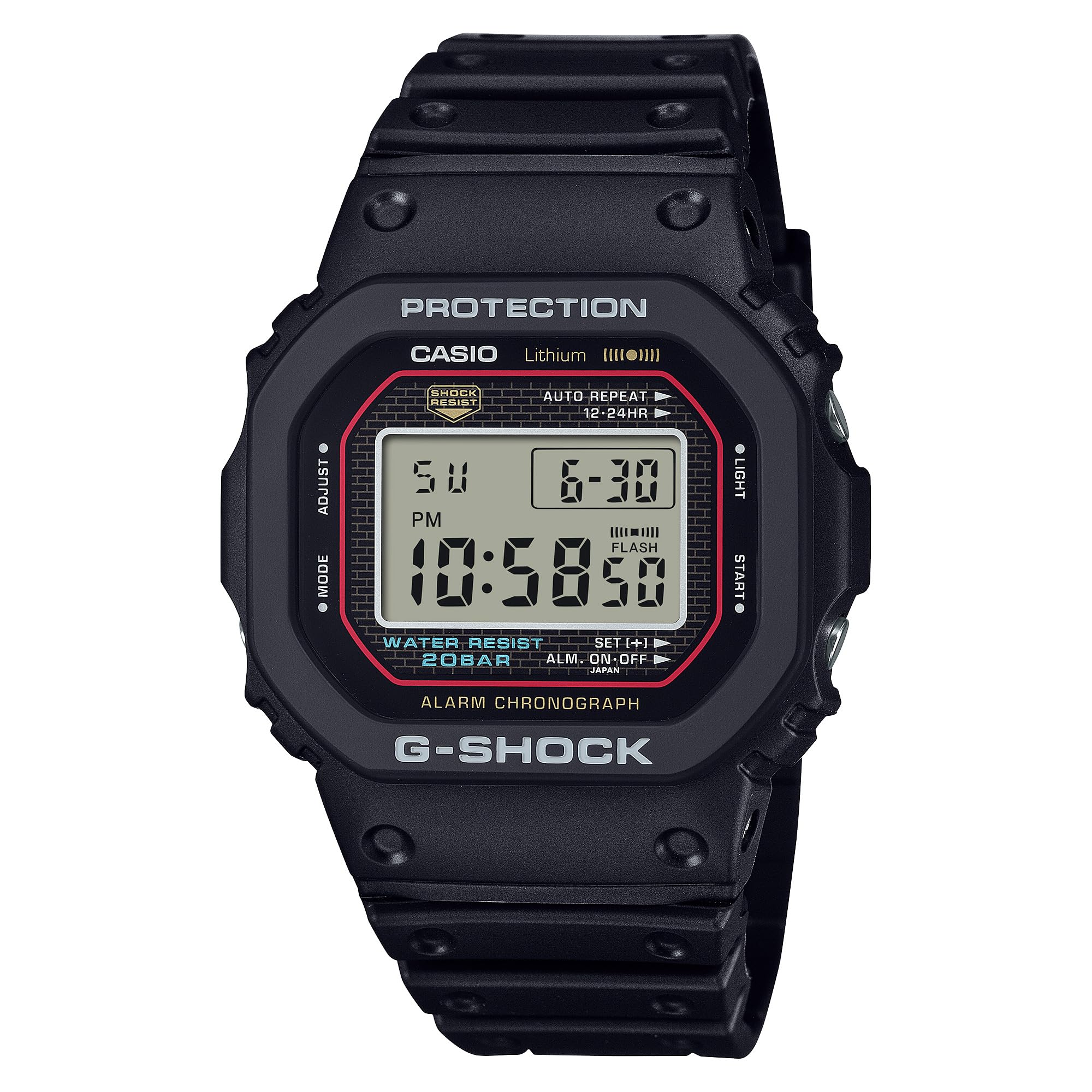
Figure 3.1: Front view of the watch, showing the display and button labels.

Figure 3.2: Side view of the watch, illustrating the profile and button placement.

Figure 3.3: Back view of the watch, detailing the screw lock back and strap attachment.
The watch features four buttons: ADJUST (top left), MODE (bottom left), LIGHT (top right), and START (bottom right). These buttons are used for navigating modes, setting functions, and activating the backlight.
4. Initial Setup
4.1 Charging the Watch (Tough Solar)
Your G-Shock DW5000R-1A is equipped with Tough Solar technology, which converts light into electrical power. To ensure optimal performance, expose the watch face to light regularly. The watch has a power saving function that turns off the display when left in the dark for a certain period. A full charge can last approximately 5 years on a CR2016 battery under normal use.
4.2 Setting the Time and Date
- In the Timekeeping Mode, press and hold the ADJUST button until the city code starts to flash. This indicates the setting mode.
- Use the LIGHT and START buttons to select your desired city code (time zone).
- Press the MODE button to cycle through the settings: Daylight Saving Time (DST), 12/24-hour format, seconds, hour, minute, year, month, and day.
- Use the LIGHT and START buttons to change the flashing value.
- Once all settings are correct, press the ADJUST button to exit the setting mode.
5. Operating Instructions
5.1 Mode Navigation
Press the MODE button to cycle through the different watch modes:
- Timekeeping Mode: Displays current time, date, and day of the week.
- World Time Mode: Displays current time in various cities around the globe.
- Alarm Mode: Set and manage alarms.
- Stopwatch Mode: Measure elapsed time.
- Countdown Timer Mode: Count down from a specified time.
5.2 Using the Stopwatch
- Navigate to the Stopwatch Mode using the MODE button.
- Press the START button to begin timing.
- Press the START button again to pause timing.
- Press the ADJUST button to reset the stopwatch to zero.
5.3 Setting an Alarm
- Navigate to the Alarm Mode using the MODE button.
- Press the ADJUST button until the alarm time starts to flash.
- Use the LIGHT and START buttons to set the desired alarm hour and minute.
- Press the MODE button to switch between hour and minute settings.
- Press the ADJUST button to confirm and exit the setting mode.
- Press the START button to toggle the alarm ON/OFF.
5.4 Activating the LED Backlight
Press the LIGHT button at any time to illuminate the display for a few seconds. The Super Illuminator feature provides bright and clear visibility.
6. Maintenance
6.1 Cleaning Your Watch
Wipe the watch with a soft, dry cloth. For stubborn dirt, use a soft cloth dampened with water and a mild neutral detergent, then wipe dry. Avoid using volatile agents like thinner, gasoline, alcohol, or chemical sprays, as they may damage the resin components.
6.2 Water Resistance Precautions
The DW5000R-1A is water-resistant to 200 meters. This means it is suitable for recreational scuba diving. However, avoid operating buttons while the watch is submerged in water or wet, as this can compromise the water resistance. After exposure to saltwater, rinse the watch thoroughly with fresh water and dry it with a soft cloth.
6.3 Solar Charging Tips
To maintain optimal battery levels, expose your watch to bright light regularly. Avoid prolonged storage in dark places. If the battery level becomes low, the display may dim or certain functions may be disabled. Place the watch in a brightly lit area to recharge.
7. Troubleshooting
7.1 Display is Blank or Dim
This usually indicates a low battery level. Expose the watch to bright light for several hours to recharge. If the issue persists after adequate charging, contact Casio customer support.
7.2 Time is Incorrect
Ensure your home city code and Daylight Saving Time (DST) settings are correct. Refer to Section 4.2 for instructions on setting the time and date. If the watch is exposed to strong magnetic fields, it may affect timekeeping accuracy. Move away from such fields and reset the time if necessary.
7.3 Buttons are Unresponsive
Ensure the watch is not in a mode that locks button operations. If the watch has been exposed to extreme temperatures, allow it to return to normal operating temperature. If the problem continues, a factory reset (if applicable and described in a full manual) or professional service may be required.
8. Specifications
| Feature | Specification |
|---|---|
| Model Number | DW5000R-1A |
| Case Size (L×W×H) | 48.9 × 42.3 × 13.1 mm |
| Weight | 76 g |
| Case / Bezel Material | Stainless steel / Bio-based resin |
| Band Material | Bio-based resin |
| Water Resistance | 200-meter |
| Power Supply | Tough Solar (Solar powered) |
| Approx. Battery Life | 5 years on CR2016 (included) |
| Glass | Mineral Glass |
| Back Structure | Screw Lock Back |
| Clasp Type | Buckle |
9. Warranty and Support
For warranty information, please refer to the warranty card included with your product or visit the official Casio website. If you require further assistance or service, please contact Casio customer support. Keep your purchase receipt as proof of purchase for warranty claims.
Online Resources: For the most up-to-date information, detailed module instructions, and FAQs, please visit the official Casio G-Shock support website.


