
1. Introduction and Overview
The Klein Tools 32809MAGM is an 11-in-1 Multi-Nut Driver designed for professionals. This versatile tool features a pass-through handle and barrels, allowing it to drive nuts onto threaded rods of any length without bottoming out. It includes eleven metric hex sizes, making it a compact and efficient solution for various applications. The tool incorporates both rare-earth magnets and spring coils for secure fastener retention, enhancing one-handed operation. Its heavy-duty construction and Cushion-Grip handle provide increased torque and comfort during use.
2. Key Features
- 11 Metric Hex Sizes: Includes 5, 7, 8, 9, 10, 11, 13, 14, and 19mm sockets, plus 8mm and 10mm hex keys, all in one tool.
- Pass-Through Handle and Barrels: Enables torquing hex nuts onto threaded rods of any length by allowing the rod to pass completely through the tool.
- Rare-Earth Magnets: Sizes 5, 7, 8, 9, and 11mm feature strong magnets to securely hold nuts and bolts for efficient, one-handed driving.
- Spring Coils: Sizes 10, 13, 14, and 19mm utilize spring coils to retain nuts and bolts in place without the need for magnets.
- Extended Wrench-Assist: Each barrel is designed with an extended wrench-assist feature, providing additional leverage and torque for challenging tasks.
- Color-Coded Sizes: The ends of the nut driver barrels are color-coded for quick and easy identification of the correct size.
- Heavy-Duty Cushion-Grip Handle: Engineered for durability, comfort, and to provide a firm grip, allowing for greater torque application.

Figure 1: Overview of the Klein Tools 32809MAGM Multi-Nut Driver, highlighting its color-coded sizes, wrench-assist, and pass-through handle functionality. This image illustrates the various features integrated into the tool's design.

Figure 2: A close-up view of the individual nut driver barrels, demonstrating the color-coded rings for easy size identification and the various metric sizes included in the set.
3. Setup
- Identify Required Size: Determine the correct metric hex nut size needed for your application. Refer to the color-coded ends on the nut driver barrels for quick identification.
- Select and Insert Barrel: Choose the appropriate nut driver barrel. Align the barrel with the handle and firmly push it into place until it clicks securely. Ensure the barrel is fully seated to prevent dislodgement during use.
- Verify Retention Mechanism: For sizes 5, 7, 8, 9, and 11mm, confirm the rare-earth magnet is present and functional by testing with a nut. For sizes 10, 13, 14, and 19mm, ensure the spring coils are intact and provide adequate retention.

Figure 3: A worker demonstrating the insertion of a nut driver barrel into the main handle of the Klein Tools 11-in-1 Multi-Nut Driver, ensuring a secure connection before use.
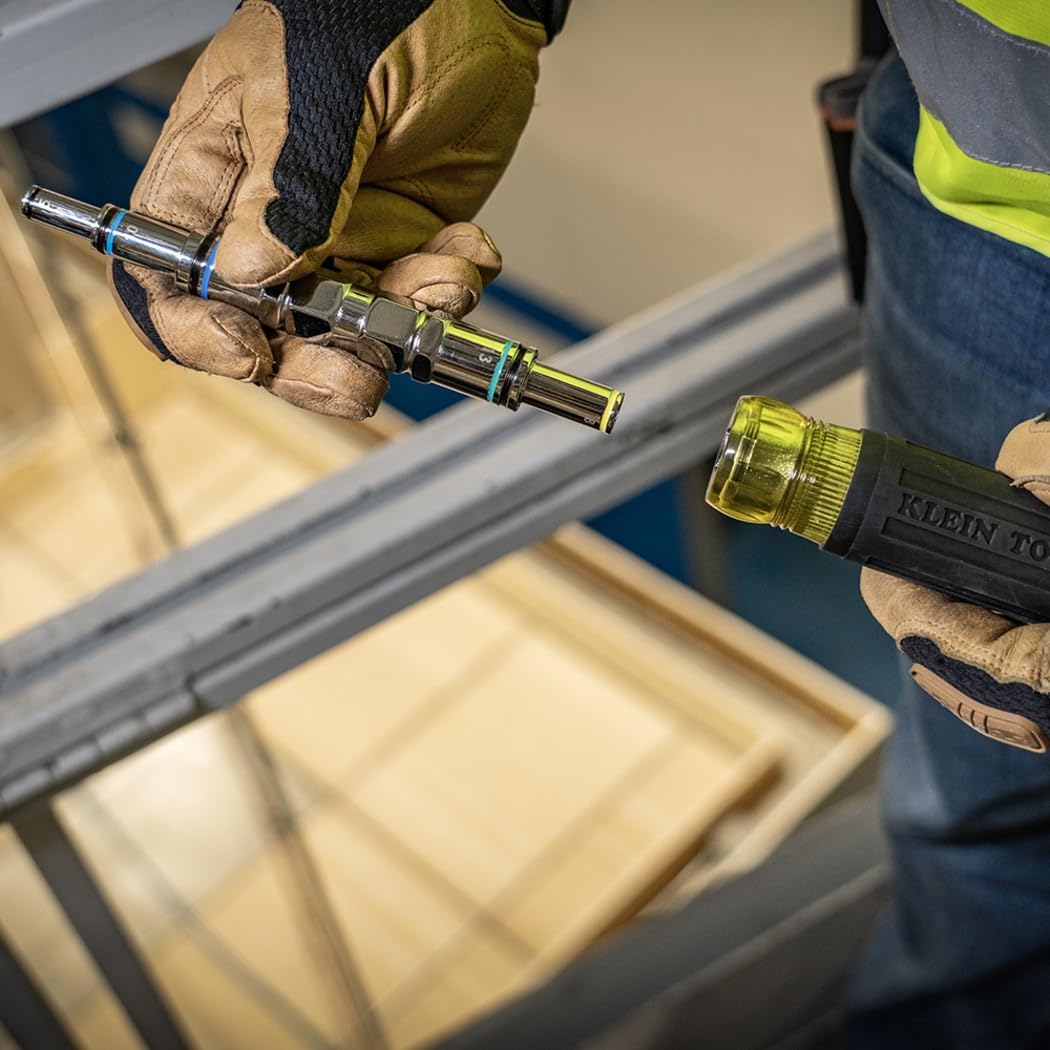
Figure 4: Illustrates the process of removing a nut driver barrel from the handle, showing how to detach the components for size changes or storage.
4. Operating Instructions
- Driving Nuts on Threaded Rods: For applications involving threaded rods, select the appropriate pass-through barrel. Insert the threaded rod through the hollow handle and barrel. Place the nut onto the rod and use the driver to tighten it. The pass-through design allows for unlimited rod length.
- Standard Nut Driving: For standard nuts and bolts, place the nut driver barrel over the fastener. The magnetic or spring coil retention system will hold the fastener in place, facilitating one-handed operation. Apply rotational force to tighten or loosen the fastener.
- Applying Extra Torque (Wrench-Assist): If additional torque is required, use a wrench on the extended wrench-assist feature located on the barrel. This provides extra leverage for stubborn fasteners.
- Hex Key Usage: For 8mm and 10mm hex key applications, ensure the correct hex key is extended from the tool. Insert the hex key into the fastener and apply rotational force.

Figure 5: The Klein Tools 11-in-1 Multi-Nut Driver shown with a threaded rod extending completely through its hollow handle and barrel, demonstrating its pass-through capability for long threaded applications.
Figure 6: A detailed view of the nut driver's handle and barrel in action, showing a nut being driven onto a threaded rod, illustrating the tool's ergonomic design and functionality.
5. Maintenance
- Cleaning: After each use, wipe down the tool with a clean, dry cloth to remove dirt, grease, and debris. For stubborn grime, a mild detergent solution can be used, followed by thorough drying. Avoid harsh chemicals or abrasive cleaners that could damage the finish or grip.
- Inspection: Regularly inspect the nut driver barrels for any signs of wear, damage, or corrosion. Check the magnets and spring coils for proper function and retention. Ensure the handle is free from cracks or damage.
- Storage: Store the tool in a dry environment, away from excessive moisture and extreme temperatures, to prevent rust and material degradation. Keep all barrels together to avoid loss.
6. Troubleshooting
| Problem | Possible Cause | Solution |
|---|---|---|
| Nut/bolt not securely held by barrel. | Incorrect barrel size selected; magnet or spring coil damaged/weakened; excessive debris in barrel. | Ensure correct size is used. Clean the barrel thoroughly. If magnet/spring is damaged, consider replacing the barrel or tool. |
| Difficulty inserting/removing barrels from handle. | Debris in handle or barrel connection point; barrel not aligned correctly. | Clean connection points. Ensure barrel is aligned straight before pushing/pulling firmly. |
| Tool slips on fastener. | Incorrect size selected; fastener is stripped; excessive wear on barrel hex. | Verify correct size. Replace stripped fasteners. If barrel is worn, replace the barrel. |
7. Specifications
| Attribute | Detail |
|---|---|
| Model Number | 32809MAGM |
| Included Components | 11-in-1 Pass-Through Magnetic Multi-Nut Driver, Metric |
| Metric Hex Sizes | 5, 7, 8, 9, 10, 11, 13, 14, 19mm (sockets); 8mm, 10mm (hex keys) |
| Material | Alloy Steel |
| Color | Black/Yellow |
| Item Dimensions (L x W x H) | 9.15 x 1.42 x 1.42 inches (23.24 x 3.61 x 3.61 cm) |
| Item Weight | 11.52 ounces (326.6 grams) |
| Manufacturer | Klein Tools |
| UPC | 092644329067 |
8. Warranty and Support
Klein Tools products are manufactured to high standards and are designed for durability and performance. For specific warranty information, product support, or to inquire about replacement parts, please visit the official Klein Tools website or contact their customer service department directly. Keep your purchase receipt for warranty claims.
Official Website: www.kleintools.com


