
Uniclife BG3592-WT
Uniclife Wall Mount Medicine Cabinet with Combination Lock (Model BG3592-WT)
Instruction Manual
1. Introduction
This manual provides essential instructions for the safe and effective use of your Uniclife Wall Mount Medicine Cabinet with Combination Lock, Model BG3592-WT. Please read this manual thoroughly before installation and operation, and retain it for future reference. This cabinet is designed for secure storage of medications, first aid supplies, and other personal items, offering both wall-mounted and self-standing options.
2. Safety Information
- Always ensure the cabinet is securely mounted to the wall if choosing the wall-mount option to prevent it from falling and causing injury or damage.
- Keep the combination code confidential and out of reach of children to prevent unauthorized access to the contents.
- When opening the cabinet, use two hands to maintain stability and avoid pinching fingers.
- Do not overload the cabinet beyond its stated capacity.
- Keep the cabinet away from extreme temperatures or direct moisture to preserve its integrity and the contents.
3. Product Overview
The Uniclife Medicine Cabinet is constructed from rigid steel with a white coating, designed for durability and security. It features a 3-digit combination lock and two internal compartments for organized storage.
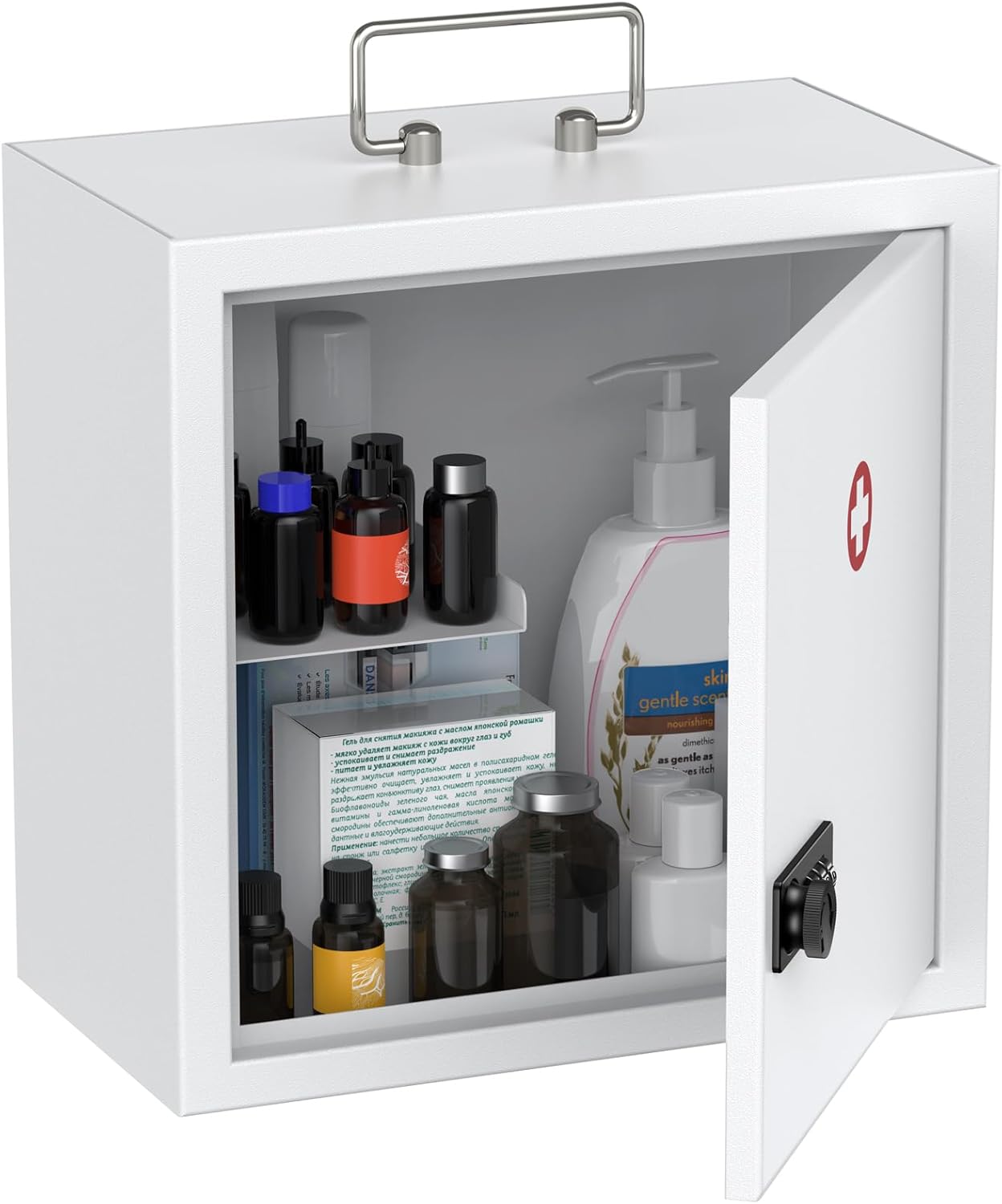
Image 3.1: Front view of the Uniclife Medicine Cabinet with the door open, revealing two internal compartments for organized storage of various items.
3.1 Components
- Medicine Cabinet Body (Steel, White)
- 3-Digit Combination Lock
- Top Handle (for self-standing use)
- Internal Shelf (creating two compartments)
- Mounting Hardware (included for wall installation)
3.2 Dimensions

Image 3.2: Dimensional diagram of the cabinet, indicating a length of 10 inches (25.4 cm), a width of 5.5 inches (14 cm), and a height of 10 inches (25.4 cm).
The cabinet measures approximately 10 inches (L) x 5.5 inches (W) x 10 inches (H). The internal compartments are designed to accommodate various sizes of bottles and boxes.
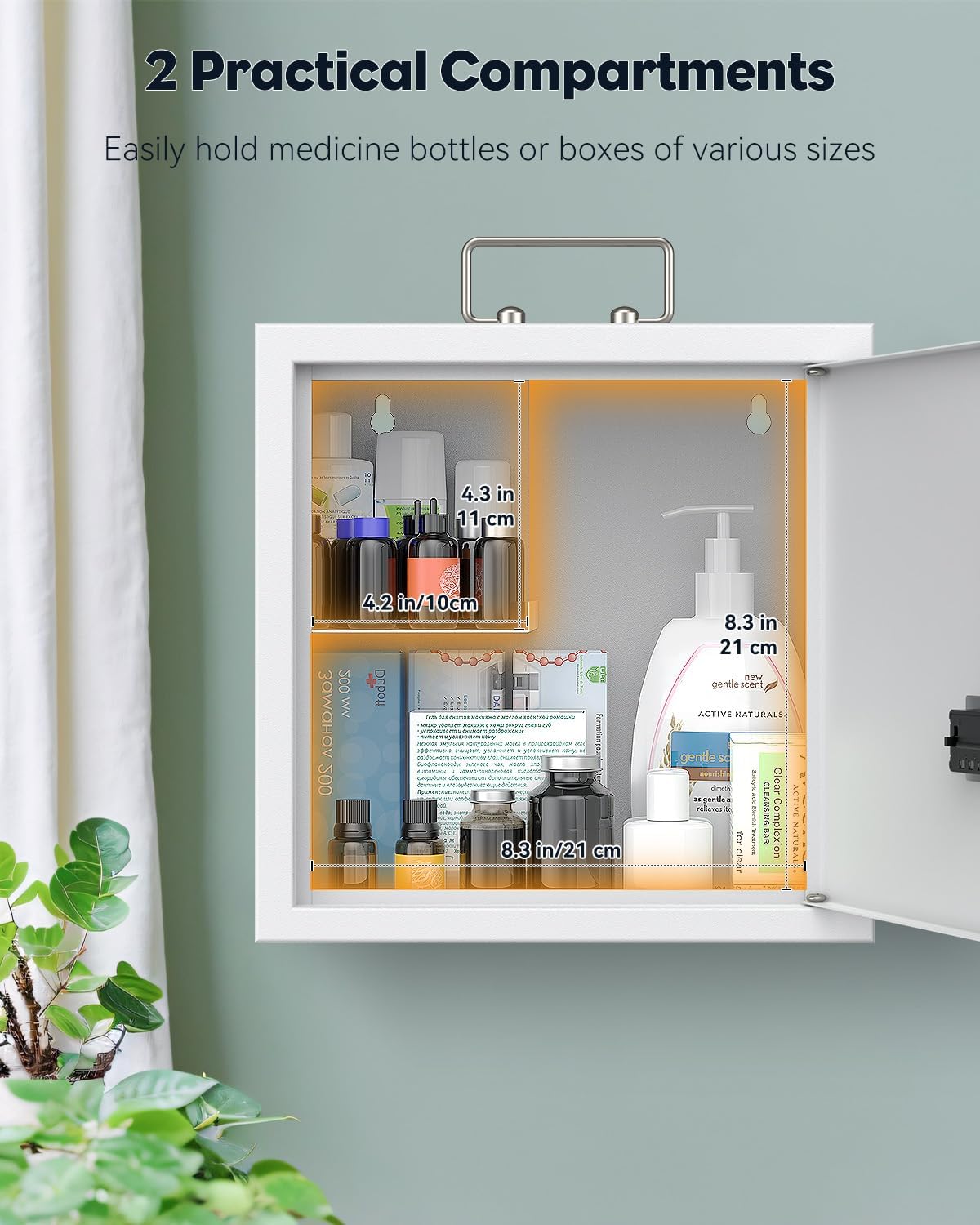
Image 3.3: Internal view highlighting the two compartments. The top compartment is approximately 4.3 inches (11 cm) high, and the bottom compartment is approximately 8.3 inches (21 cm) high. Both are 4.2 inches (10 cm) deep.
4. Setup and Installation
4.1 Self-Standing Use
The cabinet can be used as a self-standing unit. Simply place it on a stable, flat surface. The integrated top handle allows for easy portability.

Image 4.1: Illustration of the cabinet being used in a self-standing configuration, with the top handle rotated for easy movement.
4.2 Wall-Mounted Installation
For enhanced security and to keep contents out of reach, the cabinet can be wall-mounted. Mounting hardware is included.

Image 4.2: The medicine cabinet mounted on a wall, positioned to be out of reach, illustrating its secure placement.
- Choose Location: Select a suitable wall location, ensuring it is a sturdy surface capable of supporting the cabinet's weight when full. Consider accessibility for authorized users and inaccessibility for children.
- Mark Drilling Points: Hold the cabinet against the wall at the desired height and use a pencil to mark the positions for the mounting holes on the back of the cabinet.
- Drill Holes: Using an appropriate drill bit for your wall type (e.g., masonry bit for concrete, wood bit for studs), drill pilot holes at the marked locations.
- Insert Anchors (if necessary): If drilling into drywall or hollow walls, insert wall anchors into the pilot holes.
- Mount Cabinet: Align the cabinet's mounting holes with the drilled holes/anchors. Insert screws through the cabinet's back and tighten them securely. Ensure the cabinet is level and firmly attached to the wall.
5. Operating Instructions
5.1 Setting the Combination Lock
The cabinet features a 3-digit combination lock. The factory default combination is typically 0-0-0. Follow these steps to set or change your personal combination:
- Open the Cabinet: Ensure the cabinet door is open.
- Locate Reset Button: On the inside edge of the lock mechanism, locate a small reset button or lever.
- Press/Slide Reset: Use a pen or small pointed object to press and hold the reset button, or slide the lever to the 'Set' position.
- Set New Combination: While holding the reset button/lever, rotate the three number dials to your desired 3-digit combination.
- Release Reset: Release the reset button/lever. Your new combination is now set.
- Test Combination: Close the cabinet door, scramble the dials, and then enter your new combination to ensure it opens correctly.
Important: Remember your combination. There is no master key or override for the combination lock. If you forget your combination, you may not be able to access the contents.

Image 5.1: Detailed view of the 3-digit combination lock, illustrating the mechanism for setting and operating the lock.
5.2 Locking and Unlocking

Image 5.2: Visual guide for unlocking and locking the cabinet using the combination lock. To unlock, enter the correct code and turn the knob right. To lock, close the door and turn the knob left.
- To Unlock: Enter your 3-digit combination by rotating the dials. Once the correct combination is aligned, turn the knob on the lock mechanism to the right to release the latch and open the door.
- To Lock: Close the cabinet door. Scramble the number dials to a random combination. Turn the knob on the lock mechanism to the left to engage the latch and secure the door.
6. Maintenance
- Cleaning: Wipe the cabinet exterior with a soft, damp cloth. Avoid abrasive cleaners or solvents that could damage the finish.
- Inspection: Periodically check the mounting screws (if wall-mounted) to ensure they remain tight. Inspect the lock mechanism for smooth operation.
- Rust Prevention: The steel construction is resistant to rust, but prolonged exposure to high humidity or moisture should be avoided.
7. Troubleshooting
- Cabinet will not open:
- Ensure the correct 3-digit combination is entered.
- Verify the knob is turned fully to the right after entering the combination.
- If the combination was recently changed, ensure you are using the new combination.
- Cabinet feels loose on the wall:
- Tighten the mounting screws.
- If screws do not tighten, the wall anchors may be damaged or the wall material compromised. Consider relocating or reinforcing the mounting area.
8. Specifications
| Feature | Specification |
|---|---|
| Brand | Uniclife |
| Model Number | BG3592-WT |
| Color | White |
| Product Dimensions | 10" L x 5.5" W x 10" H (25.4 cm x 14 cm x 25.4 cm) |
| Material | Steel |
| Lock Type | 3-Digit Combination Lock |
| Mounting Type | Wall Mount / Self-Standing |
| Number of Compartments | 2 |
| Item Weight | 2 Pounds (approx. 0.9 kg) |
| Assembly Required | Yes (for wall mounting) |
9. Warranty and Support
For warranty information or technical support, please refer to the contact details provided with your purchase or visit the official Uniclife website. Keep your purchase receipt as proof of purchase for any warranty claims.
Ask a question about this manual
Ask about setup, troubleshooting, compatibility, parts, safety, or missing instructions. Manuals+ will review the question and use this page’s manual context to help answer it.