
Introduction
The Treasure Hunter GT150 Pinpointer Metal Detector is a versatile and easy-to-use device designed for precise metal detection. This pinpointer features high sensitivity, 360-degree detection capabilities, and a waterproof design, making it suitable for various environments and treasure hunting activities. It is equipped with both audio and vibration alerts, an anti-loss alarm, and a rechargeable battery for extended use. This manual provides detailed instructions for the proper setup, operation, and maintenance of your GT150 pinpointer.
What's in the Box
Upon unboxing your Treasure Hunter GT150 Pinpointer, please ensure all the following components are present:
- 1 x GT150 Pinpointer Metal Detector
- 1 x Belt Holster
- 1 x Anti-loss Lanyard
- 1 x USB Charging Cable

Image: The GT150 Pinpointer shown with its included belt holster, anti-loss lanyard, and USB charging cable.
Product Features
- High Sensitivity: Detects various metals including ferrous and non-ferrous types with a detection depth of approximately 15-30 cm.
- 360° Detection: Offers full-range scanning for efficient target pinpointing.
- IP68 Waterproof Rating: Fully submersible, allowing use in water bodies like ponds, rivers, and oceans.
- Adjustable Sensitivity: Features 3 sensitivity levels to adapt to different detection environments.
- Multiple Alert Modes: Provides simultaneous audio and vibration alerts, with intensity increasing as the device approaches a metal object.
- LED Flashlight: Integrated LED light for improved visibility in low-light conditions.
- Rechargeable Battery: Equipped with a 1300 mAh rechargeable battery.
- Anti-Loss Alarm: Activates an increasing warning if no button is pressed or no detection occurs for 5 minutes.
- Automatic Shut-off: Conserves battery life by automatically turning off after a period of inactivity.
- Compact and Lightweight: Designed for portability and ease of handling.

Image: The GT150 Pinpointer is capable of detecting all types of metal, including iron, aluminum, silver, gold, rings, coins, keys, and watches.

Image: The GT150 Pinpointer is IP68 rated, making it fully waterproof and suitable for use in deep water environments like ponds, rivers, and oceans.
Setup
1. Charging the Battery
The GT150 Pinpointer comes with a built-in 1300 mAh rechargeable battery. Before first use, fully charge the device.
- Locate the charging port on the device.
- Connect the provided USB charging cable to the pinpointer and a suitable USB power source (e.g., wall adapter, computer USB port).
- The LED indicator will show the charging status. Once fully charged, disconnect the cable.
2. Attaching the Lanyard and Holster
For convenience and to prevent loss, attach the anti-loss lanyard and use the belt holster.
- Attach one end of the anti-loss lanyard to the designated loop on the pinpointer.
- Secure the other end of the lanyard to your belt or clothing.
- Slide the pinpointer into the belt holster for easy carrying during detection activities.
Operating Instructions
1. Power On/Off
- To power on the device, press and hold the power button until you hear a short beep and/or feel a vibration.
- To power off the device, press and hold the power button until you hear a longer beep and/or feel a vibration.
2. Detection Modes (Audio & Vibration)
The GT150 offers different alert modes to suit various environments:
- Vibration Mode: Ideal for quiet environments where audible alerts might be disruptive.
- Sound Mode: Suitable for outdoor use where sound is preferred.
- Vibration & Sound Mode: Best for noisy environments to ensure detection alerts are not missed.
To cycle through the modes, briefly press the power button while the device is on. The device will indicate the current mode through a combination of beeps and vibrations.

Image: The GT150 Pinpointer offers distinct sound and vibration modes for optimal performance in quiet, outdoor, and noisy environments.
3. Adjusting Sensitivity
The GT150 has 3 sensitivity levels. Adjusting the sensitivity can help in different soil conditions or when searching for smaller targets.
- To adjust sensitivity, quickly press the power button twice while the device is on.
- Each double press will cycle through the sensitivity levels.
- The device will provide feedback (e.g., number of beeps/vibrations) to indicate the current sensitivity level.
4. 360° Detection and Pinpointing
The GT150 features a 360° detection area, allowing for broad scanning, and a precise tip for pinpointing targets.
- Sweep the pinpointer over the search area. When a metal object is detected, the alarm intensity (audio and/or vibration) will increase as you get closer to the target.
- Use the tip of the pinpointer for precise location of the target once a general area has been identified.

Image: The GT150 Pinpointer offers 360-degree detection and can locate metal objects buried up to 35cm deep, as illustrated by a treasure chest and gold bars underground.
5. Using in Water
Thanks to its IP68 waterproof rating, the GT150 can be used underwater.
- Ensure the battery compartment is securely sealed before submerging the device.
- After use in saltwater, rinse the pinpointer thoroughly with fresh water to prevent corrosion.
Maintenance
1. Cleaning
- After each use, especially in dirty or sandy conditions, wipe down the pinpointer with a damp cloth.
- If used in saltwater, rinse with fresh water and dry completely before storage.
- Do not use abrasive cleaners or solvents, as these can damage the device.
2. Battery Care
- Recharge the battery when the low battery alert is activated.
- For long-term storage, charge the battery to approximately 50% to prolong its lifespan.
- Avoid fully discharging the battery frequently.
3. Storage
- Store the pinpointer in a cool, dry place, away from direct sunlight and extreme temperatures.
- Keep the device away from strong magnetic fields.
Troubleshooting
1. Anti-Loss Alert
The GT150 features an anti-loss alarm to prevent accidental loss.
- If no button is pressed and no metal is detected for 5 minutes, the device will emit an increasing warning sound.
- To stop the alarm, press any button or detect a metal object.
2. Low Battery Alert
When the battery level is low, the device will provide a specific alert.
- A double beep will sound when the battery is low.
- Recharge the pinpointer promptly to ensure continuous operation.

Image: The GT150 Pinpointer includes an Anti-loss Alert that warns after 5 minutes of inactivity and a Low Battery Alert indicated by a double beep.
Specifications
| Feature | Specification |
|---|---|
| Model Number | GT150 |
| Alarm Indication | Audio and Vibration (simultaneous) |
| Sensitivity | Adjustable (3 levels), approx. ≥ 15 cm (for RMB, Yuan coin) |
| Detection Range | 15-30 cm |
| Waterproof Rating | IP68 (full machine waterproof) |
| Power Supply | Rechargeable |
| Battery Capacity | 1300 mAh |
| Anti-Loss Alarm | Yes |
| Automatic Shut-off | Yes |
| Product Dimensions | 4 x 4 x 26 cm (1.57 x 1.57 x 10.24 inches) |
| Net Weight | 200 g |
| Material | Plastic |
| Color | Black + Orange |

Image: The physical dimensions of the GT150 Pinpointer, measuring 26cm in length and 4cm in width.
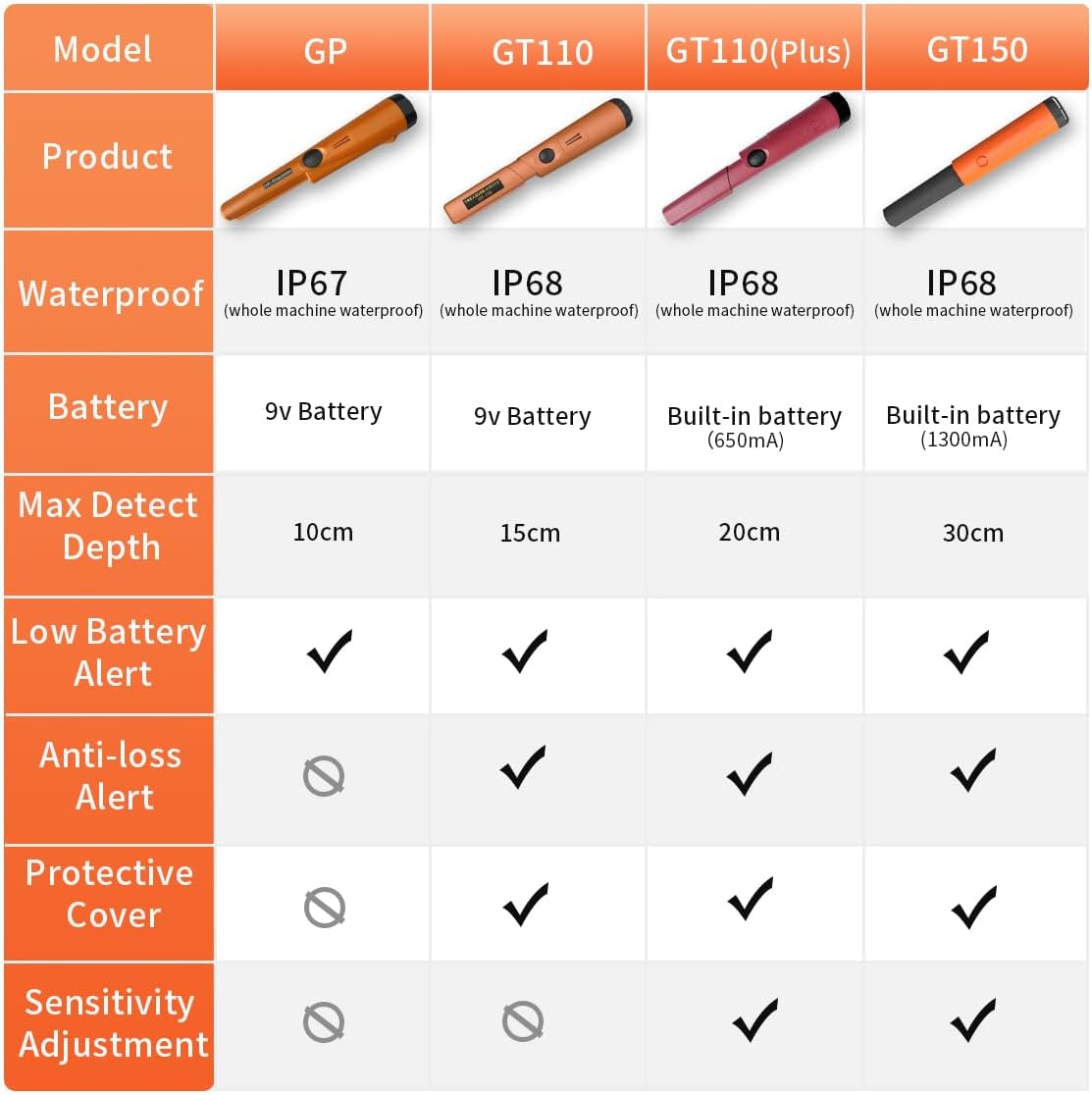
Image: A comparison chart highlighting key features of various Treasure Hunter pinpointer models, including the GT150's IP68 waterproof rating, 1300mAh built-in battery, 30cm max detect depth, and presence of low battery and anti-loss alerts, and sensitivity adjustment.
Warranty Information
Please refer to the warranty card included with your product for specific warranty terms and conditions. Generally, Treasure Hunter products are covered by a limited warranty against manufacturing defects from the date of purchase. Keep your proof of purchase for any warranty claims.
Support
For technical assistance, troubleshooting beyond this manual, or inquiries regarding your Treasure Hunter GT150 Pinpointer, please contact Treasure Hunter customer support. Contact details can typically be found on the product packaging or the official Treasure Hunter website. When contacting support, please have your model number (GT150) and purchase information ready.


