
1. Introduction
This manual provides instructions for the ALLIMITY Universal Learn Remote Control, model SN-14+AL. This remote is designed to operate various Sony 3D/LCD/LED HDTV television models. Please read this manual carefully before using the remote control to ensure proper operation and to maximize its functionality.

Image 1.1: Front view of the ALLIMITY SN-14+AL Universal Remote Control, showing its button layout.
2. Setup
2.1 Battery Installation
The remote control requires two AAA alkaline batteries (not included). Follow these steps to install the batteries:
- Locate the battery compartment cover on the back of the remote control.
- Slide the cover downwards or press the latch and lift to open the compartment.
- Insert two new AAA alkaline batteries, ensuring the positive (+) and negative (-) terminals match the diagrams inside the compartment.
- Replace the battery compartment cover, sliding it back into place until it clicks securely.

Image 2.1: Back view of the remote control with the battery compartment open, showing where to insert AAA batteries.
2.2 Initial Use
Once batteries are installed, the remote is ready for use with compatible Sony televisions. No complex programming is typically required for basic functions.
3. Operating Instructions
To operate your television using the ALLIMITY SN-14+AL remote control, observe the following guidelines:
- Direct Line of Sight: Point the remote control directly at the infrared (IR) sensor located on your television unit.
- Obstruction-Free Path: Ensure that no objects are blocking the path between the remote control and the IR sensor on your television.
- Button Functions: Press the desired buttons for functions such as power, volume, channel selection, input, menu navigation, and smart TV applications (if supported by your TV model).

Image 3.1: A person using the remote control to operate a television, demonstrating the typical usage scenario.
4. Compatibility
The ALLIMITY SN-14+AL Universal Learn Remote Control is compatible with a wide range of Sony 3D/LCD/LED HDTV models. Known compatible Sony remote control models that this unit replaces include, but are not limited to, the following:
- RM-YD005
- RM-YD014
- RM-YD018
- RM-YD021
- RM-YD024
- RM-YD025
- RM-YD026
- RM-YD027
- RM-YD028
- RM-YD040
- RM-YD063
- RM-YD065
- RM-YD092
- RM-YD102
- RM-YD103
- RM-Y156
If your specific television model or original remote control model is not listed, please refer to the support section for assistance.
5. Troubleshooting
If you experience issues with your ALLIMITY SN-14+AL remote control, consider the following troubleshooting steps:
- Remote Not Responding:
- Ensure the remote is pointed directly at the TV's IR sensor.
- Check for any obstructions between the remote and the TV.
- Verify that the batteries are inserted correctly, observing the positive (+) and negative (-) polarity.
- Replace the batteries with new, brand-name alkaline batteries. Rechargeable batteries may not provide sufficient power for optimal performance.
- Limited Functionality:
- While this is a universal remote, some advanced or specific functions of your original TV remote might not be replicated.
- Ensure your TV model is within the range of compatible Sony TVs.
6. Specifications
| Feature | Detail |
|---|---|
| Model Number | ZCM-SN-14+AL-Universal |
| Brand | ALLIMITY |
| Compatible Devices | Television (Sony 3D/LCD/LED HDTV) |
| Power Source | 2 x AAA Alkaline Batteries (not included) |
| Product Dimensions | 5 x 2 x 0.6 inches (approximately 12.7 x 5.08 x 1.52 cm) |
| Item Weight | 1 ounce (approximately 28 grams) |
| Color | Black |
| Special Feature | Ergonomic design |
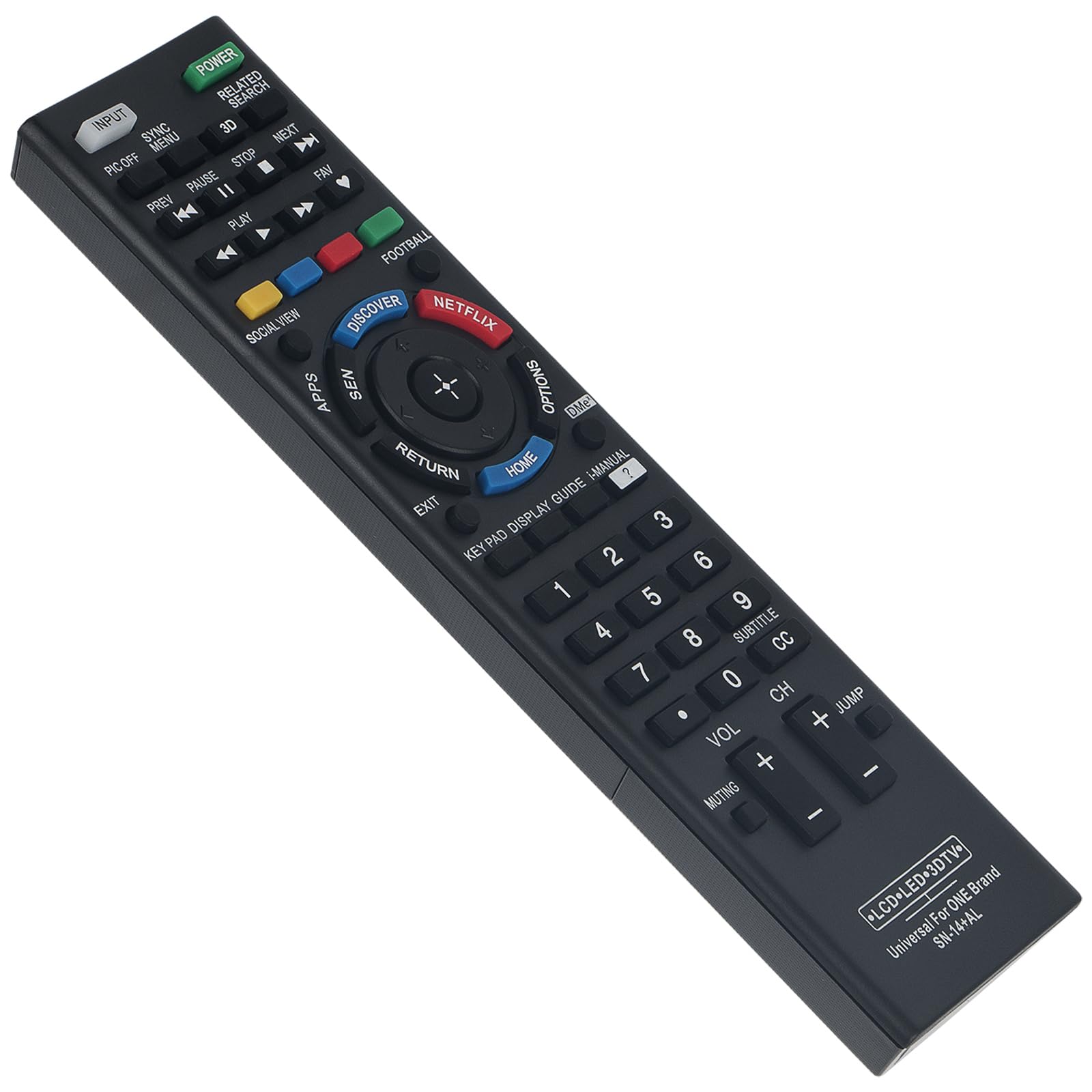
Image 6.1: The remote control with its approximate dimensions of 7.87 inches (20 cm) in length and 1.97 inches (5 cm) in width.
7. Support and Contact Information
For any questions, concerns, or issues regarding your ALLIMITY Universal Learn Remote Control SN-14+AL, please contact the seller directly. The seller is committed to responding to customer inquiries within 24 hours.
When contacting support, please provide your product model number (SN-14+AL) and a clear description of the issue you are experiencing.